tencent cloud

Cloud Object Storage

Release Notes and Announcements
Release Notes
Announcements
Product Introduction
Overview
Features
Use Cases
Strengths
Concepts
Regions and Access Endpoints
Specifications and Limits
Service Regions and Service Providers
Billing
Billing Overview
Billing Method
Billable Items
Free Tier
Billing Examples
Viewing and Downloading Bill
Payment Overdue
FAQs
Getting Started
Console
Getting Started with COSBrowser
User Guide
Creating Request
Bucket
Object
Data Management
Batch Operation
Global Acceleration
Monitoring and Alarms
Operations Center
Data Processing
Content Moderation
Smart Toolbox
Data Processing Workflow
Application Integration
User Tools
Tool Overview
Installation and Configuration of Environment
COSBrowser
COSCLI (Beta)
COSCMD
COS Migration
FTP Server
Hadoop
COSDistCp
HDFS TO COS
GooseFS-Lite
Online Tools
Diagnostic Tool
Use Cases
Overview
Access Control and Permission Management
Performance Optimization
Accessing COS with AWS S3 SDK
Data Disaster Recovery and Backup
Domain Name Management Practice
Image Processing
Audio/Video Practices
Workflow
Direct Data Upload
Content Moderation
Data Security
Data Verification
Big Data Practice
COS Cost Optimization Solutions
Using COS in the Third-party Applications
Migration Guide
Migrating Local Data to COS
Migrating Data from Third-Party Cloud Storage Service to COS
Migrating Data from URL to COS
Migrating Data Within COS
Migrating Data Between HDFS and COS
Data Lake Storage
Cloud Native Datalake Storage
Metadata Accelerator
GooseFS
Data Processing
Data Processing Overview
Image Processing
Media Processing
Content Moderation
File Processing Service
File Preview
Troubleshooting
Obtaining RequestId
Slow Upload over Public Network
403 Error for COS Access
Resource Access Error
POST Object Common Exceptions
API Documentation
Introduction
Common Request Headers
Common Response Headers
Error Codes
Request Signature
Action List
Service APIs
Bucket APIs
Object APIs
Batch Operation APIs
Data Processing APIs
Job and Workflow
Content Moderation APIs
Cloud Antivirus API
SDK Documentation
SDK Overview
Preparations
Android SDK
C SDK
C++ SDK
.NET(C#) SDK
Flutter SDK
Go SDK
iOS SDK
Java SDK
JavaScript SDK
Node.js SDK
PHP SDK
Python SDK
React Native SDK
Mini Program SDK
Error Codes
Harmony SDK
Endpoint SDK Quality Optimization
Security and Compliance
Data Disaster Recovery
Data Security
Cloud Access Management
FAQs
Popular Questions
General
Billing
Domain Name Compliance Issues
Bucket Configuration
Domain Names and CDN
Object Operations
Logging and Monitoring
Permission Management
Data Processing
Data Security
Pre-signed URL Issues
SDKs
Tools
APIs
Agreements
Service Level Agreement
Privacy Policy
Data Processing And Security Agreement
Contact Us
Glossary

Working with COSBench

PDF
Mode fokus
Ukuran font
Terakhir diperbarui: 2024-11-18 14:12:26

COSBench Overview

COSBench is an open-source stress test tool developed by Intel for testing the performance of cloud object storage systems. As a cloud storage system compatible with S3 protocol, COSBench can be used to perform benchmark tests on the read/write performance of COS.

System Environment

It is recommended that you run COSBench in CentOS 7.0 or a later version. If you run it in Ubuntu, unexpected issues may occur.

Performance Factors

CPU cores: a small number of CPU cores coupled with a large number of running workers is very likely to cause high overheads for context switching. Therefore, 32 or 64 cores are recommended for the test.
NIC: the outbound traffic from the server is limited. To test the traffic for large files, an NIC above 10 GB is recommended.
Network link: public network links vary in quality. Charges will incur for public network downstream traffic for downloads over public network. Therefore, private network is recommended for access within the same region.
Test duration: in order to get a reliable value, we recommend a longer test period.
Test environment: the version of the JDK running on your program is also a key performance factor. For example, when testing on HTTPS, with an earlier JDK version, GCM bugs may occur for the encryption algorithm, as well as the locking issues for the random number generator.

Directions

1. Download COSBench 0.4.2.c4.zip from GitHub and decompress it on your server.
2. Install the COSBench dependent library and run the following command.
For CentOS, run the following command to install the dependencies:
sudo yum install nmap-ncat java curl java-1.8.0-openjdk-devel -y
For Ubuntu, run the following command to install the dependencies:
sudo apt install nmap openjdk-8-jdk
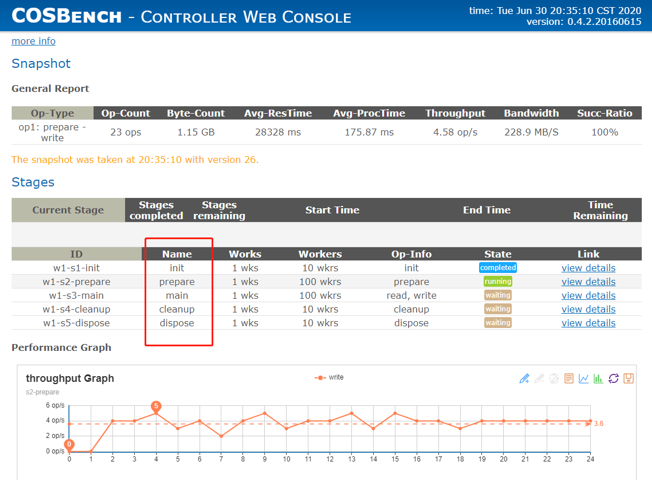
3. Edit the file s3-config-sample.xml and configure a test job. The test job is divided into the following five stages.
init: creates a bucket.
prepare: uses parallel threads (or workers) to PUT (upload) objects with specified size to read in the main stage.
main: uses parallel workers to read and write objects for a specified period of time.
cleanup: deletes the created objects.
dispose: deletes buckets.
The sample configuration is as shown below.
<?xml version="1.0" encoding="UTF-8" ?>
<workload name="s3-50M-sample" description="sample benchmark for s3">

<storage type="s3" config="accesskey=************************************;secretkey=************************************;endpoint=http://cos.ap-beijing.myqcloud.com" />

<workflow>

<workstage name="init">
<work type="init" workers="10" config="cprefix=examplebucket;csuffix=-1250000000;containers=r(1,10)" />
</workstage>

<workstage name="prepare">
<work type="prepare" workers="100" config="cprefix=examplebucket;csuffix=-1250000000;containers=r(1,10);objects=r(1,1000);sizes=c(50)MB" />
</workstage>

<workstage name="main">
<work name="main" workers="100" runtime="300">
<operation type="read" ratio="50" config="cprefix=examplebucket;csuffix=-1250000000;containers=u(1,10);objects=u(1,1000)" />
<operation type="write" ratio="50" config="cprefix=examplebucket;csuffix=-1250000000;containers=u(1,10);objects=u(1000,2000);sizes=c(50)MB" />
</work>
</workstage>

<workstage name="cleanup">
<work type="cleanup" workers="10" config="cprefix=examplebucket;csuffix=-1250000000;containers=r(1,10);objects=r(1,2000)" />
</workstage>

<workstage name="dispose">
<work type="dispose" workers="10" config="cprefix=examplebucket;csuffix=-1250000000;containers=r(1,10)" />
</workstage>

</workflow>

</workload>
Parameter description:
Parameter
Description
accesskey, secretkey
Key information. We recommend you use a sub-account key and follow the principle of least privilege to reduce risks. For information about how to obtain a sub-account key, see Access Key.
cprefix
Bucket name prefix, such as examplebucket.
containers
Value range for bucket names. A bucket name is made up of cprefix and containers, such as examplebucket1 or examplebucket2.
csuffix
Your APPID. Note that APPID is prefixed with a -, such as -1250000000.
runtime
Duration of the stress test
ratio
Ratio of reads to writes
workers
Number of stress test threads
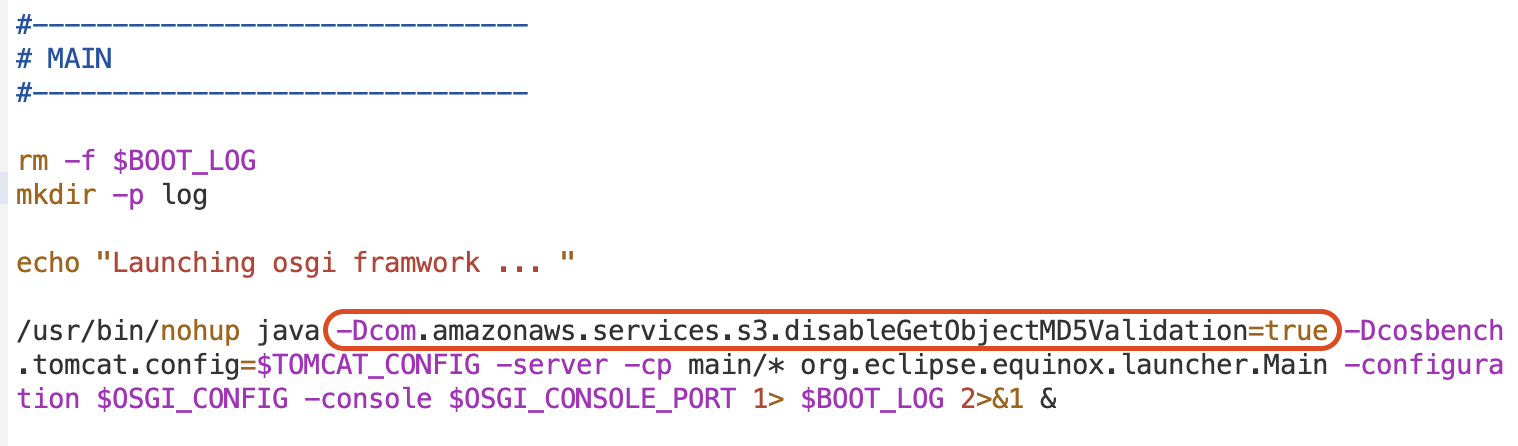
4. Edit the file cosbench-start.sh and add the following parameter to the Java startup command line to disable S3 MD5 verification.
-Dcom.amazonaws.services.s3.disableGetObjectMD5Validation=true


5. Start the COSBench service.
For CentOS, run the following command:
sudo bash start-all.sh
For Ubuntu, run the following command:
sudo bash start-driver.sh &sudo bash start-controller.sh &
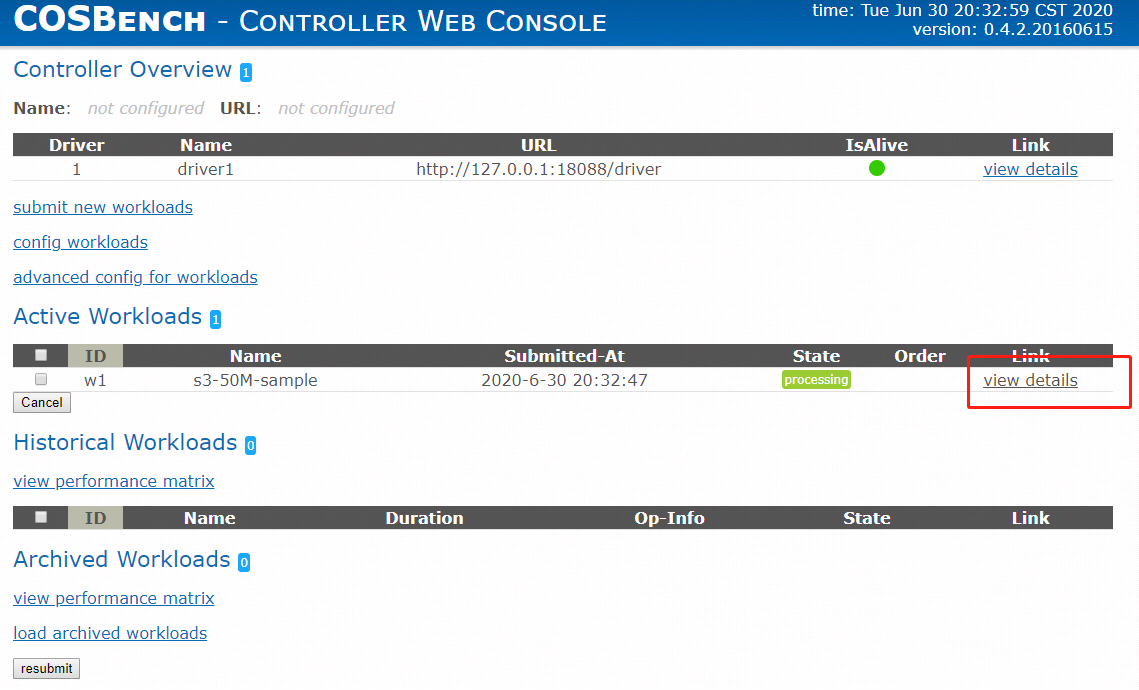
6. Run the following command to submit the job.
sudo bash cli.sh submit conf/s3-config-sample.xml
Check the test status at http://ip:19088/controller/index.html (replace the IP in this link with the IP of your own testing server).


You can see the five work stages as shown below.


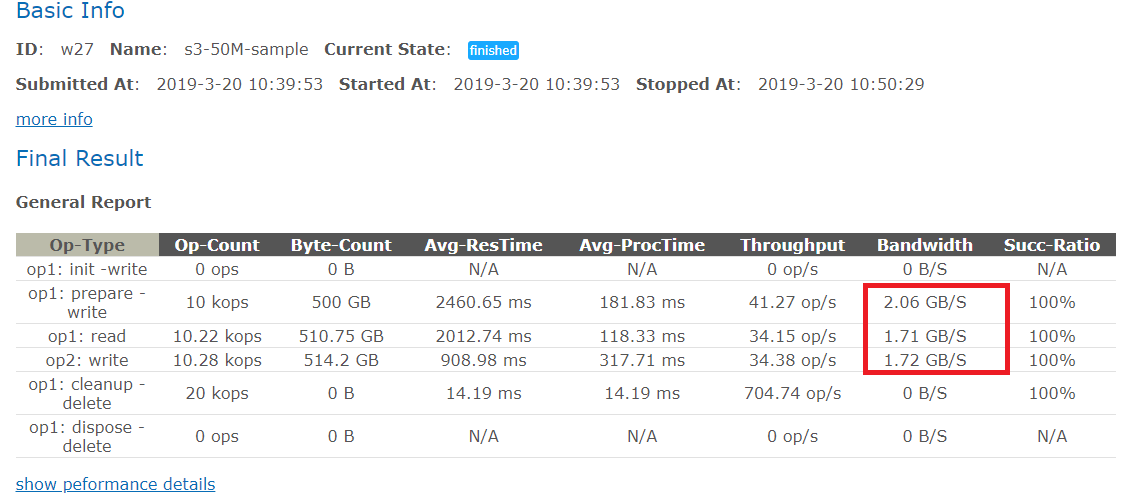
7. The following example shows the performance tests of uploads and downloads on a CVM instance with 32 cores and 17 Gbps private network bandwidth in Beijing region. The test includes the following two stages.
prepare: 100 workers threads are run to upload 1,000 objects (50 MB each).
main: 100 workers read and write objects in parallel for 300 seconds.
The test results after two stages above are as shown below.
8. Run the following command to stop the test.
sudo bash stop-all.sh


Bantuan dan Dukungan

Apakah halaman ini membantu?

masukan