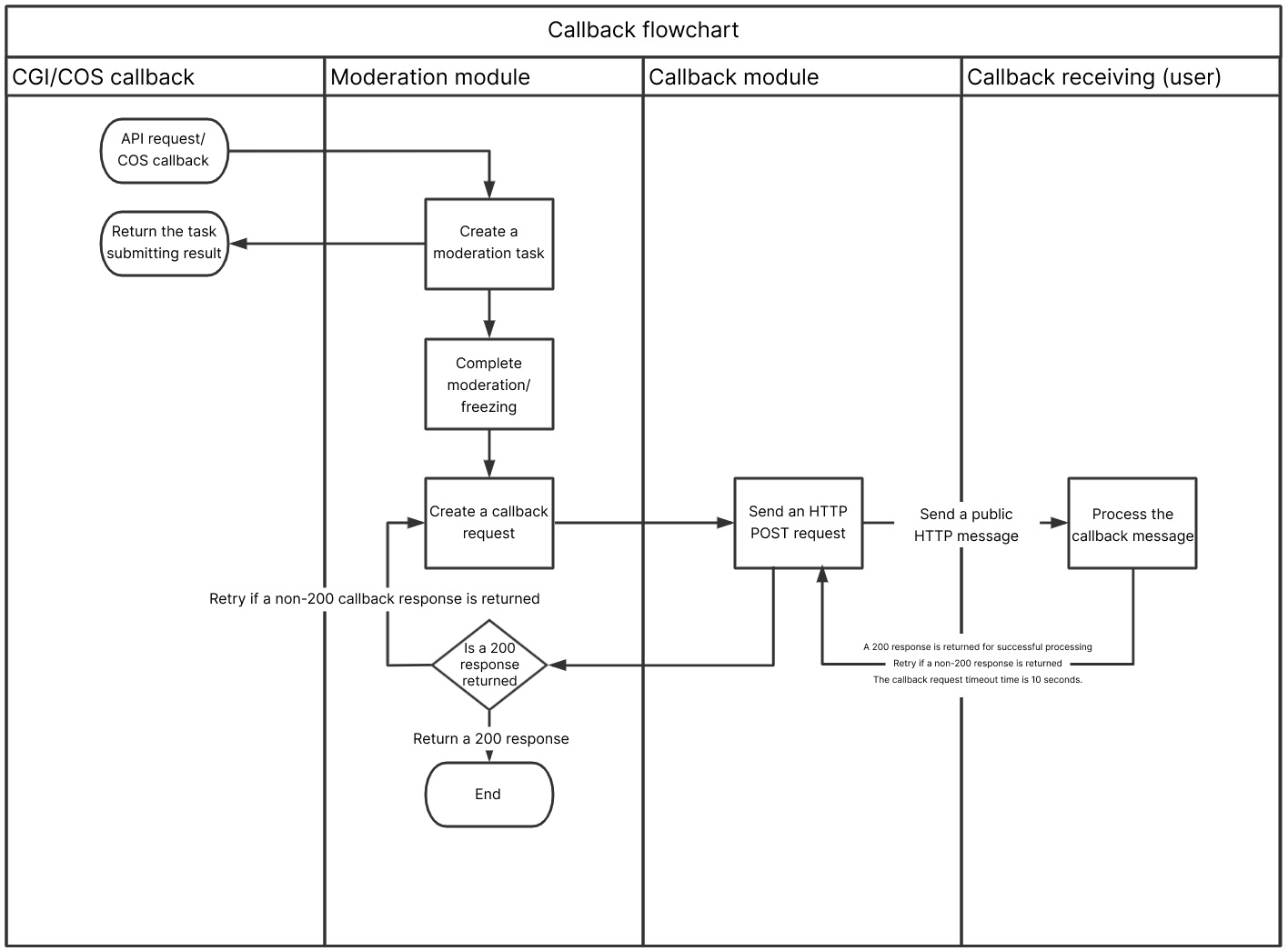
If you have configured a moderation callback address, after image moderation is completed, the backend will call back the moderation result in JSON format to the callback address. You can perform subsequent file processing operations based on the callback content.
The callback content is divided into simple callback (Simple) and detailed callback (Detail).
Callback Content Description
Simple callback (Simple)
The callback notification adopts the POST method of HTTP, with the X-Ci-Content-Version: Simple header.
The response body returns application/json data. The following contains all the nodes:
"message":"Test request when setting callback url"
}
The nodes are described as follows:
Parameter
Description
Type
Required
code
Error code. 0: moderation succeeded; other values: moderation failed. For more information, see Error Codes.
Integer
Yes
message
Error message.
String
Yes
data
Details of the image moderation result.
Object
Yes
data is as described below:
Parameter
Description
Type
Required
trace_id
Unique ID.
String
Yes
url
Full URL of the moderated image.
String
Yes
event
Triggered event, which is fixed at ReviewImage here.
String
Yes
result
This field indicates the moderation result. You can perform subsequent operations based on the result. We recommend you handle different results based on your business needs. Valid values: 0 (normal), 1 (sensitive), 2 (suspiciously sensitive, with human review recommended).
Integer
Yes
forbidden_status
If you set automatic freezing, this field indicates the frozen status of the image. 0: not frozen, 1: frozen, 2: file moved.
Integer
Yes
cos_headers
The custom header content set when the resource is uploaded. If it is not set, it will not be returned.
Object
No
porn_info
The moderation result of the pornographic information moderation scene.
Object
No
ads_info
The moderation result of the advertising information moderation scene.
Object
No
xx_info is as described below:
Parameter
Description
Type
Required
hit_flag
The moderation result returned for the moderation scene. Return values: 0 (normal), 1 (confirmed as a violation of the current scene), and 2 (suspected as a violation of the current scene).
Integer
Yes
score
The confidence the moderation result hits the moderation scene. Value range: 0–100. The higher the value, the more likely the content hits the currently returned moderation scene. Generally, a value in the range of 0–60, 61–90, or 91–100 means that the image is normal, suspiciously sensitive, or sensitive respectively. For example, Porn 99 means that the content is very likely to be pornographic.
Integer
Yes
label
Hit tag name.
String
Yes
Detail callback (Detail)
The callback notification adopts the POST method of HTTP, with the X-Ci-Content-Version: Detail header.
The response body returns application/json data. The following contains all the nodes:
Error code, which will be returned only if State is Failed. For more information, see Error Codes.
String
Message
Error message, which will be returned only if State is Failed.
String
JobId
Moderation job ID.
String
State
Status of the moderation job. Valid values: Submitted, Success, Failed, Auditing.
String
CreationTime
Creation time of the moderation job.
String
CompressionResult
Whether the image is compressed. Valid values: 0 (no), 1 (yes).
Integer
Object
The name of the image file to be moderated, which will be returned if Object is selected during job creation.
String
Url
The URL of the image file to be moderated, which will be returned if Url is selected during job creation.
String
Label
This field is used to return the maliciousness tag with the highest priority in the detection result, which represents the moderation result suggested by the model. We recommend you handle different types of violations and suggestions based on your business needs. Return values: Normal, Porn, Ads, and other types of unsafe or inappropriate content.
String
Result
This field indicates the moderation result. You can perform subsequent operations based on the result. We recommend you handle different results based on your business needs. Valid values: 0 (normal), 1 (sensitive), 2 (suspiciously sensitive, with human review recommended).
Integer
Score
The confidence the moderation result hits the moderation scene. Value range: 0–100. The higher the value, the more likely the content hits the currently returned moderation scene. Generally, a value in the range of 0–60, 61–90, or 91–100 means that the image is normal, suspiciously sensitive, or sensitive respectively. For example, Porn 99 means that the content is very likely to be pornographic.
Integer
Category
This field is a subset of Label, indicating the specific moderation category hit; for example, Sexy represents the sexy category in the Porn tag.
String
SubLabel
This field indicates the specific sub-tag hit by the moderation job; for example, SexBehavior is a sub-tag under the Porn tag.
Note: This field may return null, indicating that no specific sub-tags are hit.
String
Text
The specific text content recognized by OCR in the image, which will be returned if OCR is enabled in the moderation policy.
String
PornInfo
The moderation result of the pornographic information moderation scene.
Object
AdsInfo
The moderation result of the advertising information moderation scene.
Object
BucketId
Name of the bucket of the created moderation job.
String
Region
Bucket region.
String
ForbidState
If you set automatic freezing, this field indicates the status of the image. 0: not frozen; 1: frozen, 2: file moved.
Integer
CosHeaders
The custom header content set when the resource is uploaded to COS. If it is not set, it will not be returned. It is in a map structure, where key is the custom header name and value is the content.
Object
PornInfo and AdsInfo have the following sub-nodes:
Node Name (Keyword)
Description
Type
HitFlag
The moderation result returned for the moderation scene. Return values: 0 (normal); 1 (confirmed as a violation of the current scene); 2 (suspected as a violation of the current scene).
Integer
Score
The confidence the moderation result hits the moderation scene. Value range: 0–100. The higher the value, the more likely the content hits the currently returned moderation scene. Generally, a value in the range of 0–60, 61–90, or 91–100 means that the image is normal, suspiciously sensitive, or sensitive respectively. For example, Porn 99 means that the content is very likely to be pornographic.
Integer
Label
This field indicates the overall result tag of the screenshot, which may be SubLabel, a person name, etc.
String
Category
This field indicates the specific moderation category hit; for example, Sexy represents the sexy category in the Porn tag. It may be null, indicating that no category is hit or there is no relevant category.
String
SubLabel
This field indicates the specific sub-tag hit by the moderation job; for example, SexBehavior is a sub-tag under the Porn tag.
Note: This field may return null, indicating that no specific sub-tags are hit.
String
OcrResults
This field represents the detailed OCR result, including the text recognition result and hit keyword. It will be returned if there is non-compliant content.
Array
LibResults
This field returns results based on recognition against the risk library.
Note: This field will not be returned if no samples in the risk library are hit.
Container Array
LibResults has the following sub-nodes:
Node Name (Keyword)
Description
Type
ImageId
This field represents the hit image sample ID in the risk library.
String
Score
This field returns the confidence under the current tag. Value range: 0–100. The higher the value, the more likely the image hits a sample in the risk library. For example, Porn 99 means that the content is very likely to hit a pornographic sample in the library.
Integer
OcrResults has the following sub-nodes:
Node Name (Keyword)
Description
Type
Text
The specific text content recognized by OCR in the image.
String
Keywords
Keywords hit by the current moderation scene.
Array
Location
This parameter is used to return the position (X and Y coordinates of the top-left corner, length, width, and rotation angle) of the OCR detection frame in the image for quick location of the recognized text.
Object
ObjectResults has the following sub-nodes:
Node Name (Keyword)
Description
Type
Name
This field is used to return the name of the recognized object, such as person name.
String
Location
This parameter is used to return the position (X and Y coordinates of the top-left corner, length, width, and rotation angle) of the recognition result in the image for you to quickly locate information.
Object
Location has the following sub-nodes:
Node Name (Keyword)
Description
Type
X
This parameter is used to return the pixel position of the abscissa (X) of the top-left corner of the detection frame. It can be combined with other parameters to uniquely determine the size and position of the detection frame.
Float
Y
This parameter is used to return the pixel position of the ordinate of the top-left corner (Y) of the detection frame. It can be combined with other parameters to uniquely determine the size and position of the detection frame.
Float
Height
This parameter is used to return the height of the detection frame (the length starting from the top-left corner and extending down the Y axis). It can be combined with other parameters to uniquely determine the size and position of the detection frame.
Float
Width
This parameter is used to return the width of the detection frame (the length starting from the top-left corner and extending to the right on the X axis). It can be combined with other parameters to uniquely determine the size and position of the detection frame.
Float
Rotate
This parameter is used to return the rotation angle of the detection frame. Valid values: 0–360 (degrees), and the direction is counterclockwise rotation. This parameter can be combined with the X and Y coordinate parameters to uniquely determine the specific position of the detection frame.