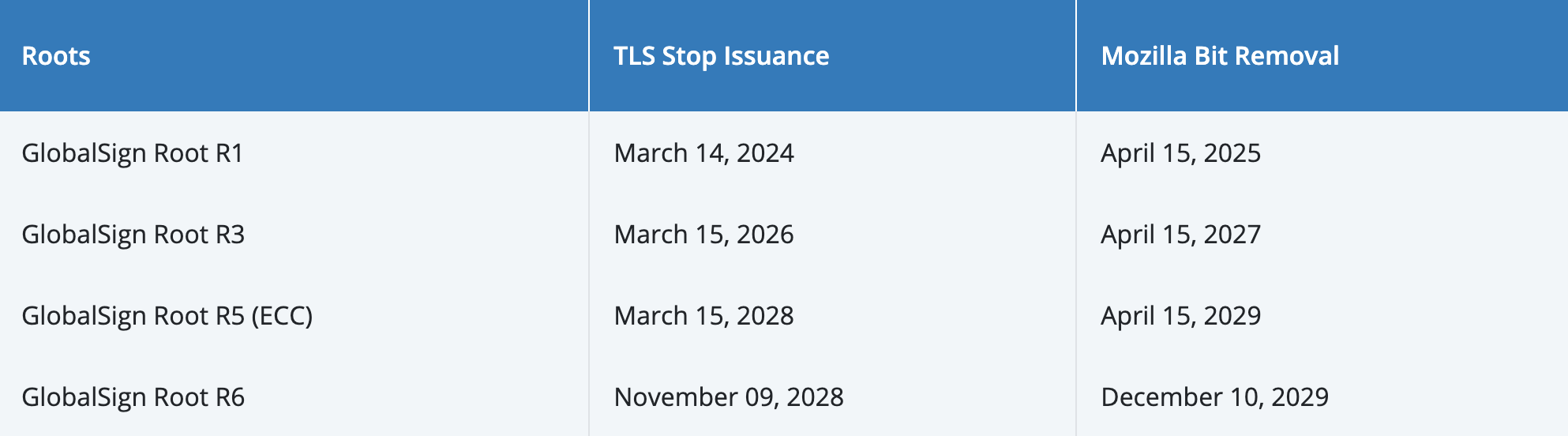
Due to Mozilla's Trust Store updating its root certificate trust policy, all trusted root certificates from CAs worldwide must be replaced at least every 15 years after generation. Trusted root certificates exceeding this period will be gradually distrusted by Mozilla. After April 15, 2025, the old GlobalSign R1 root certificate will no longer be trusted by Mozilla browsers.
As a result, GlobalSign certificate authority will gradually discontinue issuing TLS/SSL certificates using the old root system (R1) and begin using the new root system (R3) to issue TLS/SSL certificates, to ensure that TLS/SSL certificates continue to be trusted in Firefox browsers.
Notice
Tencent Cloud COS (Cloud Object Storage, COS)'s domain uses certificates issued by GlobalSign. To ensure that user requests are not affected, COS plans to gradually update the domain certificates. The change plan is as follows:
Before April 15, 2025, COS certificates will be replaced with cross-certificates. The cross-certificates are compatible with both the old R1 root certificate and the new R3 root certificate, ensuring minimal impact on user requests.
However, as cross-certificates will gradually expire, the old R1 root certificate will eventually be phased out. By then, clients using the new R3 root certificate will be able to make requests normally, while clients using the old R1 root certificate will fail to make requests. Therefore, it is recommended that you add the new root certificate to your trusted root certificate store as soon as possible.
In the long term, the new GlobalSign R3 root certificate will also no longer be trusted by Mozilla after April 15, 2027, and will ultimately expire on March 18, 2029. Considering long-term security and compatibility, it is recommended that clients promptly upgrade their root certificates while ensuring the root certificate list includes all known and trusted authoritative root certificates such as GlobalSign R1, R3, R6, R46 (refer to GlobalSign Root Certificates for the complete list).
User Adaptation
1. Verify whether the GlobalSign R3 new root certificate already exists in the root certificate list.
If the root certificate is missing, please add the new root certificate to your trusted root certificate store as soon as possible.
2. Ensure all authoritative root certificates have been integrated into the trusted root certificate store.
Considering long-term security and compatibility, it is recommended to pre-integrate all known and trusted authoritative root certificates into the client's trusted root certificate store to avoid future connection failures or security warnings caused by certificate trust chain issues.
3. Service monitoring.
Cross-certificates are compatible with both the old R1 root certificate and the new R3 root certificate, and theoretically should not affect user requests. However, due to variations in client environments, unforeseen situations may occur. We recommend monitoring service monitoring and alarms, which can be ignored if unrelated to your business.