High Cluster Reliability
Download
Mode fokus
Ukuran font
TDMQ for CKafka (CKafka) provides cluster-level high-availability capabilities. Through cross-availability zone (AZ) deployment and instance AZ migration features, it effectively enhances the stability and disaster recovery capability of the messaging service.
Cluster-Level High-Availability Capability Description
High-Availability Capability | Applicable Version | Description | Reference Documentation |
Cross-AZ deployment | Advanced Edition and Pro Edition | When purchasing a CKafka instance in a region with 3 or more AZs, you can choose to deploy it across multiple AZs, so that partition replicas are forcibly distributed across nodes in different AZs. This deployment mode ensures that your instance can continue to provide services normally, even if a single AZ becomes unavailable. Pro Edition allows you to select up to four AZs. Advanced Edition allows you to select up to two AZs. | |
Instance AZ change | Pro Edition | Migrate an instance to another AZ in the same region, after which all properties, configurations, and connection addresses of the instance will not be changed. Migrate an instance from one AZ to another: The AZ where the instance resides becomes fully loaded or experiences other issues that affect instance performance. Migrate an instance from one AZ to multiple AZs: Enhance the disaster recovery capability of the instance and achieve cross-IDC disaster recovery. |
Cross-AZ Deployment
Deployment Architecture
The cross-AZ deployment architecture of CKafka is divided into the network layer, data layer, and control layer.
Network Layer
CKafka exposes a VIP to clients. After connecting to the VIP, clients obtain the metadata of topic partitions (the metadata typically maps addresses to different ports on the same VIP). This VIP can fail over to another AZ at any time. When an AZ becomes unavailable, the VIP automatically migrates to another available node in the same region, achieving cross-AZ disaster recovery.
Data Layer
The data layer of CKafka adopts the same distributed deployment mode as native Kafka. In the mode, multiple data replicas are distributed across different broker nodes, and these nodes are deployed in different AZs. During the processing of a partition, a leader-follower relationship exists between nodes. If the leader goes offline due to an exception, the cluster control node (controller) will elect a new partition leader to handle requests for that partition.
For clients, when an AZ becomes unavailable due to an exception, if the leader of a topic partition is located on a broker node in the unavailable AZ, established connections may time out or be disconnected. After the leader node of that partition fails, the controller (if the controller node fails, the remaining nodes will elect a new controller node) will select a new leader node to provide services. The leader switch typically completes within seconds (the exact duration is proportional to the number of cluster nodes and metadata size). Clients periodically refresh topic partition metadata to connect to the new leader node for production and consumption.
Control Layer
The control layer of CKafka adopts the same technical solution as native Kafka. It relies on ZooKeeper (ZK) for broker node service discovery and cluster controller election. For CKafka instances supporting cross-AZ deployment, ZK nodes of the ZK cluster are deployed across three AZs (or IDCs). If ZK nodes in any AZ become faulty or disconnected, the entire ZK cluster can still provide services normally.
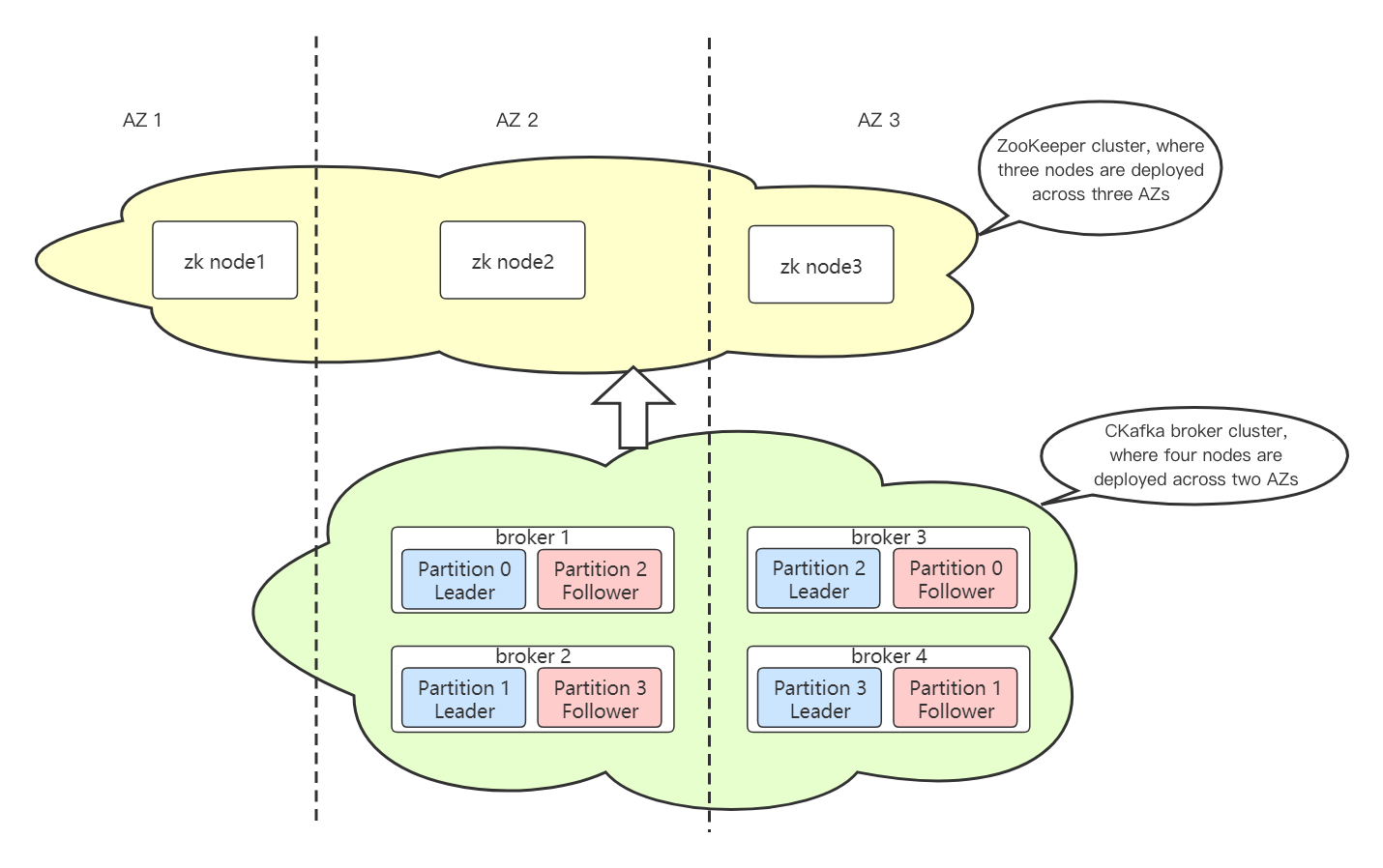
Advantages and Disadvantages of Cross-AZ Deployment
Advantages
Cross-AZ deployment can significantly enhance the disaster recovery capability of a cluster. When force majeure risks such as unexpected network instability or power outages/restarts occur in a single AZ, it ensures that clients can resume message production and consumption after a brief reconnection wait.
Disadvantages
In the cross-AZ deployment mode, since partition replicas are distributed across multiple AZs, message replication involves additional cross-region latency compared with the single-AZ deployment mode. This latency directly affects client write time for production (when the client ack parameter is greater than 1 or equal to -1 or all). Currently, cross-AZ latency in major regions such as Guangzhou, Shanghai, and Beijing typically ranges from 10 ms to 40 ms.
Analysis of Cross-AZ Deployment Scenarios
Single AZ Unavailable
After a single AZ becomes unavailable, as explained in the previous section on the principles, clients will get disconnected and reconnected. After clients get reconnected, services can still be provided normally.
Since the management API service currently does not support cross-AZ deployment, if a single AZ becomes unavailable, you may be unable to create topics, configure the access control list (ACL) policies, or view monitoring metrics via the console. However, this does not affect production and consumption for existing businesses.
Network Isolation Between AZs
If network isolation occurs between AZs, meaning that they cannot communicate with each other, a split-brain scenario may arise in the cluster. Nodes in both AZs will continue to provide services, but data written in one AZ will be considered dirty data after the cluster recovers.
Consider the following scenario: The cluster controller node and one ZK node in the ZK cluster experience network isolation from other nodes. At this point, the other nodes will re-elect a new controller (since most nodes in the ZK cluster maintain normal network communication, a controller can be elected successfully). However, the controller that experiences network isolation still considers itself the controller node, resulting in a split-brain scenario in the cluster.
Client writes in this scenario need to be considered according to different situations. For example, when the acknowledgment policy on the client is set to -1 or all and the number of replicas is 2, assuming the cluster has 3 nodes, after a split-brain event, the distribution ratio will be 2:1 and writes to partitions where the original leader was in the 1-node region will report an error, while writes on the other side are normal. However, if the number of replicas is 3 and ack = -1 or ack = all is set, writes will fail on both sides. In this case, further handling schemes should be determined based on specific parameter configurations.
After the cluster network recovers, clients can resume production and consumption without any manual intervention. However, as the server will normalize the data again, data from one split-brain node will be truncated directly. For the multi-replica cross-region data storage mode, this truncation does not result in data loss.
Multi-AZ Disaster Recovery Limits
Capacity Limits
CKafka achieves multi-AZ disaster recovery by distributing underlying resources across multiple AZs. When an AZ fails, CKafka switches the partition leader to a broker node in another AZ. This reduces the underlying resources that handle traffic, leading to capacity issues. Below is the resource availability status when an AZ fails:
For a two-AZ disaster recovery instance, Usable capacity = Instance capacity/2. To ensure normal use, customers need to reserve redundant resources of 100%.
For a three-AZ disaster recovery instance, Usable capacity = Instance capacity/3 x 2. To ensure normal use, customers need to reserve redundant resources of 50%.
For a four-AZ disaster recovery instance, Usable capacity = Instance capacity/4 x 3. To ensure normal use, customers need to reserve redundant resources of 33.3%.
For an n-AZ disaster recovery instance, Usable capacity = Instance capacity/n x (n - 1). To ensure normal operation, customers need to reserve redundant resources of 1/(n-1).
Parameters and Configuration Limits
CKafka supports modifying the topic-level configuration
min.insync.replicas in the console. This configuration takes effect when ack = -1 is set for the client, ensuring that a message is only acknowledged as successfully produced after being synchronized by min.insync.replicas replicas simultaneously (for example, if the number of topic replicas is 3 and min.insync.replicas is set to 2, a message needs to be synchronized by at least 2 replicas before being considered successfully produced).Therefore, to ensure production availability when an AZ fails, the topic configuration must satisfy:
min.insync.replicas < Number of AZs. To guarantee production availability when a node fails, the topic configuration must satisfy: min.insync.replicas < Number of topic replicas. The configuration rule is: min.insync.replicas < Number of topic replicas <= Number of AZs.Two-AZ instance: Number of topic replicas = 2; min.insync.replicas = 1
Three-AZ instance: Number of topic replicas = 2; min.insync.replicas = 1
Three-AZ instance: Number of topic replicas = 3; min.insync.replicas <= 2
Bantuan dan Dukungan
Apakah halaman ini membantu?
Anda juga dapat Menghubungi Penjualan atau Mengirimkan Tiket untuk meminta bantuan.
masukan