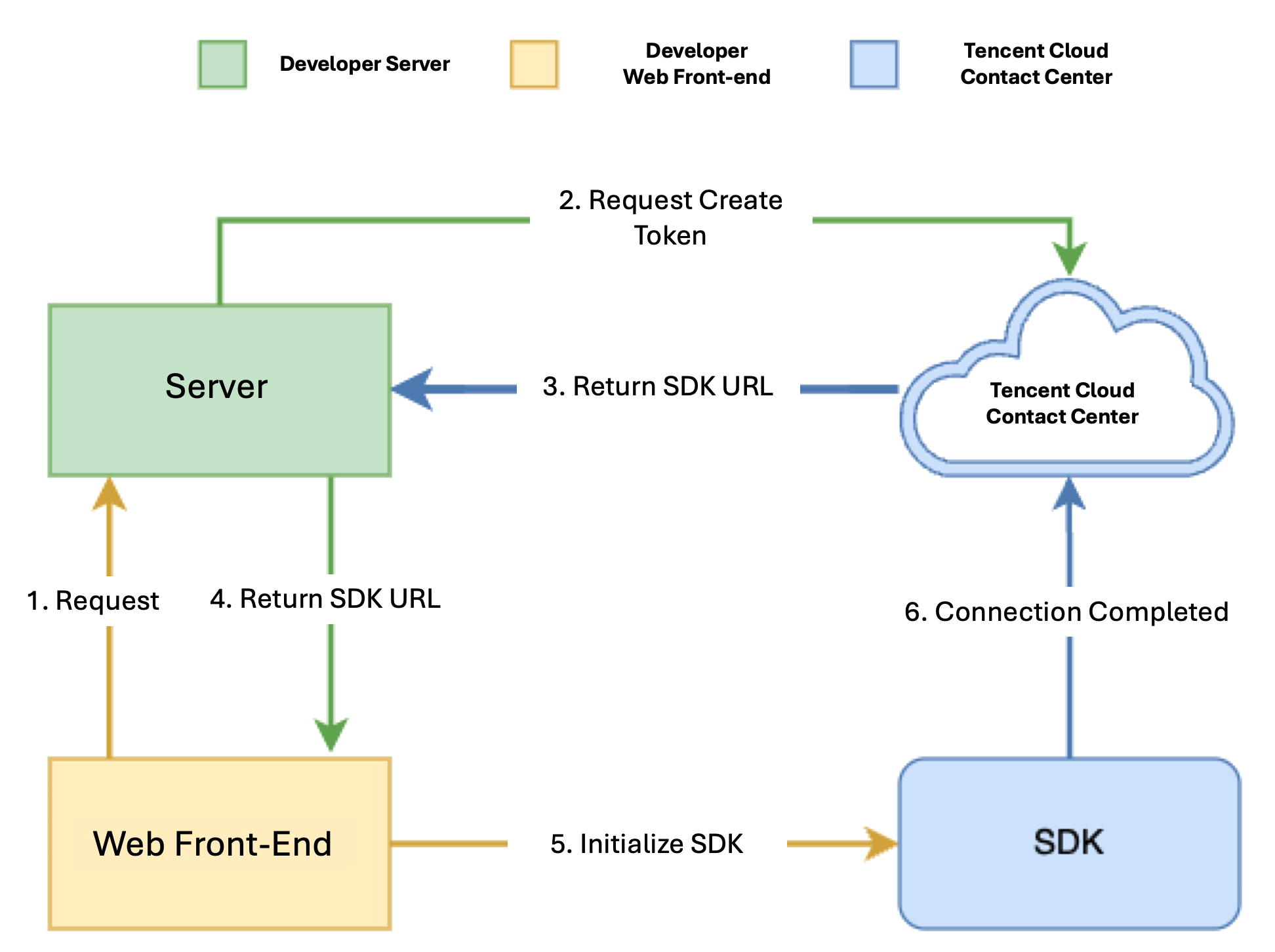
Cloud Contact Center provides a JavaScript SDK for developers. Developers can import the SDK into the page using a script, which completes the initialization of the SDK. The integration interaction is as follows:
Notes
1. TCCC Web SDK supports Chrome 56+ and Edge 80+. It’s recommended to use the latest version for more features.
2. Use HTTPS for deploying frontend pages (localhost is fine for development); otherwise, calls may not work due to browser restrictions.
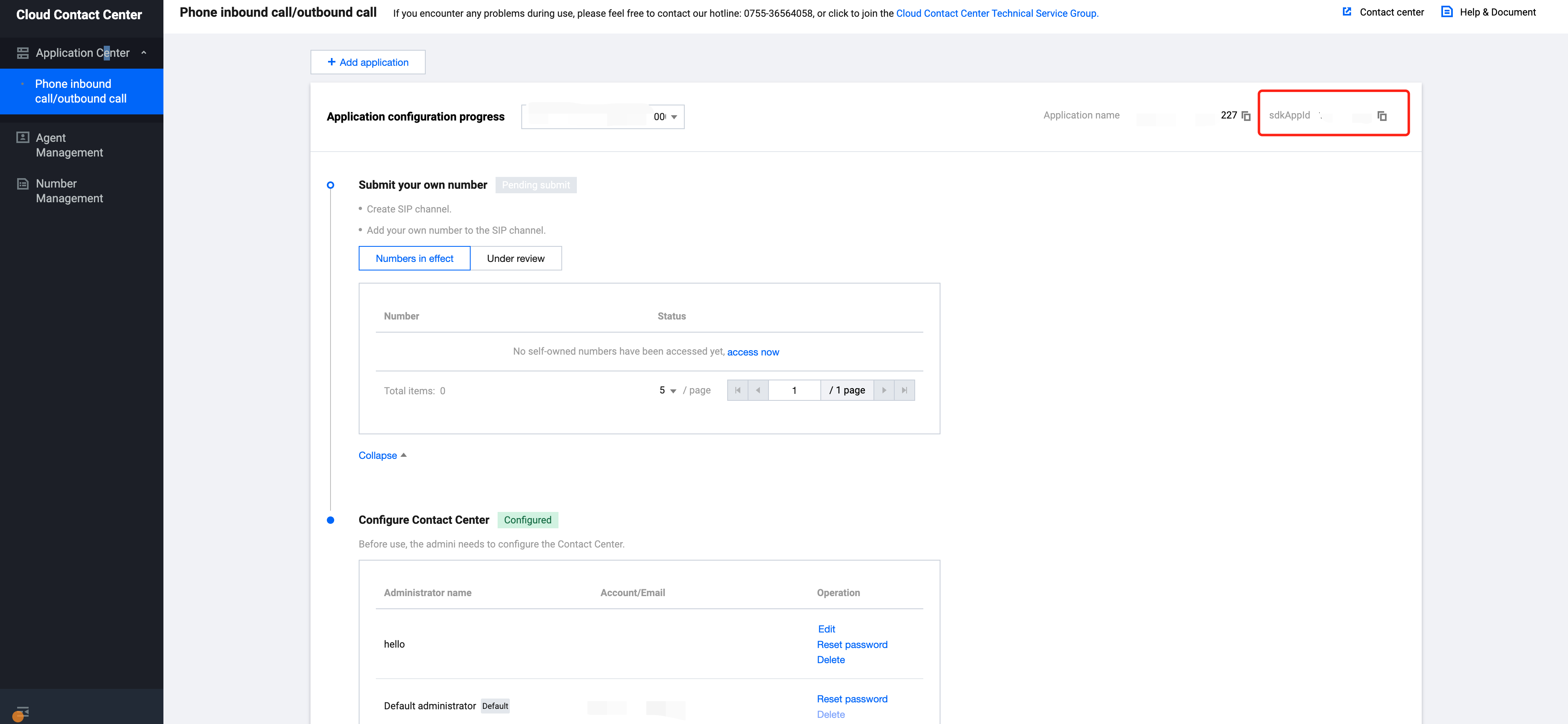
SdkAppId: A unique application ID created in Tencent Cloud Console. Each Tencent Cloud account can create up to 20 TCCC applications.
UserID: The member ID added in the Tencent Cloud Contact Center, usually an email address. For first-time setup, the admin account and password can be found in the Internal Message (sub-accounts must subscribe to TCCC product notification). Each SDKAppID supports multiple UserIDs, and additional licenses can be purchased at Agent Purchase.
SecretId and SecretKey: Developers need credentials to call the Cloud API. SecretId and Secretkey can be created in the Tencent Cloud console.
SDKURL: JS URL Created via the cloud API, valid for 10 minutes. Use it only once for SDK initialization. Request URL each time when initialize the SDK. Once initialized, no need to re-create.
SessionId: A unique ID for the entire call, from start to finish, whether it's the user's or the agent's call. It can be used to retrieve recordings, call logs, events, and more.
Step 1: Get Required Parameters
1. Get Tencent Cloud Contact Center SecretId and SecretKey. For guide, see Access Key.
// Address to obtain secretId and secretKey: https://console.tencentcloud.com/cam/capi
credential:{
secretId:'SecretId',
secretKey:'SecretKey'
},
region:'ap-singapore',
profile:{
httpProfile:{
endpoint:'ccc.tencentcloudapi.com'
}
}
};
const client =newCccClient(clientConfig);
const params ={
SdkAppId:1400000000,// Replace it with your own SdkAppId
SeatUserId:'xxx@qq.com'// Replace it with the agent account
};
client.CreateSDKLoginToken(params).then(
(data)=>{
res.send({
SdkURL: data.SdkURL
})
},
(err)=>{
console.error('error', err);
res.status(500);
}
);
})
Step 3: Request the SDK URL On the Web Frontend and Complete the Initialization
Note: This step requires implementation on the integrator's frontend.
1. Request /loginTCCC API implemented in step two to get SDKURL.
2. Insert SdkURL into the page using script method.
3. Monitor tccc.events.ready event, and upon success, execute your business flow logic.
functioninjectTcccWebSDK(SdkURL){
if(window.tccc){
console.warn('The SDK has been initialized. Please confirm whether the initialization is being executed repeatedly');
return;
}
returnnewPromise((resolve, reject)=>{
const script = document.createElement('script');
script.setAttribute('crossorigin','anonymous');
// The DomId needs to be rendered into it. If it is filled in, there is no floating window, and the workspace is directly rendered into the specified dom element (XML)
// To ensure the integrity of the workspace UI, the rendered Dom should have a minimum height of 480px and a minimum width of 760px
// script.dataset.renderDomId = "renderDom";
script.src = SdkURL;
document.body.appendChild(script);
script.addEventListener('load',()=>{
// JS SDK file loaded successfully. At this point, you can use the global variable "tccc"
window.tccc.on(window.tccc.events.ready,()=>{
/**
* TCCC SDK initialization succeeded. At this point, you can call out, listen to inbound events, and use other features.
* Note ⚠️: Please ensure that the SDK is only initialized once