Unbinding from a CVM
Download
フォーカスモード
フォントサイズ
This document describes how to unbind a secondary Elastic Network Interface (ENI) from a Cloud Virtual Machine (CVM).
Note:
After an ENI is unbound from a CVM, the ENI no longer provides network services for the CVM. Before unbinding an ENI from a CVM, please ensure that the selected ENI meets the expectations.
Prerequisites
Operation Steps
1. Log in to the Virtual Private Cloud (VPC) console.
2. In the left sidebar, choose IP and ENI > ENI to go to the ENI list page.
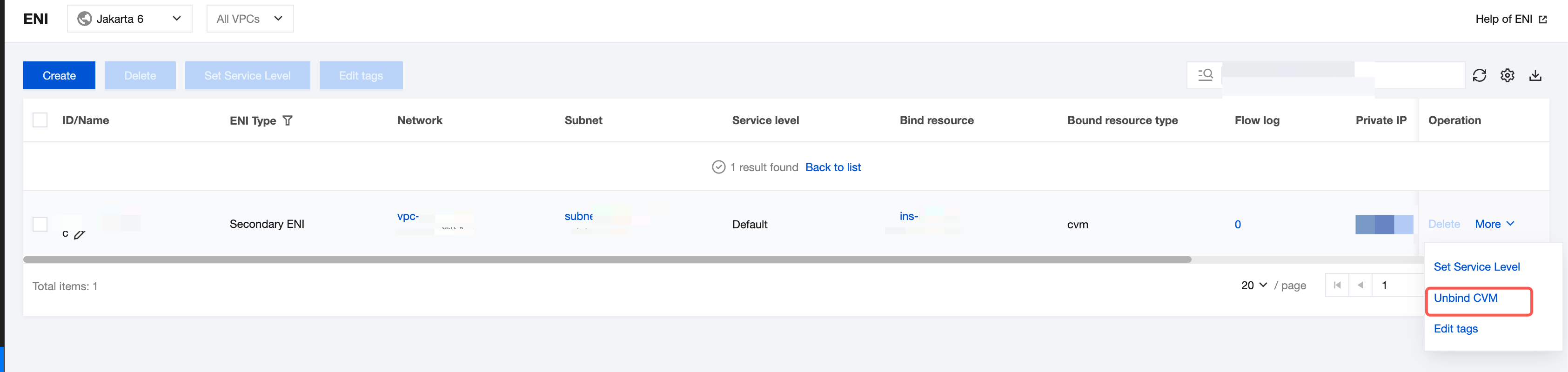
3. Find the row of the ENI that you want to unbind, and choose More > Unbind CVM in the Operation column.
Note:
You can also click the ENI ID go to the details page, click Unbind CVM or go to the ENIs tab page of the CVM console to unbind the ENI from the CVM. These methods have the same effect.
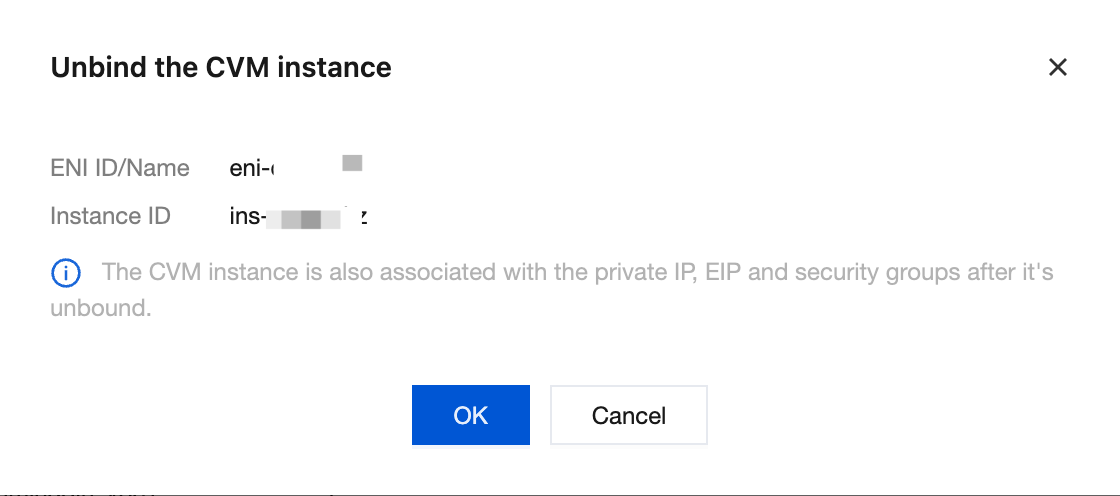
4. In the displayed dialog box, confirm the impact of the unbinding operation and click OK.
Note:
If an Elastic IP (EIP) is bound to the ENI, fees for the EIP resources are charged after the EIP is unbound. For specific fees, see IP Resource Fees.
If you no longer require the EIP, release it in a timely manner. After the release, fees for the EIP resources are no longer charged. For details, see Releasing an EIP.
フィードバック