tencent cloud

Cloud Infinite

Release Notes and Announcements
Release Notes
Announcements
Product Introduction
Product Overview
Product Strengths
Use Cases
Feature Overview
Regions and Domains
Specifications and Limits
Billing
Billing Overview
Billing Mode
Billable Items
Free Tier
Payment Overdue
Viewing Bill Details
FAQs
Getting Started
Registering and Logging In
Bind Bucket
Uploading and Processing File
Downloading and Deleting Images
Unbinding Buckets
Using CI via COS
Features
Image Processing
Media Processing
Content Moderation
AI Content Recognition
File Processing
Smart Voice
File processing
User Guide
Overview
Bucket Management
Smart Toolbox
Job and Workflow
Data Monitoring
Usage statistics
Use Cases
Copyright Protection Solutions
Image Processing Practices
Working with API Authorization Policies
Workflow Practices
API Documentation
API Overview
Structure
Common Request Headers
Common Response Headers
Activate Vast Service
Image Processing
AI-Based Content Recognition
Smart Audio
Media Processing
Content Moderation
Document Processing
File Processing
Job and Workflow
Cloud Virus Detection
Error Codes
Request Signature
SDK Documentation
SDK Overview
Android SDK
iOS SDK
COS Android SDK
C SDK
C++ SDK
.NET(C#) SDK
Go SDK
COS iOS SDK
Java SDK
JavaScript SDK
Node.js SDK
PHP SDK
Python SDK
Mini Program SDK
Personal Information Protection Policy for SDK
Security and Compliance
Permission ‍Management
FAQs
Basic Settings
Document Processing
Media Processing
Content Recognition
Smart Audio
Agreements
Service Level Agreement
Contact Us
Glossary

Content Recognition

PDF
포커스 모드
폰트 크기
마지막 업데이트 시간: 2025-12-04 10:30:06

Feature Overview

For files already existing in the Bucket, you can create tasks to perform operations such as CR. Task creation is based on the Template feature; you can directly use the system preset Templates provided by Cloud Infinite, or customize Templates. For Template details, see Template documentation.
Note:
When initiating an AI CR task, you must enter the complete file name and file format; otherwise, the system cannot recognize the format and process it.
Currently, the task feature can only operate on existing files. If you need to process files during upload, use the Workflow feature.
After creating a task, corresponding feature fees will be incurred. For billing details, see Content Recognition Billing Documentation.
When using services, ensure resource availability by not enabling access restriction features such as Original Image Protection and Hotlink Protection.
When using AI CR, please first confirm the relevant restrictions and Region. For details, see Usage Restrictions.

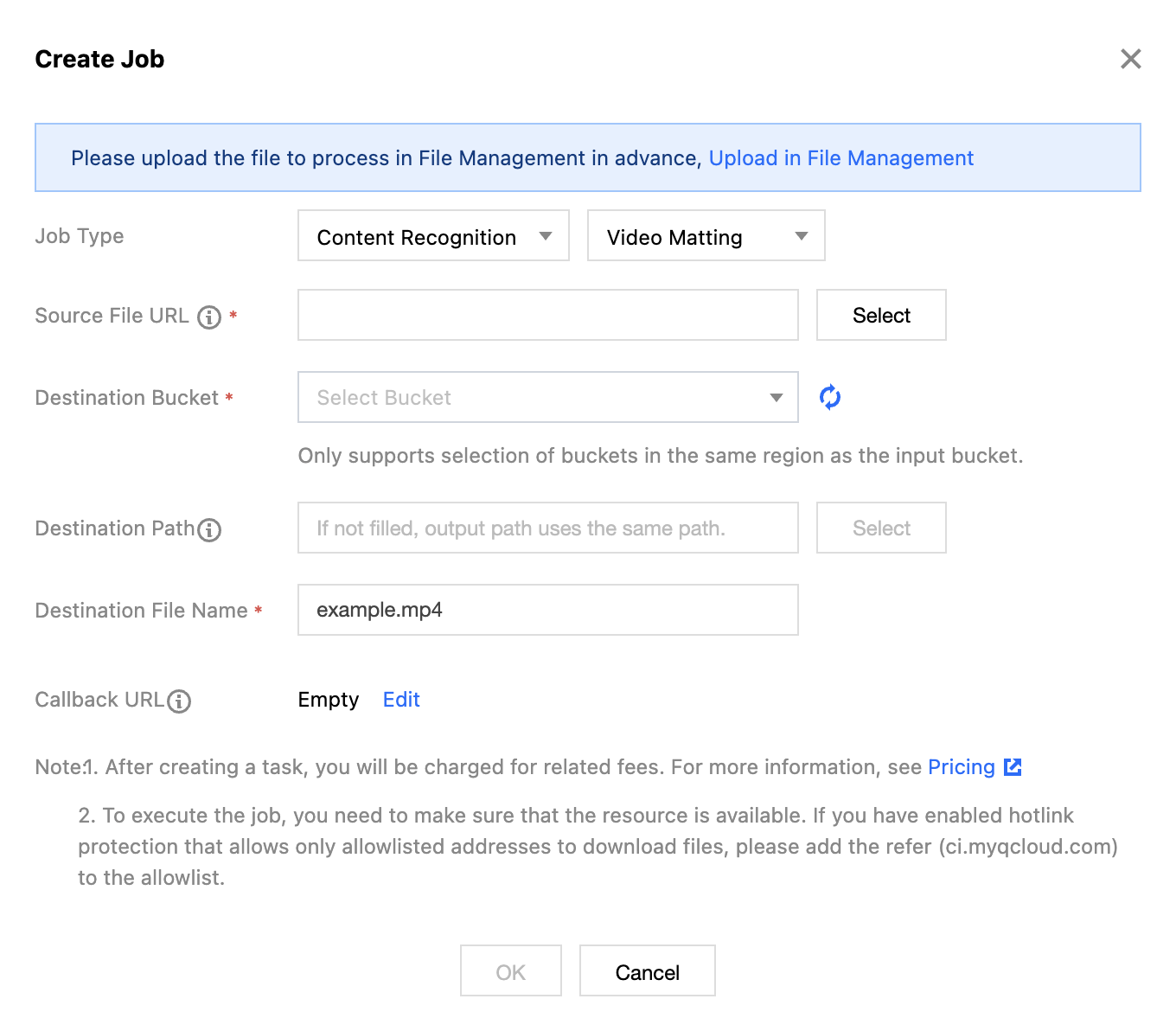
Video Portrait Segmentation (Video Matting)

Automatically identifies human body regions in videos and outputs a sequence video of the corresponding regions.

Operation Steps

1. Log in to the Cloud Infinite console.
2. In the left sidebar, click Bucket Management to go to the Bucket Management page.
3. Click the Bucket Name or Manage in the right operation bar to go to the corresponding Bucket page.
4. In the left sidebar, select Tasks and Workflows > Task Management, and select the CR tab at the top of the page.
5. Select Video Matting for the task type, click Create Task, configure according to the following settings, and then click OK.


Task Type: Select CR - Video Matting.
Source file path: Enter the path of the file to be processed. Note that the file path must not begin or end with /.
Target Bucket: Supports selecting Buckets in the same Region that have CR enabled.
Target Path: The storage path for Image Processing results.
Target file name: You can specify the file name of the target file here.
Callback URL: The callback address information bound to the Queue. For details, see Queues and Callbacks.

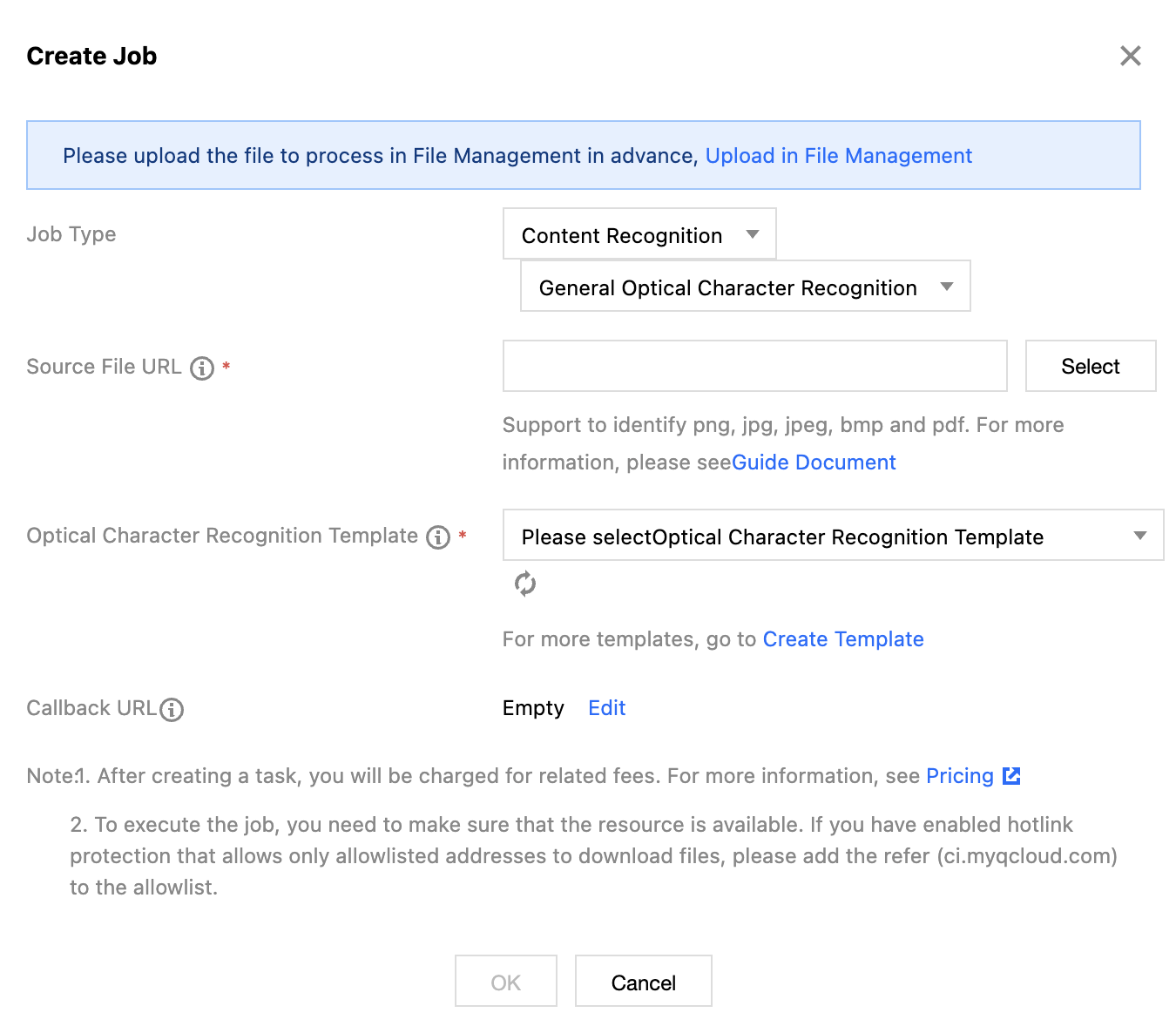
General OCR

The General OCR feature (Optical Character Recognition, OCR), based on industry-leading deep learning technologies, intelligently recognizes text content on images into editable text. It can be applied to various scenarios such as snap-and-scan, digitization of paper documents, e-commerce ad review, and more, significantly improving information processing efficiency.
Operation Steps

1. Log in to the Cloud Infinite console.
2. In the left sidebar, click Bucket Management to go to the Bucket Management page.
3. Click the Bucket Name or Manage in the right operation bar to go to the corresponding Bucket page.
4. In the left sidebar, select Tasks and Workflows > Task Management, and select the CR tab at the top of the page.
5. Select General OCR for the task type, click Create Task, configure according to the following settings, and then click OK.


Task Type: Select CR - General OCR.
Source file path: Enter the path of the image to be recognized. Note that the file path must not begin or end with /.
Select Template: Specify the model, recognition accuracy, and other parameters required for OCR.
Callback URL: The callback address information bound to the Queue. For details, see Queues and Callbacks.

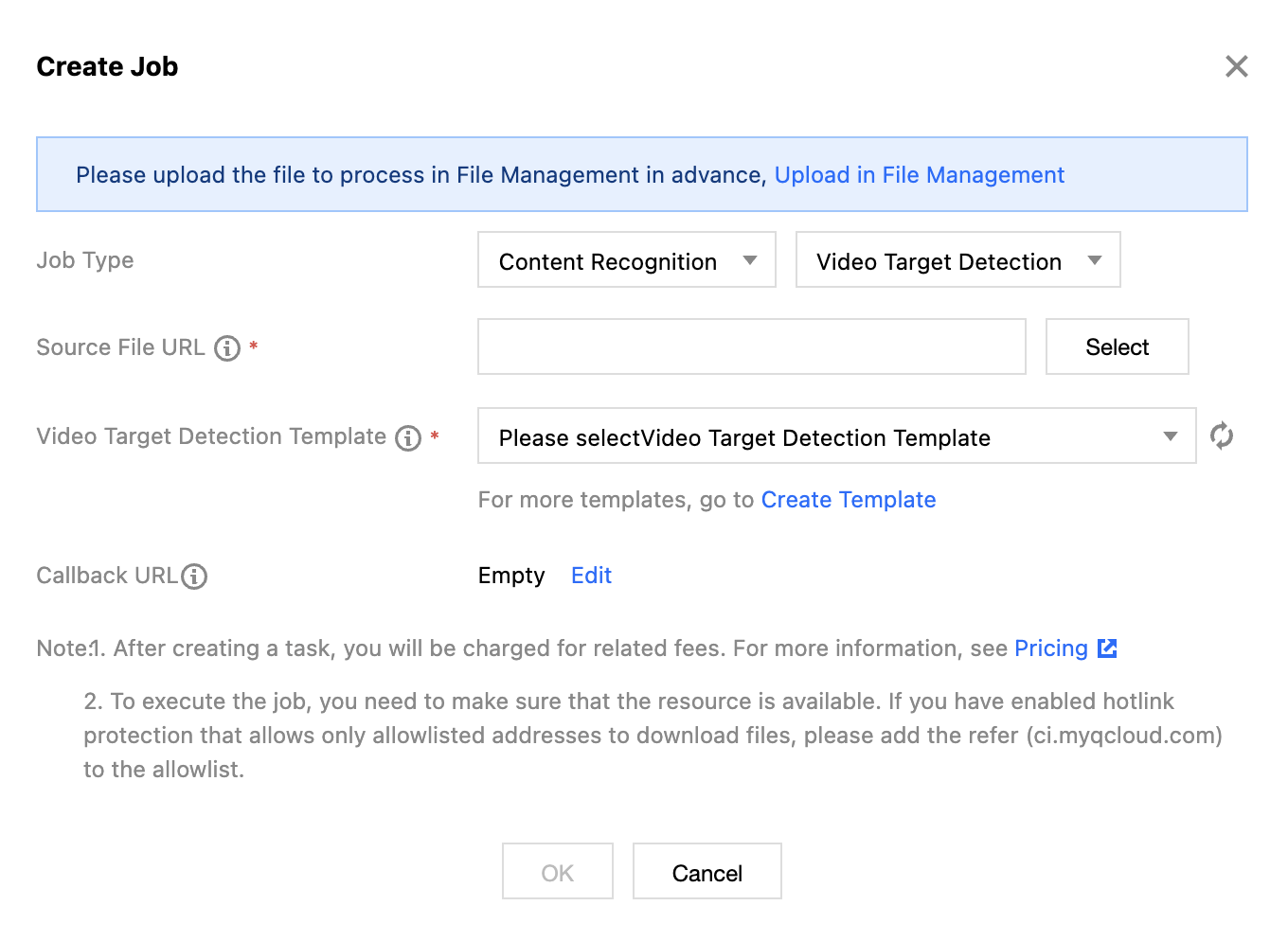
Video Object Detection

Video content is analyzed using computer vision technology to extract objects such as people, cars, pets, and perform analysis and recognition.

Operation Steps

1. Log in to the Cloud Infinite console.
2. In the left sidebar, click Bucket Management to go to the Bucket Management page.
3. Click the Bucket Name or Manage in the right operation bar to go to the corresponding Bucket page.
4. In the left sidebar, select Tasks and Workflows > Task Management, and select the CR tab at the top of the page.
5. Select Video Object Detection for the task type, click Create Task, configure according to the following settings, and then click OK.


Task Type: Select CR - Video Object Detection.
Source file path: Enter the path of the video to be recognized. Note that the file path must not begin or end with /.
Video Object Detection Template: Specify the objects to be recognized in the video and the operations after recognition.
Callback URL: The callback address information bound to the Queue. For details, see Queues and Callbacks.


도움말 및 지원

문제 해결에 도움이 되었나요?

피드백