SVIP Dashboard
Download
포커스 모드
폰트 크기
Target audience
This document is applicable to resellers and first-level resellers.
Prerequisites
View SVIP Sub-Customer Performance
1. Log in to the Tencent Cloud official website with a partner account and enter the Partner Center console.
2. In the left menu, choose Customer > SVIP Management, and switch to the SVIP Dashboard tab. This page displays the performance data of customers whose Purchase Order has been confirmed by the partner. It defaults to displaying data for the current quarter and can be queried by quarter and customer UIN.
Note:
This page only displays the performance data of customers whose Purchase Order has been confirmed by the partner, not the data of all customers.
The performance value is based on the "Amount Before Tax" in the partner's Billing Center Bills, representing the actual pre-tax amount paid by the partner on behalf of the customer. Data is current as of the day before the current date. This dashboard supports querying data for up to 3 years. For data beyond this period, please refer to the billing records.
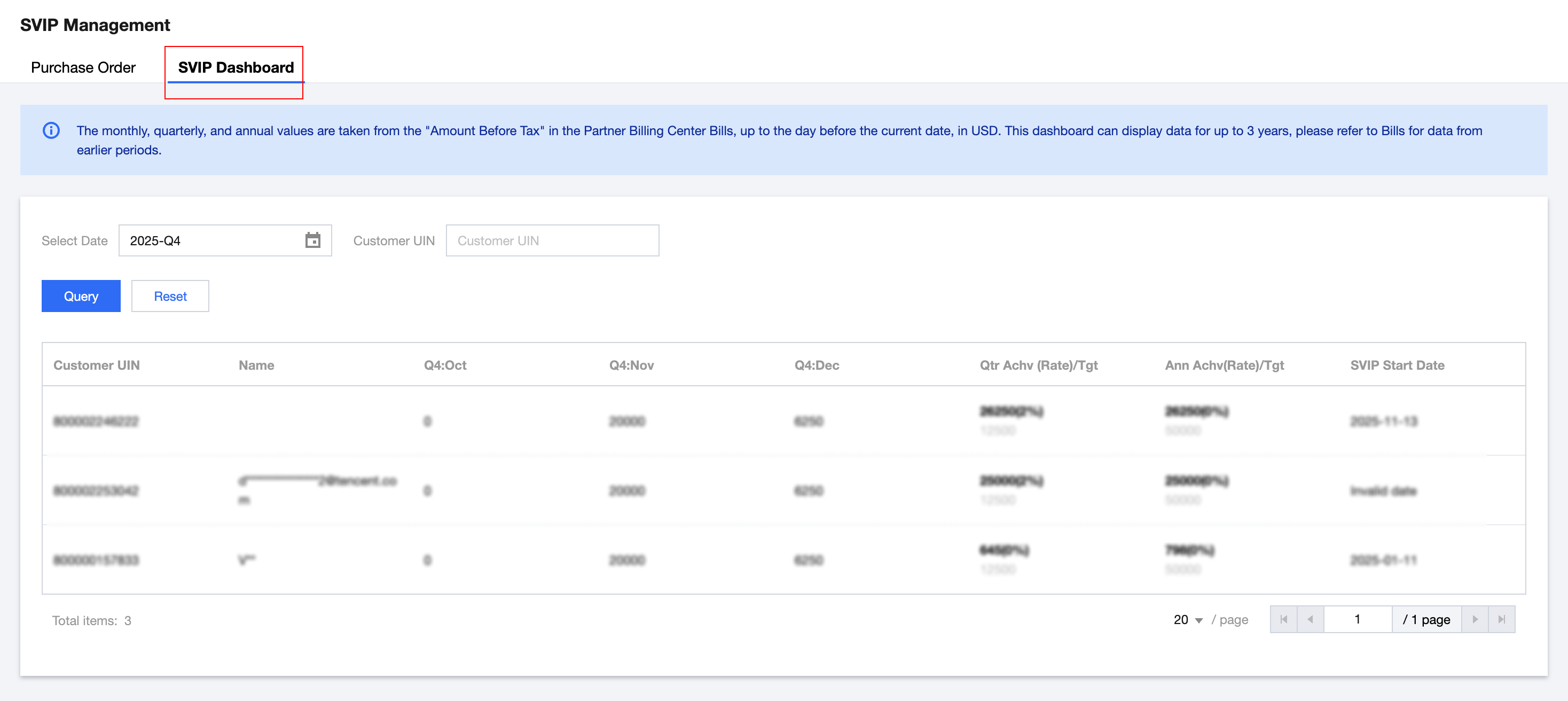
Customer UIN: The UIN of the customer whose PO has been confirmed by the reseller.
Name: customer name.
Q: Month: The customer's performance data for the current quarter and corresponding months.
Qtr Achv, Ann Achv: the sum of performance data for the 3 months of the current quarter or the 12 months of the current year.
Tgt: quarterly target and annual target.
SVIP Start Date: refers to the date when the partner first confirmed the PO for this customer.
피드백