Setting Maintenance Time
Download
포커스 모드
폰트 크기
Overview
Maintenance time is a very important concept for Tencent Cloud Distributed Cache. To ensure the stability of your Tencent Cloud Distributed Cache instance, the backend system performs maintenance operations and troubleshooting on the instance during the maintenance time. To minimize the potential impact on your business, we recommend that you set an acceptable maintenance time for your business instance, usually during off-peak hours.
In addition, we also recommend you perform operations involving data migration during the maintenance time, such as instance version or architecture upgrade. Taking the database instance version upgrade as an example, as syncing the full and incremental data involves data migration, after the upgrade is completed, a momentary disconnection from the database may occur. When the upgrade is initiated, the Switch Time can be selected as During maintenance time, so that the instance version switch will be started during the next maintenance time after the data sync is completed. Note that when you select During maintenance time for Switch Time, the switch will not occur immediately after the database version upgrade is completed; instead, the sync will continue till the instance goes into the next maintenance time, during which the switch will be performed. Therefore, the overall time it takes to upgrade the instance may be longer.
Note:
Before maintenance is carried out for Tencent Cloud Distributed Cache, notifications will be sent to the contacts configured in your Tencent Cloud account via SMS and email.
Version Description
The maintenance time is 03:00–04:00 AM by default, which can be adjusted as needed on all versions.
Prerequisites
You have created a Tencent Cloud Distributed Cache instance. For more information, see Creating Tencent Cloud Distributed Cache Instance.
The instance is in Running status.
The instance maintenance time needs to be adjusted.
Directions
1. Log in to the Tencent Cloud Distributed Cache console.
2. Above the instance list on the right, select the region.
3. In the instance list, find the target instance.
4. Click the target instance ID to enter the Instance Details page.
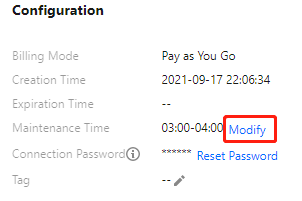
5. In the Configuration section on the Instance Details page, click Modify on the right of Maintenance Time.
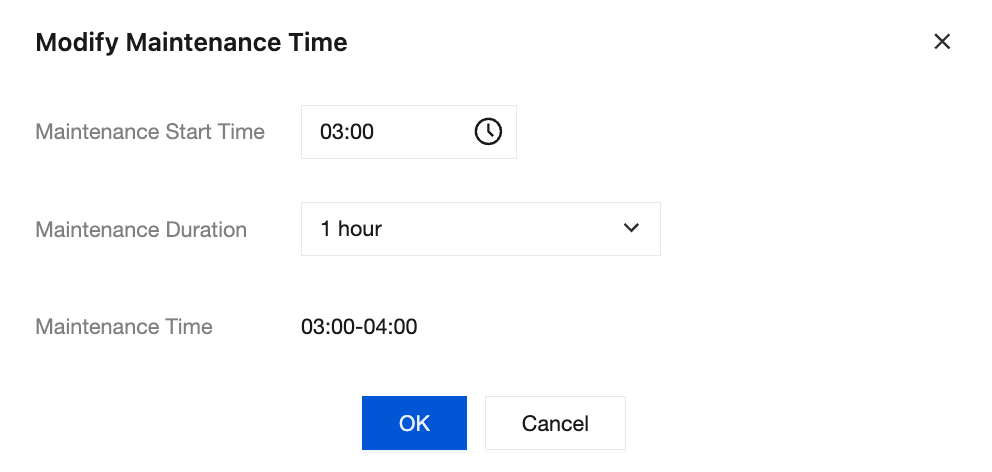
6. In the Modify Maintenance Time window, refer to the table below to set the maintenance time.
Parameter | Description |
Maintenance Start Time | Select the start time of the maintenance time in the drop-down list. |
Maintenance Duration | Select the desired duration of the maintenance time in the drop-down list, which can be 30 minutes, 1 hour, 1.5 hours, 2 hours, or 3 hours. |
Maintenance Time | The new maintenance time is displayed, which is 03:00–04:00 AM by default. |
7. Click OK.
Related APIs
API Name | Description |
Queries instance maintenance time | |
ModifyMaintenanceWindow | Modifies instance maintenance time |
피드백