Achieve Cloud-Based Content Understanding
다운로드
포커스 모드
폰트 크기
Scenario Description
In scenarios such as remote education, showroom streaming, video conferencing, remote loss assessment, financial audiovisual recording, and online medical consultation, requirements like evidence collection, quality inspection, review, archiving, and replay often require the entire video call or live streaming process to undergo content analysis by a third-party service provider through Cloud Slicing.
Billing Overview
For the cloud-based content understanding feature initiated through TRTC, TRTC only charges you for audio slicing and video screenshots. Meanwhile, the third-party service provider will charge you for cloud-based content understanding based on their respective billing rules. For details on the cost of audio slicing and video screenshots, refer to Audio Slicing and Video Screenshot Billing Description..
Feature Description
With TRTC's cloud-based content understanding feature, you can perform cloud slicing on each user's media stream in a room and send it to a third-party service provider for content understanding, with no need for client-side processing.
Definitions
Cloud moderation: Send audio and video content to a third-party vendor via cloud slicing, obtain the results, and return them to the backend via callback.
Cloud Slicing: including both audio slicing and video screenshot scenarios.
Audio Slicing: Slice a user's audio stream in the room at specified time intervals, resulting in audio segments.
Video Screenshot: Capture screenshots of a user's video stream in the room at specified time intervals, resulting in images.
File storage: Supports storing cloud-sliced files in COS, AWS S3, or Alibaba Cloud OSS.
Callback Notification: We support callback notification. By configuring your callback domain, the event status of cloud moderation will notify your callback server.
Cloud Content Understanding Process
Based on your initiated cloud content understanding request and the third-party service provider info in the request (you need to enable or purchase third-party service in advance), the audio and video content in the cloud content understanding task will be sent to the third-party content processing service provider via the cloud content understanding API for processing.
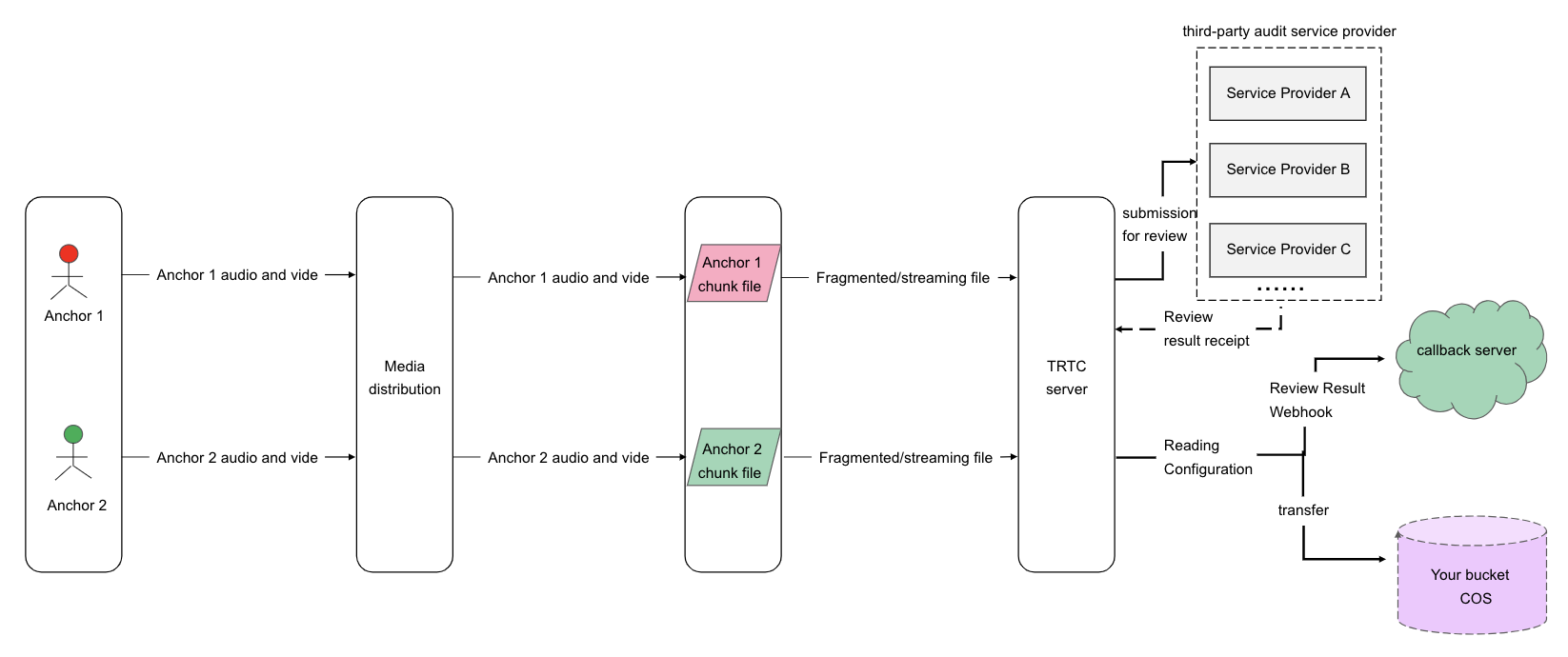
As shown above is a single stream recording scenario. Inside room 1234, anchor 1 and anchor 2 have both uploaded audio and video streams. If you subscribe to their media streams and set simultaneous video screenshot and audio slicing review, the backend will pull their streams separately and slice them into independent screenshot files and audio files for external content understanding service providers.
Currently supported audit service providers include: Tencent TIANYU, Shumei, NetEase Yidun.
API Interface and Audit Call Concurrency Limit
The call rate limit for the cloud-based content understanding API is 20 qps (if needed, submit a ticket to raise qps).
The API timeout duration is 6 seconds.
A single application supports 500 concurrent push streams by default. Tasks exceeding the concurrency limit will fail. If more concurrent push streams are needed, please submit a ticket to contact us.
A single task supports up to 25 subscribed hosts in a room. Hosts occupying an upstream audio stream also count as a separate push stream.
Cloud Content Understanding Task Execution Process
Starting Up Cloud Content Understanding (CreateCloudModeration)
To start a cloud content understanding task, call the REST API (CreateCloudModeration) through your backend service. Pay special attention to the parameter—Task ID (TaskId); this parameter is the unique identifier of the task. You need to save this Task ID as it will be required for subsequent operations targeting this task interface.
1. API for initiating cloud content understanding tasks (CreateCloudModeration)
In the API, you need to specify the room entry parameters UserId and UserSig for assigning a streaming robot (How to Obtain UserSig). Ensure the UserId does not duplicate those of regular anchors or audience in your room and does not match the UserId of a streaming robot already assigned to a room in the midst of streaming; otherwise, it will lead to recording task failure.
2. Assign streaming users (SubscribeModerationUserIds)
You can also specify the blacklist and whitelist information of anchor users for streaming or exclusion through the parameter SubscribeModerationUserIds. Of course, we also support update operations during the task process.
3. Specify transfer storage location (ModerationStorageParams)
Storage location: Support storing to AWS S3 or COS. Specify your storage parameters in the ModerationStorageParams parameter.
Image slice files are in png format, audio slicing files are in ogg format.
4. Specify content understanding service provider (ModerationSupplierParam)
Querying Cloud Content Understanding Task Status (DescribeCloudModeration)
If necessary, you can call this API to query the task status of cloud-based content understanding.
Modifying Cloud Content Understanding Task Status (ModifyCloudModeration)
If necessary, you can call this API to modify task parameters, such as subscribing to blocklist/allowlist SubscribeModerationUserIds
Disabling Cloud Content Understanding Task (DeleteCloudModeration)
After successful activation of the cloud-based content understanding task, you can use this API to stop it.
Cloud Content Understanding Callback
We provide multiple callback events for the cloud-based content understanding feature to help you promptly learn about the handling and completion status of content understanding tasks.
Cloud Content Understanding Callback Address Configuration
Tencent Real-Time Communication (TRTC) Console supports self-service configuration of callback information. Once configured, you can receive event callback notifications. For detailed operation guide, see Callback Configuration.
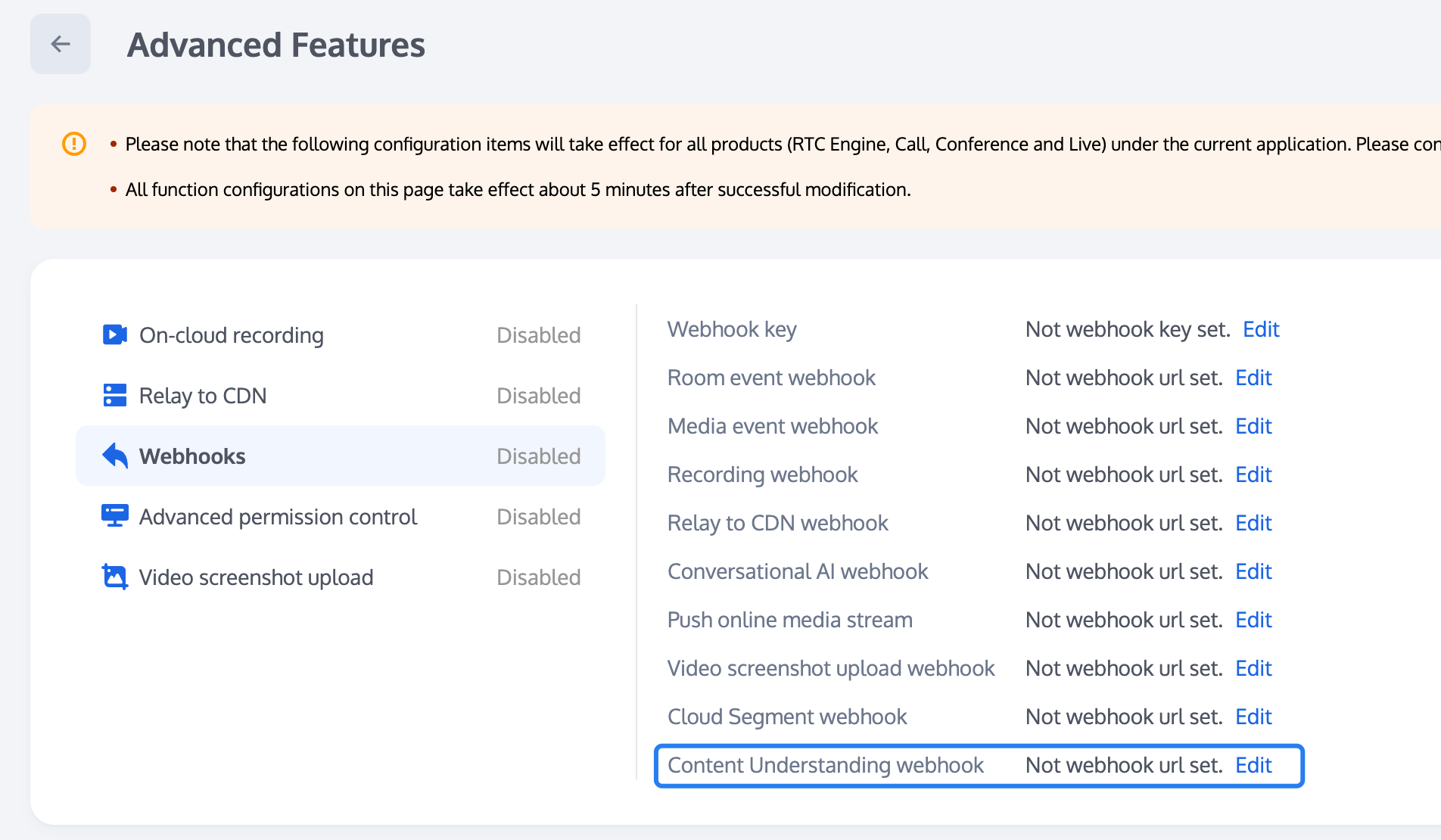
Callback API
You can provide an HTTP/HTTPS service gateway to receive callbacks and subscribe to callback messages. During the occurrence of related events, the cloud-based content understanding system will send callback event notifications to your message receiving server.
Event callback message format: HTTPS POST request sent to your server. Among them:
Character Encoding Format: UTF-8.
Request: body format is JSON.
Response: HTTP STATUS CODE = 200. The server ignores the response packet content. For protocol friendliness, it is recommended that your response content carry JSON: {"code":0}.
Cloud Content Understanding Callback Event
Parameter Description
The header of the event callback message contains the following fields:
Field Name | Value |
Content-Type | application/json |
Sign | signature value |
SdkAppId | SDK application ID value |
The body of the event callback message contains the following fields:
Field Name | Type | Description |
EventGroupId | Number | Event Group ID. The cloud-based content understanding event group is fixed as 11. |
EventType | Number | Event type of callback notification. |
CallbackTs | Number | Unix Timestamp of Callback Request Sent by Event Callback Server to Your Server in milliseconds. |
EventInfo | JSON Object | Event information. |
Event Type Description
Field Name | Type | Description |
EVENT_TYPE_CLOUD_Moderation_START | 1101 | Cloud content understanding module startup. |
EVENT_TYPE_CLOUD_Moderation_STOP | 1102 | Cloud content understanding module exit. |
EVENT_TYPE_CLOUD_Moderation_SEND_START | 1103 | Cloud content understanding task start. |
EVENT_TYPE_CLOUD_Moderation_TASK_INFO | 1104 | Cloud content understanding result callback. |
EVENT_TYPE_CLOUD_Moderation_SEND_STOP | 1105 | Cloud content understanding submission for review. |
EVENT_TYPE_CLOUD_Moderation_UPLOAD_ERROR | 1106 | Cloud content understanding delivery module error occurs. |
Event Information Description
Field Name | Type | Description |
RoomId | String/Number | Room name (type matches the client room ID type). |
EventTs | Number | Unix Timestamp of Event Occurrence, in seconds (not recommended for use, recommend using EventMsTs). |
EventMsTs | Number | Unix Timestamp of Event Occurrence in milliseconds. |
UserId | String | User ID of the pull-stream robot. |
TaskId | String | Task ID, a unique ID for a cloud-based content understanding task that runs only once. |
Payload | JsonObject | Define different event types. |
Event type 1101 Definition of Payload when EVENT_TYPE_CLOUD_Moderation_START:
Field Name | Type | Description |
Status | Number | 0: Represents module startup successful. 1: Represents module startup failed. |
{"EventGroupId": 11,"EventType": 1101,"CallbackTs": 1726125338219,"EventInfo": {"RoomId": "960025","EventTs": 1726125338,"EventMsTs": 1726125338219,"UserId": "inspect","TaskId": "-npVqpdU7sBobiK1iskE3BwlLIebCMrbKUbnL4K-rO+8oZWQndib9uvO4Deq9P1Na+sXGNGNuAE.""Payload": {"Status": 0}}}
Event type 1102 Definition of Payload when EVENT_TYPE_CLOUD_Moderation_STOP:
Field Name | Type | Description |
LeaveCode | Number | 0: Represents the cloud-based content understanding module normally called review log out. 1: The streaming robot was kicked out of the room by the customer. 2: The customer dismissed the room. 3: The server kicked out the streaming robot. 4: The server dismissed the room. 99: No other user streams in the room except the streaming robot, exit after exceeding specified time. 100: Room timeout exit. 101: The same user repeatedly entering the same room causes the robot to log out. |
{"EventGroupId": 11,"EventType": 1102,"CallbackTs": 1729601782073,"EventInfo": {"RoomId": "975626","EventTs": "1729601782","EventMsTs": 1729601782073,"UserId": "SliceTaskDuration1-partner-robot","TaskId": "-nHRjqhU7gTG0UIL-MquzG8D0Q+wehTbVTeeIIK-rO+8oZWQndibtueIpQ8A0F3n9PEVRk0rngE.","Payload": {"LeaveCode": 99}}}
Event type 1103 Definition of Payload when EVENT_TYPE_CLOUD_Moderation_SEND_START:
Field Name | Type | Description |
Status | Number | 0: Represents start sending slice file. |
{"EventGroupId": 11,"EventType": 1103,"CallbackTs": 1726750023538,"EventInfo": {"RoomId": "295210","EventTs": 1726750023,"EventMsTs": 1726750023538,"UserId": "inspect","TaskId": "-nHwXIdU7mJvL22pFsXZ-v7OgEzq1OzbNXe9L4K-4pycoZWQndib3ZfzqN7Wq+AdiPLMBLxd0gE.","Payload": {"Status": 0}}}
Review Result
Event type 1104 Definition of Payload when EVENT_TYPE_CLOUD_Moderation_FILE_INFO:
Field Name | Type | Description |
DataId | String | Cloud content understanding task ID. |
RequestId | String | Third-party content understanding provider request ID. |
MediaType | Number | speech 2: Image. |
Suggest | Number | 0: It is recommended to pass. 1: Manual review is recommended. 2: It is recommended to block. |
Label | String | Normal Ad: Advertisement Porn: Pornography Abuse: Insult Illegal: Prohibited Polity: Political content Terror: Violence and terror Sexy: Sexy image QRCode: QR code Custom |
Image | String | User bucket image path. |
Audio | String | User bucket audio path. |
AudioText | String | Audio recognition text. |
CheckDetail | Object | Cloud content understanding detailed results. |
Keywords | []String | Keyword(s) |
Score | Number | Confidence score. |
AudioSegments | Object | Audio segment location information. |
ImageLocation | Object | Image hit coordinate information. |
Audio Auditing Service review result example:
{"EventGroupId": 11,"EventType": 1104,"CallbackTs": 1726750309161,"EventInfo": {"RoomId": "963239","EventTs": 1735872251,"EventMsTs": 1735872251524,"UserId": "TRTCModerationCase2-user0","StreamerUserId": "SliceCustomUploadCase6-user0","TaskId": "-m9lm+lU7tOlL2mFgsPuzHeyNThbhZzbJlKQI4K-raO8oZWQndibARGYcSDohF0Zfgo7RNCuGQE.","Payload": {"DataId": "547512114953106866","RequestId": "","MediaType": 1,"Suggest": 2,"Label": "Polity","Image": "","Rate": 100,"Audio": "https://x.xx.com/-m9lm+lU7tOlL2mFgsPuzHeyNThbhZzbJlKQI4K-raO8oZWQndibARGYcSDohF0Zfgo7RNCuGQE./547512114835666354.ogg","AudioText": "xxxxxx.","CheckDetail": [{"Label": "Polity","Suggest": 2,"Keywords": ["XXX"],"Score": 100,"Desc": "","AudioSegments": {},"ImageLocation": {}}]}}}
Image Auditing result example:
{"EventGroupId": 11,"EventType": 1104,"CallbackTs": 1726750309161,"EventInfo": {"RoomId": "963239","EventTs": 1735872251,"EventMsTs": 1735872251524,"UserId": "TRTCModerationCase2-user0","StreamerUserId": "SliceCustomUploadCase6-user0","TaskId": "-m9lm+lU7tOlL2mFgsPuzHeyNThbhZzbJlKQI4K-raO8oZWQndibARGYcSDohF0Zfgo7RNCuGQE.","Payload": {"DataId": "554678038156038407","RequestId": "a82e0175-65ed-46b5-a656-45814aea1c60","MediaType": 2,"Suggest": 2,"Label": "Ad","Image": "https://trtcauto-sg-1311572968.cos.ap-singapore.myqcloud.com/prefix1/prefix2/-nHlf1xU7tsdRVBjLsog0ZX9T62DtVjbNguMJYK-58aNM6KipeDPAfrKt1aejC8ipMaphfYxAQ../TianyuModerationCase3-user1/images/20005067_963715_TianyuModerationCase3-user1_20250221211113.png","ImageOcr": "Movable Type Culture Moveable TVo The pain of never being able to go home again;""Rate": 90,"Audio": "","AudioText": "","CheckDetail": [{"Scene": "Ad","Label": "Normal","Suggest": 2,"Keywords": [],"Score": 90,"AudioSegments": {},"ImageLocation": {}}]}}}
Event type 1105 Definition of Payload when EVENT_TYPE_CLOUD_Moderation_SEND_STOP:
Field Name | Type | Description |
Status | Number | End the task. |
{"EventGroupId": 11,"EventType": 1105,"CallbackTs": 1726751347072,"EventInfo": {"RoomId": "295211","EventTs": 1726751347,"EventMsTs": 1726751347072,"UserId": "inspect","TaskId": "-nHwXIdU7jx6C00Nt8Vr+3h4GwYdP7zbeHi9L4K-4pycoZWQndibqFeEaV4LvjFqSuQvaAkrNQE.","Payload": {"Status": 0}}}
Event type 1106 Definition of Payload when EVENT_TYPE_CLOUD_Moderation_SEND_ERROR:
Field Name | Type | Description |
Code | Number | COS or third-party storage error code. |
Message | String | COS or third-party storage error message. |
{"EventGroupId": 11,"EventType": 1106,"CallbackTs": 1726751347072,"EventInfo": {"RoomId": "295211","EventTs": 1726751347,"EventMsTs": 1726751347072,"UserId": "inspect","TaskId": "-nHwXIdU7jx6C00Nt8Vr+3h4GwYdP7zbeHi9L4K-4pycoZWQndibqFeEaV4LvjFqSuQvaAkrNQE.","Payload": {"Code": 10002,"Message": "BadRequest"}}}
Moderating File Management
When initiating a TencentCloud API request for cloud moderation, you can configure whether to transfer hit files through the ModerationParams.SaveModerationFile parameter. The backend will designate the required hit files to be uploaded to your specified cloud storage platform (COS, AWS S3, or Alibaba Cloud OSS).
Hit File Naming Specification
Default naming for audio segments:
{bucket name}/{taskId}/{userId}/audios/{sdkappid}_{roomId}_{userid}_{UTC time}.ogg
Default naming for video screenshot images:
{bucket name}/{taskId}/{userId}/images/{sdkappid}_{roomId}_{userid}_{UTC time}.png
Field Meaning Description
Field | Meaning |
<taskId> | Cloud content understanding task ID. |
<sdkappid> | Cloud content understanding task SdkAppId. |
<roomId> | Room number for cloud content understanding. |
<userid> | anchor user ID |
UTC time | current time string, for example: 20250106143143 |
피드백