Realize Cloud Slicing
다운로드
포커스 모드
폰트 크기
Scenario Description
In remote education, live show streaming, video conferencing, remote loss assessment, financial audiovisual recording, and online medical consultation scenarios, considering the needs for evidence collection, quality inspection, review, archiving, and playback, it is often necessary to store the entire video call or live streaming process through cloud-based slice storage.
Cloud Slicing Cost
For cloud moderation initiated through TRTC, TRTC only charges you for audio slicing and video screenshots, while third-party audits will charge you auditing costs based on their respective billing rules. For details on audio slicing and video screenshot costs, refer to Audio Slicing and Video Screenshot Billing Description..
Feature Description
With TRTC's Cloud Slicing feature, you can perform cloud-based audio slicing or video screenshot processing on each user's media stream in the room without the need for client access.
Definitions
Audio Slicing: Slice a user's audio stream in the room at specified time intervals, resulting in audio segments.
Video Screenshot: Capture screenshots of a user's video stream in the room at certain time intervals, resulting in images.
File storage: Supports storing cloud-sliced files in COS, AWS S3, or Alibaba Cloud OSS.
Callback Notification: We support the ability of callback notification. By configuring your callback domain, the event status of Cloud Slicing will notify your callback server.
Audio Slicing and Video Screenshot Process
As shown below, inside the room, both Anchor 1 and Anchor 2 have uploaded audio and video streams. If you subscribe to their streams via a robot and set simultaneous video screenshot and audio slicing, the backend will pull the streams from both anchors, segment them into multiple standalone audio files and screenshot image files.
Multiple audio slicing files from Anchor 1.
Multiple video screenshot files from Anchor 1.
Multiple audio slicing files from Anchor 2.
Multiple video screenshot files from Anchor 2.
The backend will upload these files to your designated cloud storage platform (COS, AWS S3, or Alibaba Cloud OSS). The specific slicing process is as follows:

API Interface and Slicing Concurrency Limit
The API timeout duration is 6 seconds.
A single application supports 500 concurrent slicing streams by default (total API slicing tasks). Tasks exceeding the concurrency limit will fail. If more concurrent streams are needed, please submit a ticket to contact us.
A single slicing task supports up to 25 concurrent subscribed hosts in a room. Hosts transmitting only uplink audio will occupy a separate stream.
Slicing Task Execution Process
Starting a Slicing Task (CreateCloudSlice)
To start Cloud Slicing, call the REST API (CreateCloudSlice) through your backend service. Pay special attention to the parameter Task ID (TaskId); this parameter is the unique identifier of this slicing task. You need to save this Task ID as it will be required for subsequent operations targeting this slicing task interface.
Note:
1. Task Initiation (CreateCloudSlice)
To initiate a cloud slicing task via the API CreateCloudSlice, you must specify the room entry parameters UserId and UserSig (how to obtain UserSig) for the slicing robot. Ensure the UserId does not duplicate those of regular anchors in the room or the audience, and must not match the designated slicing robot UserId in any ongoing slicing task inside the room, otherwise lead to task failure.
2. Specify slicing users (SubscribeStreamUserIds)
You can also specify the blacklist and whitelist information of anchor users for or against slicing through the parameter SubscribeStreamUserIds. Of course, we also support update operations during the slicing process.
3. Specify storage location (SliceStorageParams)
3.1 Storage location: Support storing to AWS S3 or COS. Specify your storage parameters in the SliceStorageParams parameter.
3.2 Slice format: Image slice files are in png, and audio slicing files are in ogg.
Querying Slice Task Status (DescribeCloudSlice)
If necessary, you can call this API to query the status of services.
Modifying Slicing Task Parameters (ModifyCloudSlice)
If necessary, you can call this API to modify the parameters of slicing services, such as specifying slice users (SubscribeStreamUserIds).
Stopping a Slicing Task (DeleteCloudSliceTask)
After successful activation of the slicing task, you can use this API to stop the task.
Slicing File Management
Slicing File Naming Specification
Audio segments are named by default as:
{bucket name}/{taskId}/{userId}/audios/{sdkappid}_{roomId}_{userid}_{UTC time}.ogg
Video screenshot images are named by default as:
{bucket name}/{taskId}/{userId}/images/{sdkappid}_{roomId}_{userid}_{UTC time}.png
Field meaning description:
Field | Meaning |
<taskId> | Slicing Task ID |
<sdkappid> | Slicing Task SdkAppId |
<roomId> | Room number of the slicing task |
<userid> | User ID of the slicing task |
UTC time | Current time string, for example: 20250106143143 |
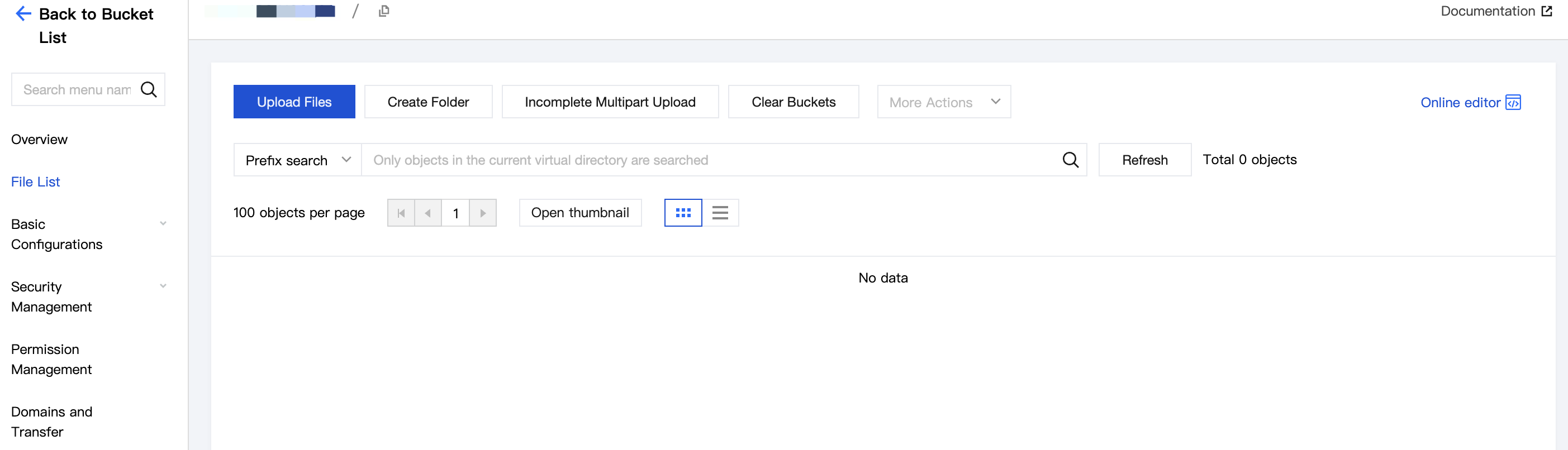
Searching Slicing Files
Audio segment path: {bucket name}/{taskId}/{userId}/audios/
Video screenshot path: {bucket name}/{taskId}/{userId}/images/
Slicing Callback Event
We provide multiple callback events for the Cloud Slicing feature to help you promptly learn about the handling and completion status of slicing tasks.
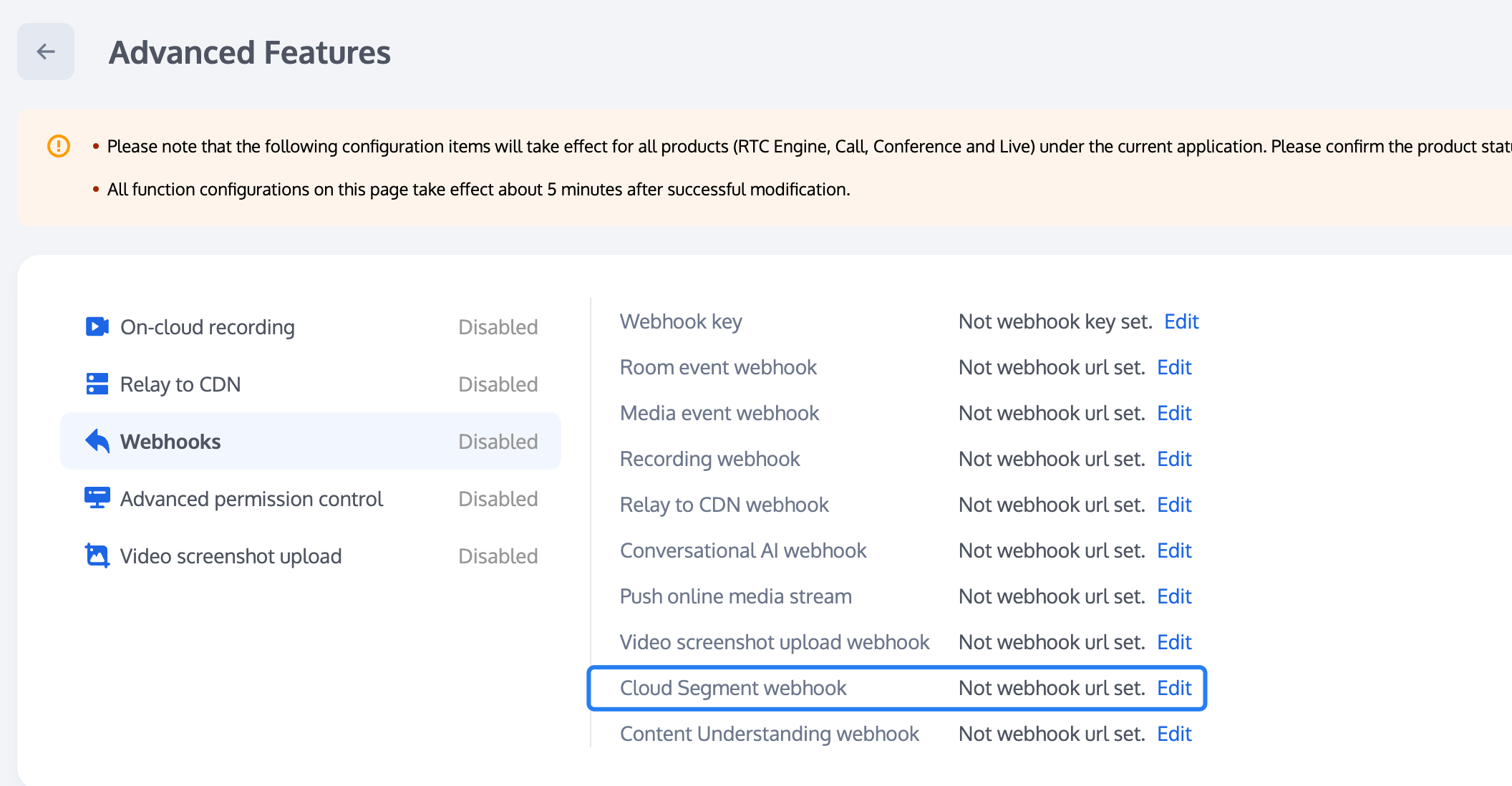
Configuring the Slicing Callback Address
Tencent Real-Time Communication (TRTC) Console supports self-service configuration of callback information. After the configuration is complete, you will be able to receive event callback notifications. For detailed operation guide, see Callback Configuration.
Callback API
You can provide an HTTP/HTTPS service gateway for callback receiving to subscribe to callback messages. During the occurrence of related events, the cloud slicing system will send callback event notifications to your message receiving server.
Event Callback Message Format
Event callback messages are sent to your server via HTTP/HTTPS POST request, where:
Character Encoding Format: UTF-8.
Request: body format is JSON.
Response: HTTP STATUS CODE = 200. The server ignores the response packet content. For protocol friendliness, it is advisable for the customer to carry JSON in the response content: {"code":0}.
Slicing Callback Event
Parameter Description
The header of the event callback message contains the following fields:
Field Name | Value |
Content-Type | application/json |
Sign | signature value |
SdkAppId | SDK application ID value |
Body of Event Callback Message Contains Following Fields
Field Name | Type | Description |
EventGroupId | Number | Event Group ID Cloud Slicing fixed as 10 |
EventType | Number | Event type of callback notification |
CallbackTs | Number | Unix Timestamp of Callback Request Sent by Event Callback Server to Your Server in milliseconds |
EventInfo | JSON Object | event information |
Event Type Description
Field Name | Type | Description |
EVENT_TYPE_CLOUD_SLICE_START | 1001 | Cloud Slicing module startup |
EVENT_TYPE_CLOUD_SLICE_STOP | 1002 | Cloud Slicing module exit |
EVENT_TYPE_CLOUD_SLICE_UPLOAD_START | 1003 | Cloud Slicing file upload task starts, callback only when COS is selected |
EVENT_TYPE_CLOUD_SLICE_FILE_INFO | 1004 | Cloud Slicing generates video screenshots or audio fragment files, callback after successful upload, only when COS is selected |
EVENT_TYPE_CLOUD_SLICE_UPLOAD_STOP | 1005 | Cloud Slicing file upload complete, callback only when COS is selected |
EVENT_TYPE_CLOUD_SLICE_UPLOAD_ERROR | 1006 | Cloud Slicing delivery module error occurs |
Event Information Description
Field Name | Type | Description |
RoomId | String/Number | room name (type matches the client room ID type) |
EventTs | Number | Unix Timestamp of Event Occurrence, unit: seconds (not recommended for use, recommend using EventMsTs) |
EventMsTs | Number | Unix Timestamp of Event Occurrence in milliseconds |
UserId | String | User ID of the slicing robot |
TaskId | String | Slicing Task ID, the unique ID of a cloud slicing task |
Payload | JsonObject | Define different event types |
When the EVENT TYPE is 1001 (EVENT_TYPE_CLOUD_SLICE_START), the Payload definition:
Field Name | Type | Description |
Status | Number | 0: Represents module startup successful 1: Represents module startup failed |
{"EventGroupId":10,"EventType":1001,"CallbackTs":1726125338219,"EventInfo":{"RoomId":"960025","EventTs":1726125338,"EventMsTs":1726125338219,"UserId":"inspect","TaskId":"-npVqpdU7sBobiK1iskE3BwlLIebCMrbKUbnL4K-rO+8oZWQndib9uvO4Deq9P1Na+sXGNGNuAE.""Payload":{"Status":0}}}
When the EVENT TYPE is 1002 (EVENT_TYPE_CLOUD_SLICE_STOP), the Payload definition:
Field Name | Type | Description |
LeaveCode | Number | 0: Represents module normally called stop slice exit 1: The slice robot was kicked out of the room by the customer. 2: The customer dismissed the room. 3: The server kicked out the slice robot. 4: The server dissolves the room. 99: No other users inside the room except the slice robot. Exit after exceeding specified time. 100: Room timeout exit. 101: The same user repeatedly enters the same room, causing the robot to exit. |
{"EventGroupId":10,"EventType":1002,"CallbackTs":1729601782073,"EventInfo":{"RoomId":"975626","EventTs":"1729601782","EventMsTs":1729601782073,"UserId":"SliceTaskDuration1-partner-robot","TaskId":"-nHRjqhU7gTG0UIL-MquzG8D0Q+wehTbVTeeIIK-rO+8oZWQndibtueIpQ8A0F3n9PEVRk0rngE.","Payload":{"LeaveCode":99}}}
When the EVENT TYPE is 1003 (EVENT_TYPE_CLOUD_SLICE_UPLOAD_START), the Payload definition:
Field Name | Type | Description |
Status | Number | 0: Represents the upload module started normally 1: Represents the upload module initialization failed. |
{"EventGroupId":10,"EventType":1003,"CallbackTs":1726750023538,"EventInfo":{"RoomId":"295210","EventTs":1726750023,"EventMsTs":1726750023538,"UserId":"inspect","TaskId":"-nHwXIdU7mJvL22pFsXZ-v7OgEzq1OzbNXe9L4K-4pycoZWQndib3ZfzqN7Wq+AdiPLMBLxd0gE.","Payload":{"Status":0}}}
When the EVENT TYPE is 1004 (EVENT_TYPE_CLOUD_SLICE_FILE_INFO), the Payload definition:
Field Name | Type | Description |
Payload | Object | Slice result |
StreamUserId | String | Current Anchor id |
{"EventGroupId":10,"EventType":1004,"CallbackTs":1726750309161,"EventInfo":{"RoomId":"963600","EventTs":1730186326,"EventMsTs":1730186326109,"UserId":"SliceCustomUploadCase6-partner-robot","StreamerUserId":"SliceCustomUploadCase6-user0","TaskId":"-nHRjqhU7kGRgNhGI8Gq8JkT7wnFeUXbXG-6IYK-yb3t8ZWQndibhWMUwNxQwRlgnWuvEuBSqAE.","Payload":{"FileList":"20012177_2428_1929088_20250106143143.png"}}}
When the EVENT TYPE is 1005 (EVENT_TYPE_CLOUD_SLICE_UPLOAD_STOP), the Payload definition:
Field Name | Type | Description |
Status | Number | End submission for review |
{"EventGroupId":10,"EventType":1005,"CallbackTs":1726751347072,"EventInfo":{"RoomId":"295211","EventTs":1726751347,"EventMsTs":1726751347072,"UserId":"inspect","TaskId":"-nHwXIdU7jx6C00Nt8Vr+3h4GwYdP7zbeHi9L4K-4pycoZWQndibqFeEaV4LvjFqSuQvaAkrNQE.","Payload":{"Status":0}}}
When the EVENT TYPE is 1006 (EVENT_TYPE_CLOUD_SLICE_UPLOAD_ERROR), the Payload definition:
Field Name | Type | Description |
Code | Number | cos or third-party storage error code |
Message | String | cos or third-party storage error message |
{"EventGroupId":10,"EventType":1006,"CallbackTs":1726751347072,"EventInfo":{"RoomId":"295211","EventTs":1726751347,"EventMsTs":1726751347072,"UserId":"inspect","TaskId":"-nHwXIdU7jx6C00Nt8Vr+3h4GwYdP7zbeHi9L4K-4pycoZWQndibqFeEaV4LvjFqSuQvaAkrNQE.","Payload":{"Code":10002,"Message":"BadRequest"}}}
피드백