This guide walks you through integrating VoIP Push functionality using the TIMPush service, designed for headless (UI-less) scenarios with AtomicXCore.
VoIP Push requires a dedicated certificate. Standard APNs push certificates cannot be reused. You must apply for a VoIP Push certificate separately through the Apple Developer portal.
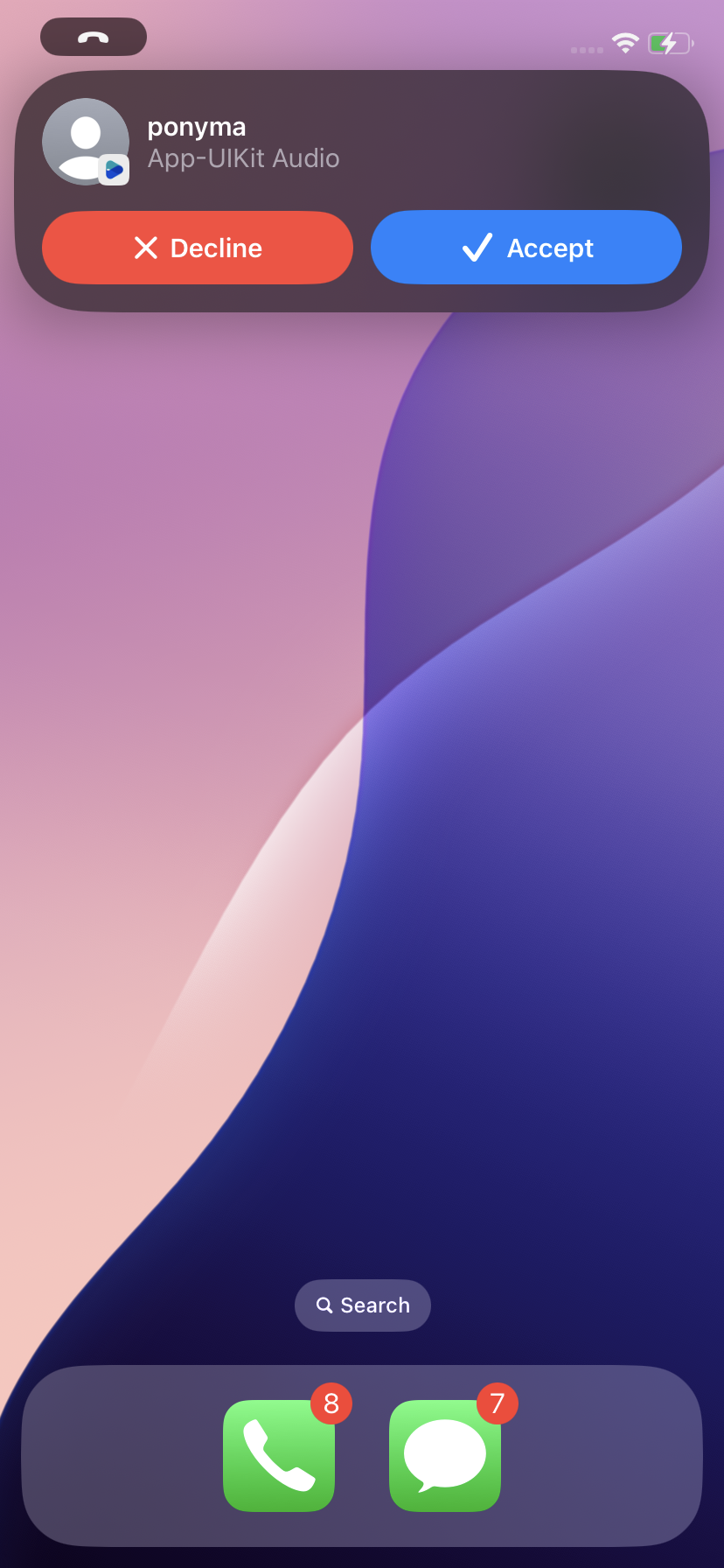
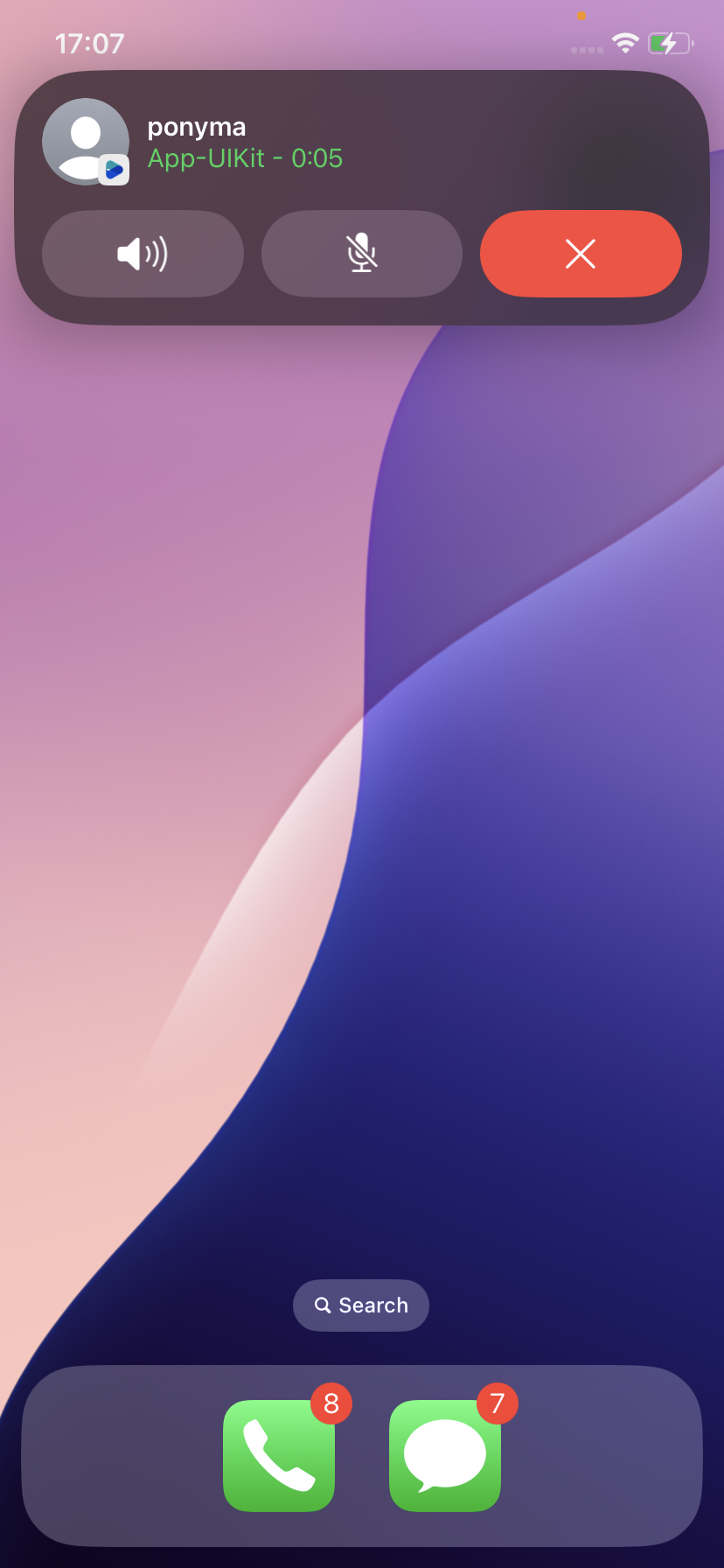
After following this guide to integrate Apple LiveCommunicationKit, your app will support native call experiences similar to WeChat. Even if your app is terminated or the device is locked, the system will present a full-screen incoming call interface automatically:
Before Answering
After Answering
Prerequisites
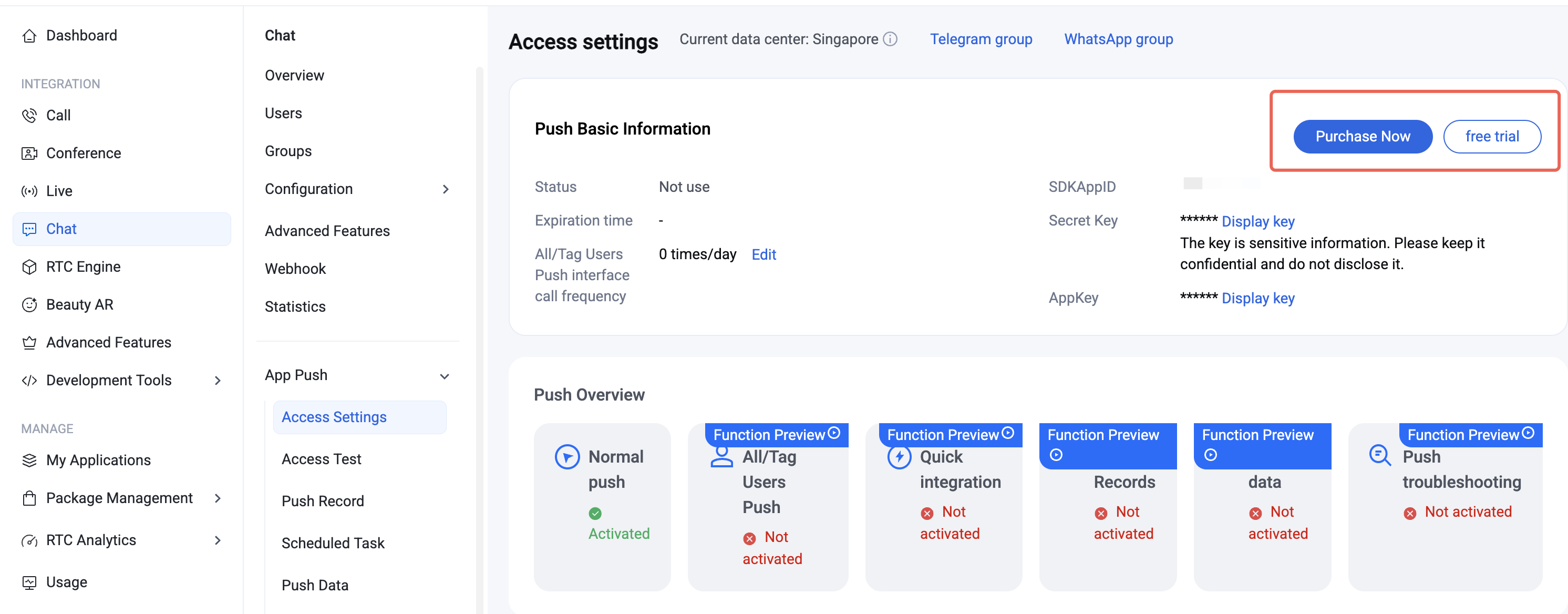
Activate the Service
Go to the Chat Console > Plugin Marketplace and click Purchase Now or Free Trial (each app is eligible for a one-time, 7-day free trial).
Note:
The push plugin will stop providing push services (including offline message push and broadcast/tag push) when your trial or subscription expires. To prevent service interruption, please purchase or renew your subscription in advance.
Configurate Vendors
Step 1: Apply for a VoIP Push Certificate
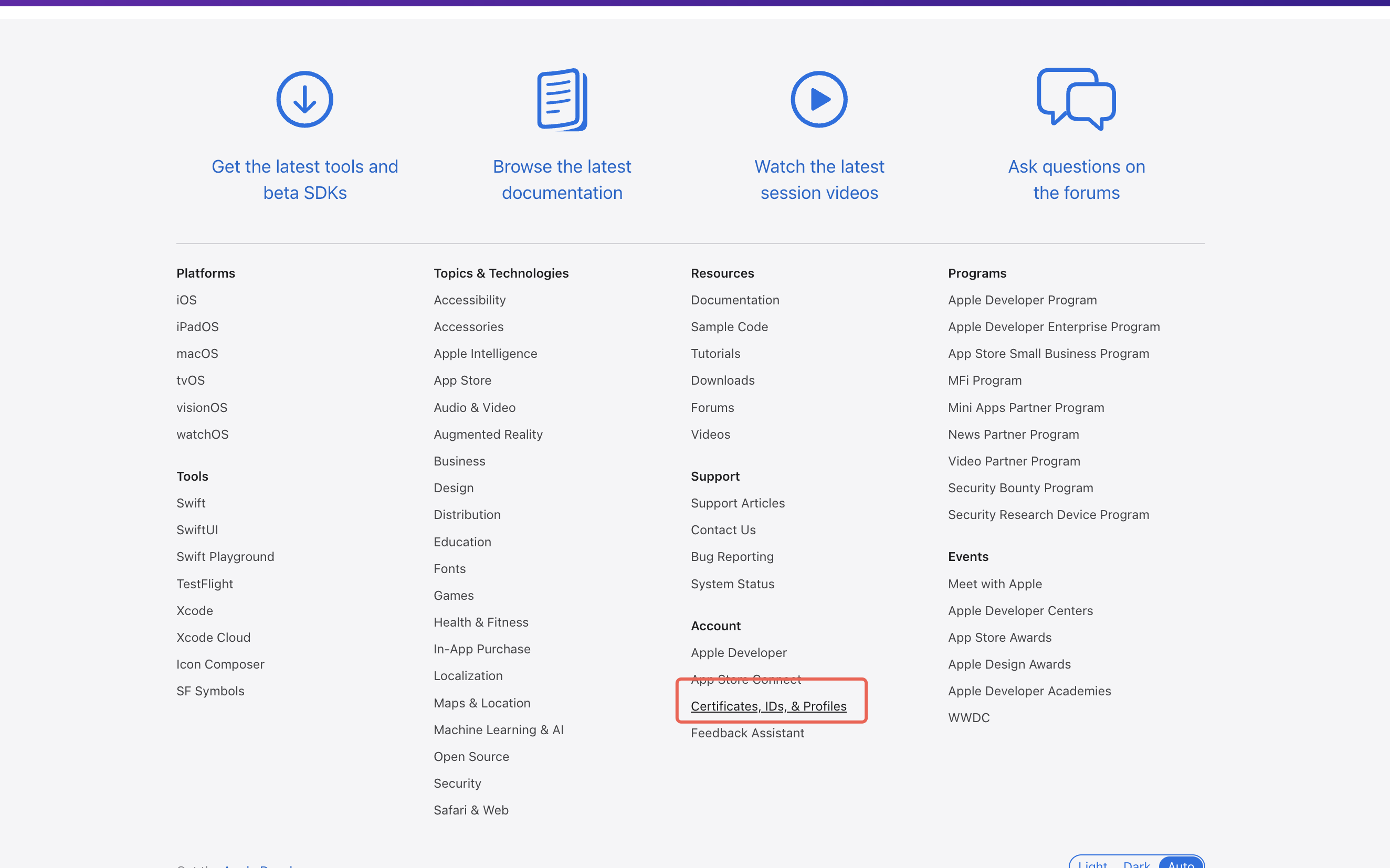
Before applying for a VoIP Push certificate, log in to the Apple Developer Center and enable remote push notifications for your app. Once your AppID has Push Notification capability, follow these steps to apply for and configure your VoIP Push certificate:
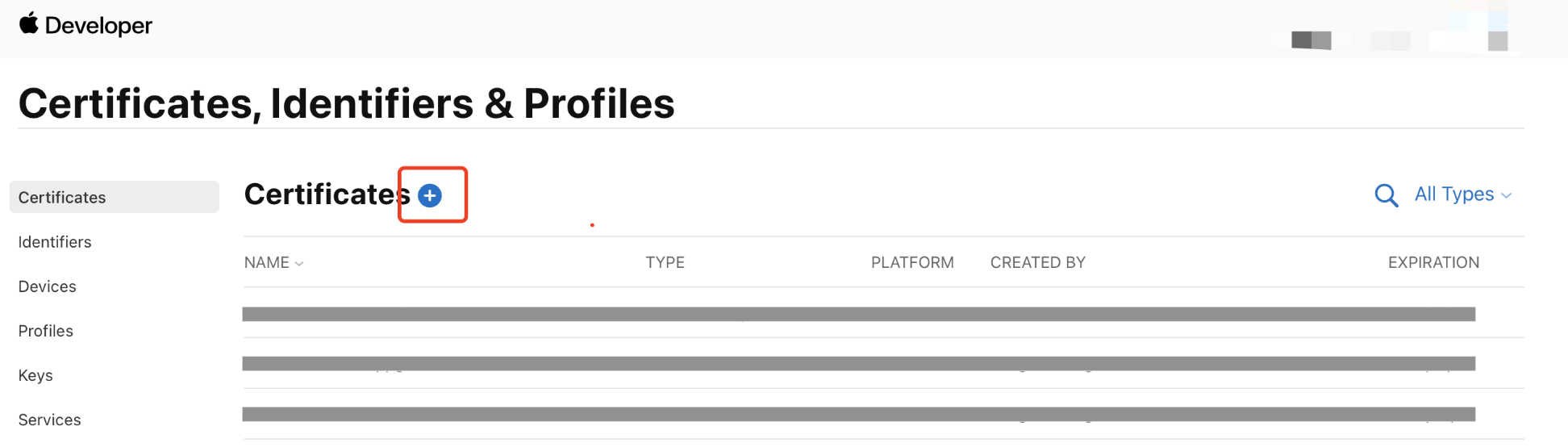
1. Log in to the Apple Developer Center, click Certificates, IDs & Profiles to enter the Certificates, Identifiers & Profiles page.
2. Click the + button next to Certificates.
3. On the Create a New Certificate page, select VoIP Services Certificate and click Continue.
4. Select your app's Bundle ID and click Continue.
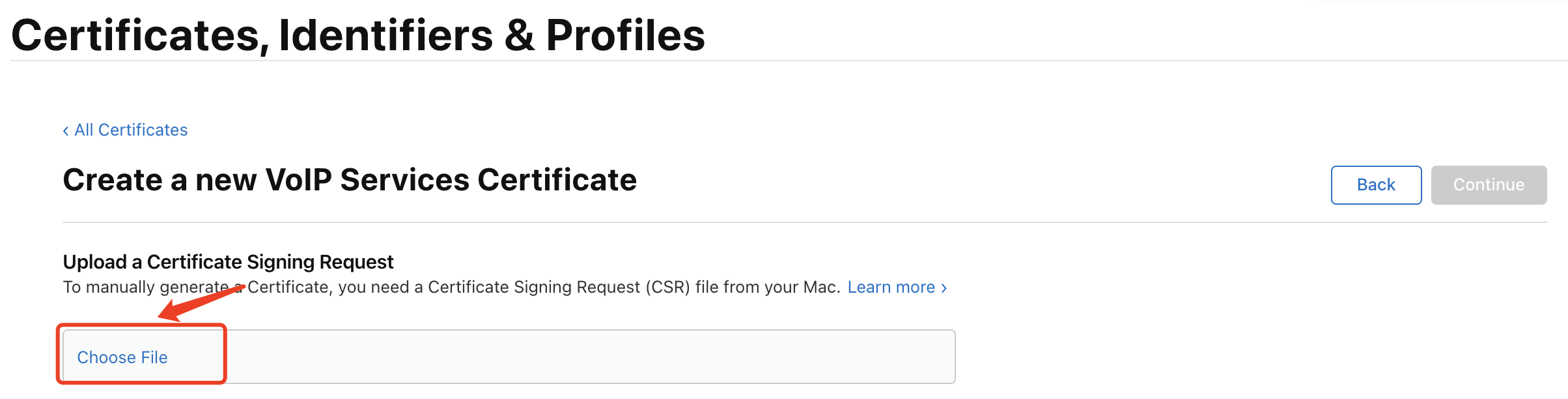
5. The system will prompt you to upload a Certificate Signing Request (CSR).
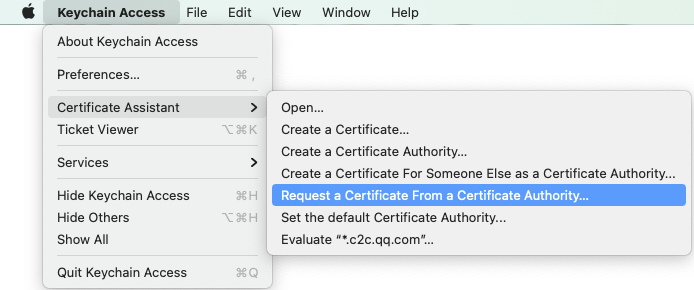
6. On your Mac, open Keychain Access and go to Keychain Access > Certificate Assistant > Request a Certificate From a Certificate Authority.
7. Enter your email address and common name (your name or company name), select Save to disk, then click Continue. This will generate a *.certSigningRequest file.
Return to the Apple Developer website (from Step 5), click Choose File, and upload the generated *.certSigningRequest.
8. Click Continue to generate the certificate, then click Download to save it locally.
9. Double-click the downloaded voip_services.cer to import it into Keychain.
10. In Keychain, under Login > My Certificates, right-click the new VoIP Services certificate and export it as a P12 file.
Note:
Be sure to set a password when saving the P12 file.
Step 2: Upload the Certificate to the Chat Console
Open the Chat Console, select your Chat application, and upload the certificate as follows:
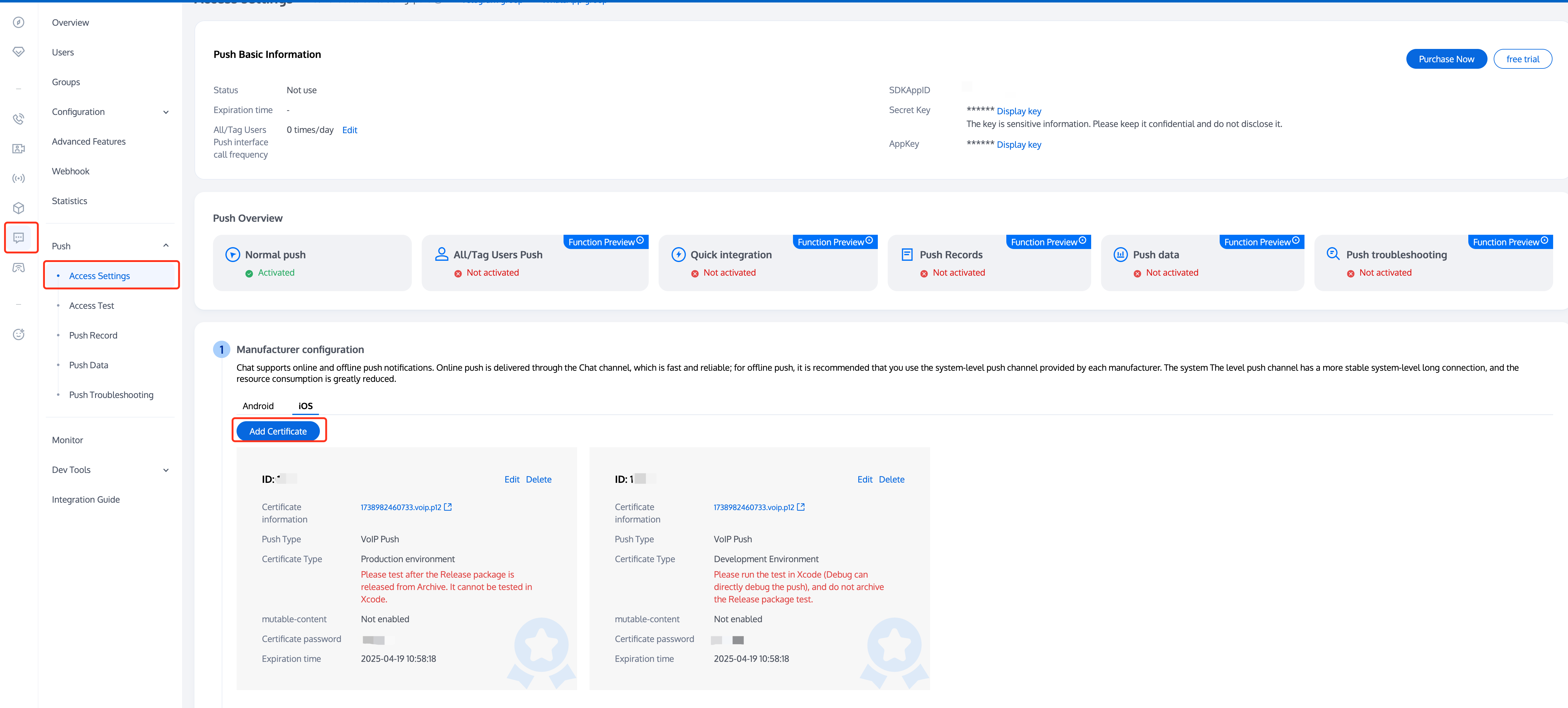
1. Select your Chat application, go to the Access Settings page of Push.
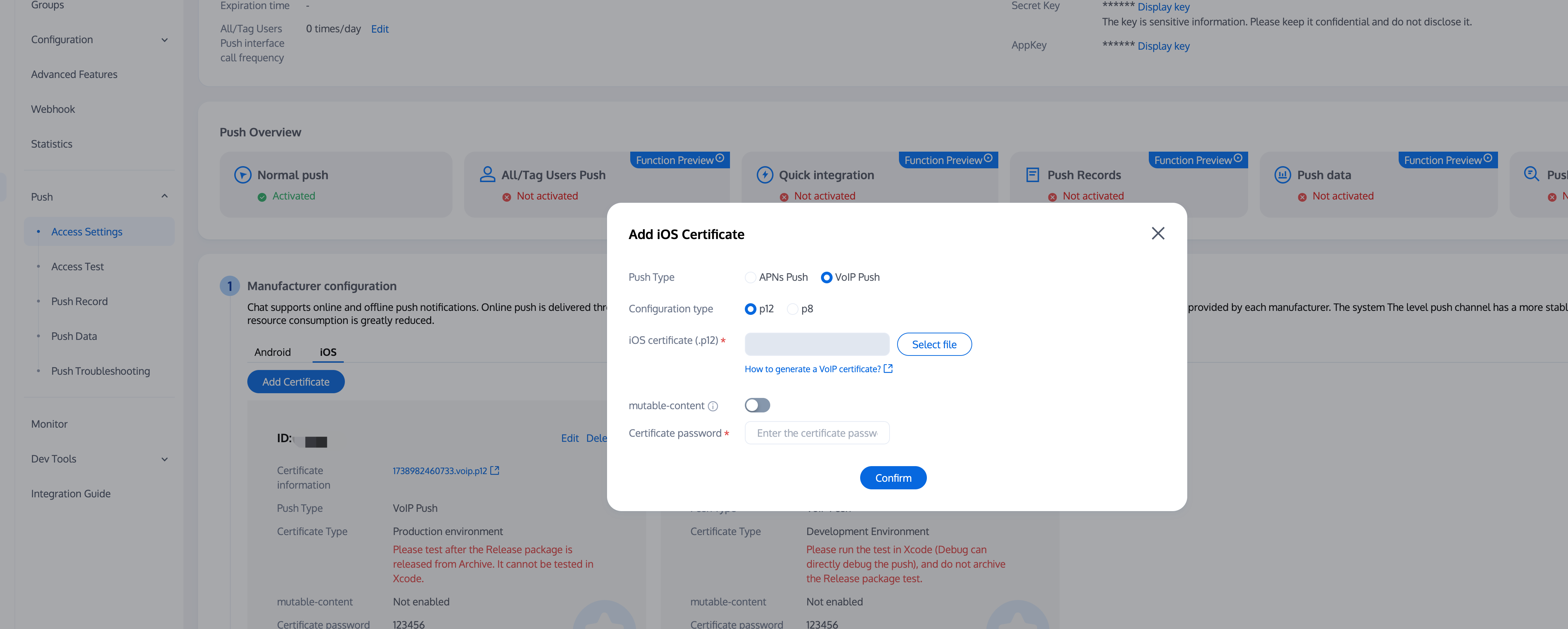
2. In Manufacturer configuration, switch to iOS, click the Add Certificate button, then select the certificate type in the floating page, upload the iOS certificate (p12), set the certificate password, and click Confirm.
Description:
When adding certificates, the push type defaults to APNs, which does not affect the upload and use of VoIP certificates.
VoIP Push certificates themselves do not distinguish between production and testing environments. Production and development environments use the same VoIP Push certificate, please upload separately.
Certificate names uploaded should preferably use all English (especially avoid special characters like parentheses).
Uploaded certificates need to set a password, otherwise push notifications cannot be received.
Certificates for App Store release need to be set to production environment, otherwise push notifications cannot be received.
The uploaded p12 certificate must be a real and valid certificate you applied for yourself.
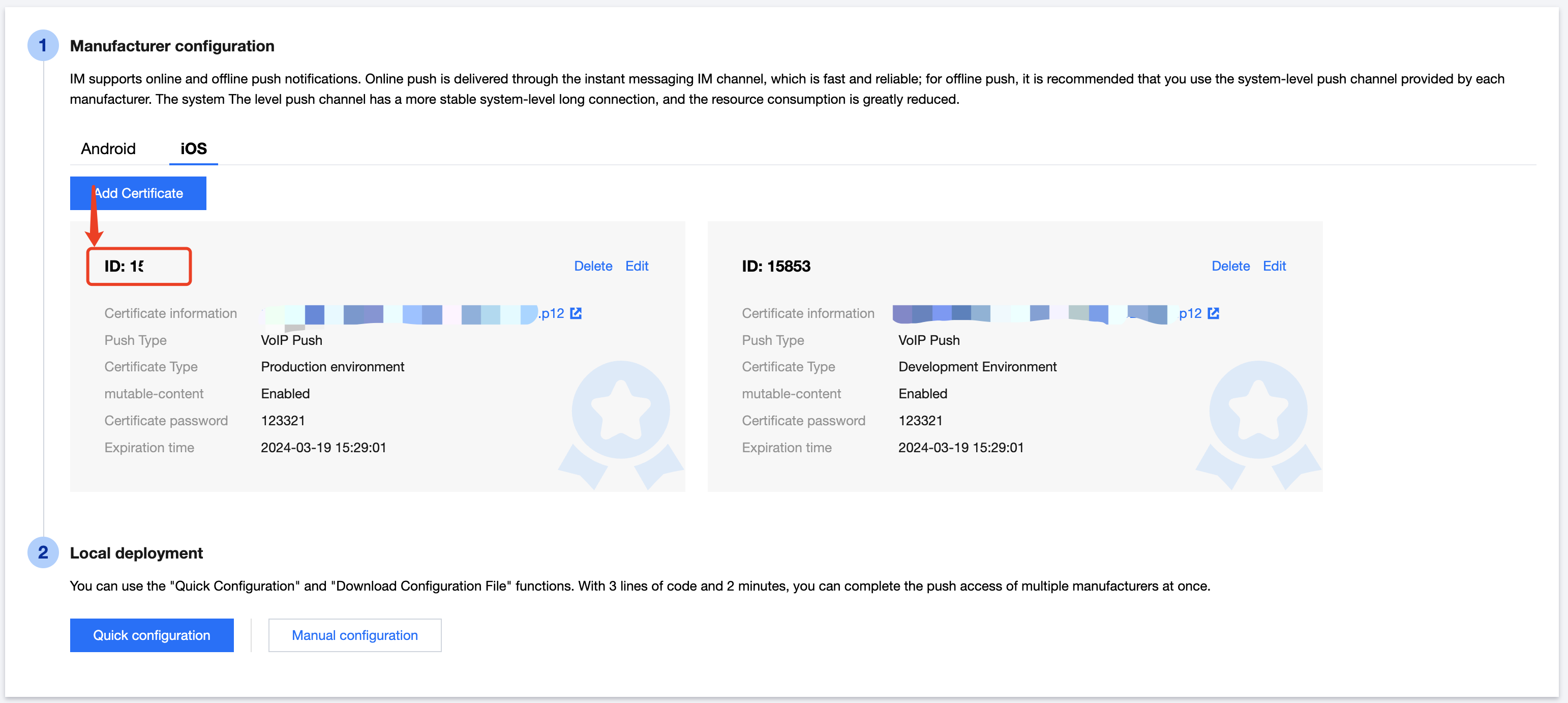
3. After upload is complete, record the certificate IDs for different environments.
Description:
Certificate IDs for development and production environments must be strictly distinguished, please fill in according to the actual environment.
Feature Integration
Step 1: Configure Project Capabilities
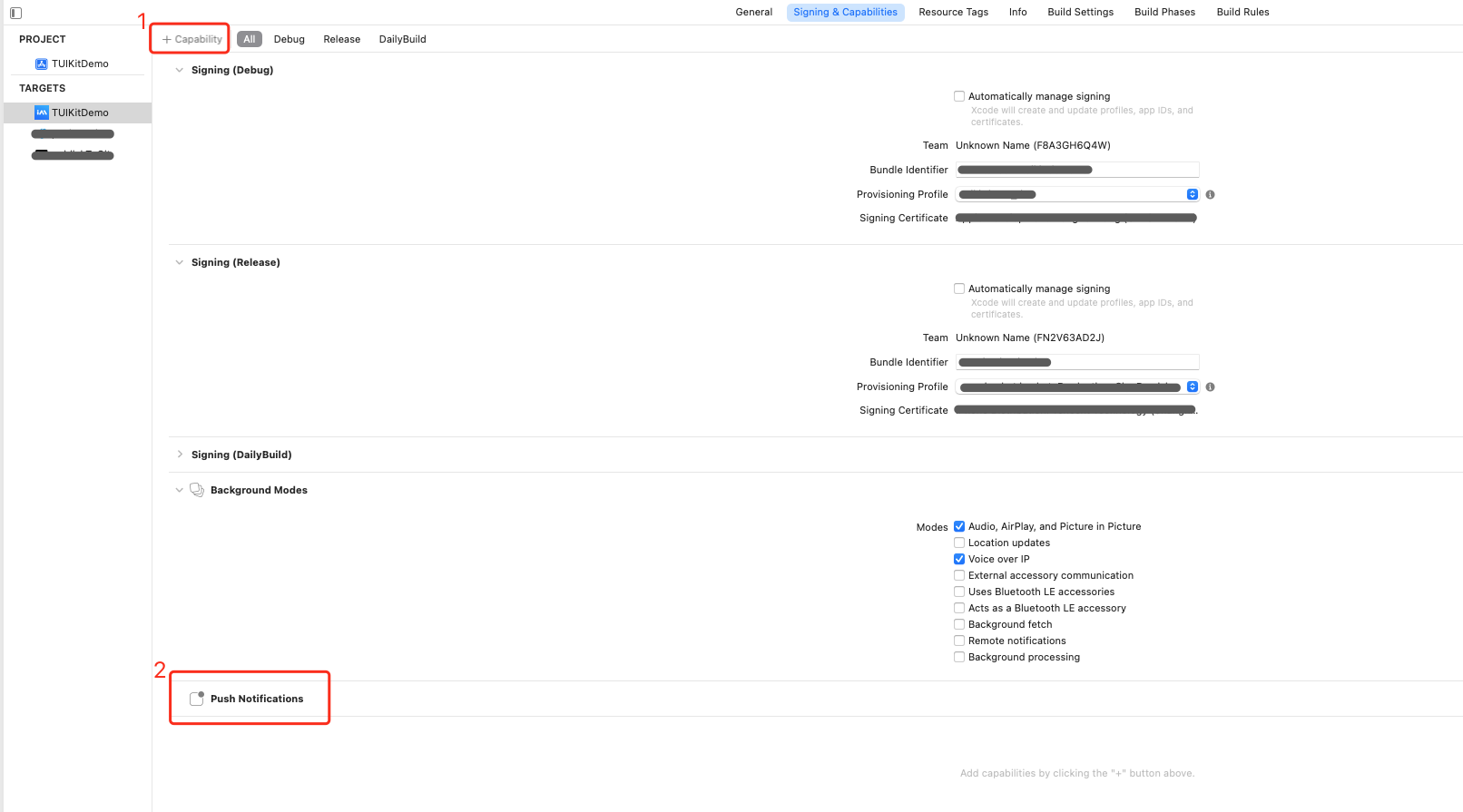
1. In your Xcode project, enable the Push Notifications capability under Capabilities.
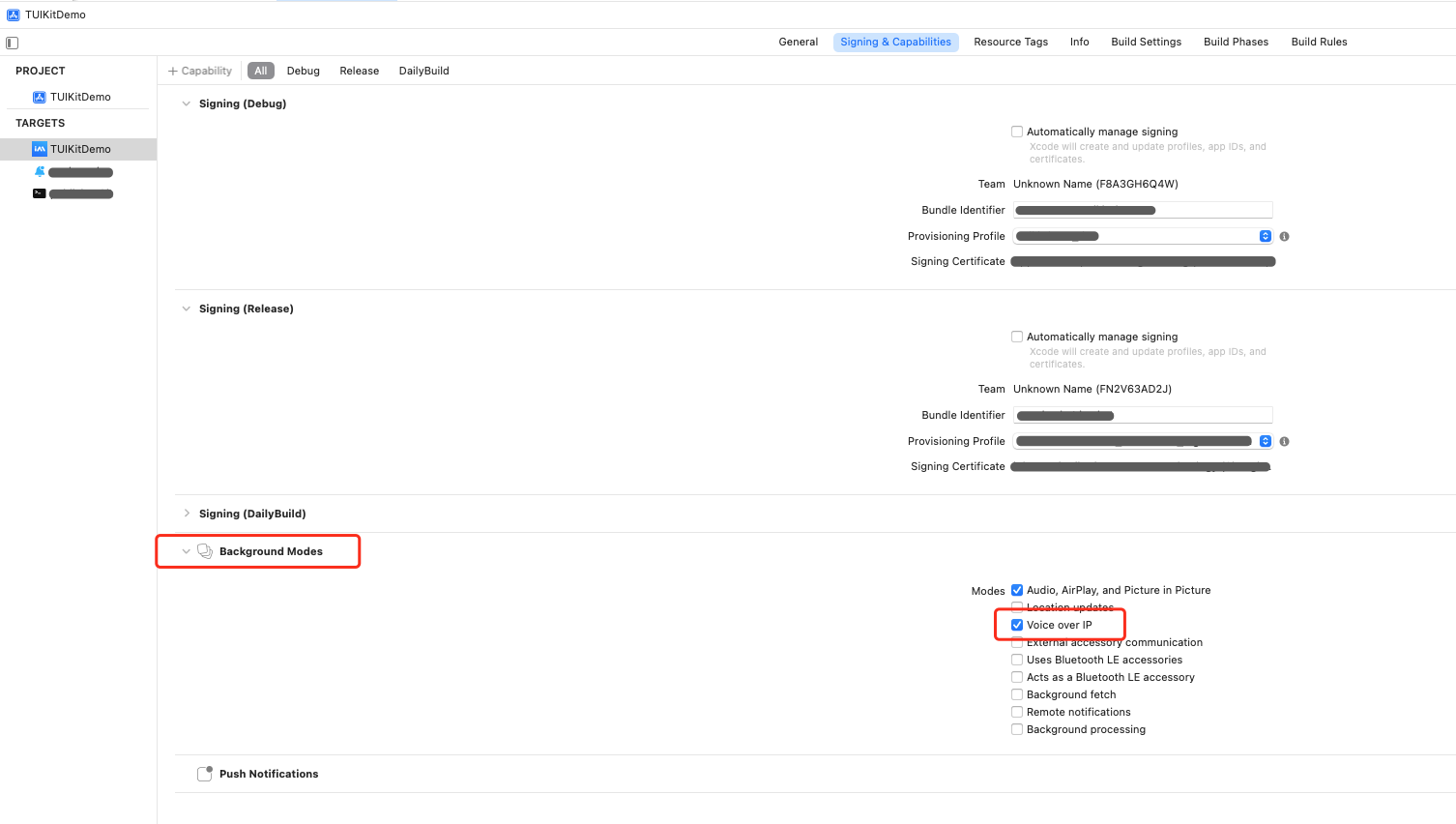
2. Under Background Modes, enable the Voice over IP option.
Step 2: Add Dependencies
1. Add Pod Dependency: Add pod 'TUICore' to your Podfile.
pod 'TUICore'
2. Install Component: In your terminal, navigate to your project directory and run:
pod install --repo-update
Step 3: Initialize PushKit and Set Certificate ID
1. Create a class to manage VoIP Push, and initialize PushKit to receive VoIP push notifications.
importPushKit
importImSDK_Plus
importLiveCommunicationKit
classVoIPPushManager:NSObject{
privatelet pushRegistry:PKPushRegistry
privatevar certificateID:Int=0
privatevar voipToken:Data?// Store token, report after TUILogin succeeds
// Store the current call UUID
privatevar currentCallUUID:UUID?
// ConversationManager for displaying the system call interface (Step 7)
certificateID is the ID you received after uploading your certificate in the Chat Console.
Always use the correct certificate ID for your development or production environment.
Step 4: Obtain and Save VoIP Token
Implement the PKPushRegistryDelegate protocol. After obtaining the VoIP Token, save it first and report it only after TUILogin succeeds.
importPushKit
importImSDK_Plus
extensionVoIPPushManager:PKPushRegistryDelegate{
// Save VoIP Token after obtaining (do not report immediately)
funcpushRegistry(_ registry:PKPushRegistry,
didUpdate pushCredentials:PKPushCredentials,
for type:PKPushType){
guard type ==.voIP else{return}
// Save token
voipToken = pushCredentials.token
// Convert token to string (for logging)
let tokenString = pushCredentials.token.map {String(format:"%02.2hhx",$0)}.joined()
// VoIP Token obtained:
// If TUILogin is already completed, report immediately; otherwise, wait for TUILoginSuccess notification
uploadVoIPToken()
}
// Token invalidated
funcpushRegistry(_ registry:PKPushRegistry,
didInvalidatePushTokenFor type:PKPushType){
// VoIP Token invalidated
}
}
Note:
Only report the VoIP Token after the Chat SDK login is successful. Do not report immediately when the token is obtained.
Step 5: Report Token
When a user logs in, first log in to the Chat SDK, then to TUICore. After TUICore login succeeds, a TUILoginSuccess notification is sent, and VoIPPushManager will automatically report the VoIP Token.
importTUICore
importAtomicXCore
// Step 1: Log in to Chat SDK (AtomicXCore -- LoginStore)
LoginStore.shared.login(
sdkAppID: sdkAppID,
userID: userID,
userSig: userSig
){ result in
switch result {
case.success:
// Chat SDK login succeeded
// Step 2: Log in to TUICore
TUILogin.login(
sdkAppID,
userID: userID,
userSig: userSig
){
// TUICore login succeeded
// Send notification to trigger VoIP Token reporting
NotificationCenter.default.post(
name:NSNotification.Name("TUILoginSuccess"),
object:nil
)
} fail:{ code, message in
// TUICore login failed
}
case.failure(let error):
// Chat SDK login failed
}
}
Step 6: Receive VoIP Push Notifications
extensionVoIPPushManager:PKPushRegistryDelegate{
// Receive VoIP Push
funcpushRegistry(_ registry:PKPushRegistry,
didReceiveIncomingPushWith payload:PKPushPayload,
for type:PKPushType){
guard type ==.voIP else{return}
// You must report the incoming call to the system within 5 seconds, or the app will crash
showIncomingCall(with: payload)// Step 7
}
}
Step 7: Display Incoming Call Notification
Use LiveCommunicationKit to report the incoming call to the system, which will automatically display the native incoming call UI.
// User taps "Answer", call CallStore to accept the call
CallStore.shared.accept { result in
switch result {
case.success:
// Answer succeeded, navigate to your call page here
case.failure(let error):
}
}
}elseif action isEndConversationAction{
// User taps "Hang Up", call CallStore to end the call
CallStore.shared.hangup { result in
switch result {
case.success:
case.failure(let error):
}
}
}
// You must call fulfill() to notify the system that the operation is complete
action.fulfill()
}
}
You can customize the caller information and call type shown on the incoming call screen by configuring the following parameters in Conversation.Update:
Parameter
Type
Required
Description
members
[Handle]
Required
Array of caller information, supports multi-party call scenarios.
Each Handle includes:
type: usually .generic
value: unique identifier of the caller (recommended to use user ID)
displayName: name displayed on the incoming call interface
capabilities
Conversation.Capabilities
Required
Call type:
.video: video call (shows video icon)
.playingTones: audio call (shows audio icon)
Note:
After the user taps "Answer" or "Hang Up", the system will invoke the ConversationManagerDelegate callback. Implement your answer/hang up logic in this callback (e.g., navigate to your call page, call the CallStore API, etc.).
CallStore uses VoIP Push by default, so you do not need to manually set the offlinePushInfo parameter. CallStore will automatically set the following push information.
Push Type: .voIP
Push Title: current user ID
Push Description: "You have a new call"
iOS Ringtone: phone_ringing.mp3
Swift
importAtomicXCore
// Construct call parameters (no need to set offlinePushInfo)
var params =CallParams()
params.timeout =30// Timeout in seconds
params.userData ="custom data"// Extension info (optional)
// Create a call
let userIdList =["callee's userID"]
let mediaType =CallMediaType.video // .video for video call, .audio for audio call
CallStore.shared.calls(
participantIds: userIdList,
callMediaType: mediaType,
params: params
){ result in
switch result {
case.success:
// Call initiated successfully
// Navigate to your call page
case.failure(let error):
// Handle call failure
}
}
Note:
VoIP Push Downgrade Strategy
When using VoIP Push, the backend will intelligently select the certificate type to ensure users receive push notifications:
If a VoIP certificate is uploaded: VoIP Push will be sent.
If only an APNs certificate is uploaded: the system will automatically downgrade to APNs Push.
Answer a Call
When the callee is offline and receives a VoIP Push, tapping "Answer" will wake up your app. At this point, listen for call events and navigate to your call page.
1. Check the login sequence: You must log in to the Chat SDK first, then TUICore. Otherwise, the VoIP Token cannot be reported. See Step 5.
2. Ensure your app's runtime environment, certificate environment, and certificate ID all match. If not, push notifications will not be delivered.
3. Make sure the logged-in account is offline: either send the app to the background or kill the process after login. VoIP Push currently only supports push for offline users.
4. Verify that your project configuration is correct.
5. Restart the test device to clear system cache and memory (this is important).
6. Use the Chat Console's Push Troubleshooting tool for diagnostics. For details, see: Push Troubleshooting Tool. (highly recommended)
Why does the app crash after receiving a VoIP Push?
This usually happens if you do not report the incoming call to the system within 5 seconds. Make sure to call reportNewIncomingConversation immediately in the didReceiveIncomingPushWith callback.
How can I customize the incoming call notification content?
You can customize the incoming call notification using Conversation.Update, including: