제품 업데이트
Tencent Cloud 오디오/비디오 단말 SDK 재생 업그레이드 및 권한 부여 인증 추가
TRTC 월간 구독 패키지 출시 관련 안내

Module | Feature Description |
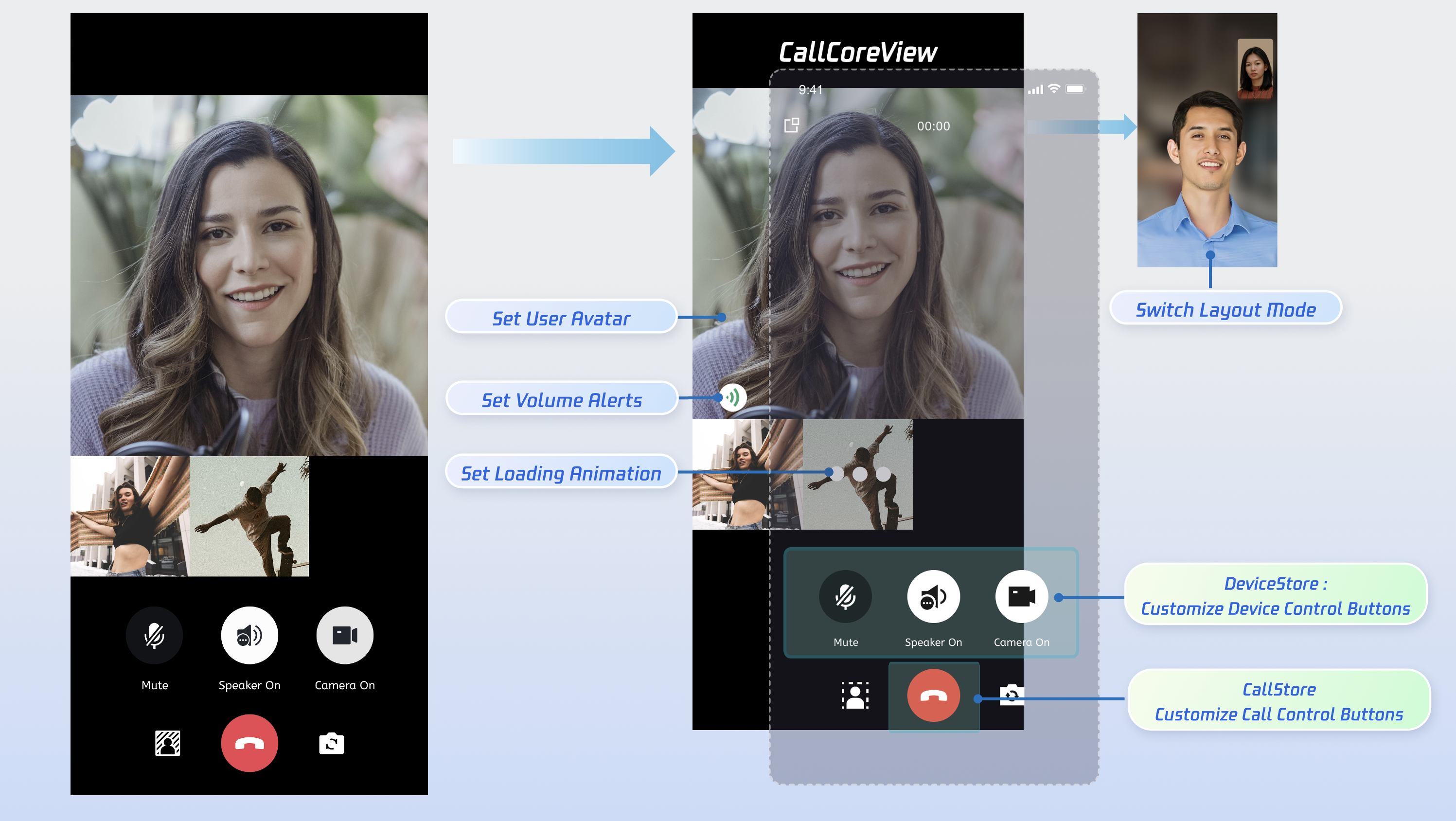
The main call UI component. It observes CallStore data and handles video rendering automatically, and supports customization of layout, avatars, and icons. | |
Manages the call lifecycle (place a call, answer, reject, hang up) and exposes real-time participant audio/video status, call duration, call logs, and more. | |
Controls audio/video devices: microphone (toggle/volume), camera (toggle/switch/quality), screen sharing, and real-time device status monitoring. |
api "io.trtc.uikit:atomicx-core:latest.release" and api "com.tencent.imsdk:imsdk-plus:8.7.7201" in your build.gradle file, then run Gradle Sync.dependencies {api "io.trtc.uikit:atomicx-core:latest.release"api "com.tencent.imsdk:imsdk-plus:8.7.7201"// Other dependencies...}

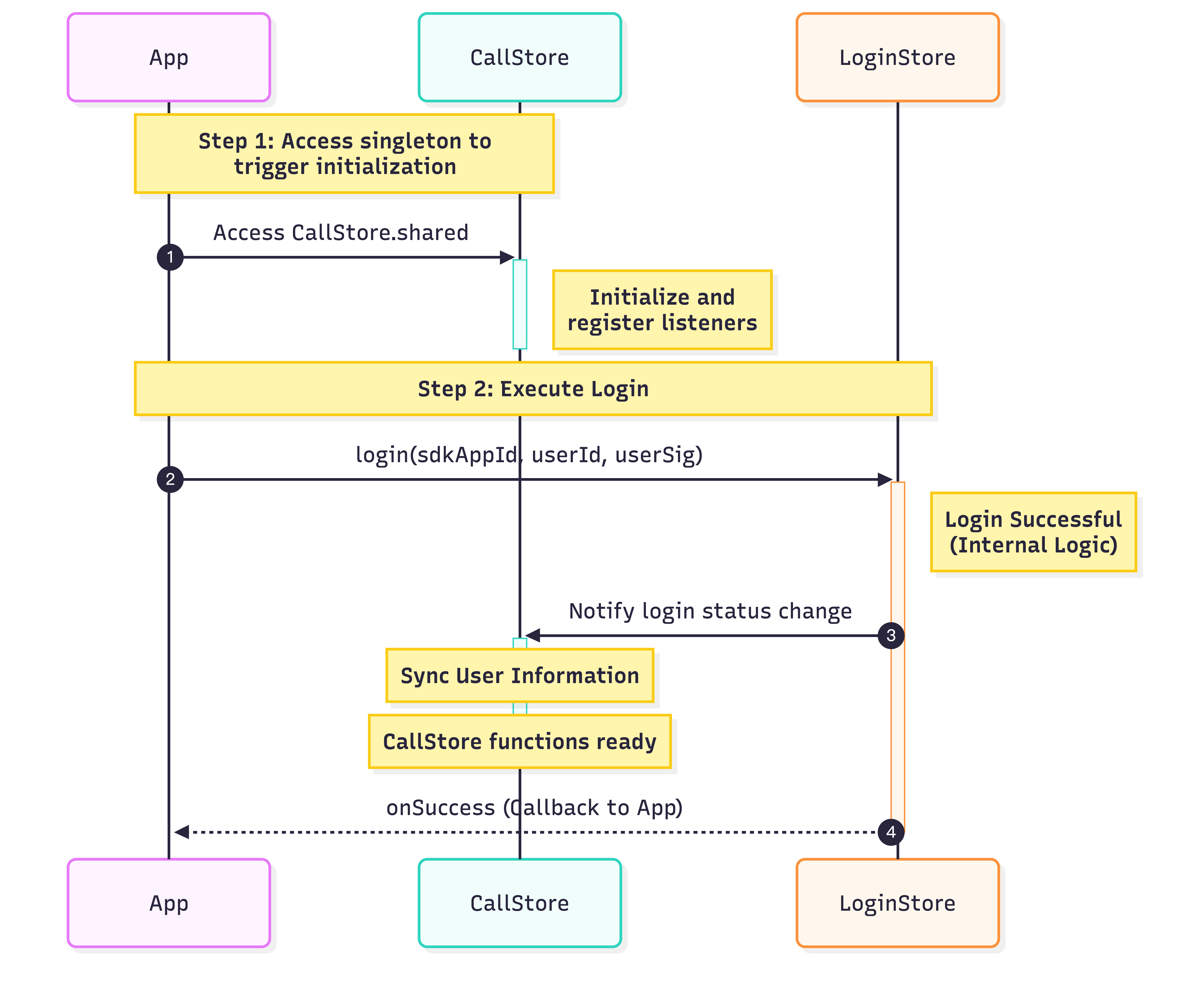
class MainActivity : ComponentActivity() {override fun onCreate(savedInstanceState: Bundle?) {super.onCreate(savedInstanceState)// Initialize CallStoreCallStore.sharedval sdkAppId = 1400000001 // Replace with your SDKAppIDval userId = "test_001" // Replace with your UserIDval userSig = "xxxxxxxxxxx" // Replace with your UserSigLoginStore.shared.login(this,sdkAppId,userId,userSig,object : CompletionHandler {override fun onSuccess() {// Initialize TUICallEngineTUICallEngine.createInstance(this@MainActivity).init(sdkAppId, userId, userSig, null)// Login successfulLog.d("Login", "login success");}override fun onFailure(code: Int, desc: String) {// Login failedLog.e("Login", "login failed, code: $code, error: $desc");}})}}
Parameter | Type | Description |
userId | String | Unique identifier for the current user. Only letters, numbers, hyphens, and underscores are allowed. Avoid simple IDs like 1 or 123 to prevent multi-device login conflicts. |
sdkAppId | int | |
userSig | String | Authentication token for TRTC. Development: Use the local GenerateTestUserSig.genTestUserSig function or the UserSig Tool to generate a temporary UserSig. Production: Always generate UserSig server-side to prevent SecretKey leakage. See Server-side UserSig Generation. For more details, see How to calculate and use UserSig. |
class CallActivity : AppCompatActivity() {private var callCoreView: CallCoreView? = null// 1. Create call page containeroverride fun onCreate(savedInstanceState: Bundle?) {super.onCreate(savedInstanceState)// 2. Attach CallCoreView to the call screencallCoreView = CallCoreView(this)setContentView(callCoreView)}}
Feature | Description | Reference |
Set Layout Mode | Switch between different layout modes. If not specified, layout adapts automatically based on participant count. | Switch Layout Mode |
Set Avatar | Customize avatars for specific users via resource path. | Customize Default Avatar |
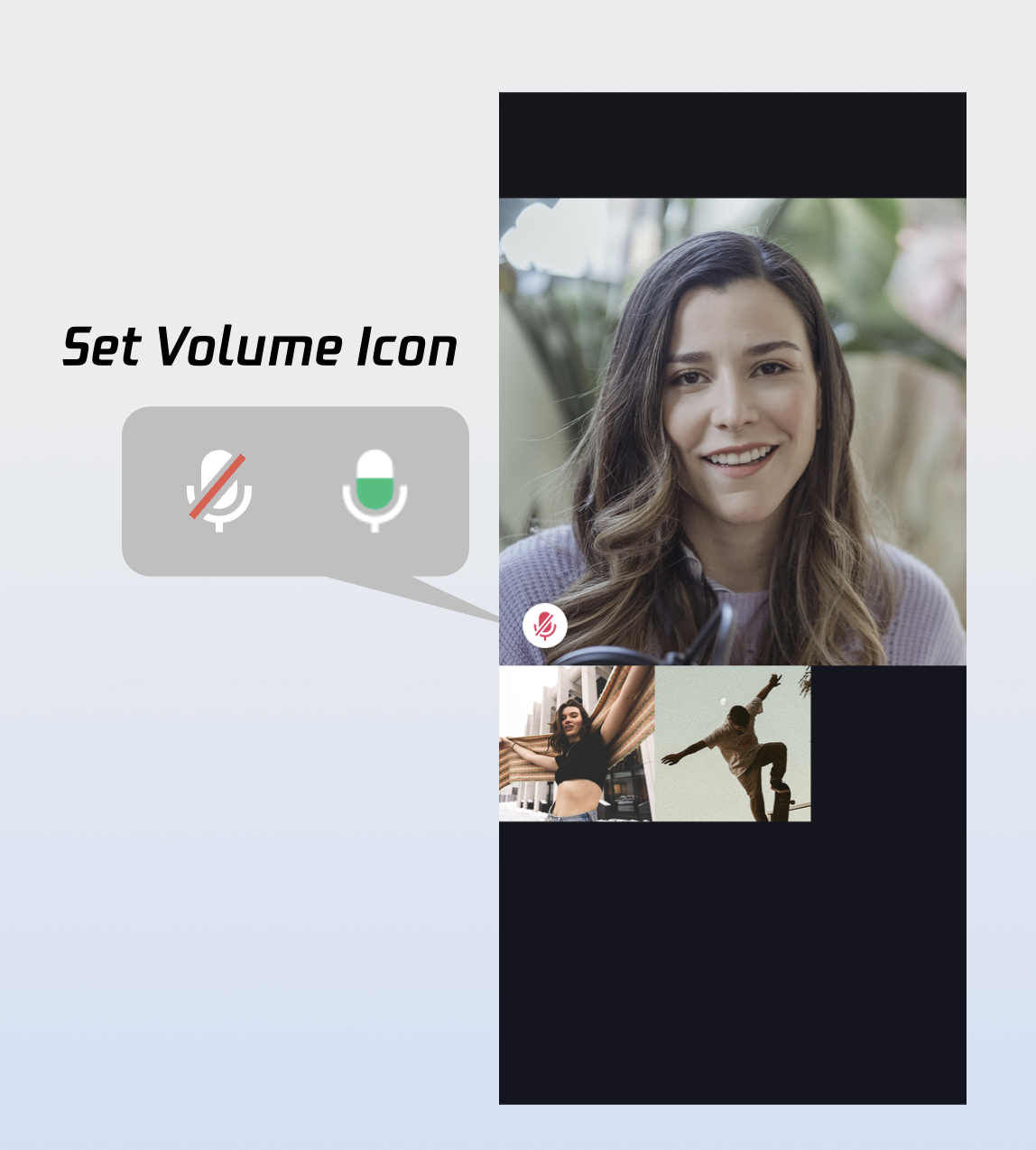
Set Volume Indicator Icon | Personalize volume indicator icons for different volume levels. | Customize Volume Indicator Icon |
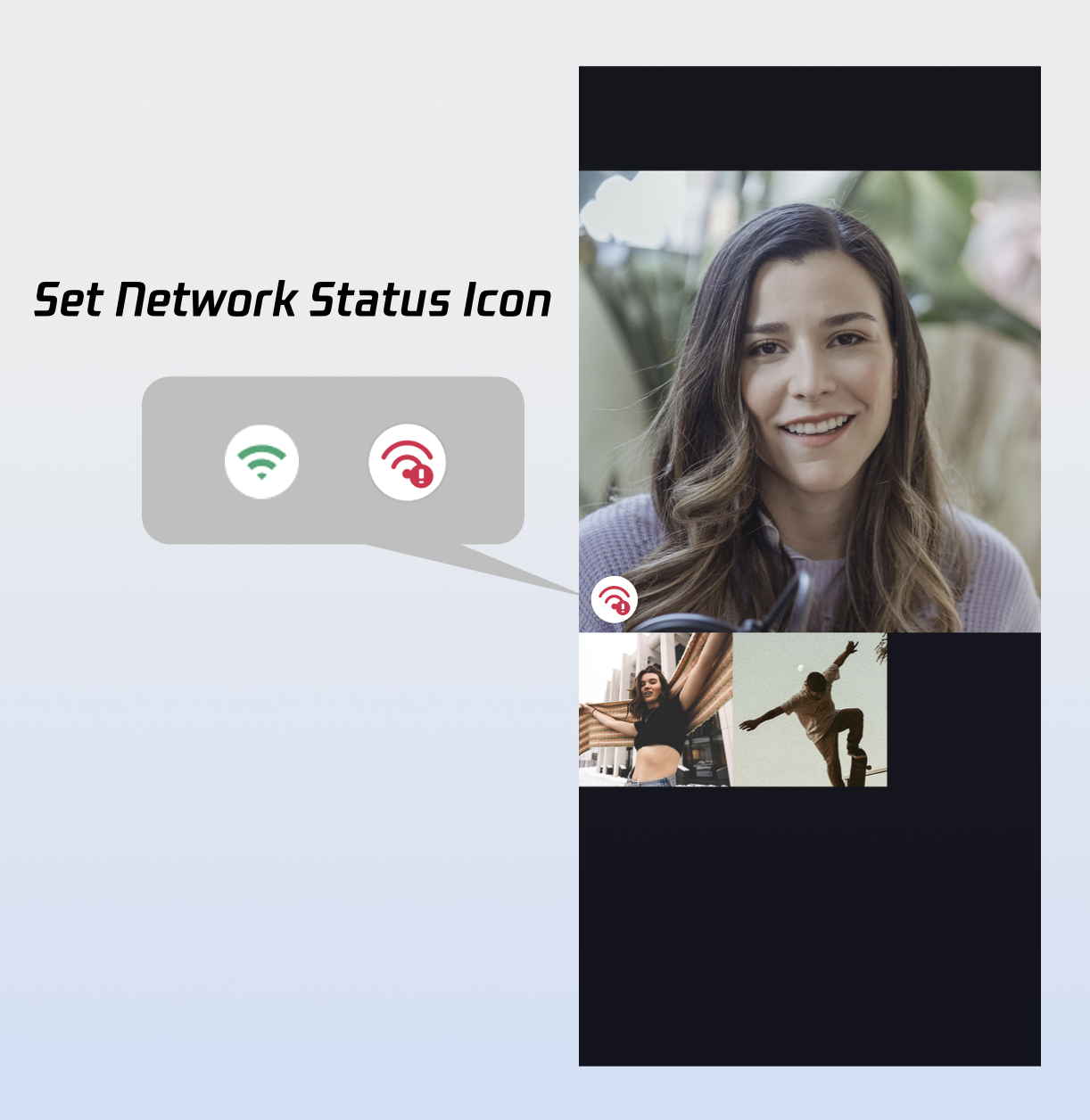
Set Network Indicator Icon | Show network quality status with real-time indicator icons. | Customize Network Indicator Icon |
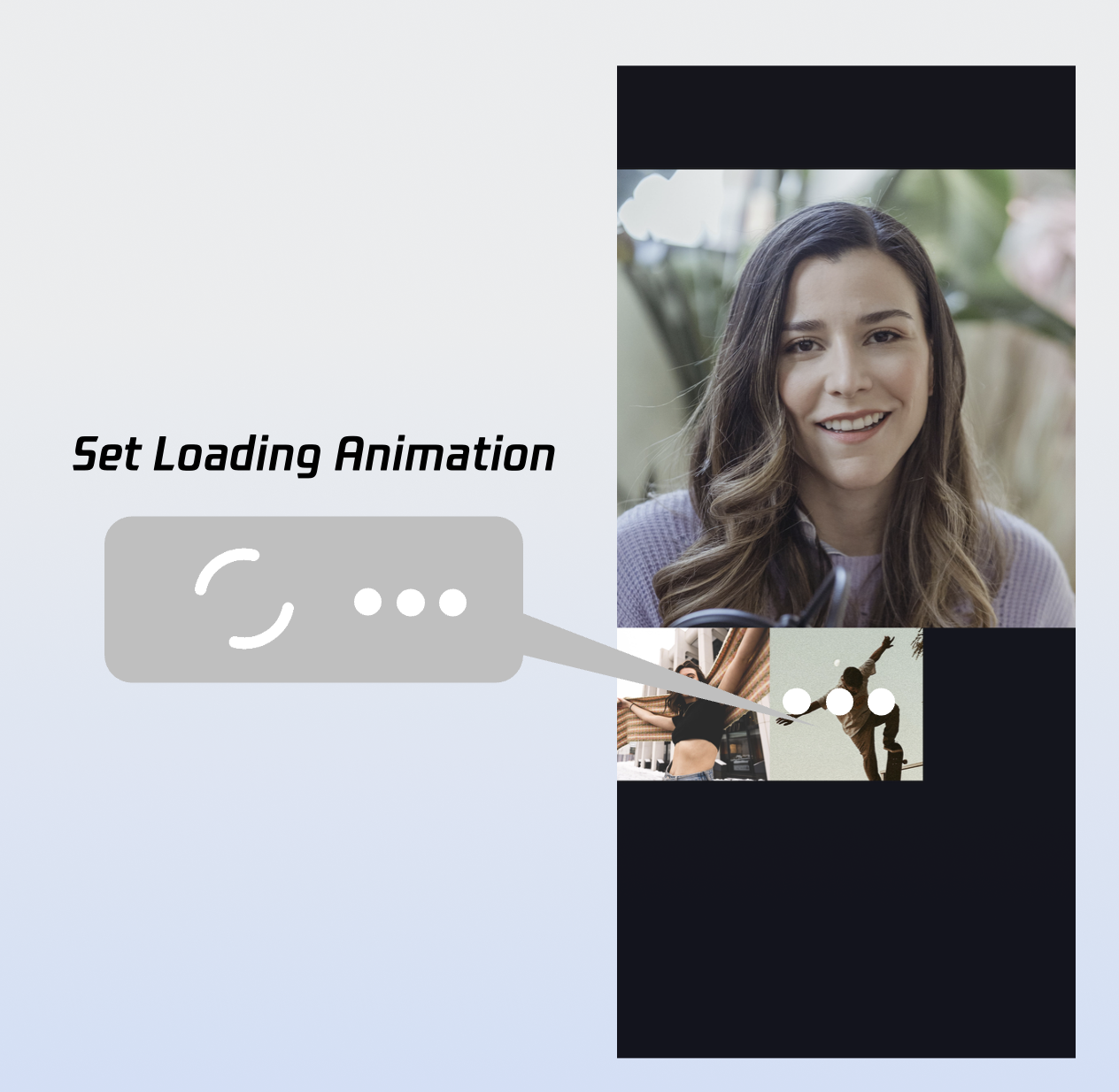
Set Waiting Animation for Users | Display GIF animations for users in the waiting state during multi-party calls. | Customize Loading Animation |
import io.trtc.tuikit.atomicxcore.api.call.CallStoreimport io.trtc.tuikit.atomicxcore.api.view.CallCoreViewimport io.trtc.tuikit.atomicxcore.api.device.DeviceStoreclass CallActivity : AppCompatActivity() {private var buttonContainer: Button? = nulloverride fun onCreate(savedInstanceState: Bundle?) {super.onCreate(savedInstanceState)// Other initialization code// Create bottom bar containercreateButtonContainer()setContentView(buttonContainer)}private fun createButtonContainer() {buttonContainer = LinearLayout(this).apply {orientation = LinearLayout.HORIZONTALgravity = Gravity.CENTERlayoutParams = FrameLayout.LayoutParams(FrameLayout.LayoutParams.MATCH_PARENT,FrameLayout.LayoutParams.WRAP_CONTENT).apply {gravity = Gravity.BOTTOMbottomMargin = dpToPx(80)}}}}
import io.trtc.tuikit.atomicxcore.api.call.CallStoreimport io.trtc.tuikit.atomicxcore.api.view.CallCoreViewimport io.trtc.tuikit.atomicxcore.api.device.DeviceStoreclass CallActivity : AppCompatActivity() {private var buttonContainer: Button? = nullprivate var buttonHangup: Button? = nulloverride fun onCreate(savedInstanceState: Bundle?) {super.onCreate(savedInstanceState)// Other initialization code// 1. Add hang up button to bottom toolbaraddHangupButton()setContentView(buttonContainer)}private fun addHangupButton() {buttonHangup = Button(this).apply {text = "Hang Up"layoutParams = LinearLayout.LayoutParams(0, LinearLayout.LayoutParams.WRAP_CONTENT, 1f).apply {marginEnd = dpToPx(8)}setOnClickListener {// 2. Call hangup API and close the screenCallStore.shared.hangup(null)finish()}}buttonContainer?.addView(buttonHangup)}}
import io.trtc.tuikit.atomicxcore.api.call.CallStoreimport io.trtc.tuikit.atomicxcore.api.view.CallCoreViewimport io.trtc.tuikit.atomicxcore.api.device.DeviceStoreclass CallActivity : AppCompatActivity() {private var buttonContainer: Button? = nullprivate var buttonMicrophone: Button? = nulloverride fun onCreate(savedInstanceState: Bundle?) {super.onCreate(savedInstanceState)// Other initialization code// 1. Add microphone toggle to bottom toolbaraddMicrophoneButton()setContentView(buttonContainer)}private fun addMicrophoneButton() {buttonMicrophone = Button(this).apply {layoutParams = LinearLayout.LayoutParams(0, LinearLayout.LayoutParams.WRAP_CONTENT, 1f).apply {setMargins(16, 0, 16, 0)}setOnClickListener {// 2. Toggle microphone on clickval isMicrophoneOpen = DeviceStore.shared().deviceState.microphoneStatus.value == DeviceStatus.ONif (isMicrophoneOpen) {DeviceStore.shared().closeLocalMicrophone()} else {DeviceStore.shared().openLocalMicrophone(null)}}}val isMicrophoneOpen = DeviceStore.shared().deviceState.microphoneStatus.value == DeviceStatus.ONbuttonMicrophone?.text = if (isMicrophoneOpen) "Mute Microphone" else "Unmute Microphone"buttonContainer?.addView(buttonMicrophone)}}
import io.trtc.tuikit.atomicxcore.api.call.CallStoreimport io.trtc.tuikit.atomicxcore.api.view.CallCoreViewimport io.trtc.tuikit.atomicxcore.api.device.DeviceStoreclass CallActivity : AppCompatActivity() {private var buttonContainer: Button? = nullprivate var buttonCamera: Button? = nulloverride fun onCreate(savedInstanceState: Bundle?) {super.onCreate(savedInstanceState)// Other initialization code// 1. Add camera toggle button to bottom toolbaraddCameraButton()setContentView(buttonContainer)}private fun addCameraButton() {buttonCamera = Button(this).apply {layoutParams = LinearLayout.LayoutParams(0, LinearLayout.LayoutParams.WRAP_CONTENT, 1f).apply {setMargins(16, 0, 16, 0)}setOnClickListener {// 2. Toggle camera on clickval isCameraOpen = DeviceStore.shared().deviceState.cameraStatus.value == DeviceStatus.ONif (isCameraOpen) {DeviceStore.shared().closeLocalCamera()} else {val isFrontCamera = DeviceStore.shared().deviceState.isFrontCamera.valueDeviceStore.shared().openLocalCamera(isFrontCamera, null)}}}val isCameraOpen = DeviceStore.shared().deviceState.cameraStatus.value == DeviceStatus.ONbuttonCamera?.text = if (isCameraOpen) "Turn Off Camera" else "Turn On Camera"buttonContainer?.addView(buttonCamera)}}
import io.trtc.tuikit.atomicxcore.api.call.*import io.trtc.tuikit.atomicxcore.api.device.DeviceStoreimport kotlinx.coroutines.*class CallActivity : AppCompatActivity() {private var buttonCamera: Button? = nullprivate var buttonMicrophone: Button? = nulloverride fun onCreate(savedInstanceState: Bundle?) {super.onCreate(savedInstanceState)// Other initialization code// 1. Observe microphone and camera statusobserveDeviceState()}private fun observeDeviceState() {deviceStateJob = CoroutineScope(Dispatchers.Main).launch {supervisorScope {launch {DeviceStore.shared().deviceState.cameraStatus.collect { status ->// 2. Update camera button textbuttonCamera?.text = if (status == DeviceStatus.ON) "Turn Off Camera" else "Turn On Camera"}}launch {DeviceStore.shared().deviceState.microphoneStatus.collect { status ->// 2. Update microphone button textbuttonMicrophone?.text = if (status == DeviceStatus.ON) "Mute Microphone" else "Unmute Microphone"}}}}}}
AndroidManifest.xml.<manifest xmlns:android="http://schemas.android.com/apk/res/android"><!-- Microphone permission --><uses-permission android:name="android.permission.RECORD_AUDIO" /><!-- Camera permission --><uses-permission android:name="android.permission.CAMERA" /><application><!-- ... --><activityandroid:name=".CallActivity"android:exported="false"android:screenOrientation="portrait" /></application></manifest>
// Request permissions dynamicallyprivate fun requestAllCallPermissions() {val allPermissions = arrayOf(Manifest.permission.CAMERA,Manifest.permission.RECORD_AUDIO)if (!checkPermissions(allPermissions)) {ActivityCompat.requestPermissions(this, allPermissions, PERMISSION_REQUEST_CODE)}}// Handle permission request resultoverride fun onRequestPermissionsResult(requestCode: Int,permissions: Array<out String>,grantResults: IntArray) {super.onRequestPermissionsResult(requestCode, permissions, grantResults)if (requestCode == PERMISSION_REQUEST_CODE) {// Check if all permissions are grantedvar allGranted = truefor (result in grantResults) {if (result != PackageManager.PERMISSION_GRANTED) {allGranted = falsebreak}}if (allGranted) {// Permissions granted} else {// Some permissions denied}}}
calls API to start a call.import io.trtc.tuikit.atomicxcore.api.CompletionHandlerimport io.trtc.tuikit.atomicxcore.api.call.CallMediaTypeimport io.trtc.tuikit.atomicxcore.api.call.CallStoreclass MainActivity : ComponentActivity() {// 1. Make a callprivate fun startCall(userIdList: List<String>, mediaType: CallMediaType) {CallStore.shared.calls(userIdList, mediaType, null, object : CompletionHandler {override fun onFailure(code: Int, desc: String) {}override fun onSuccess() {// 2. Enable media devicesopenDeviceForMediaType(mediaType)// 3. Launch call screenval intent = Intent(this@MainActivity, CallActivity::class.java)startActivity(intent)}})}private fun openDeviceForMediaType(mediaType: CallMediaType?) {if (mediaType == null) {return}DeviceStore.shared().openLocalMicrophone(null)if (mediaType == CallMediaType.Video) {val isFrontCamera = DeviceStore.shared().deviceState.isFrontCamera.valueDeviceStore.shared().openLocalCamera(isFrontCamera, null)}}}
Parameter | Type | Required | Description |
userIdList | List | Yes | List of target user userIds. |
mediaType | Yes | Call media type: audio or video. CallMediaType.Video: Video call. CallMediaType.Audio: Audio call. | |
params | No | Optional call parameters, such as room ID, call invitation timeout, etc. roomId (String): Room ID, optional. If not specified, the server assigns one. timeout (Int): Call timeout (seconds).userData (String): Custom user data.chatGroupId (String): Chat group ID for group calls.isEphemeralCall (Boolean): If true, the call is encrypted and not logged. |
onCallEnded event.onCallEnded is triggered, finish the Activity.import io.trtc.tuikit.atomicxcore.api.call.CallEndReasonimport io.trtc.tuikit.atomicxcore.api.call.CallListenerimport io.trtc.tuikit.atomicxcore.api.call.CallMediaTypeimport io.trtc.tuikit.atomicxcore.api.call.CallStoreclass CallActivity : AppCompatActivity() {private var callListener: CallListener? = nulloverride fun onCreate(savedInstanceState: Bundle?) {super.onCreate(savedInstanceState)// ... Other initialization code// 1. Listen for call end eventaddListener()}private fun addListener() {callListener = object : CallListener() {override fun onCallEnded(callId: String, mediaType: CallMediaType, reason: CallEndReason, userId: String) {// 2. Close call screenfinish()}}callListener?.let { CallStore.shared.addListener(it) }}}
Parameter | Type | Description |
callId | String | Unique identifier for the call. |
mediaType | Call media type: audio or video. CallMediaType.Video: Video call.CallMediaType.Audio: Audio call. | |
reason | Reason for call end. Unknown: Unknown reason.Hangup: User ended the call.Reject: Callee rejected the call.NoResponse: No answer within timeout.Offline: Callee is offline.LineBusy: Callee is busy.Canceled: Caller canceled before callee answered.OtherDeviceAccepted: Call answered on another device.OtherDeviceReject: Call rejected on another device.EndByServer: Call ended by server. | |
userId | String | ID of the user who triggered the end event. |


private fun setIconResourcePath() {val volumeLevelIcons = mapOf(VolumeLevel.Mute to "path/to/icon/resource")val callCoreView = CallCoreView(context)callCoreView.setVolumeLevelIcons(volumeLevelIcons)}
Parameter | Type | Required | Description |
icons | Map | Yes | Maps each volume level to an icon resource. Key (VolumeLevel): VolumeLevel.Mute: Microphone muted.VolumeLevel.Low: Volume (0-25].VolumeLevel.Medium: Volume (25-50].VolumeLevel.High: Volume (50-75].VolumeLevel.Peak: Volume (75-100]. Value (String): Path to the icon resource for each level. |

private fun setNetworkQualityIcons() {val volumeLevelIcons = mapOf(NetworkQuality.BAD to "path/to/icon")val callCoreView = CallCoreView(context)callCoreView.setNetworkQualityIcons(volumeLevelIcons)}
Parameter | Type | Required | Description |
icons | Map | Yes | Maps each network quality level to an icon resource. Key (NetworkQuality): NetworkQuality.UNKNOWN: Unknown.NetworkQuality.EXCELLENT: Excellent.NetworkQuality.GOOD: Good.NetworkQuality.POOR: Poor.NetworkQuality.BAD: Bad.NetworkQuality.VERY_BAD: Very bad.NetworkQuality.DOWN: Disconnected.Value (String): Path to the icon resource for each status. |
Icon | Description | Download Link |
![]() | Poor network indicator. Use for NetworkQuality.BAD, VERY_BAD, or DOWN when the network is poor or disconnected. |
private fun setParticipantAvatars() {val avatars: MutableMap<String, String> = mutableMapOf()val userId = "" // User IDval avatarPath = "" // Path to user's default avatar resourceavatars[userId] = avatarPathval callCoreView = CallCoreView(context)callCoreView.setParticipantAvatars(avatars)}
Parameter | Type | Required | Description |
icons | Map | Yes | Maps user IDs to avatar resources. Key: User's userID. Value: Absolute path to the user's avatar resource. |
Icon | Description | Download Link |
![]() | Default avatar. Use when a user's avatar is not set or fails to load. |

private fun setWaitingAnimation() {val waitingAnimationPath = "" // Path to waiting animation GIF resourceval callCoreView = CallCoreView(context)callCoreView.setWaitingAnimation(waitingAnimationPath)}
Parameter | Type | Required | Description |
path | String | Yes | Absolute path to the GIF animation resource. |
Icon | Description | Download Link |
![]() | Waiting-for-answer animation. Use in group calls when a participant's status is waiting. |
CallStore.observerState.activeCall for updates to the current call.activeCall.duration to a UI control. The UI updates automatically—no need to manage a timer manually.import android.content.Contextimport androidx.appcompat.widget.AppCompatTextViewimport androidx.core.content.ContextCompatimport com.tencent.qcloud.tuicore.util.DateTimeUtilimport io.trtc.tuikit.atomicxcore.api.call.CallStoreimport io.trtc.tuikit.atomicxcore.api.call.CallParticipantStatusimport kotlinx.coroutines.CoroutineScopeimport kotlinx.coroutines.Dispatchersimport kotlinx.coroutines.Jobimport kotlinx.coroutines.launchclass TimerView(context: Context) : AppCompatTextView(context) {private var subscribeStateJob: Job? = nulloverride fun onAttachedToWindow() {super.onAttachedToWindow()// 1. Subscribe to activeCallregisterActiveCallObserver()}private fun registerActiveCallObserver() {subscribeStateJob = CoroutineScope(Dispatchers.Main).launch {CallStore.shared.observerState.activeCall.collect { activeCall ->// 2. Bind call duration data, update timerupdateDurationView(activeCall)}}}private fun updateDurationView(activeCall: CallInfo) {val currentDuration = activeCall.durationtext = DateTimeUtil.formatSecondsTo00(currentDuration.toInt())}override fun onDetachedFromWindow() {super.onDetachedFromWindow()subscribeStateJob?.cancel()}}
val user = UserProfile()user.userID = "" // Your userIduser.avatarURL = "" // Avatar URLuser.nickname = "" // Nickname to setLoginStore.shared.setSelfInfo(user, object : CompletionHandler {override fun onSuccess() {// Success callback}override fun onFailure(code: Int, desc: String) {// Failure callback}})
Parameter | Type | Required | Description |
userProfile | Yes | User profile struct. userID (String): User ID.avatarURL (String): Avatar URL.nickname (String): Nickname. | |
completion | CompletionHandler | No | Callback for the result of the operation. |
Float mode by default, while multi-party calls use Grid mode. Layout mode descriptions:Float Mode | Grid Mode | PIP Mode |
![]() | ![]() | ![]() |
Layout: Full screen self-view while waiting; after connecting, full screen remote view with self-view as a floating window. Interaction: Floating window supports drag and click-to-swap with the main view. | Layout: Grid layout for all participants, suitable for 2+ users. Supports click-to-enlarge. Interaction: Click any participant's view to enlarge. | Layout: 1v1 shows fixed remote view; multi-party uses active speaker strategy with full screen for the current speaker. Interaction: Waiting state shows self-view; after connecting, call duration is displayed. |
private fun setLayoutTemplate() {val callCoreView = CallCoreView(context)val template = CallLayoutTemplate.Grid// Set layout modecallCoreView.setLayoutTemplate(template)setContentView(callCoreView)}
Parameter | Type | Required | Description |
template | Yes | CallCoreView layout mode. CallLayoutTemplate.Float: Full screen self-view while waiting; after connecting, full screen remote view with self-view as a floating window.CallLayoutTemplate.Grid: Grid layout for all members, suitable for 2+ participants, supports click-to-enlarge.CallLayoutTemplate.Pip: 1v1 fixed remote view; multi-party uses active speaker strategy. |
val callParams = CallParams()callParams.timeout = 30 // Set call timeoutCallStore.shared.calls(userIdList, CallMediaType.Video, callParams, null)
Parameter | Type | Required | Description |
userIdList | List | Yes | List of target userIds. |
mediaType | Yes | Call media type: audio or video. CallMediaType.Video: Video call.CallMediaType.Audio: Audio call. | |
params | No | Optional call parameters, such as room ID, call invitation timeout, etc. roomId (String): Room ID, optional.timeout (Int): Call timeout (seconds).userData (String): Custom user data.chatGroupId (String): Chat group ID for group calls.isEphemeralCall (Boolean): If true, the call is encrypted and not logged. |
Pip layout when entering PiP mode.enterPictureInPictureMode.private fun enterPictureInPictureModeWithBuild() {if (Build.VERSION.SDK_INT >= Build.VERSION_CODES.O && hasPipModePermission()) {val pictureInPictureParams: PictureInPictureParams.Builder = PictureInPictureParams.Builder()val floatViewWidth = resources.getDimensionPixelSize(R.dimen.callkit_video_small_view_width)val floatViewHeight = resources.getDimensionPixelSize(R.dimen.callkit_video_small_view_height)val aspectRatio = Rational(floatViewWidth, floatViewHeight)pictureInPictureParams.setAspectRatio(aspectRatio).build()this.enterPictureInPictureMode(pictureInPictureParams.build())}}
onPictureInPictureModeChanged, set CallCoreView layout to Pip when entering PiP mode.val callCoreView = CallCoreView(context)override fun onPictureInPictureModeChanged(isInPictureInPictureMode: Boolean) {super.onPictureInPictureModeChanged(isInPictureInPictureMode)if (isInPictureInPictureMode) {callCoreView.setLayoutTemplate(CallLayoutTemplate.Pip)}}
onResume is triggered. Reset the layout based on participant count: use Float for 1v1, Grid for multi-party.val callCoreView = CallCoreView(context)override fun onResume() {super.onResume()val allParticipants = CallStore.shared.observerState.allParticipants.valueif (allParticipants.size > 2) {callCoreView?.setLayoutTemplate(CallLayoutTemplate.Grid)} else {callCoreView?.setLayoutTemplate(CallLayoutTemplate.Float)}}
WindowManager.LayoutParams.FLAG_KEEP_SCREEN_ON flag. This is the recommended approach.class CallActivity : AppCompatActivity() {override fun onCreate(savedInstanceState: Bundle?) {super.onCreate(savedInstanceState)window.addFlags(WindowManager.LayoutParams.FLAG_SHOW_WHEN_LOCKED or // Show when lockedWindowManager.LayoutParams.FLAG_DISMISS_KEYGUARD or // Dismiss keyguardWindowManager.LayoutParams.FLAG_KEEP_SCREEN_ON or // Keep screen onWindowManager.LayoutParams.FLAG_TURN_SCREEN_ON // Turn screen on)setContentView(R.layout.activity_call)}}
MainScope().launch {CallStore.shared.observerState.selfInfo.collect { selfInfo ->if (selfInfo.status == CallParticipantStatus.Accept || selfInfo.status == CallParticipantStatus.None) {// Stop ringtonereturn@collect}if (selfInfo.status == CallParticipantStatus.Waiting) {// Play ringtone}}
<manifest xmlns:android="http://schemas.android.com/apk/res/android"><uses-permission android:name="android.permission.FOREGROUND_SERVICE" /><uses-permission android:name="android.permission.FOREGROUND_SERVICE_CAMERA" /><uses-permission android:name="android.permission.FOREGROUND_SERVICE_MICROPHONE" /><application><serviceandroid:name=".CallForegroundService"android:enabled="true"android:exported="false"android:foregroundServiceType="camera|microphone" /></application></manifest>
import android.app.Notificationimport android.app.NotificationChannelimport android.app.NotificationManagerimport android.app.Serviceimport android.content.Contextimport android.content.Intentimport android.os.Buildimport android.os.IBinderimport androidx.core.app.NotificationCompatclass CallForegroundService : Service() {companion object {private const val NOTIFICATION_ID = 1001private const val CHANNEL_ID = "call_foreground_channel"fun start(context: Context) {val intent = Intent(context, CallForegroundService::class.java)if (Build.VERSION.SDK_INT >= Build.VERSION_CODES.O) {context.startForegroundService(intent)} else {context.startService(intent)}}fun stop(context: Context) {val intent = Intent(context, CallForegroundService::class.java)context.stopService(intent)}}override fun onCreate() {super.onCreate()createNotificationChannel()// Start foreground notification to ensure background capture permissionstartForeground(NOTIFICATION_ID, createNotification())}override fun onBind(intent: Intent?): IBinder? = nullprivate fun createNotification(): Notification {return NotificationCompat.Builder(this, CHANNEL_ID).setContentTitle("In Call").setContentText("App is running in the background to keep the call active").setSmallIcon(android.R.drawable.ic_menu_call) // Replace with your app icon.setPriority(NotificationCompat.PRIORITY_HIGH).build()}private fun createNotificationChannel() {if (Build.VERSION.SDK_INT >= Build.VERSION_CODES.O) {val channel = NotificationChannel(CHANNEL_ID,"Call Keep-Alive Service",NotificationManager.IMPORTANCE_HIGH)val manager = getSystemService(NotificationManager::class.java)manager.createNotificationChannel(channel)}}}
Feature | Description | Integration Guide |
Answer the First Call | Step-by-step guide to integrating the answer flow, including launching the call UI, and implementing answer and reject controls. |
AndroidManifest.xml.<activityandroid:name=".view.CallActivity" <!-- Your call interface -->android:launchMode="singleTask"android:taskAffinity="${applicationId}.call" />
피드백