About Data Import (Bulk Load Mode)
Baixar
Modo Foco
Tamanho da Fonte
Tool Introduction
TDSQL Boundless supports fast data import into databases via bulk load. Compared to executing traditional SQL transactions, the fast import mode of bulk load typically delivers 5 to 10 times faster performance. It is suitable for migrating existing large-scale databases to new TDSQL Boundless clusters during business deployment phases.
Currently supports using
INSERT INTO / REPLACE INTO statements for data import via bulk load.Use Limits
Syntax Level:
SET SESSION tdsql_bulk_load = ON, meaning the mode of bulk load needs to be turned on.Only optimizes
INSERT INTO/REPLACE INTO statements, while other statements do not support the mode of bulk load.SQL statements in the form of
INSERT INTO/REPLACE INTO must contain multiple VALUES. The mode of bulk load is not supported for inserting single-row data.SQL statements in the form of
INSERT INTO SET/REPLACE INTO SET can only write a single row of data and do not support the mode of bulk load.INSERT INTO ... ON DUPLICATE KEY UPDATE is not optimized. Since the mode of bulk load does not check for existing primary keys, UPDATE operations cannot be performed.For
INSERT INTO, it actually executes the REPLACE INTO syntax. This means that when primary key conflicts occur between imported new data and existing data, no error is reported; instead, the new data silently overwrites the old data.For SQL statements containing the
IGNORE syntax (INSERT INTO ... IGNORE), it is necessary to set SET SESSION tdsql_bulk_load_allow_insert_ignore = ON beforehand; otherwise, import via bulk load cannot be performed.For SQL statements containing the
IGNORE syntax (INSERT INTO IGNORE), during import via bulk load, the source end data must ensure uniqueness. This means there should be no primary key conflicts between the new data being imported and existing data, nor conflicts within the new data itself. Otherwise, since primary key data will be silently overwritten in the mode of bulk load (retaining only one row), it would violate the IGNORE syntax (which discards new data and preserves old data).Secondary Index:
When a table has a secondary index,
SET SESSION tdsql_bulk_load_allow_sk = ON needs to be enabled beforehand; otherwise, the optimization for bulk load cannot be applied.When a table has a secondary index, the mode of bulk load requires the source data to ensure uniqueness—meaning no primary key conflicts between new and existing data, nor within the new data itself. Otherwise, in the mode of bulk load, primary key data will be silently overwritten (retaining only one row). However, since the encoded keys of secondary index data lack uniqueness, both old and new records of the secondary index may persist, resulting in inconsistencies between the primary key and secondary index.
For tables requiring a secondary index, in versions 21.x or later, when you import data via bulk load, it is recommended to create the table without the secondary index first. After the import is complete, create the secondary index. The creation process can be optimized by enabling fast online DDL (requires manual activation), which offers better performance and bypasses the "source data uniqueness" limitation.
When a table has a unique secondary index, the source data must ensure uniqueness—meaning no primary key conflicts and no violations of the uniqueness constraint for the secondary index data. Otherwise, inconsistencies between the primary key and secondary index may occur, or the uniqueness constraint of the secondary index data may be broken.
Other Limitations:
System tables do not support the mode of bulk load. Since system tables should not undergo large-scale writes, and any issues with them could prevent the cluster from starting, they use a more robust write path.
Tables with triggers do not support imports via bulk load mode.
The mode of bulk load is currently mutually exclusive with DDL operations. That is, if there is an ongoing DDL operation on the table, the mode of bulk load is not supported; if data is being imported in the mode of bulk load, new DDL requests will be rejected.
Data imported via the mode of bulk load does not generate binlogs and will not be synchronized to secondary instances in disaster recovery clusters.
Runtime Environment Requirements
It is recommended to deploy dedicated import servers (that is, target nodes to which MyLoader sends data) without placing RGs on them during pre-planned RG distribution. After import completion, RGs can be rebalanced to these import servers by initiating RG migration (enabling MC auto-balancing), essentially repurposing the import servers as standard compute-storage hybrid nodes. Alternatively, the import servers can be decommissioned. This approach ensures optimal import performance by providing exclusive access to I/O and CPU resources.
Memory and CPU: It is recommended to use a CPU with 16 cores or higher and 64GB or more of RAM for the import server to achieve better performance.
Storage Space: The import server requires at least (transaction size × concurrency) of storage space, which should typically remain consistent with the data storage nodes.
Other configurations should remain consistent with regular hybrid nodes or data storage nodes in the cluster.
Working Principles
Write Process for Regular Transactions
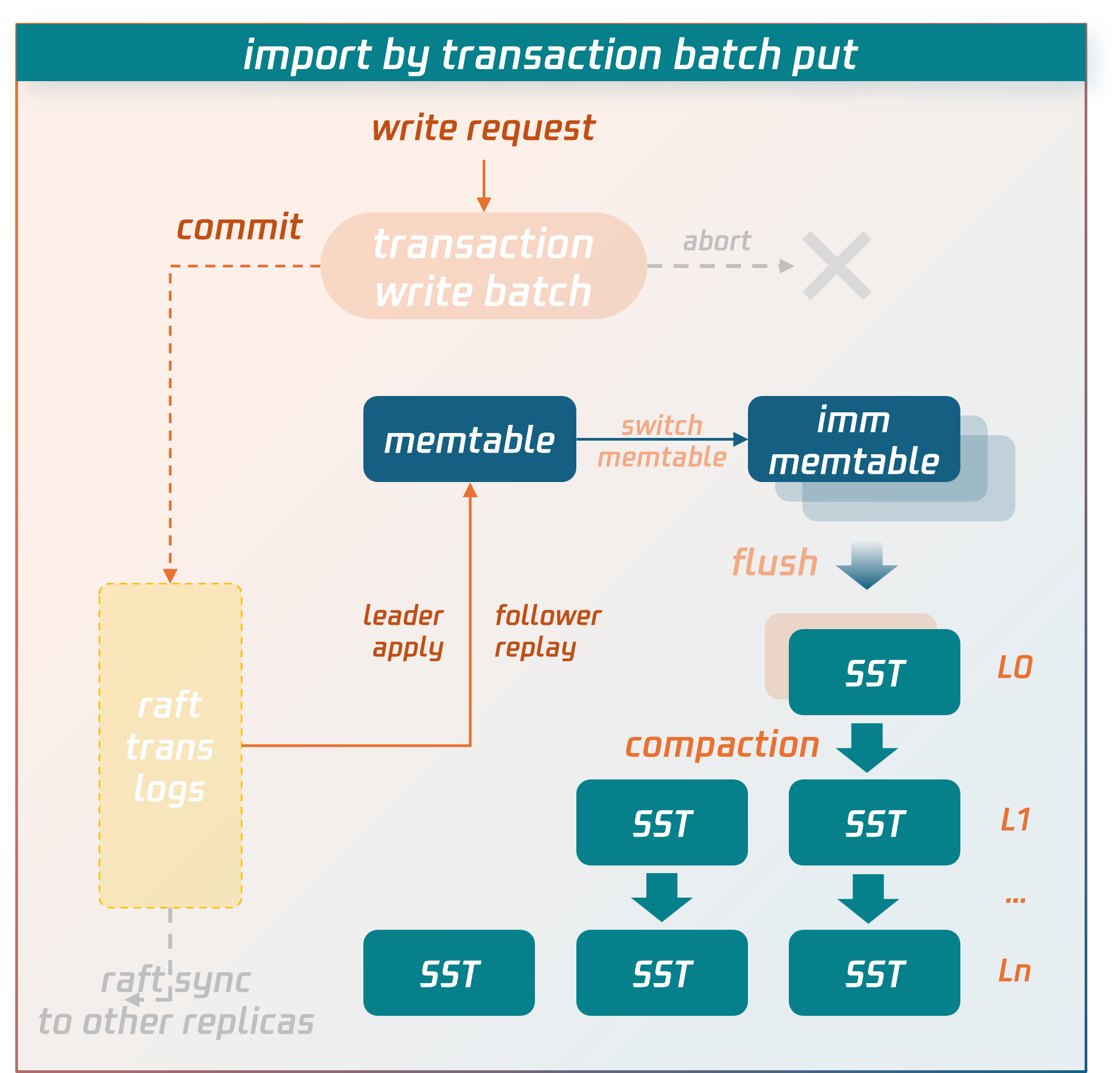
Data is temporarily stored in the transaction context's write batch before commit. After the commit phase is entered, the data in the write batch is first persisted to disk as transaction logs and synchronized to replica nodes via the raft protocol. After majority consensus is achieved, the data is written into the memtable structure in memory. When the memtable fills up, it flushes to disk to form SST data files. SST files are organized into levels using an LSM-tree structure. Asynchronous background threads perform compaction operations to merge and clean the data.
Write Process for Bulk Load
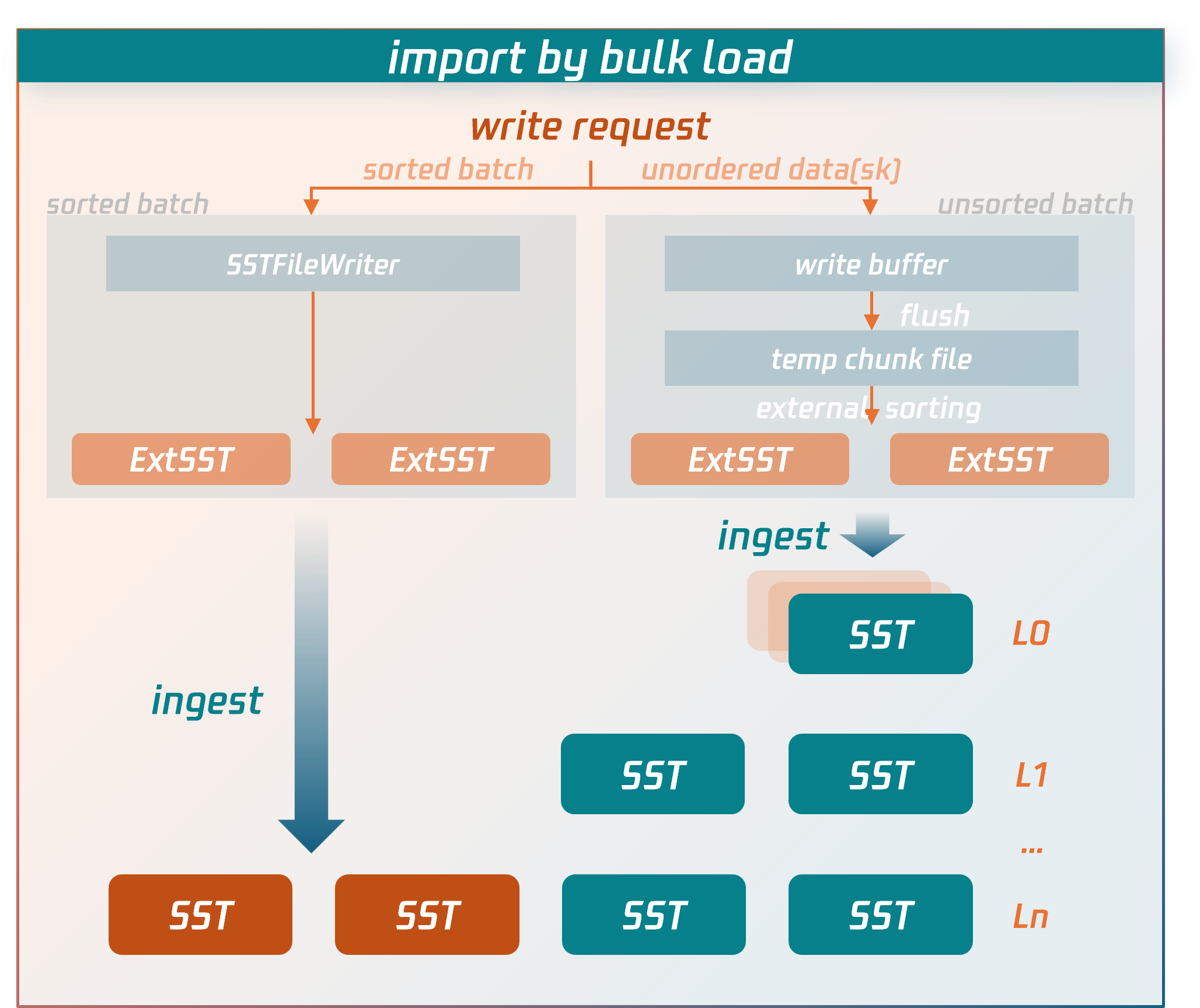
The write process for bulk load imports bypasses the lengthy write paths of regular transactions and directly writes data to compressed data files.
Specific procedures:
1. The node receiving the write request for a bulk load transaction (source node) will first parse and encode the SQL statements into key-value (KV) pairs.
For sorted data: it is written directly to external SST files.
For unsorted data: it is first written to temporary data files, then undergoes an external merge sort to generate external SST files.
2. After the bulk load transaction enters the commit phase, the source node fetches the latest replication group (RG) routing information from the MC control node to determine the target RG and replica locations for the external SST files.
3. Based on the RG routing information, the source node sends the external SST files to the nodes (data nodes) where the RG replicas reside.
4. After confirming that all external SST files are received and validated by the data nodes, the source node sends a commit request for a bulk load transaction to the RG leader data node. The RG leader data node then synchronizes a commit log for bulk load (Raft log). Once the log achieves majority consensus, the data nodes hosting RG replicas directly insert the external SST files into the appropriate level of the LSM-tree by executing or replaying this log. At this point, the data is successfully written to the database.
Key performance optimization points of the write process for bulk load compared to the write process for regular transactions:
It does not perform transaction conflict detection.
Instead of temporarily storing data in write batches in memory, it directly persists to SST data files on disk.
Unlike regular transactions, bulk load does not require writing data to transaction logs and synchronizing them first (Note: Although bulk load transactions also write a commit log to maintain consistency between primary and secondary data writes, they do not serialize transaction data into the log, only synchronizing essential metadata).
Instead of entering the LSM-tree through flush and compaction operations at the top level, external SST files are directly inserted into the lowest possible level of the LSM-tree.
These targeted optimizations implemented by bulk load significantly reduce CPU, memory, and I/O resource consumption, serving as the key factors for performance enhancement of imports.
Ajuda e Suporte
Esta página foi útil?
Você também pode entrar em contato com a Equipe de vendas ou Enviar um tíquete em caso de ajuda.
comentários