Migrate from Self-Built HBase to TDSQL Boundless
Download
Modo Foco
Tamanho da Fonte
Migration Tool Feature
Basic Features
Multithreaded export: Data is sharded by the Regions of HBase partitioned tables, or you can manually split the data.
Global Rate Limiting: Supports rate limiting by bytes or rows.
KV Structure Export: Simplifies configuration by eliminating the need to customize the Schema structure for each table.
Export Tool Default Behavior Description
Default Value Handling
date and varchar types: Empty strings are directly used.
Other data types: Populated with "NULL".
Range Export: The start_key and end_key use a left-closed, right-open interval.
Select Migration Solution
Migration Plan Description
Migration Scheme | Description |
Full migration | Applicable scenarios: First-time migration Features: One-time migration of all historical data. |
Incremental synchronization | Applicable scenarios: Continuous data synchronization. Features: Full migration first, then continuously synchronize incremental changes. |
Migration Limitation Notes
1. The current migration does not currently support resuming from breakpoints.
2. Incremental migration requires a self-provided Kafka environment.
Preparing the Environment
1. Have obtained the migration tool.
Note:
It is recommended to use the latest version of the migration tool.
2. Upload the tool to a custom directory (this article uses
/data/tdsql-project/ as an example) and extract it.Tool directory structure:
/data/tdsql-project/apache-seatunnel-2.3.8/├── bin/ # Directory containing execution scripts├── config/ # Configuration file directory, including log components, jvm configuration, etc.├── connectors/ # Directory for storing dependent jar packages├── lib/ # Directory for storing dependent jar packages├── licenses/ # Directory for storing dependent jar packages├── plugins/ # Directory for storing dependent jar packages└── starter/ # Directory for storing dependent jar packages├── logging/
3. Prepare the HBase cluster to be migrated and the TDSQL Boundless instance.
4. Kafka environment preparation (required for HBase incremental synchronization only)
A Kafka environment that is accessible. For details, see official website. Use Docker to quickly start an environment on the migration machine.
docker pull apache/kafka:4.1.0docker run -p 9092:9092 apache/kafka:4.1.0
Full migration
Run the export tool through the
seatunnel.sh script.You can view the help information for running the script through
./bin/seatunnel.sh -h.Step 1: Create Configuration File
Create a configuration file (such as
file_config) and save it in the config/ directory. The configuration file contains three main parts:env: environment configuration item.
source: HBase data source configuration.
sink: target configuration.
env {# Environment configuration items - Controls the task execution environment and resource limits. For details, see Environment Configuration (env)parallelism = 1job.mode = "BATCH"}source {Hbase {# Define the connection information, authentication method, and data export rules for the HBase data source. For details, see HBase Data Source Configuration (source)}}sink {# Configure the data write target, supports two modes: JDBC (recommended) and localfile. For details, see Target Configuration (sink)}
1. Environment Configuration (env)
env is the global configuration for export and import tasks, primarily setting concurrency and rate limiting (no rate limiting by default).
env {parallelism = 1 # Specifies the number of concurrent threads for Source and Sink operations. The actual concurrency may be determined by the Source and Sink configurations.job.mode = "BATCH"read_limit.bytes_per_second = 7000000 # Rate limiting based on bytes read. If not set, no rate limiting is applied.read_limit.rows_per_second = 200000 # Rate limiting based on rows read. If not set, no rate limiting is applied.}
2. HBase Data Source Configuration (source)
Each row of data in HBase is ultimately converted into multiple KV pairs, depending on the number of columns in that row. Each converted KV pair will be stored as a separate row of data in TDSQL Boundless.
Default table structure in TDSQL Boundless KV state:
CREATE TABLE IF NOT EXISTS `{TableName}`(`K` varbinary(1024) not null,`Q` varbinary(256) not null,`T` bigint not null,`V` mediumblob,PRIMARY KEY (`K`, `Q`, `T`))partition by key(`k`) partitions 6;
KV Format Configuration Template:
source {Hbase {# HBase Connection Options:# Required.zookeeper_quorum = "127.0.0.1:2181,127.0.0.2:2181,127.0.0.3:2181" // ZooKeeper address and port of the HBase cluster for connecting to HBasehbase_extra_config={ # Additional customized HBase connection settings. If not required, this need not be set.zookeeper.znode.parent=/bdphbs07/hbaseidhbase.client.ipc.pool.size=***hbase.client.scanner.timeout.period=6000000hbase.rpc.timeout=6000000hbase.cells.scanned.per.heartbeat.check=10000}SourceModeKV = {specified_namespace = "***" # Specify the namespace to be exportedtable_match_rules = ["***"] # Specify the matching rules for tables to be exported}}}
Note:
Notes on Multithreading:
Multithreading requires specifying the required number of threads under the env configuration first.
Export tasks are split according to default rules: For each table, splitting is based on the distribution of the table across regionServers, with each shard treated as an export task.
Since multiple tables are involved, the scheduling policy for export task shards across multiple threads prioritizes processing by table. It follows the scanning order of tables (lexicographical order) and prioritizes scheduling export tasks for the same table.
3. Target Configuration (sink)
Configures the data write target, supporting two modes: JDBC (writes directly to the TDSQL Boundless database) and LocalFile (exports to the local file system).
Method 1 (recommended): Import via JDBC.
sink {jdbc {# The url must enable bulkload and include rewriteBatchedStatements=true; otherwise, only single insert statements will be executed, resulting in extremely poor import efficiency.url = "jdbc:mysql://{ip}:{port}/?rewriteBatchedStatements=true&sessionVariables=tdsql_bulk_load='ON'"driver = "com.mysql.cj.jdbc.Driver"user = "test"password = "test123"schema_save_mode = "CREATE_SCHEMA_WHEN_NOT_EXIST"enable_upsert = false # Disable upsertmax_retries = 3 # Number of retriesgenerate_sink_sql = "true" # Generate import SQL based on the databasedatabase = "hbase" # Import tables to the hbase databasebatch_size = 500000 # The batch transaction size for the tool. To improve efficiency, it accumulates the specified quantity before flushing.# The larger the better, without exceeding the memory limit of the machine where the tool resides.batch_interval_ms = 500transaction_timeout = 60000 # Set transaction timeout to 60 seconds (to avoid timeout for large batches)}}
Method 2: LocalFile
sink {LocalFile {# Do not modify:file_format_type = "text" # Export file format, currently only text is supportedfield_delimiter = "," # Field delimiter, only comma is supportedrow_delimiter = "\\n" # Row delimiter, only newline is supportedis_enable_transaction = false # Transaction not supported# Required:path = "/root/dumper_test/apache-seatunnel-2.3.4" # Export pathtmp_path = "/root/dumper_test/apache-seatunnel-2.3.4" # During export, data is first exported to tmp_path, then moved to path. Therefore, tmp_path must be set; otherwise, it will occupy the root directory space.result_table_name = "test_mytable" # Export table nameresult_database_name = "test_mydatabase" # Export database name, used to generate the file nameresult_column_names = ["id", "name"] # Exported column names, must be the same as the number of columns in the source s chema# Optional:parent_directory = "test_directory" # The parent directory of the actual exported files. If specified, the actual file path will be :path/parent_directory/file; if not specified, the actual path will be :path/filefile_start_index = 1000 # Starting sequence for filenames; the sequence in filenames will increment from this number, defaults to 0}}
Note:
If you choose to export to LocalFile, it only converts HBase data into local SQL files; you still need to use tools like myloader to import the LocalFile into TDSQL Boundless.
4. Parameter Adjustment
Modify the memory allocated to the JVM by the SeaTunnel tool by editing the
config/jvm_client_options configuration.# The initial value in the configuration file is set too low, which may cause tasks to fail to work under high concurrency due to insufficient memory resource allocation. Adjust the value appropriately based on the machine resources.-Xms32g # Specifies the initial heap memory size for the JVM as 16GB-Xmx128G
Before performing data migration, log in to the TDSQL Boundless instance and run the following command to adjust the parameter configuration.
set persist tdsql_bulk_load_allow_auto_organize_txn = on; // Enable bulkload self-organized transaction import; this needs to be disabled for incremental migrationset persist tdsql_bulk_load_allow_unsorted = on; // Allow bulkload out-of-order transactionsset persist tdsql_bulk_load_commit_threshold = 4294967296; // commit threshold adjustmentset persist tdsql_bulk_load_rpc_timeout = 7200000; // rpc timeout
Step 2: Perform Data Migration
After filling out the configuration files, you can prepare to export. Each configuration file will be executed as a SeaTunnel task. This document describes how to start a SeaTunnel export task in local cluster mode.
1. In a custom directory (this document uses
/data/tdsql-project/apache-seatunnel-2.3.8/ as an example), save the completed configuration files under the ./config directory.2. In a custom directory, run the following command to start a SeaTunnel local cluster using this configuration file for export.
nohup ./bin/seatunnel.sh --config ./config/hbase_config -m local > seatunnel_hbase_local.log 2>&1 &tail -f seatunnel_hbase_local.log
Parameter description:
--config: Specifies the configuration file path.-m local: Run in local mode.Step 3: Data Verification
Verification rules are as follows: Read data from HBase and TDSQL Boundless by data shard, calculate the CRC32 checksum for each row of data and accumulate the results, then compare the final accumulated values.
Data verification steps are as follows:
1. Create and write the validation configuration file
config/validation_config.HBaseDataValidation {parallelism = 10specified_namespace = "default"table_match_rules = []zookeeper_quorum = "127.0.0.1:2181,127.0.0.2:2181,127.0.0.3:2181"// Replace with your own username and password, ip portmysql_jdbc_url = "jdbc:mysql://{ip}:{port}/hbase?user=test&password=test1234"}
2. Run data validation.
The verification program is packaged in
hbase-connector.jar. You can run the script in the package deployment directory:./bin/validateKV.sh ./config/validation_config
Tool directory structure:
## dir tree./apache-seatunnel-2.3.8/bin/├── install-plugin.cmd├── install-plugin.sh├── seatunnel-cluster.cmd├── seatunnel-cluster.sh├── seatunnel.cmd├── seatunnel-connector.cmd├── seatunnel-connector.sh├── seatunnel.sh└── validateKV.sh
Incremental Synchronization (Including Snapshot Full Synchronization + Incremental Synchronization)
Incremental synchronization involves preparing full snapshot data and enabling the position for incremental data reception. The migration tool first synchronizes the full snapshot data, and after the snapshot data synchronization is completed, it proceeds with incremental data synchronization without the need to manually synchronize the full data.
Note:
In incremental synchronization mode, the tool needs to perform the following operations on the HBase cluster:
1. If the table itself
replication_scope attribute is not enabled, it needs to execute disable table; enable table;.2. Create a snapshot and restore a snapshot table as the export point for full snapshot data.
3. Execute add_peer on the original HBase cluster to capture incremental data.
Step 1: Environment Detection
1. Check the column family attributes of the table to be synchronized. The attribute
replication_scope must be set to 1 (synchronization enabled). Otherwise, enable the corresponding tool switch: auto_enable_replication = true.# Verify that the replication_scope attribute of the column family in the table to be synchronized is 1.hbase shelldescribe 'your_table_name'
2. Network connectivity verification: Ensure that the HBase cluster can access the migration tool node via domain name.
3. Kafka cluster: Ensure that the migration machine can properly access Kafka. The migration tool needs to temporarily store incremental data. After full synchronization is completed, it will consume the temporarily stored incremental data one by one. Incremental data will be temporarily stored in the Kafka cluster. If the data volume is large, it is recommended to provide a stable Kafka environment. Alternatively, you can quickly deploy a Kafka cluster locally using Docker with the following command:
docker pull apache/kafka:4.1.0docker run -p 9092:9092 apache/kafka:4.1.0
For details, see the official website to quickly spin up an environment using Docker on the migration machine.
4. Port confirmation: The incremental migration tool automatically starts an HBase instance, which uses local directories and specified ports (default: 2181, 16000, 16010, 16020, 16030) to launch the HBase structure required by the migration tool. Ensure these ports are available; otherwise, specify the ports to be used in the configuration file.
Step 2: Start Incremental Synchronization
1. Create the incremental verification configuration file.
Note:
1.
job.mode must be set to STREAMING. Otherwise, the system will not run in incremental mode and will export data in full mode.2. When table replication is enabled, the table will be disabled and then re-enabled. Although this process is typically fast, it is recommended to keep the default setting of
auto_enable_replication as false. If the table's replication attribute (replication_scope) is not enabled, you should either enable this switch or manually set the replication_scope attribute of the table's column family to 1.3. Kafka cluster configuration: If the cluster is started via Docker as described above, no additional configuration is required; keep the default settings.
4. Detailed parameter descriptions see Configuration parameters.
env {parallelism = 4job.mode = "STREAMING" // Incremental mode requires setting to STREAMING modejob.retry.times = 0}source {Hbase {HbaseCDCConfig {auto_enable_replication = truekafka_bootstrap_servers = "localhost:9092" // If started using docker, keep the defaultpeer_name = "incr_001" // hbase peer name// The following ports are used by the self-started hbase of the incremental migration tool. If port conflicts occur, you can configure the ports manually; otherwise, the default ports 2181, 16000, 16010, 16020, 16030 are used.zk_host = "ip:12181"hbase.master.port = 26000hbase.master.info.port = 26010hbase.regionserver.port = 26020hbase.regionserver.info.port = 26030}SourceModeKV = {specified_namespace = "***" // Specify the namespace to be exportedtable_match_rules = ["***"] // Specify the matching rules for tables to be exporteddump_create_schema = truedump_source_split_metrics = false}zookeeper_quorum = "127.0.0.1:2181"# Optional configuration.is_kerberos_connection=true # Whether kerberos authentication is required; defaults to false. The following four items only need to be provided when this is set to true.kerberos_ms_name="xxx" # hbase.master.kerberos.principalkerberos_rs_name="xxx" # hbase.regionserver.kerberos.principalkerberos_user_name="xxx"kerberos_keytab="xxx"}}sink {jdbc {// Enable bulk_loadurl = "jdbc:mysql://127.0.0.1:6050/?rewriteBatchedStatements=true&sessionVariables=tdsql_bulk_load='ON'"driver = "com.mysql.cj.jdbc.Driver"properties {autoReconnect = "true"failOverReadOnly = "false"maxReconnects = "10"tcpKeepAlive = "true"rewriteBatchedStatements = "true"}user = "test"password = "test123"schema_save_mode = "CREATE_SCHEMA_WHEN_NOT_EXIST"enable_upsert = truemax_retries = 1generate_sink_sql = truedatabase = "hbase" // Import to the hbase databasebatch_size = 500000}}
2. Parameter Adjustment
Modify the memory allocated to the JVM by the SeaTunnel tool by editing the
config/jvm_client_options configuration.# The initial value in the configuration file is set too low, which may cause tasks to fail to work under high concurrency due to insufficient memory resource allocation. Adjust the value appropriately based on the machine resources.-Xms32g # Specifies the initial heap memory size for the JVM as 16GB-Xmx128G
Before performing data migration, log in to the TDSQL Boundless instance and run the following command to adjust the parameter configuration.
set persist tdsql_bulk_load_allow_unsorted = on; // Allow bulkload out-of-order transactionsset persist tdsql_bulk_load_commit_threshold = 4294967296; // commit threshold adjustmentset persist tdsql_bulk_load_rpc_timeout = 7200000; // rpc timeout
3. Start Sync Task
In a custom directory (this document uses
/data/tdsql-project/apache-seatunnel-2.3.8/ as an example), run the following command to start incremental synchronization../bin/seatunnel.sh --config ./config/incremental_config -m local
Step 3: Monitor Incremental Data Validation Progress and Stop Incremental Migration at the Appropriate Time
The tool will first synchronize the full data, a process that is usually time-consuming. After the full data synchronization is completed, it will begin migrating the incremental data.
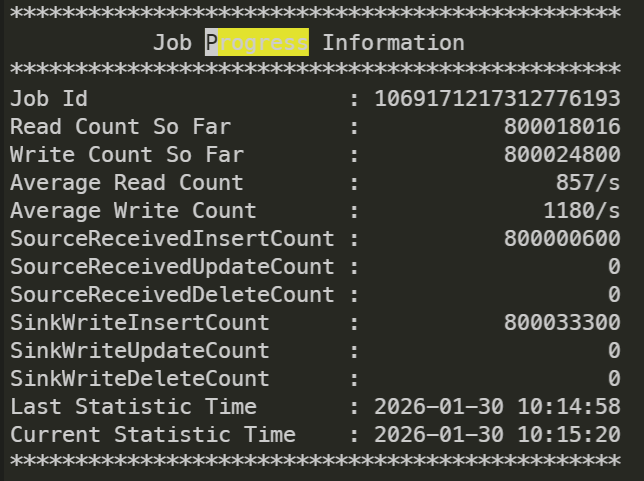
You can view the overall synchronization status by checking the Progress Information in the logs.
You can check the status of incremental synchronization via IncSplit Progress Information.
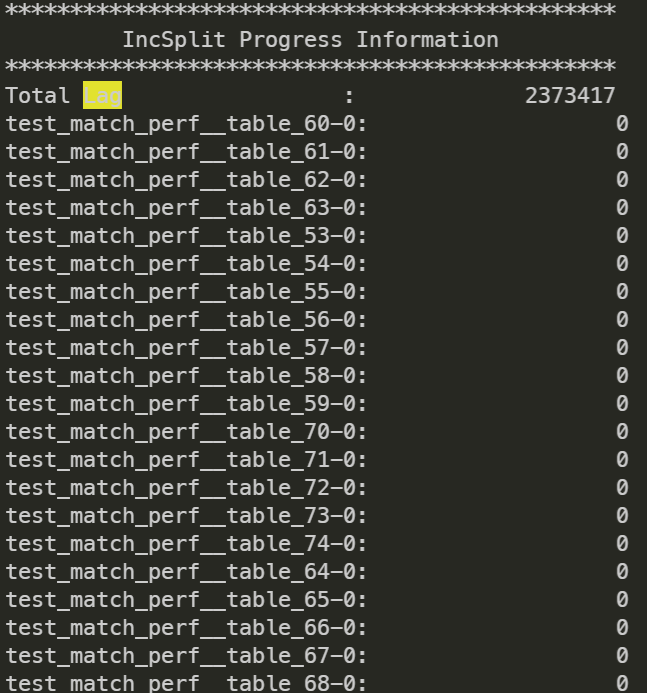
The tool prints the LAG for each table in Kafka during incremental synchronization, which represents the consumption status of incremental data.
Step 4: Data Validation
1. After migration is completed, perform data validation. Please first stop the business traffic and create the validation configuration file
config/validation_config.HBaseDataValidation {parallelism = 10specified_namespace = "default" // namespace in hbasetable_match_rules = ["(?!.*snapshot_for_seatunnel_incremental_source).*"] // Tables to be validated, filtering out snapshot tables created by the validation toolzookeeper_quorum = "127.0.0.1:2181,127.0.0.2:2181,127.0.0.3:2181"// Replace with your own username and password, ip portmysql_jdbc_url = "jdbc:mysql://{ip}:{port}/hbase?user=test&password=test1234"}
2. The incremental migration tool creates a snapshot table in the original HBase. The snapshot table is named in the format
$(originTableName)_snapshot_for_seatunnel_incremental_source by default. Before the validation is started, ensure to filter out tables ending with "_snapshot_for_seatunnel_incremental_source" in table_match_rules to avoid impact, or refer to Step 5 to run the cleanup tool and remove this table.3. Perform validation. The validation program is packaged in
hbase-connector.jar. You can run the script in the package deployment directory../bin/validateKV.sh ./config/validation_config
Step 5: Run the Cleanup Tool to Clean Up Residual Artifacts from the Incremental Migration Process
After validation passes, the tool script can be used to clean up temporary resources such as replication pairs (Peer) created in HBase and Kafka topics.
If you used
config/incr_migration_config for incremental migration, run the following script for cleanup. There is no need to create a new configuration file; simply reuse the migration configuration file../bin/cleanupIncrementResource.sh ./config/incr_migration_config
Configuration Parameters
Migration Type | Parameter Classification | Parameter | Parameter Description | Example Value |
Full/Incremental Migration | Environment Configuration (env) | parallelism | Specifies the number of concurrent threads for Source/Sink operations. The actual concurrency may be affected by data source sharding. | 1,4,10 |
Full/Incremental Migration | Environment Configuration (env) | job.mode | Task running mode. Full migration must be configured as batch mode, while incremental migration requires streaming mode. | "BATCH" "STREAMING" |
Full/Incremental Migration | Environment Configuration (env) | read_limit.bytes_per_second | Rate limiting based on bytes read to control the pressure of full migration on the HBase cluster. | 7000000(7MB/s) |
Full/Incremental Migration | Environment Configuration (env) | read_limit.rows_per_second | Rate limiting based on rows read to help control the migration speed. | 200,000 (200,000 rows/s) |
Full/Incremental Migration | HBase Data Source (source) | zookeeper_quorum | ZooKeeper address and port of the HBase cluster for establishing HBase connection | "127.0.0.1:2181,127.0.0.2:2181" |
Full/Incremental Migration | HBase Data Source (source) | SourceModeKV.specified_namespace | Specify the HBase namespace to be exported (Namespace). | "default","hbase_test" |
Full/Incremental Migration | HBase Data Source (source) | SourceModeKV.table_match_rules | Specify the table matching rules for export (wildcards supported). | ["table_*", "user_info"] |
Full/Incremental Migration | Destination (sink-jdbc) | url | TDSQL Boundless JDBC connection URL | "jdbc:mysql://{ip}:{port}/?rewriteBatchedStatements=true&sessionVariables=tdsql_bulk_load='ON'" |
Full/Incremental Migration | Destination (sink-jdbc) | batch_size | The batch transaction size affects synchronization efficiency and memory usage. | 500000,1000000 |
Incremental Migration | HBase Data Source (source) | HbaseCDCConfig.auto_enable_replication | Automatically enable the replication_scope attribute for HBase table column families (must be set to 1). | true,false |
Incremental Migration | HBase Data Source (source) | HbaseCDCConfig.kafka_bootstrap_servers | Kafka cluster address for temporary storage of incremental data | "localhost:9092","192.168.1.1:9092" |
Full/Incremental Migration | HBase Data Source (source) | is_kerberos_connection | Whether to enable Kerberos authentication to connect to HBase | true,false |
Full/Incremental Migration | HBase Data Source (source) | kerberos_ms_name | HBase Master node Kerberos principal name | "hbase/master@EXAMPLE.COM" |
Full/Incremental Migration | HBase Data Source (source) | kerberos_rs_name | HBase RegionServer node Kerberos principal name | "hbase/regionserver@EXAMPLE.COM" |
Full/Incremental Migration | HBase Data Source (source) | kerberos_user_name | Kerberos authentication username | "hbase_user" |
Full/Incremental Migration | HBase Data Source (source) | kerberos_keytab | Kerberos authentication keytab file path | "/etc/kerberos/keytabs/hbase.keytab" |
Full/Incremental Migration | Destination (sink-jdbc) | enable_upsert | Enable UPSERT semantics (update if exists, insert if not) | true,false |
Incremental Migration | HBase Port Configuration | hbase.master.port | Manually specify the HBase Master service port (to resolve conflicts with the default port 16000). | 16001,16002 |
Incremental Migration | HBase Port Configuration | hbase.master.info.port | Manually specify the HBase Master Web UI port (to resolve conflicts with the default port 16010). | 16011,16012 |
Incremental Migration | HBase Port Configuration | zk_host | Manually specify the HBase ZK port. | "ip:port" "127.0.0.1:12181" |
Incremental Migration | HBase Port Configuration | hbase.regionserver.port | Manually specify the HBase RegionServer port (to resolve conflicts with the default port 16020). | 16021,16022 |
Ajuda e Suporte
Esta página foi útil?
Você também pode entrar em contato com a Equipe de vendas ou Enviar um tíquete em caso de ajuda.
comentários