Linux 实例:VNC 或 SSH 登录报错“Permission denied”
Download
포커스 모드
폰트 크기
现象描述
使用 VNC 或 SSH 登录时,提示报错信息 “Permission denied”。
VNC 登录报错如下图所示:
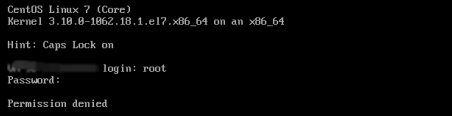
SSH 登录报错如下图所示:

可能原因
使用 VNC 或 SSH 登录会调用 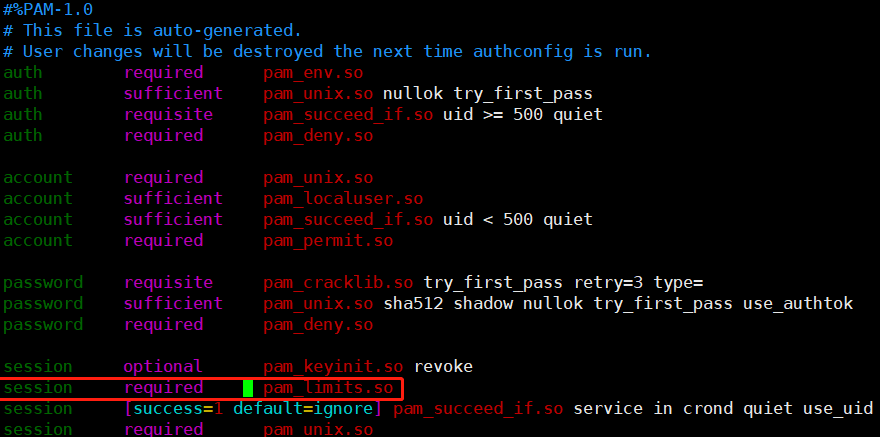
/etc/pam.d/login 这个 pam 模块进行校验,在 /etc/pam.d/login 配置中默认会引入 system-auth 模块进行认证,system-auth 模块默认会引入 pam_limits.so 模块进行认证。system-auth 的默认配置如下图所示:
pam_limits.so 模块的主要功能是限制用户会话过程中对各种系统资源的使用情况。默认情况下该模块的配置文件是 /etc/security/limits.conf,该配置文件规定了用户可使用的最大文件数、最大线程数、最大内存等资源使用量。参数说明如下表:参数 | 说明 |
soft nofile | 可打开的文件描述符的最大数(软限制)。 |
hard nofile | 可打开的文件描述符的最大数(硬限制),不能超过该设定值。 |
fs.file-max | 系统级别的能够打开的文件句柄(内核中 struct file)的数量。针对整个系统的限制,并不针对用户。 |
fs.nr_open | 单个进程可分配的最大文件描述符数目(fd 个数)。 |
可能导致无法正常登录的原因是配置文件
/etc/security/limits.conf 中关于 root 用户最大能打开的文件描述符个数配置错误,正确的配置应满足 soft nofile ≤ hard nofile ≤ fs.nr_open 关系。解决思路
处理步骤
1. 尝试使用 SSH 登录云服务器,详情请参见 使用 SSH 登录 Linux 实例。
登录成功,则执行下一步。
登录失败,则需使用单用户模式,详情请参见 通过控制台进入 Linux 实例单用户模式。
2. 查看参数
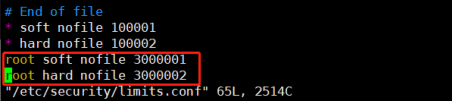
soft nofile、hard nofile 及 fs.nr_open 值是否满足 soft nofile ≤ hard nofile ≤ fs.nr_open 关系:执行以下命令,查看
soft nofile 及 hard nofile 值。cat /etc/security/limits.conf
本文获取结果为3000001及3000002。如下图所示:
执行以下命令,查看
fs.nr_open 值。sysctl -a 2>/dev/null | grep -Ei "file-max|nr_open"
本文获取结果为1048576。如下图所示:

3. 修改
/etc/security/limits.conf 文件,在文件末尾添加或修改如下配置:root soft nofile:100001root hard nofile:1000024. 修改
/etc/sysctl.conf 文件,在文件末尾添加或修改如下配置:说明:
在满足
soft nofile ≤ hard nofile ≤ fs.nr_open 关系时,此步骤非必选,可在系统最大限制不足时再进行调整。fs.file-max = 2000000fs.nr_open = 20000005. 执行以下命令,使配置立即生效。配置完成后,即可恢复登录。
sysctl -p
피드백