Disabling or Enabling the kdump Service for a Linux Instance
Download
Focus Mode
Font Size
Disclaimer: This document may contain information about third-party products, which is provided for reference only. Tencent Cloud makes no representations or warranties, express or implied, regarding the performance, reliability, or potential impacts of third-party products.
Overview
kdump is a kernel crash dump mechanism for the Linux system. When the system experiences a kernel crash, it can capture the memory dump at the time of the crash to facilitate subsequent analysis and troubleshooting. This document mainly introduces how to disable or enable the kdump service for Cloud Virtual Machine (CVM) instances on the Linux operating system.
Disabling the kdump Service and Releasing the Memory Reserved for kdump
During the Linux system boot, kdump configures a kernel memory area as reserved memory, which is used exclusively to start the second kernel in the event of a system crash. If your business does not require a detailed analysis of kernel crash causes and you prefer to release the reserved memory, disabling kdump can be taken into consideration.
Note: Disabling kdump carries the risk that the kernel crash causes may become undiagnosable.
Different Linux distributions have different methods for disabling kdump. This document lists certain methods of disabling kdump and releasing the memory reserved for kdump on several operating systems.
Taking CentOS 7/CentOS 8/TencentOS 2/TencentOS 3/TencentOS 4 operating systems as examples, you can follow the steps below to disable kdump and release the memory reserved for kdump.
1. Run the commands below to disable the kdump service, disable kdump auto-start at boot time, and check its status.
systemctl disable kdump --nowsystemctl status kdump.servicesystemctl is-enabled kdump.service
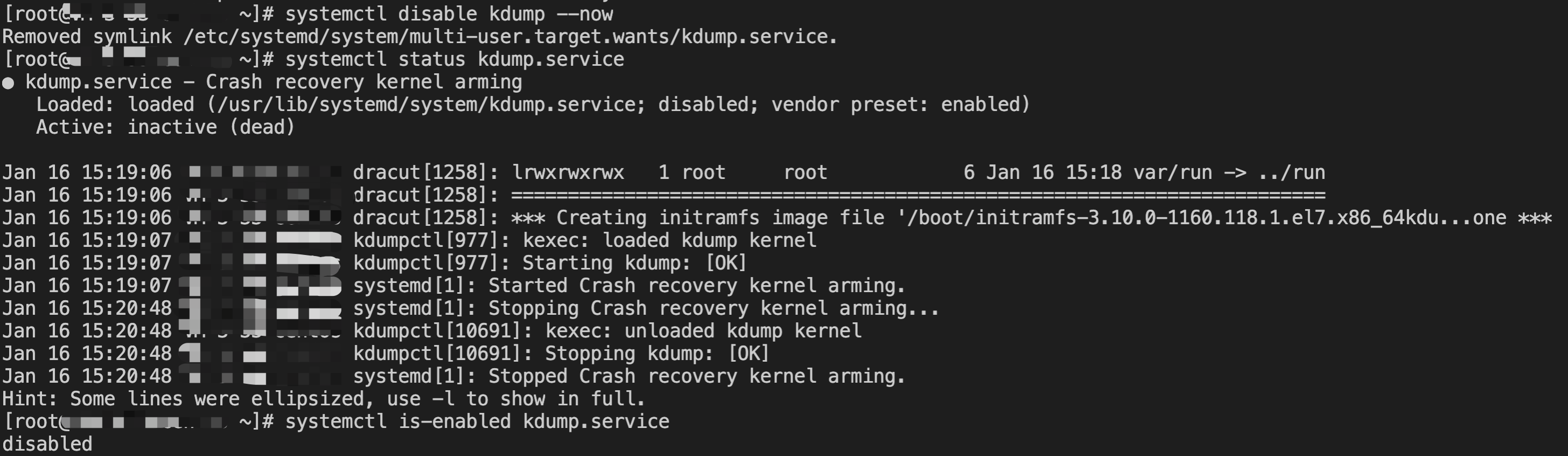
2. Use the grubby-related commands to remove the crashkernel configuration from the grub parameters and update the configuration in the boot file.
2.1 Run the commands below to check whether the args parameter displayed by grubby contains configuration items related to crashkernel and back up the parameter.
grubby --info=ALL|tee -a grubby.bak.$(date +%Y%m%d)
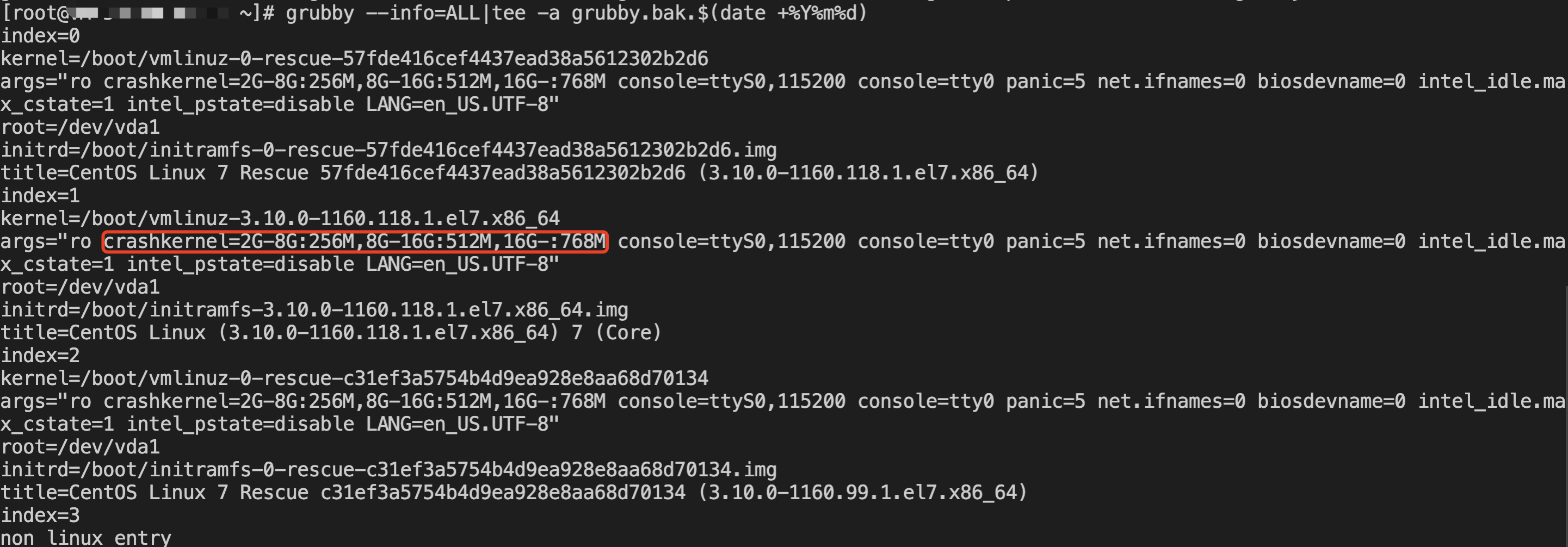
2.2 Run the commands below to remove the parameters related to crashkernel, automatically update the grub configuration, and view the parameter configuration after removal.
grubby --update-kernel=ALL --remove-args="crashkernel"grubby --info=ALL
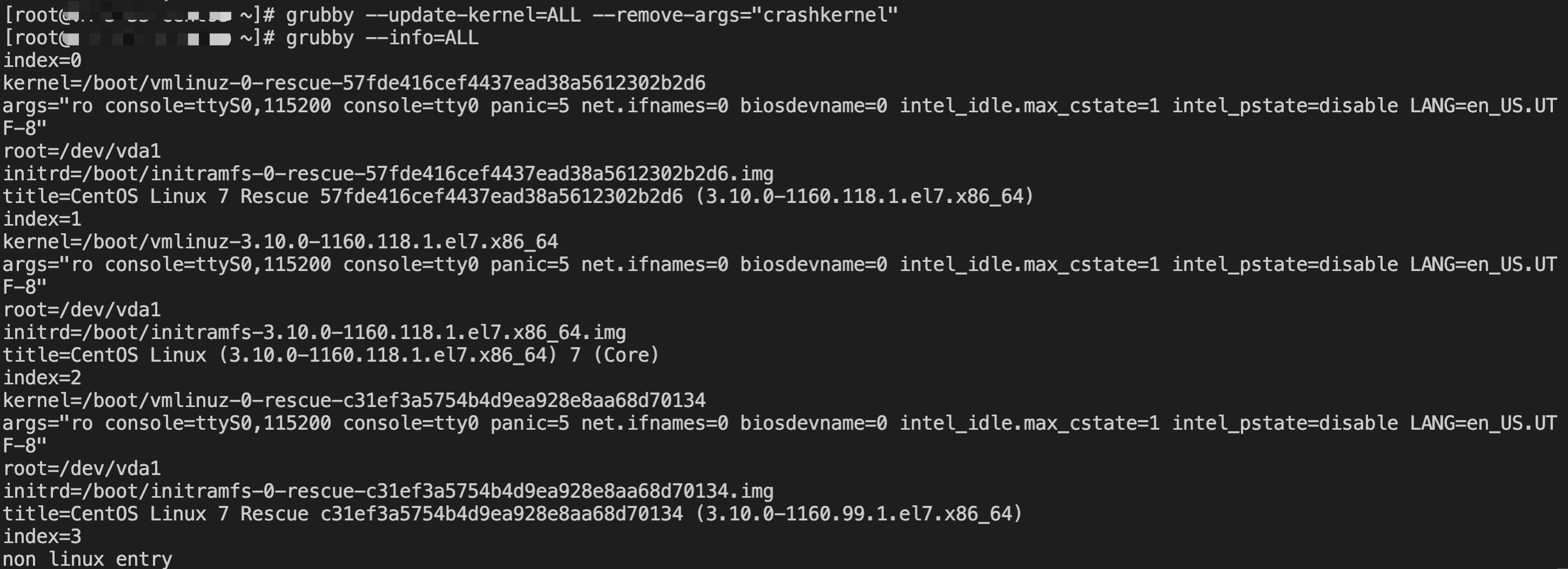
3. Restart the server to verify whether the kdump service is disabled and whether the memory reserved for kdump is released.
Warning: Restarting the server may cause business interruption. Evaluate the impact of the restart on your business carefully.
After the server restart, run the commands below to check whether the server has been restarted (by checking whether the value of uptime matches the interval from the restart execution time to the current time), whether the kdump service is in the inactive (dead) status, whether the reserved memory size for the crash (namely, the value of
/sys/kernel/kexec_crash_size) is 0, and whether the Linux boot command line parameter /proc/cmdline contain configuration items related to crashkernel.uptimesystemctl status kdump.servicecat /sys/kernel/kexec_crash_sizecat /proc/cmdline

If the server is not allowed to be restarted, but you want to release the memory reserved for the kdump service, run the command below to release the reserved memory for the crash in the kdump service.
echo 0 >/sys/kernel/kexec_crash_size
Run the command below to verify that the memory address space is no longer reserved for kdump, namely, a return value of 0.
cat /sys/kernel/kexec_crash_size
Taking OpenCloudOS 7/OpenCloudOS 8/OpenCloudOS 9 operating systems as examples, you can follow the steps below to disable kdump and release the memory reserved for kdump.
1. Run the commands below to disable the kdump service, disable kdump auto-start at boot time, and check its status.
systemctl disable kdump --nowsystemctl status kdumpsystemctl is-enabled kdump
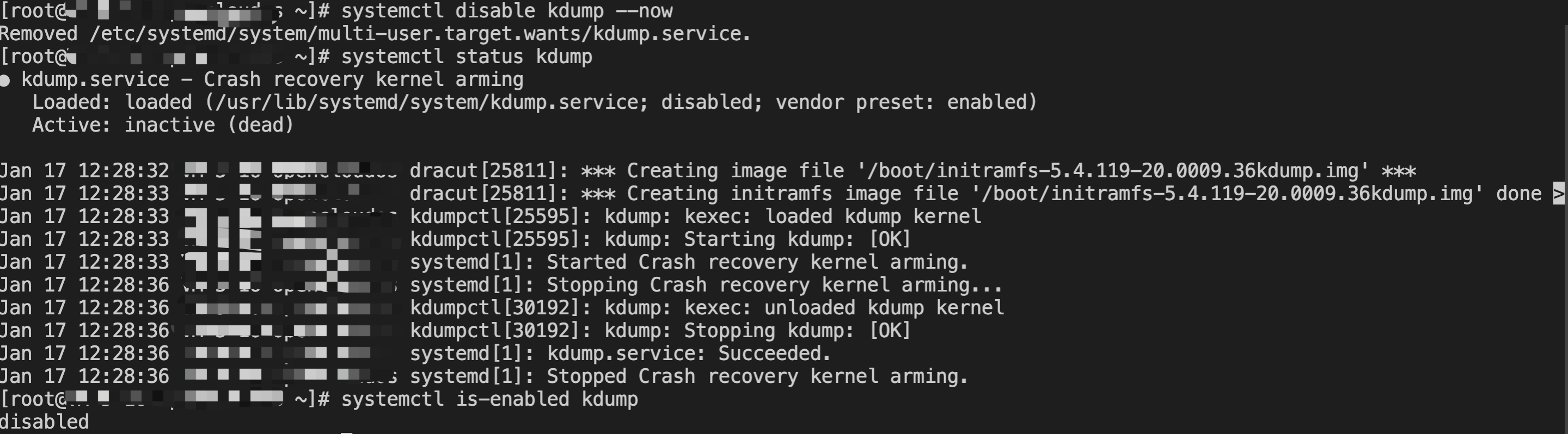
2. Modify
/etc/default/grub to remove the crashkernel configuration from GRUB_CMDLINE_LINUX and update the configuration to the boot file.2.1 Run the following command to back up the
/etc/default/grub file.cp /etc/default/grub /etc/default/grub.bak.$(date +%Y%m%d)
2.2 Use vim or another editor to remove the
crashkernel=XXX configuration item (such as the content highlighted in red below) from the GRUB_CMDLINE_LINUX line in the /etc/default/grub file and save the changes.
2.3 Run the following command to update the grub configuration file.
grub2-mkconfig -o /boot/grub2/grub.cfg

3. Restart the server to verify whether the kdump service is disabled and whether the memory reserved for kdump is released.
Warning: Restarting the server may cause business interruption. Evaluate the impact of the restart on your business carefully.
After the server restart, run the commands below to check whether the server has been restarted (by checking whether the value of uptime matches the interval from the restart execution time to the current time), whether the kdump service is in the inactive (dead) status, whether the reserved memory size for the crash (namely, the value of
/sys/kernel/kexec_crash_size) is 0, and whether the Linux boot command line parameter /proc/cmdline contain configuration items related to crashkernel.uptimesystemctl status kdump.servicecat /sys/kernel/kexec_crash_sizecat /proc/cmdline

If the server is not allowed to be restarted, but you want to release the memory reserved for the kdump service, run the command below to release the reserved memory for the crash in the kdump service.
echo 0 >/sys/kernel/kexec_crash_size
Run the command below to verify that the memory address space is no longer reserved for kdump, namely, a return value of 0.
cat /sys/kernel/kexec_crash_size
Taking Ubuntu 18.04/Ubuntu 20.04/Ubuntu 22.04/Ubuntu 24.04/Debian 10/Debian 11/Debian 12 operating systems as examples, you can follow the steps below to disable kdump and release the memory reserved for kdump.
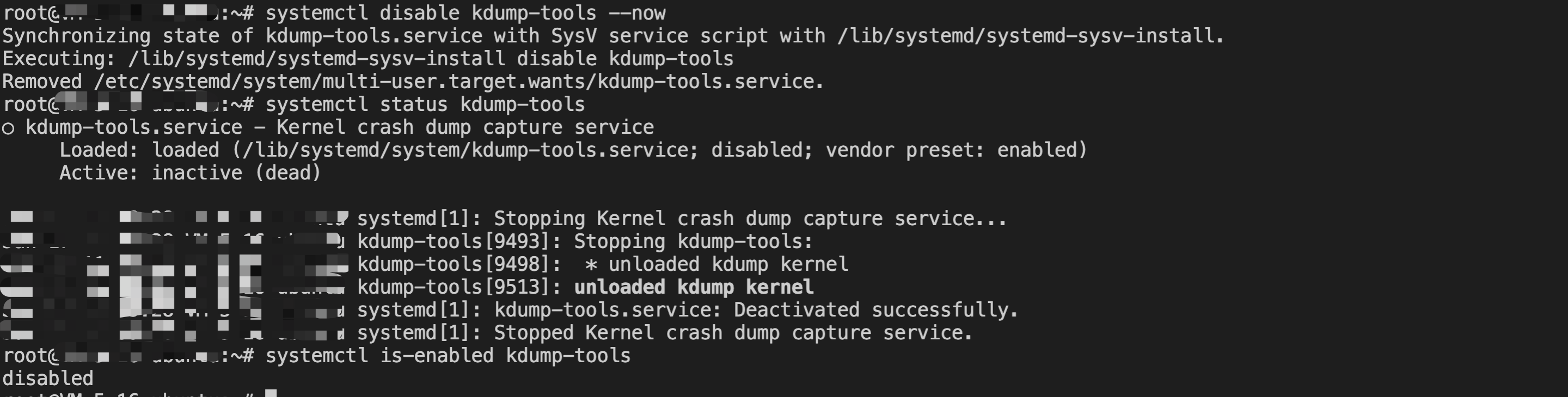
1. Run the commands below to disable the kdump-tools service, disable kdump-tools auto-start at boot time, and check its status.
systemctl disable kdump-tools --nowsystemctl status kdump-toolssystemctl is-enabled kdump-tools
2. Modify the configurations of
/etc/default/grub or /etc/default/grub.d to remove the crashkernel configuration from GRUB_CMDLINE_LINUX or GRUB_CMDLINE_LINUX_DEFAULT, and update the configuration to the boot file.2.1 Run the following command to back up the
/etc/default/grub file.cp /etc/default/grub /etc/default/grub.bak.$(date +%Y%m%d)
2.2 Use vim or another editor to remove the
crashkernel=XXX configuration item
(such as the content highlighted in red below) from the GRUB_CMDLINE_LINUX or GRUB_CMDLINE_LINUX_DEFAULT line in the /etc/default/grub file and save the changes.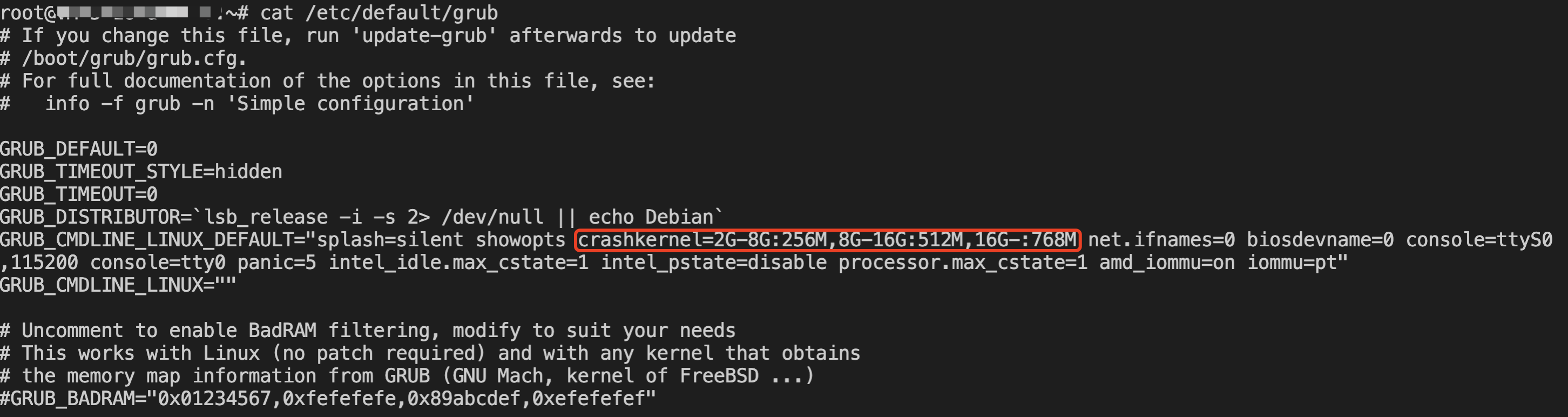
If there is no configuration item related to crashkernel in the
/etc/default/grub file, check whether the kdump-tools.cfg configuration file in /etc/default/grub.d contains the configuration item related to crashkernel (such as the content highlighted in red below). If it exists, remove the crashkernel=XXX configuration item.
Specific operations: You can run the following commands to enter the
/etc/default/grub.d/ directory, check whether there is the kdump-tools.cfg file, check the kdump-tools.cfg configuration, back up the file, remove the configuration item related to crashkernel, and verify the modification result.cd /etc/default/grub.d/cat kdump-tools.cfgcp kdump-tools.cfg kdump-tools.cfg.bak.$(date +%Y%m%d)vim kdump-tools.cfgcat kdump-tools.cfg

2.3 Run the following command to update the grub configuration file.
update-grub

3. Restart the server to verify whether the kdump-tools service is disabled and whether the memory reserved for kdump is released.
Warning: Restarting the server may cause business interruption. Evaluate the impact of the restart on your business carefully.
After the server restart, run the commands below to check whether the server has been restarted (by checking whether the value of uptime matches the interval from the restart execution time to the current time), whether the kdump service is in the inactive (dead) status, whether the reserved memory size for the crash (namely, the value of
/sys/kernel/kexec_crash_size) is 0, and whether the Linux boot command line parameter /proc/cmdline contain configuration items related to crashkernel.uptimesystemctl status kdump-toolscat /sys/kernel/kexec_crash_sizecat /proc/cmdline

If the server is not allowed to be restarted, but you want to release the memory reserved for the kdump service, run the command below to release the reserved memory for the crash in the kdump service.
echo 0 >/sys/kernel/kexec_crash_size
Run the command below to verify that the memory address space is no longer reserved for kdump, namely, a return value of 0.
cat /sys/kernel/kexec_crash_size
Enabling the kdump Service
kdump is enabled by default for servers created using Linux public images of Tencent Cloud. When a kernel panic occurs, the system memory dump information is typically generated under
/var/crash. The crash tool can be used to analyze the cause of the panic that occurs on the server. However, enabling kdump consumes part of the memory space of the operating system. Different Linux distributions have different methods for enabling kdump. Below are configuration methods for several Linux distributions:
Help and Support
Was this page helpful?
You can also Contact sales or Submit a Ticket for help.
Help us improve! Rate your documentation experience in 5 mins.
Feedback