tencent cloud

Short Message Service

Release Notes and Announcements
Announcements
Product Introduction
Glossary
Product Overview
Review Standards
Notes
Signature Review Standards
Body Template Review Standards
Sample Body Templates
Reasons for Rejection
Global SMS
Global SMS Intro
Global SMS Pricing
Getting Started
Console Guide
Console Overview
Global SMS
Marketing Management
Business Statistics
Application Management
General Management
Access Management
Practical Tutorial
How to Send Bulk Best Wishes Messages
How to Send SMS Verification Codes
API Documentation
History
Introduction
API Category
Making API Requests
Status Pull APIs
SMS Statistics APIs
SMS Signature APIs
SMS Delivery APIs
SMS Mobile Number APIs
SMS Conversion Rate APIs
SMS Template APIs
Data Types
Error Codes
SMS Callback APIs
SDK Documentation
SDK Download
SDK for Java
SDK for PHP
SDK for Python
SDK for Node.js
SDK for C#
SDK for Go
SDK for C++
FAQ
Billing
Security
Signature
Template
Message Content
Others
Service Agreement
Tencent Cloud SMS Data Processing and Security Agreement
Tencent Cloud SMS Privacy Policy
Service Level Agreement
Tencent Cloud SMS Services Terms of Service
Contact Us

Global SMS Renewal Policy

PDF
Focus Mode
Font Size
Last updated: 2025-08-25 11:15:44
When auto-renewal is enabled, the system will automatically renew your package and deduct the corresponding fee from your Tencent Cloud account once renewal conditions are met. To avoid renewal failure due to insufficient balance, please ensure your account has adequate funds.

​How to Set Up Auto-Renewal

1. Log in to the ​SMS Console.
2. Navigate to ​Package Management​ > Global SMS, where you can view auto-renewal settings and manage your purchased packages.

Global SMS Package Settings

3. If auto-renewal is not enabled, you may activate it by setting renewal conditions​ and renewal quantity​.
Note:
Only previously purchased package types are eligible for auto-renewal.
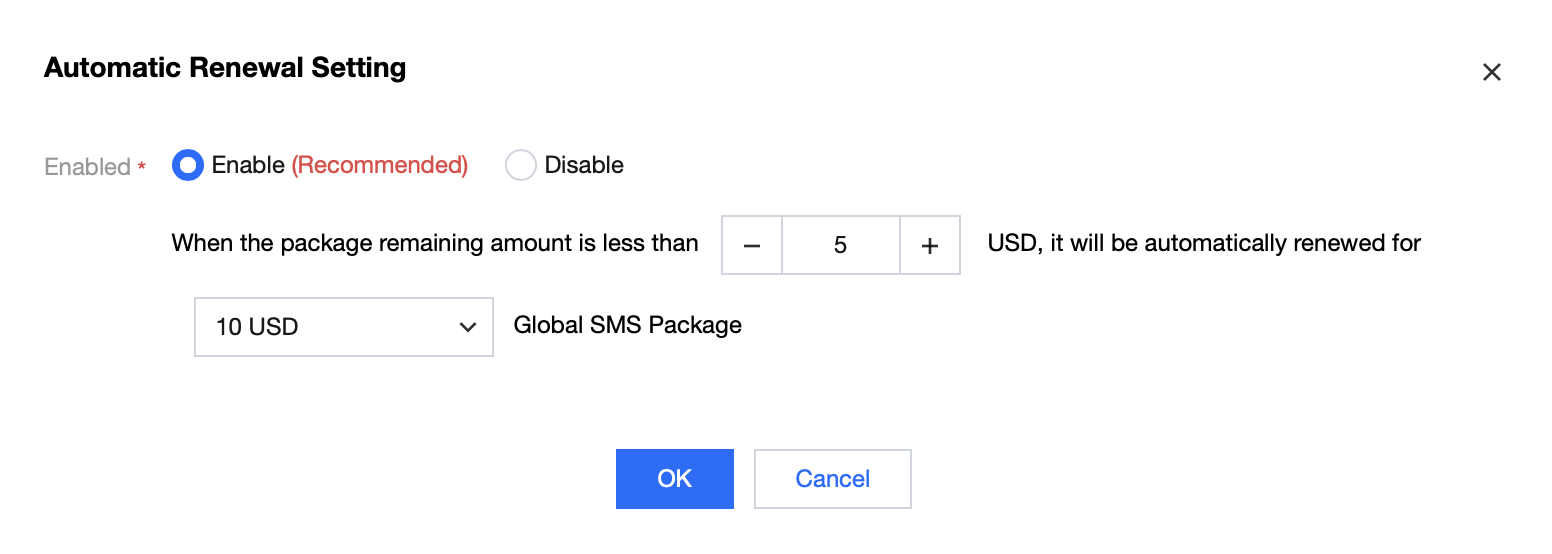
Global SMS Package Auto-renewal Settings

4. Click ​OK​ to save your settings.
5. Renewed packages will take effect as new purchases and remain valid permanently from the renewal date.

If you have any questions, please submit a ticket to contact us.


Help and Support

Was this page helpful?

Help us improve! Rate your documentation experience in 5 mins.

Feedback