tencent cloud

TDMQ for RocketMQ

Release Notes and Announcements
Release Notes
Announcements
Product Introduction
Introduction and Selection of the TDMQ Product Series
What Is TDMQ for RocketMQ
Strengths
Scenarios
Product Series
Comparison with Open-Source RocketMQ
High Availability
Quotas and Limits
Supported Regions
Basic Concepts
Billing
Billing Overview
Pricing
Billing Examples
Pay-as-you-go Switch to Monthly Subscription (5.x)
Renewal
Viewing Consumption Details
Refund
Overdue Payments
Getting Started
Getting Started Guide
Preparations
Step 1: Creating TDMQ for RocketMQ Resources
Step 2: Using the SDK to Send and Receive Messages (Recommended)
Step 2: Running the TDMQ for RocketMQ Client (Optional)
Step 3: Querying Messages
Step 4: Deleting Resources
User Guide
Usage Process Guide
Configuring Account Permissions
Creating the Cluster
Configuring the Namespace
Configuring the Topic
Configuring the Group
Connecting to the Cluster
Managing Messages
Managing the Cluster
Viewing Monitoring Data and Configuring Alarms
Cross-Cluster Message Replication
Use Cases
Naming Conventions for Common Concepts of TDMQ for RocketMQ
RocketMQ Client Use Cases
RocketMQ Performance Load Testing and Capacity Assessment
Access over HTTP
Client Risk Descriptions and Update Guide
Migration Guide for TencentCloud API Operations Related to RocketMQ 4.x Cluster Roles
Migration Guide
Disruptive Migration
Seamless Migration
Developer Guide
Message Types
Message Filtering
Message Retries
POP Consumption Mode (5.x)
Clustering Consumption and Broadcasting Consumption
Subscription Relationship Consistency
Traffic Throttling
​​API Reference(5.x)
History
API Category
Making API Requests
Topic APIs
Consumer Group APIs
Message APIs
Role Authentication APIs
Hitless Migration APIs
Cloud Migration APIs
Cluster APIs
Data Types
Error Codes
​​API Reference(4.x)
SDK Reference
SDK Overview
5.x SDK
4.x SDK
Security and Compliance
Permission Management
CloudAudit
Deletion Protection
FAQs
4.x Instance FAQs
Agreements
TDMQ for RocketMQ Service Level Agreement
Contact Us

Getting Started Guide

PDF
フォーカスモード
フォントサイズ
最終更新日: 2026-01-23 17:16:37
This document describes how to quickly use TDMQ for RocketMQ to send and receive normal messages and the related considerations.

Usage Instructions

TDMQ for RocketMQ supports four message types: normal messages, scheduled/delayed messages, ordered messages, and transactional messages. This document takes normal messages as an example to introduce message sending and receiving. For other message types, see Message Types.
Note:
Different message types cannot be mixed. Therefore, a topic you created for normal messages cannot be used to send and receive other types of messages.
TDMQ for RocketMQ supports access based on HTTP and TCP protocols. Therefore, it is recommended to create a group for each protocol. This document takes the TCP protocol as an example.
Note:
If multiple consumers use the same group to consume messages, with certain consumers using the TCP protocol and others using the HTTP protocol, it may lead to consumption failures, message duplication, or message loss.
TCP and HTTP protocols both support public network and VPC network access addresses. The VPC network is recommended by default for production environments. Public network access is disabled by default. For more information about how to enable or disable public network access, see Configuring Public Network Access. Public network access is recommended only for scenarios such as testing and debugging that do not affect the production environment.
Note:
The TCP protocol and HTTP protocol are supported in all regions. If you are unable to use the HTTP protocol in the current instance region, you can submit a ticket for application.

Operation Process

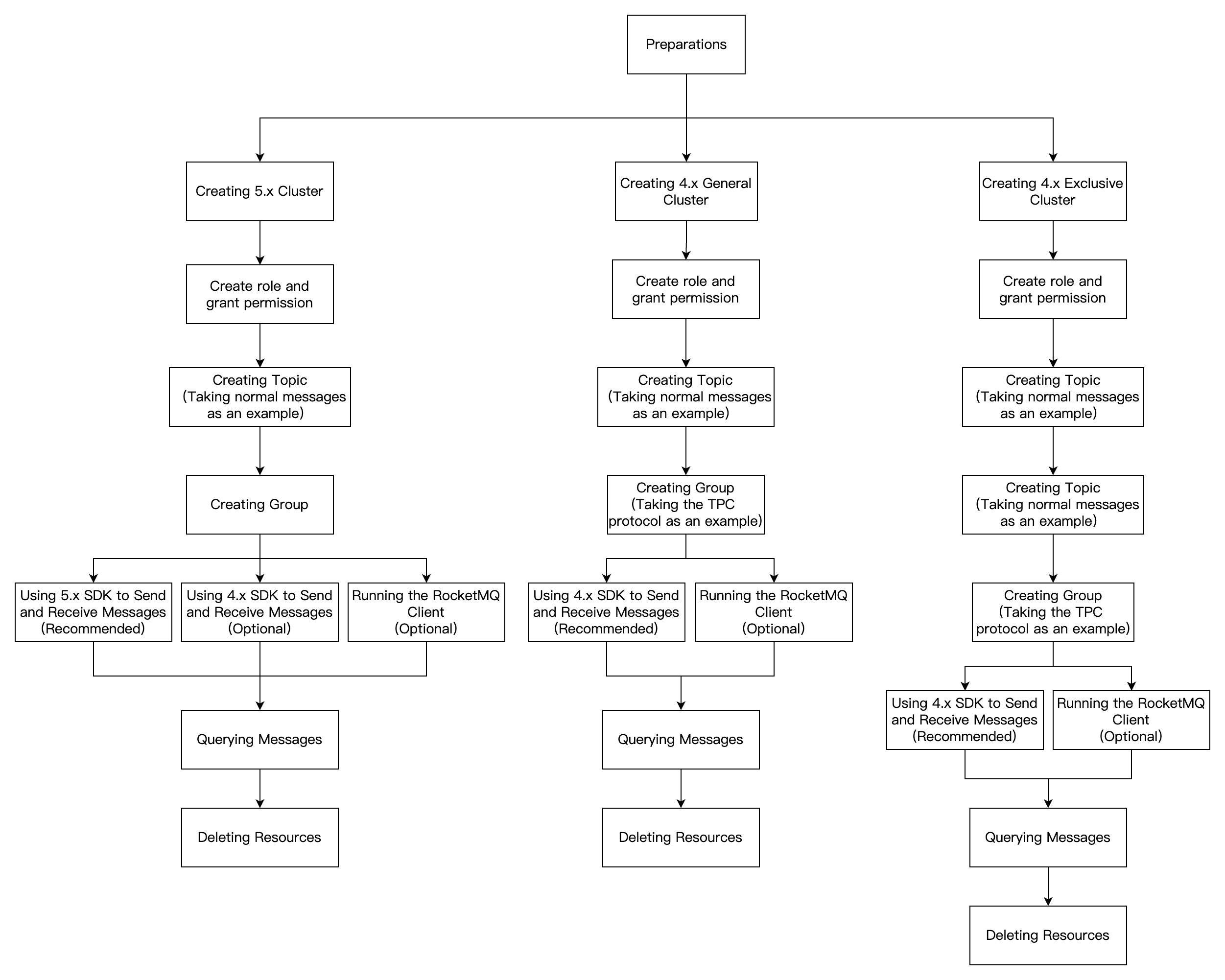
The operation process for getting started varies depending on the cluster type. The following diagram illustrates the process for sending and receiving messages using TDMQ for RocketMQ.


ヘルプとサポート

この記事はお役に立ちましたか?

フィードバック