tencent cloud

TDMQ for RocketMQ

Release Notes and Announcements
Release Notes
Announcements
Product Introduction
Introduction and Selection of the TDMQ Product Series
What Is TDMQ for RocketMQ
Strengths
Scenarios
Product Series
Comparison with Open-Source RocketMQ
High Availability
Quotas and Limits
Supported Regions
Basic Concepts
Billing
Billing Overview
Pricing
Billing Examples
Pay-as-you-go Switch to Monthly Subscription (5.x)
Renewal
Viewing Consumption Details
Refund
Overdue Payments
Getting Started
Getting Started Guide
Preparations
Step 1: Creating TDMQ for RocketMQ Resources
Step 2: Using the SDK to Send and Receive Messages (Recommended)
Step 2: Running the TDMQ for RocketMQ Client (Optional)
Step 3: Querying Messages
Step 4: Deleting Resources
User Guide
Usage Process Guide
Configuring Account Permissions
Creating the Cluster
Configuring the Namespace
Configuring the Topic
Configuring the Group
Connecting to the Cluster
Managing Messages
Managing the Cluster
Viewing Monitoring Data and Configuring Alarms
Cross-Cluster Message Replication
Use Cases
Naming Conventions for Common Concepts of TDMQ for RocketMQ
RocketMQ Client Use Cases
RocketMQ Performance Load Testing and Capacity Assessment
Access over HTTP
Client Risk Descriptions and Update Guide
Migration Guide for TencentCloud API Operations Related to RocketMQ 4.x Cluster Roles
Migration Guide
Disruptive Migration
Seamless Migration
Developer Guide
Message Types
Message Filtering
Message Retries
POP Consumption Mode (5.x)
Clustering Consumption and Broadcasting Consumption
Subscription Relationship Consistency
Traffic Throttling
​​API Reference(5.x)
History
API Category
Making API Requests
Topic APIs
Consumer Group APIs
Message APIs
Role Authentication APIs
Hitless Migration APIs
Cloud Migration APIs
Cluster APIs
Data Types
Error Codes
​​API Reference(4.x)
SDK Reference
SDK Overview
5.x SDK
4.x SDK
Security and Compliance
Permission Management
CloudAudit
Deletion Protection
FAQs
4.x Instance FAQs
Agreements
TDMQ for RocketMQ Service Level Agreement
Contact Us

Step 3: Querying Messages

PDF
フォーカスモード
フォントサイズ
最終更新日: 2026-01-23 17:16:38
After completing message sending and receiving, you can use the message query feature in the console to view the message content and trace records for a specified topic.

Operation Steps

1. Log in to the TDMQ for RocketMQ console. In the left sidebar, choose Message Query > General Query.
2. On the Comprehensive Query page, select a region and enter the query conditions according to the prompts.
Cluster: Select the cluster where the topic to be queried is located.
Topic: Select the topic to be queried.
Time Range: Select the time range of the query. Available options: last 100 messages (displayed in chronological order by default), last 30 minutes, last 1 hour, last 6 hours, last 24 hours, last 3 days, and a custom time range.
Query Methods: The message query feature supports the following query methods:
Query all: This method is suitable for querying all messages.
By message ID: This is a precise query method, with quick speed and accurate matching.
By message key: This is a fuzzy query method suitable for scenarios where you have not recorded the message ID but have set a message key. The query results display up to 64 messages. You can narrow down the query time range to pinpoint the desired messages.
Query by message tag: This is a fuzzy query method suitable for scenarios where you have not recorded the message ID but have set a message tag. The query results display up to 64 messages. You can narrow down the query time range to pinpoint the desired messages.
3. Click Query. The list at the bottom of the page displays all query results with pagination.
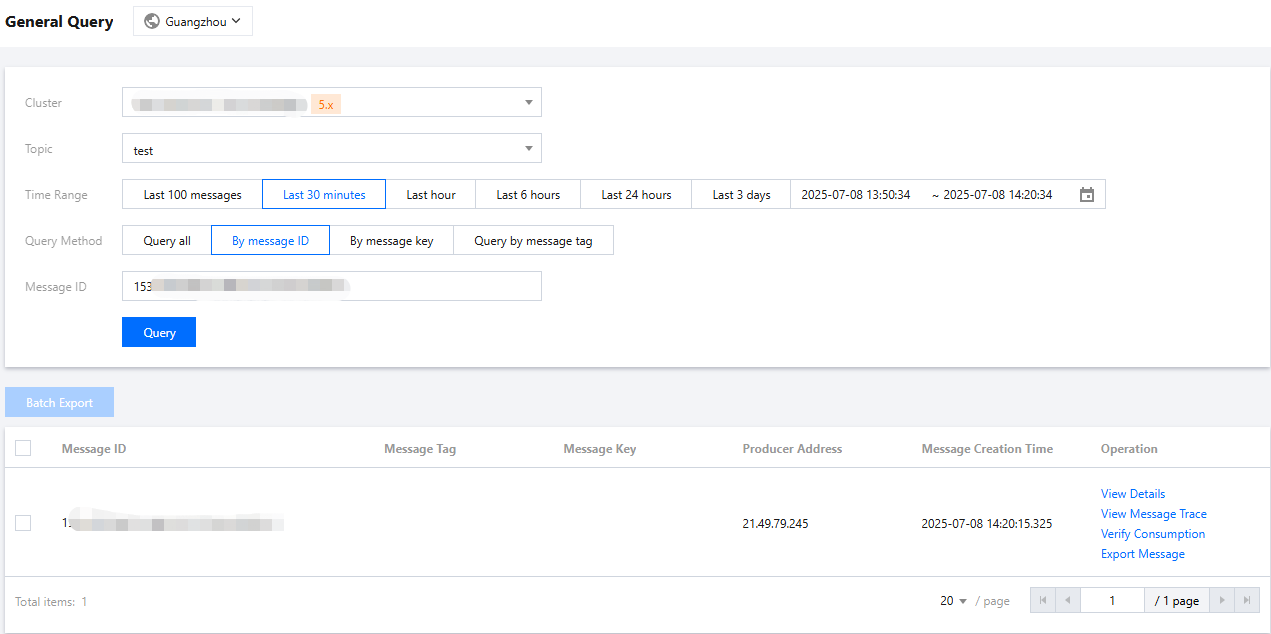
4. Find the message whose content or parameters you want to view, and click View Details in the operation column to view the basic information, content (message body), detailed parameters, and consumption status of the message.
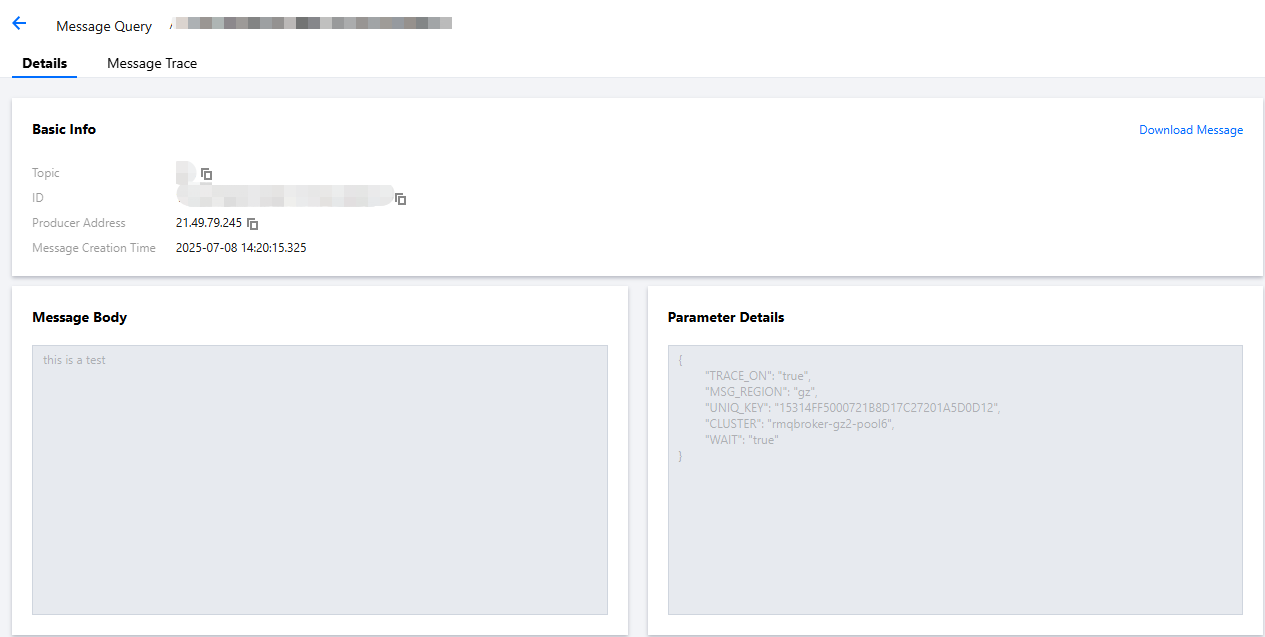
5. Click View Message Trace in the operation column, or click the Message Trace tab on the details page to view the message trace. For detailed description, see Message Trace and Description.


ヘルプとサポート

この記事はお役に立ちましたか?

フィードバック