AI Agent Outbound Call
Download
フォーカスモード
フォントサイズ
Description
You can integrate outbound call capabilities into your business system via calling AI Agent API or directly initiating AI outbound calls.
Prerequisite
Advanced edition software agent is required.
AI Outbound Calls require integration of self-owned phone number. You can use the test number provided after creating the application to try this feature.
Calling API to Initiate Outbound Call
Method 1: Call using the AI Voice Agent Created in the Management Console
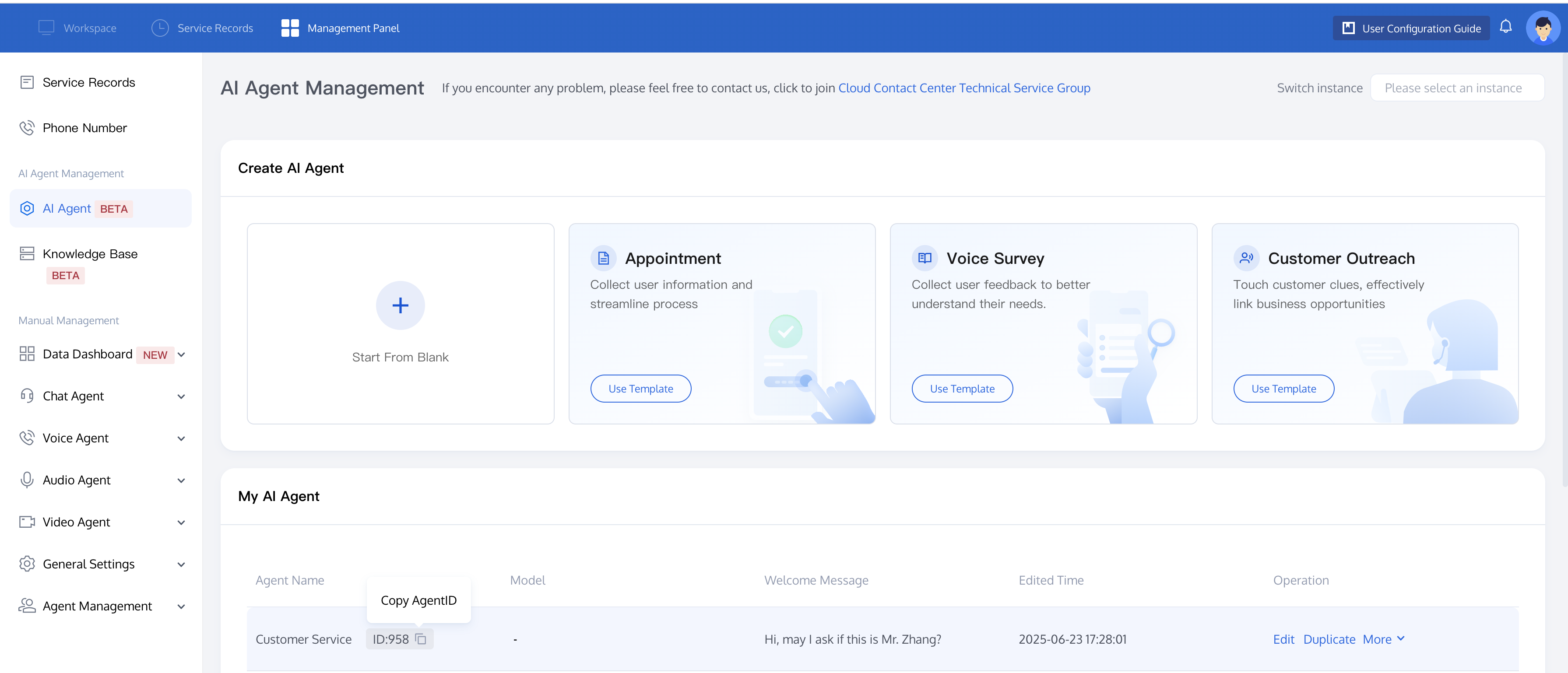
By calling the Create AI Agent API (CreateAIAgentCall), you can initiate an outbound call by providing the AI Agent ID, caller number, and recipient number. The method for obtaining the AI Agent ID is as follows:
After Integrating ChatGPT, go to the Tencent Cloud Contact Center (TCCC) Management Panel, click AI Agent in the left sidebar, and open My AI Agent module to view and manage your agents. Hover over an agent name to see its ID, then click the copy button to copy it.
Method 2: Directly Initiate AI Outbound Calls
If you need to change AI Agent properties frequently during outbound calls, you can skip the agent creation procedure and call the Create AI Session API (CreateAICall) directly.
Before initiating the call, please confirm that your model is compatible with OpenAI, Azure, or Minimax Protocol, and visit the model service provider's website for authentication information.
OpenAI Protocol
Currently, it supports general models such as GPT, Hunyuan, Deepseek, and Tongyi Qianwen.
{"LLMType": "openai", // fixed as "openai""Model": "gpt-4o-mini", // model name, supports LLMs compliant with OpenAI Protocol scale such as "hunyuan-standard", "deepseek-chat""APIKey": "114514", // The large model key is used to validate the identity of the requester. Please visit the model service provider's website to obtain authentication information."APIUrl": "https://xxx/v1/chat/completions" // Large model API address}
Common model parameter example:
Parameter | GPT | Deepseek |
Model | "gpt-4o-mini", "gpt-4o" | "deepseek-chat" |
API Key | To obtain related authentication information, see OpenAI Official Website | To obtain related authentication information, see Deepseek Official Website |
API URL | "https://api.openai.com/v1/" | "https://api.deepseek.com/v1" |
Azure Protocol
{"LLMType": "azure", //"Model": "gpt-4o-mini", // model name"APIKey": "114514", // The large model key is used to verify the requester's identity."APIUrl": "https://{your-resource-name}.openai.azure.com?api-version={api-version}"" // Large model API address}
Parameter | Example | Description |
LLM Type | azure | Protocol Name. |
Model | gpt-4o-mini | Model Name. |
API Key | 114514 | The large model key is used to verify the identity of the requester. For the specific acquisition method, refer to Azure OpenAI service documentation. |
API URL | https://{your-resource-name}.openai.azure.com?api-version={api-version} | Model API address. |
Minimax Protocol
{"LLMType": "minimax", //"Model": "abab6.5s-chat", // model name"APIKey": "114514", // The large model key is used to verify the requester's identity."APIUrl": "https://api.minimax.chat/v1" // Large model API address}
Parameter | Example | Description |
LLM Type | minimax | Protocol Name. |
Model | abab6.5s-chat | Model Name. |
API Key | 114514 | The large model key is used to verify the identity of the requester. For the specific acquisition method, refer to MiniMax Open Platform official website document. |
API URL | https://api.minimax.chat/v1 | Model API address. |
フィードバック