tencent cloud

Tencent Real-Time Communication

お知らせ・リリースノート
製品アップデート情報
Tencent Cloudオーディオビデオ端末SDKの再生アップグレードおよび承認チェック追加に関するお知らせ
TRTCアプリケーションのサブスクリプションパッケージサービスのリリースに関する説明について
製品の説明
製品概要
基礎概念
製品の機能
製品の強み
ユースケース
性能データ
購入ガイド
Billing Overview
無料時間の説明
Monthly subscription
Pay-as-you-go
TRTC Overdue and Suspension Policy
課金に関するよくあるご質問
Refund Instructions
初心者ガイド
Demo体験
Call
コンポーネントの説明(TUICallKit)
Activate the Service
Run Demo
クイック導入
オフライン通知
Conversational Chat
クラウドレコーディング(TUICallKit)
AI Noise Reduction
インターフェースのカスタマイズ
Calls integration to Chat
Additional Features
No UI Integration
Server APIs
Client APIs
Solution
ErrorCode
公開ログ
よくある質問
ライブ配信
Billing of Video Live Component
Overview
Activating the Service (TUILiveKit)
Demo のクイックスタート
No UI Integration
UI Customization
Live Broadcast Monitoring
Video Live Streaming
Voice Chat Room
Advanced Features
Client APIs
Server APIs
Error Codes
Release Notes
FAQs
RTC Engine
Activate Service
SDKのダウンロード
APIコードサンプル
Usage Guidelines
クライアント側 API
高度な機能
RTC RESTFUL API
History
Introduction
API Category
Room Management APIs
Stream mixing and relay APIs
On-cloud recording APIs
Data Monitoring APIs
Pull stream Relay Related interface
Web Record APIs
AI Service APIs
Cloud Slicing APIs
Cloud Moderation APIs
Making API Requests
Call Quality Monitoring APIs
Usage Statistics APIs
Data Types
Appendix
Error Codes
コンソールガイド
アプリケーション管理
使用統計
監視ダッシュボード
開発支援
Solution
Real-Time Chorus
よくあるご質問
課金関連問題
機能関連
UserSig関連
ファイアウォールの制限の対応関連
インストールパッケージの圧縮に関するご質問
AndriodおよびiOS関連
Web端末関連
Flutter関連
Electron関連
TRTCCalling Web関連
オーディオビデオ品質関連
その他のご質問
旧バージョンのドキュメント
TUIRoom(Web)の統合
TUIRoom (Android)の統合
TUIRoom (iOS)の統合
TUIRoom (Flutter)の統合
TUIRoom (Electron)の統合
TUIRoom APIのクエリー
クラウドレコーディングと再生の実現(旧)
Protocols and Policies
セキュリティコンプライアンス認証
セキュリティホワイトペーパー
情報セキュリティの説明
Service Level Agreement
Apple Privacy Policy: PrivacyInfo.xcprivacy
TRTC ポリシー
プライバシーポリシー
データ処理とセキュリティ契約
用語集

Flutter

PDF
聚焦模式
字号
最后更新时间: 2024-02-02 18:48:51
This document primarily delineates the process of sharing system sounds. At present, TRTC defaults not to collect the audio of the local application.

Call Guidelines

Android
iOS
This document primarily delineates the process of sharing system sounds. At present, TRTC defaults not to collect the audio of the local application.
Note:
Only Android 10.0 or higher supports sharing system audio.

Initiate system sound sharing

Step 1: Initiate Screen Sharing

Follow the steps in Enable screen sharing - Based on Android platform to turn on screen sharing.

Step 2: Initiate Share System Audio

By invoking the TRTCCloud's startSystemAudioLoopback interface, the collected system audio will be automatically mixed into the upstream.

Step 3: Terminate Share System Audio

Invoke the TRTCCloud's stopSystemAudioLoopback interface.

Step 1: Enable the microphone

Within the App, invoke startLocalAudio to kickstart microphone collection, and it's suggested to utilize TRTCAudioQualityDefault for audio quality.
Note:
This action is indispensable; by initiating microphone collection, the App can preserve its functioning even when relegated to the background.

Step 2: Initiate screen sharing

Due to the restrictions of iOS, system sounds can only be collected during screen recording. Therefore, to implement this feature, the iOS screen sharing function must be connected first.
Follow the steps in Enable Screen Sharing - Based on iOS platform to start screen recording, and system sound will be automatically collected.
Note:
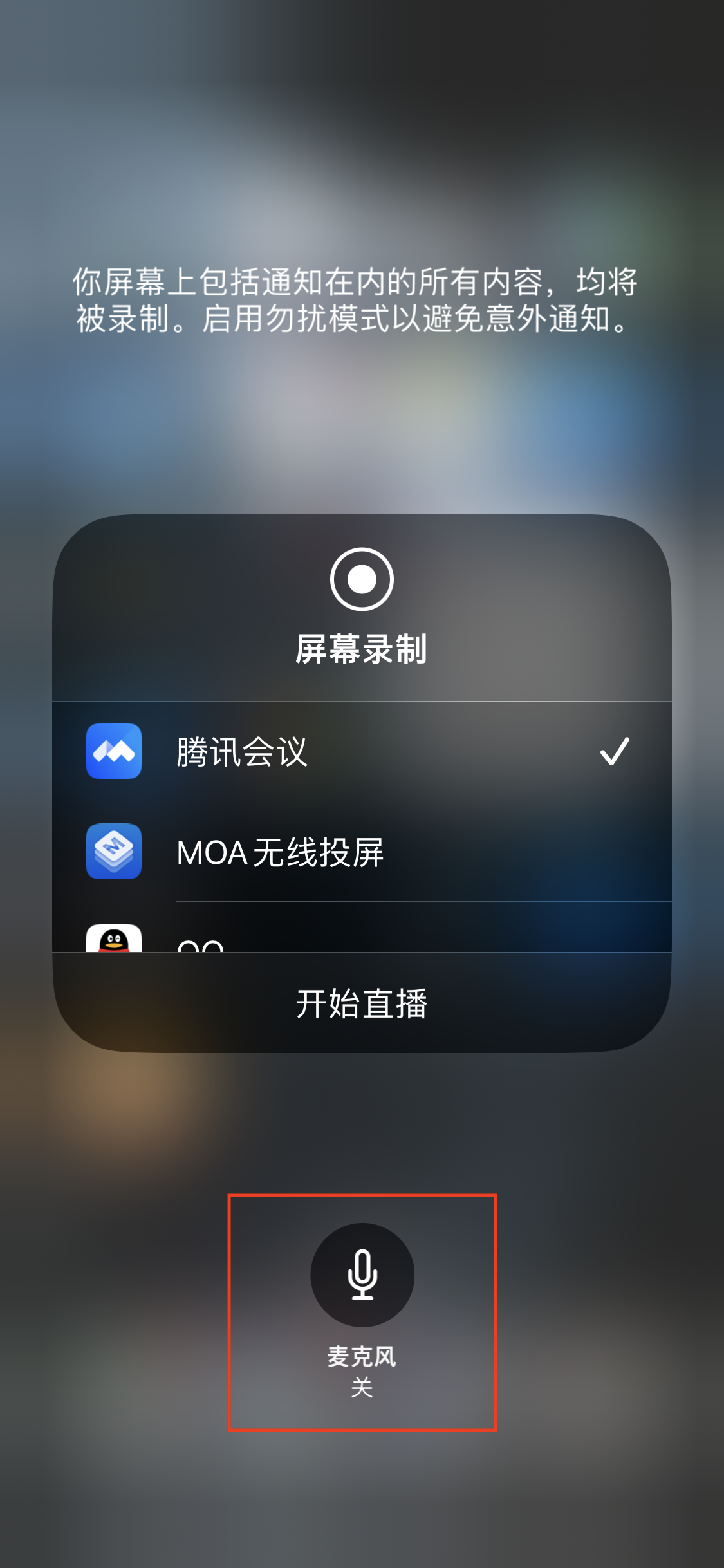
When starting screen recording, do not light up the microphone icon. Voice collection has already been started in the app.


Step 3: Midway open and close system sound

The system audio capture and screen recording are done concurrently, initiating automatically with the start of the recording and ceasing alongside the recording termination. It is not feasible to independently switch on or mute the system audio.
TRTCCloud proffers the setSystemAudioLoopbackVolume method for system audio volume conditioning. When there is no desire to output the system audio, the volume can be set to 0.


帮助和支持

本页内容是否解决了您的问题?

填写满意度调查问卷,共创更好文档体验。

文档反馈