Quick Start (Flutter)
Download
フォーカスモード
フォントサイズ
LiveListStore is the central module in AtomicXCore for managing live room lists and handling all aspects of live room lifecycle, including creation, entry, and state maintenance. Use LiveListStore to implement robust live streaming lifecycle management in your application.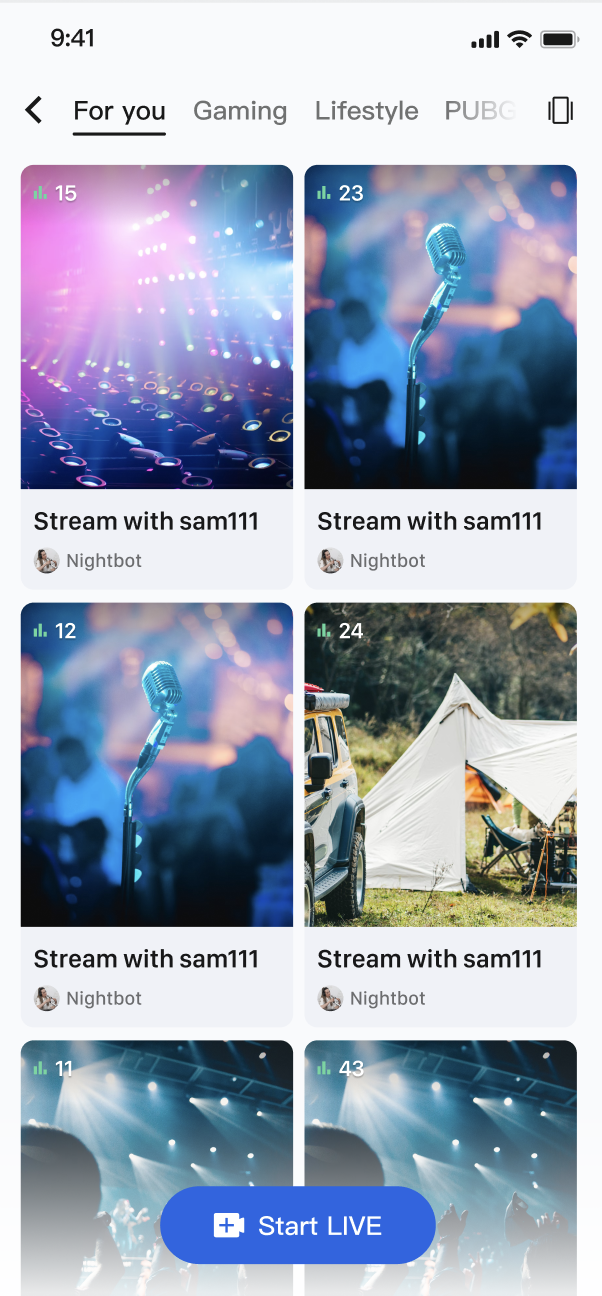
Core Features
Get live room list: Obtain the current list of all public live rooms, supporting load by page.
Live stream lifecycle management: Provides a complete process API for creation, going live, joining, leaving, and ending live stream.
Live stream information update: Hosts can update publicly available information in the live streaming room at any time, such as cover and notice.
Real-time event monitoring: Listen to key events such as live streaming end and users being kicked out.
Custom business data: Powerful custom metadata (
MetaData) capacity allows you to store and synchronize any business-relevant information in the room, such as live status, music info, and custom role.Core Concepts
Before starting integration, let's learn about several core concepts related to
LiveListStore in the following table:Core Concepts | Type | Core Responsibilities and Description |
class | Represents the information model of a live room. It contains live ID ( liveID), name (liveName), room owner information (liveOwner) and custom metadata (metaData). | |
class | Represents the current status of the live list module. Its core attribute liveList is a ValueListenable<List<LiveInfo>> data type, storing the fetched live stream list. currentLive represents the live room information where the user currently resides. | |
class | Represents the global event listener for a live streaming room. It includes two callbacks, onLiveEnded (live streaming end) and onKickedOutOfLive (kicked out of live), used to process key room status updates. | |
class | This is the core management class for interaction with the live list and room lifecycle. It is a Global Singleton ( shared), responsible for all live streaming room operations such as create, join, and information update. |
Implementation Steps
Step 1: Integrate the Component
Live streaming: Refer to Quick Integration with AtomicXCore, and complete the feature implementation for Go Live (Host) and audience viewing.
Voice chat room: Refer to Quick Integration with AtomicXCore, and complete the feature implementation for Go Live (Host) and audience listening.
Step 2: Implement Audience Entry to Live Room
Create a page to display a live broadcast list. This page uses
GridView to layout live streaming room cards. When a user clicks a certain card, get the liveID of the room and navigate to the audience viewing page.import 'package:flutter/material.dart';import 'package:atomic_x_core/atomicxcore.dart';/// Live stream list pageclass LiveListPage extends StatefulWidget {const LiveListPage({super.key});@overrideState<LiveListPage> createState() => _LiveListPageState();}class _LiveListPageState extends State<LiveListPage> {final _liveListStore = LiveListStore.shared;final ScrollController _scrollController = ScrollController();bool _isLoading = false;@overridevoid initState() {super.initState();_liveListStore.liveState.liveList.addListener(_onLiveListChanged);_scrollController.addListener(_onScroll);_fetchLiveList();}void _onLiveListChanged() {setState(() {});}void _onScroll() {// Load more when scrolling to the bottomif (_scrollController.position.pixels >=_scrollController.position.maxScrollExtent - 200) {_loadMore();}}Future<void> _fetchLiveList() async {if (_isLoading) return;setState(() => _isLoading = true);final result = await _liveListStore.fetchLiveList(cursor: '', count: 20);if (!result.isSuccess) {debugPrint('List live stream failed: ${result.message}');}setState(() => _isLoading = false);}Future<void> _loadMore() async {if (_isLoading) return;final cursor = _liveListStore.liveState.liveListCursor.value;if (cursor.isEmpty) return; // no more datasetState(() => _isLoading = true);await _liveListStore.fetchLiveList(cursor: cursor, count: 20);setState(() => _isLoading = false);}Future<void> _refresh() async {_liveListStore.reset();await _fetchLiveList();}// When user click certain card in the listvoid _onLiveCardTap(LiveInfo liveInfo) {// Create an audience viewing webpage and input the liveIDNavigator.push(context,MaterialPageRoute(builder: (context) => YourAudiencePage(liveID: liveInfo.liveID),),);}@overridevoid dispose() {_liveListStore.liveState.liveList.removeListener(_onLiveListChanged);_scrollController.dispose();super.dispose();}@overrideWidget build(BuildContext context) {final liveList = _liveListStore.liveState.liveList.value;return Scaffold(appBar: AppBar(title: const Text('Live Stream List')),body: RefreshIndicator(onRefresh: _refresh,child: liveList.isEmpty? Center(child: _isLoading? const CircularProgressIndicator()const Text('No live stream')): GridView.builder(controller: _scrollController,padding: const EdgeInsets.all(8),gridDelegate: const SliverGridDelegateWithFixedCrossAxisCount(crossAxisCount: 2,childAspectRatio: 0.75,crossAxisSpacing: 8,mainAxisSpacing: 8,),itemCount: liveList.length + (_isLoading ? 1 : 0),itemBuilder: (context, index) {if (index >= liveList.length) {return const Center(child: CircularProgressIndicator());}return _buildLiveCard(liveList[index]);},),),);}Widget _buildLiveCard(LiveInfo liveInfo) {return GestureDetector(onTap: () => _onLiveCardTap(liveInfo),child: Card(clipBehavior: Clip.antiAlias,child: Column(crossAxisAlignment: CrossAxisAlignment.start,children: [Cover imageExpanded(child: Stack(fit: StackFit.expand,children: [Image.network(liveInfo.coverURL,fit: BoxFit.cover,errorBuilder: (context, error, stackTrace) {return Container(color: Colors.grey[300]);},),// Live stream tagPositioned(top: 8,left: 8,child: Container(padding: const EdgeInsets.symmetric(horizontal: 6,vertical: 2,),decoration: BoxDecoration(color: Colors.red,borderRadius: BorderRadius.circular(4),),child: const Text(Live streamingstyle: TextStyle(color: Colors.white, fontSize: 10),),),),viewersPositioned(bottom: 8,right: 8,child: Container(padding: const EdgeInsets.symmetric(horizontal: 6,vertical: 2,),decoration: BoxDecoration(color: Colors.black54,borderRadius: BorderRadius.circular(4),),child: Row(mainAxisSize: MainAxisSize.min,children: [const Icon(Icons.visibility,color: Colors.white,size: 12,),const SizedBox(width: 4),Text('${liveInfo.totalViewerCount}',style: const TextStyle(color: Colors.white,fontSize: 10,),),],),),),],),),// Live streaming informationPadding(padding: const EdgeInsets.all(8),child: Column(crossAxisAlignment: CrossAxisAlignment.start,children: [Text(liveInfo.liveName,maxLines: 1,overflow: TextOverflow.ellipsis,style: const TextStyle(fontWeight: FontWeight.bold),),const SizedBox(height: 4),Row(children: [CircleAvatar(radius: 10,backgroundImage: NetworkImage(liveInfo.liveOwner.avatarURL,),),const SizedBox(width: 4),Expanded(child: Text(liveInfo.liveOwner.userName,maxLines: 1,overflow: TextOverflow.ellipsis,style: TextStyle(fontSize: 12,color: Colors.grey[600],),),),],),],),),],),),);}}/// Audience viewing webpage (placeholder)class YourAudiencePage extends StatelessWidget {final String liveID;const YourAudiencePage({super.key, required this.liveID});@overrideWidget build(BuildContext context) {return Scaffold(appBar: AppBar(title: const Text('Live Streaming Room')),body: Center(child: Text('Live Streaming Room: $liveID')),);}}
LiveInfo Parameters
Parameter Name | Type | Description |
liveID | String | Unique identifier of the live streaming room. |
liveName | String | Title of the live streaming room. |
coverURL | String | Thumbnail URL of the live streaming room. |
liveOwner | LiveUserInfo | Room owner's personal info. |
totalViewerCount | int | Total viewers in the live streaming room. |
categoryList | List<int> | Category tag list of the live streaming room. |
notice | String | Announcement information in the live streaming room. |
metaData | Map<String, String> | Custom metadata for complex business scenarios. |
Advanced Usage
Scenario 1: Categorized Live Room List
On the live square page of the App, the top section features category tags such as "Popular," "Music," and "Gaming." When users click different tags, the live stream list below dynamically filters to show only live streaming rooms of the corresponding category, thereby helping users quickly identify content of interest.
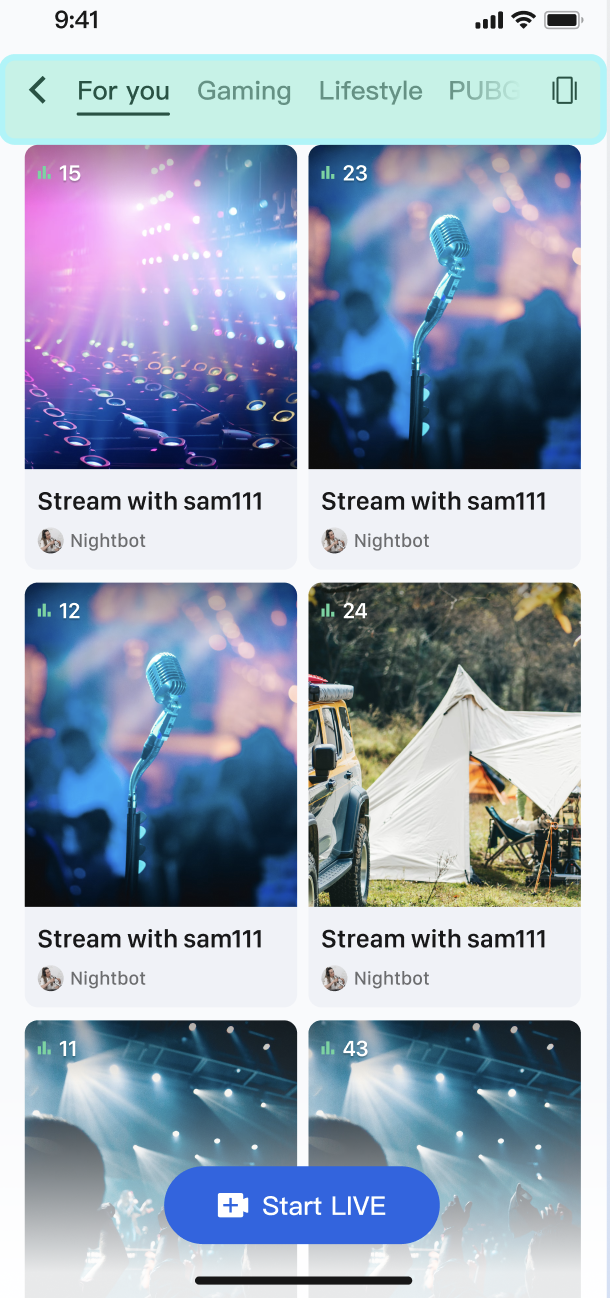
How It Works
The core is to use the
categoryList property in the LiveInfo model. When the host starts live streaming and sets the category, the LiveInfo object returned by fetchLiveList will contain this classification information. After your App obtains the complete live list, just perform a simple filter on the client according to the user's selected category, then refresh the UI.Sample Code
The following example shows how to create a
LiveListManager to handle data and filter logic.import 'package:flutter/material.dart';import 'package:atomic_x_core/atomicxcore.dart';/// Live stream list data managerclass LiveListManager extends ChangeNotifier {final _liveListStore = LiveListStore.shared;List<LiveInfo> _fullLiveList = [];List<LiveInfo> _filteredLiveList = [];int? _selectedCategoryId;List<LiveInfo> get filteredLiveList => _filteredLiveList;int? get selectedCategoryId => _selectedCategoryId;late final VoidCallback _liveListChangedListener = _onLiveListChanged;LiveListManager() {_liveListStore.liveState.liveList.addListener(_liveListChangedListener);}void _onLiveListChanged() {_fullLiveList = _liveListStore.liveState.liveList.value;_applyFilter();}Future<void> fetchFirstPage() async {_liveListStore.reset();await _liveListStore.fetchLiveList(cursor: '', count: 20);}/// Filter live stream list by categoryvoid filterLiveList({int? categoryId}) {_selectedCategoryId = categoryId;_applyFilter();}void _applyFilter() {if (_selectedCategoryId == null) {// If categoryId is null, display the complete list_filteredLiveList = List.from(_fullLiveList);} else {// Filter live streaming rooms by specified category_filteredLiveList = _fullLiveList.where((liveInfo) {return liveInfo.categoryList.contains(_selectedCategoryId);}).toList();}notifyListeners();}@overridevoid dispose() {_liveListStore.liveState.liveList.removeListener(_liveListChangedListener);super.dispose();}}
/// Live stream list webpage with category filteringclass CategoryLiveListPage extends StatefulWidget {const CategoryLiveListPage({super.key});@overrideState<CategoryLiveListPage> createState() => _CategoryLiveListPageState();}class _CategoryLiveListPageState extends State<CategoryLiveListPage> {final _manager = LiveListManager();late final VoidCallback _managerChangedListener = _onManagerChanged;// Classification list (example)final List<Map<String, dynamic>> _categories = [{'id': null, 'name': 'All'},{'id': 1, 'name': 'Music'},{'id': 2, 'name': 'Game'},{'id': 3, 'name': 'Chat'},];@overridevoid initState() {super.initState();_manager.addListener(_managerChangedListener);_manager.fetchFirstPage();}void _onManagerChanged() {setState(() {});}// When the user clicks the top category tagvoid _onCategoryTap(int? categoryId) {_manager.filterLiveList(categoryId: categoryId);}@overridevoid dispose() {_manager.removeListener(_managerChangedListener);_manager.dispose();super.dispose();}@overrideWidget build(BuildContext context) {return Scaffold(appBar: AppBar(title: const Text('Live Streaming Plaza')),body: Column(children: [// Category tag barSizedBox(height: 50,child: ListView.builder(scrollDirection: Axis.horizontal,padding: const EdgeInsets.symmetric(horizontal: 8),itemCount: _categories.length,itemBuilder: (context, index) {final category = _categories[index];final isSelected = _manager.selectedCategoryId == category['id'];return Padding(padding: const EdgeInsets.symmetric(horizontal: 4),child: ChoiceChip(label: Text(category['name']),selected: isSelected,onSelected: (_) => _onCategoryTap(category['id']),),);},),),// Live stream listExpanded(child: _manager.filteredLiveList.isEmpty? const Center(child: Text('No live stream')): GridView.builder(padding: const EdgeInsets.all(8),gridDelegate:const SliverGridDelegateWithFixedCrossAxisCount(crossAxisCount: 2,childAspectRatio: 0.75,crossAxisSpacing: 8,mainAxisSpacing: 8,),itemCount: _manager.filteredLiveList.length,itemBuilder: (context, index) {final liveInfo = _manager.filteredLiveList[index];return _buildLiveCard(liveInfo);},),),],),);}Widget _buildLiveCard(LiveInfo liveInfo) {return Card(clipBehavior: Clip.antiAlias,child: Column(crossAxisAlignment: CrossAxisAlignment.start,children: [Expanded(child: Image.network(liveInfo.coverURL,fit: BoxFit.cover,width: double.infinity,errorBuilder: (context, error, stackTrace) {return Container(color: Colors.grey[300]);},),),Padding(padding: const EdgeInsets.all(8),child: Text(liveInfo.liveName,maxLines: 1,overflow: TextOverflow.ellipsis,),),],),);}}
Scenario 2: Show Product Information in Live Shopping
During e-commerce live streaming, when the host introduces a product, a product card appears below the live video for all viewers, showing the product image, name, and price in real time. When the host switches products, the product card is instantly synchronized across all audience clients.
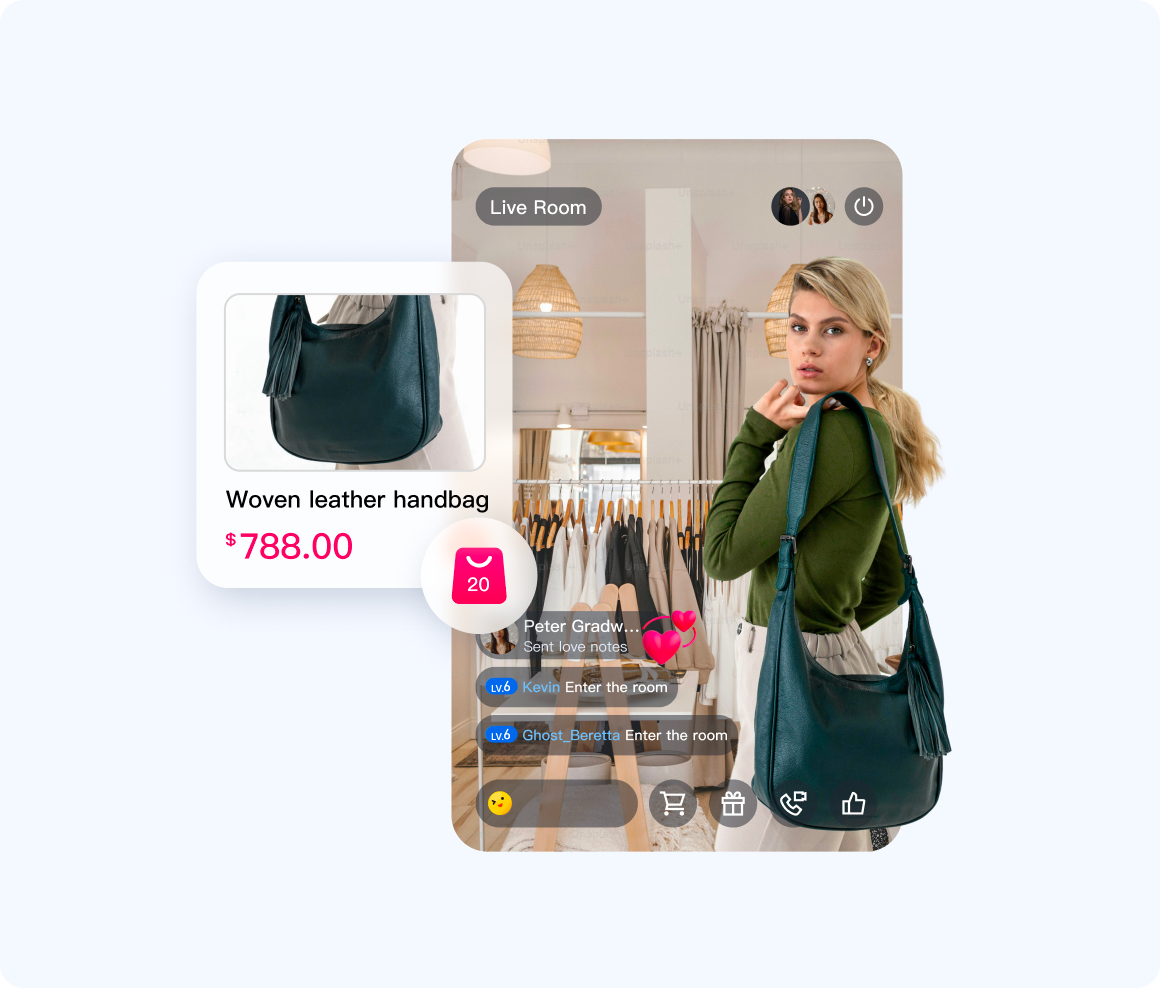
How It Works
On the host side, set the current product's structured information (preferably in JSON format) to a custom key (for example, "product_info") using the
updateLiveMetaData API. AtomicXCore will instantly sync this data to all viewers. On the audience side, subscribe to LiveListState.currentLive and listen for changes in metaData. When product_info updates, parse the JSON and refresh the product card UI.Sample Code
import 'dart:convert';import 'package:flutter/material.dart';import 'package:atomic_x_core/atomicxcore.dart';/// Product Information Modelclass Product {final String id;final String name;final String price;final String imageUrl;Product({required this.id,required this.name,required this.price,required this.imageUrl,});factory Product.fromJson(Map<String, dynamic> json) {return Product(id: json['id'] ?? '',name: json['name'] ?? '',price: json['price'] ?? '',imageUrl: json['imageUrl'] ?? '',);}Map<String, dynamic> toJson() {return {'id': id,'name': name,'price': price,'imageUrl': imageUrl,};}}/// Host: Push product informationclass HostProductController {final _liveListStore = LiveListStore.shared;Future<void> pushProductInfo(Product product) async {final jsonString = jsonEncode(product.toJson());final metaData = {'product_info': jsonString};// Use Global Singleton liveListStore to update metaDatafinal result = await _liveListStore.updateLiveMetaData(metaData);if (result.isSuccess) {debugPrint('Product ${product.name} pushed successfully');} else {debugPrint('Product information sending failed: ${result.message}');}}}/// Client: Product card componentclass ProductCardWidget extends StatefulWidget {const ProductCardWidget({super.key});@overrideState<ProductCardWidget> createState() => _ProductCardWidgetState();}class _ProductCardWidgetState extends State<ProductCardWidget> {final _liveListStore = LiveListStore.shared;Product? _currentProduct;String? _lastProductInfo;late final VoidCallback _currentLiveChangedListener = _onCurrentLiveChanged;@overridevoid initState() {super.initState();_liveListStore.liveState.currentLive.addListener(_currentLiveChangedListener);}void _onCurrentLiveChanged() {final currentLive = _liveListStore.liveState.currentLive.value;final productInfo = currentLive.metaData['product_info'];// Check whether changedif (productInfo != _lastProductInfo) {_lastProductInfo = productInfo;_parseProductInfo(productInfo);}}void _parseProductInfo(String? jsonString) {if (jsonString == null || jsonString.isEmpty) {setState(() => _currentProduct = null);return;}try {final json = jsonDecode(jsonString) as Map<String, dynamic>;final product = Product.fromJson(json);setState(() => _currentProduct = product);} catch (e) {debugPrint('Failed to parse product information: $e');}}@overridevoid dispose() {_liveListStore.liveState.currentLive.removeListener(_currentLiveChangedListener);super.dispose();}@overrideWidget build(BuildContext context) {if (_currentProduct == null) {return const SizedBox.shrink();}return Container(margin: const EdgeInsets.all(16),padding: const EdgeInsets.all(12),decoration: BoxDecoration(color: Colors.white,borderRadius: BorderRadius.circular(12),boxShadow: [BoxShadow(color: Colors.black.withOpacity(0.1),blurRadius: 8,offset: const Offset(0, 2),),],),child: Row(children: [product imageClipRRect(borderRadius: BorderRadius.circular(8),child: Image.network(_currentProduct!.imageUrl,width: 80,height: 80,fit: BoxFit.cover,errorBuilder: (context, error, stackTrace) {return Container(width: 80,height: 80,color: Colors.grey[300],child: const Icon(Icons.image),);},),),const SizedBox(width: 12),product informationExpanded(child: Column(crossAxisAlignment: CrossAxisAlignment.start,mainAxisSize: MainAxisSize.min,children: [Text(_currentProduct!.name,style: const TextStyle(fontSize: 14,fontWeight: FontWeight.bold,),maxLines: 2,overflow: TextOverflow.ellipsis,),const SizedBox(height: 4),Text('¥${_currentProduct!.price}',style: const TextStyle(fontSize: 16,color: Colors.red,fontWeight: FontWeight.bold,),),],),),purchase buttonElevatedButton(onPressed: () {// Implement purchase logicdebugPrint('Purchase goods: ${_currentProduct!.name}');},style: ElevatedButton.styleFrom(backgroundColor: Colors.orange,foregroundColor: Colors.white,),child: const Text('Buy now'),),],),);}}
API documentation
For detailed information about all public interfaces, properties and methods of LiveListStore and its related classes, please refer to the official API documentation of the AtomicXCore framework. The related Store used in this document is as follows:
Store/Component | Feature Description | API Reference |
LiveCoreWidget | The core view component for live video stream display and interaction: responsible for video stream rendering and view widget processing, supporting live streaming, audience mic connection, Host Connection (TUILiveKit), and other scenarios. | |
LiveCoreController | Controller for LiveCoreWidget: used to set up live streaming ID, control preview, and perform other operations. | |
LiveListStore | Full lifecycle management of live streaming room: create/join/leave/terminate room, query room list, modify live information (name, notice), listen to live streaming status (for example being kicked out, ended). |
FAQs
What restrictions and rules apply to updateLiveMetaData?
To ensure system stability and efficiency, the usage of
metaData follows the following rules:Permission: Only the room owner and admin can call the API
updateLiveMetaData. General audience has no permission.Quantity and size limit:
A single room supports up to 10 keys.
The length of each key does not exceed 50 bytes, and the length of each value does not exceed 2KB.
The total size of ALL values in a single room is no more than 16KB.
Conflict Handling: The update mechanism for metaData is "last write wins." If multiple administrators modify the same key in quick succession, the latest change is applied. To avoid conflicts, design your business logic so that only one person modifies a given key at a time.
フィードバック