tencent cloud

Tencent Cloud Distributed Cache (Redis OSS-Compatible)

Release Notes and Announcements
Release Notes
Announcements
User Tutorial
Product Introduction
Overview
Product Strengths
Use Cases
Storage Engine
Product Series
Product Versions
Specifications and Performance
Read/Write Separation
Multi-AZ Deployment
Regions and AZs
Terms
Service Regions and Service Providers
Purchase Guide
Billing Overview
Pricing Center
Instance Purchasing
Renewal (Yearly/Monthly Subscription)
Refund (Yearly/Monthly Subscription)
Overdue Payments
Switching from Pay-as-You-Go to Yearly/Monthly Subscription
Getting Started
Quickly Creating an Instance
Connecting to Redis Instance
Operation Guide
Operation Overview
Connecting to a Database Instance
Managing Instances
Upgrade Instance
Management Node (Redis/ValKey Edition)
Multi-AZ Deployment Management
Backup and Restoration
Managing Accounts
Parameter Configuration
Slow Query
Access Management
Network and Security
Monitoring and Alarms
Event Management (Redis/ValKey Edition)
Data Migration
Global Replication for Redis Edition
Database Audit
Performance Optimization
Sentinel Mode
Development Guidelines
Naming Rules
Basic Usage Guidelines
Design Principles of Key and Value
Command Usage Guidelines
Design Principles of Client Programs
Connection Pool Configuration
Command Reference
Command Reference Overview
Redis Edition and Valkey Edition Command Compatibility
Version Command Usage Differences
Differences Between the Proxy Architecture and Direct Connection Mode
More Command Operations (Redis/Valkey Edition)
Memcached Edition Command Compatibility
Practical Tutorial
Building TencentDB for Redis® Client Monitoring Based on Spring Boot
Redis Client Connection Configuration Policy and Practice
Global SCAN Guide for Cluster Architecture
Eliminating Instances Securely
Hot Key and Big Key
AZ Migration Scheme
Troubleshooting
Connection Exception
Exception Analysis and Solution of Redisson Client Timeout Reconnection
Performance Troubleshooting and Fine-Tuning
API Documentation
History
Introduction
API Category
Making API Requests
Instance APIs
Parameter Management APIs
Other APIs
Backup and Restoration APIs
Region APIs
Monitoring and Management APIs
Log APIs
Data Types
Error Codes
FAQs
General
Connection and Login
Purchase
Service Agreement
Service Level Agreement
Terms of Service
Glossary
Contact Us

iptables Forwarding

PDF
포커스 모드
폰트 크기
마지막 업데이트 시간: 2026-03-18 09:56:39

Overview

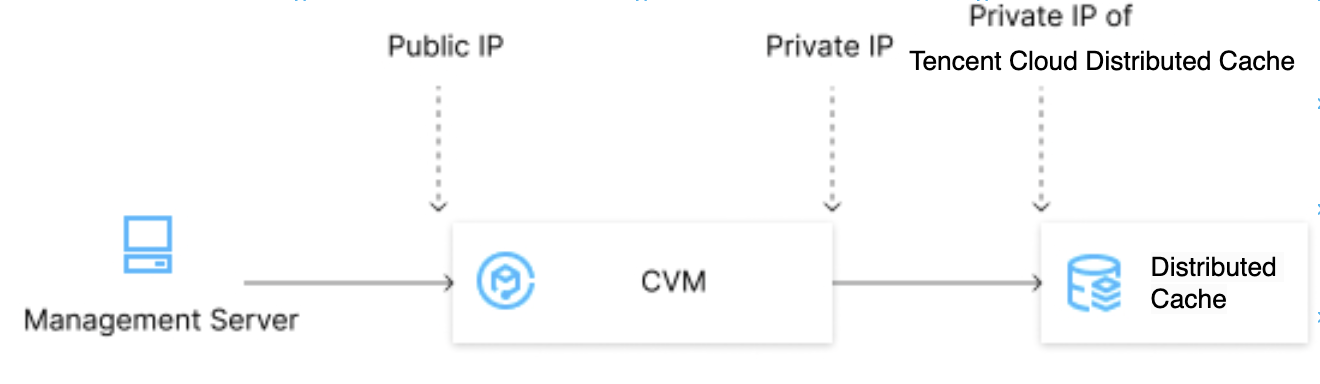
Tencent Cloud Distributed Cache supports public network access in Chengdu, Beijing, Shanghai, and Guangzhou regions. To use public network access in other regions, you can use a CVM instance with a public IP for port forwarding to access Tencent Cloud Distributed Cache over the public network.
Note:
Because iptables-based forwarding may be unstable, we recommend that you do not access instances over the public network in the production environment.

Directions

1. Log in to a CVM instance and enable the IP forwarding feature. For more information, see Logging In to Linux Instance (Web Shell).
Note:
The CVM and TencentDB instances must be under the same account and in the same VPC in the same region, or both in the classic network.
echo 1 > /proc/sys/net/ipv4/ip_forward

Running Environment

Operating System: Ubuntu 24.04.3 LTS / x86_64

Runtime Version: GNU bash, version 5.2.21(1)-release (x86_64-pc-linux-gnu)

2. Configure the forwarding rule. The sample code below forwards access requests originally to 26.xx.x.2:10001 (CVM instance public address with a custom port as desired) to the Tencent Cloud Distributed Cache instance with the private address 10.0.0.5:6379:
iptables -t nat -A PREROUTING -p tcp --dport 10001 -j DNAT --to-destination 10.0.0.5:6379
iptables -t nat -A POSTROUTING -d 10.0.0.5 -p tcp --dport 6379 -j MASQUERADE

Running Environment

Operating System: Ubuntu 24.04.3 LTS / x86_64

Runtime Version: GNU bash, version 5.2.21(1)-release (x86_64-pc-linux-gnu)

3. Configure the security group to open the public port of the CVM instance. We recommend that you configure a security group rule to allow only the source which needs to connect to the instance.
4. To connect to the Distributed Cache instance in the private network using a public network address (26.xx.xx.2:10001 in the sample code), you can use the same command as the private network connection command. For more information, see Connecting to Tencent Cloud Distributed Cache Instances > Connecting via Client Tool.
5. After connecting to the Tencent Cloud Distributed Cache instance, run the info command. If the database information is returned, the connection is successful.

도움말 및 지원

문제 해결에 도움이 되었나요?

피드백