A Node.js function generally has the following two forms:
Example 1:
exports.main_handler=async(event, context)=>{
console.log(event);
console.log(context);
return event
};
Example 2:
exports.main_handler=(event,context,callback)=>{
console.log(event);
console.log(context);
callback(null,"hello world");
}
Execution Method
When you create an SCF function, you need to specify an execution method. If the Node.js programming language is used, the execution method is similar to index.main_handler, where index indicates that the executed entry file is index.js, and main_handler indicates that the executed entry function is main_handler. When submitting the zip code package by uploading the zip file locally or through COS, please make sure that the root directory of the package contains the specified entry file, the file contains the entry function specified by the definition, and the names of the file and function match those entered in the trigger; otherwise, execution will fail as the entry file or entry function cannot be found.
Input Parameters
The input parameters in the Node.js environment include event, context, and callback, where callback is optional.
event: This parameter is used to pass the trigger event data.
context: This parameter is used to pass runtime information to your handler.
callback (optional): callback is a function that can be used in non-async handlers to return a response. The response object must be compatible with JSON.stringify. The callback function has two parameters: Error and response. When invoking this function, SCF will wait for the function to complete before returning a response or error.
Return and Exception
Async handler
Async handlers must use the async keyword, use return to return a response, and use throw to return an error message.
In SCF, if your Node.js function contains an async task, a promise must be returned to ensure that the task is executed on the current invocation. When you fulfill or reject the promise, SCF will return a response or error message.
Note:
The promise method does not support returning with the callback method. You should use return.
For non-async handlers, the function will be continuously executed until the function execution completes or times out, and SCF will return a response or error message.
Note:
Some externally referenced libraries may cause the event loop to never get empty, which leads to timeout due to failed return of the function. In order to avoid the impact of external libraries, you can control the function return timing by turning off event loop wait. You can modify the default callback behavior by setting context.callbackWaitsForEmptyEventLoop to false to avoid waiting for the event loop to get empty.
By setting context.callbackWaitsForEmptyEventLoop = false; before the callback callback is executed, the SCF backend can freeze the process immediately after the callback callback is invoked and return immediately after the sync process is completed without waiting for the event in the event loop.
Sample non-async handler:
exports.main_handler=(event, context,callback)=>{
context.callbackWaitsForEmptyEventLoop =false
callback(null,'success')
setTimeout(()=>{
console.log('finish')
},5000);
};
Async Feature Support
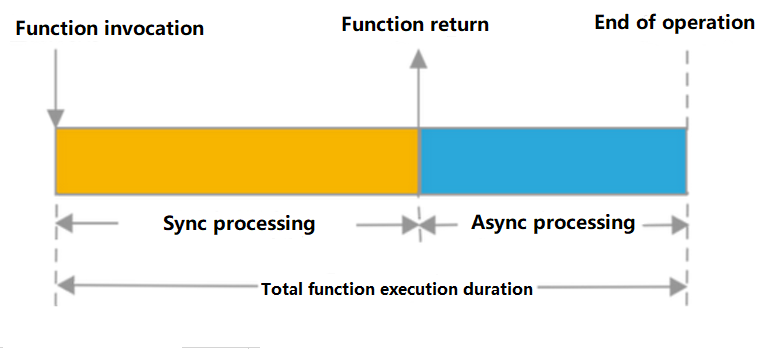
In the runtime of Node.js 10.15 and above, sync execution return and async event processing can be performed separately:
After the sync execution process of an entry function is completed and the result is returned, function invocation will immediately return its result, and the return information in the code will be send to the function invoker.
After the sync process is completed and the result returned, the async logic in the code will continue to be executed and processed. The actual function execution process ends and exits only when the async event is completely executed.
Note:
SCF logs are collected and processed after the entire execution process ends. Therefore, before the sync execution process is completed and the result is returned, logs and operation information such as time used and memory utilization cannot be provided in the SCF return information. You can query the detailed information in logs by using Request Id after the actual function execution process is completed.
The function execution duration is calculated based on the async event execution duration. If the async event queue cannot get empty or its execution cannot be completed, function timeout will occur. In this case, the invoker may have received the correct response result of the function, but the execution status of the function will still be marked as failure due to timeout, and the timeout period will be calculated as the execution duration.
The sync and async execution attributes, return time, and execution duration in Node.js are as shown below:
Async attribute sample
Use the following sample code to create a function, where the setTimeout method is used to set a function that will be executed in 2 seconds:
After saving the code, you can invoke this function through the testing feature in the console or the Invoke API. You can see that the function can return the result in a response period below 1 second.
You can see the following statistics in the function execution log:
A 2,005-ms execution period is logged. You can also find in the log that the arg => data is output 2 seconds later, which shows that the relevant async operations are executed in the current invocation after the execution of the sync process is completed, while function invocation ends after execution of the async task is completed.