Modifying Account Permissions
Baixar
Modo Foco
Tamanho da Fonte
You can authorize and manage existing database accounts via the console, granting them global privileges or object-level privileges, while simultaneously being able to revoke their authorizations.
Account Permissions Overview
Permission name | Description |
ALTER | Modify the structure of tables in the database, including permissions for altering table fields, adding table fields, deleting table fields, as well as creating and removing table indexes. |
ALTER ROUTINE | Privileges to alter routines such as stored procedures and functions. |
CREATE | Privileges to create new objects such as databases, tables, views, stored procedures, and functions. |
CREATE ROUTINE | Privileges to create routine objects such as stored procedures and functions. |
CREATE TEMPORARY TABLES | Privilege to create temporary tables. |
CREATE VIEW | Privilege to create view objects. |
DELETE | Privilege to delete data from specified tables. |
DROP | Privilege to drop objects such as databases, tables, views, stored procedures, and functions. |
EVENT | Privilege to create, modify, and delete events. |
EXECUTE | Privilege to execute existing objects such as stored procedures and functions. |
INDEX | Privilege to create and delete indexes. |
INSERT | Privilege to insert/write new data into tables. |
LOCK TABLES | Privilege to lock specified data tables for read/write operations. |
REFERENCES | Privilege to create or drop foreign key constraints within the current database. |
RELOAD | Privilege to reload some configuration files of the system, restart or shutdown the database, and perform other operations. |
REPLICATION CLIENT | Privilege to view and manage the status and parameters of replication processes. |
REPLICATION SLAVE | Privilege to replicate data from the MASTER server. |
SELECT | Privilege to query data from specified tables. |
SHOW DATABASES | Privilege to display all databases within the current database server. |
SHOW VIEW | Privilege to display views. |
SYSTEM_VARIABLES_ADMIN | Privilege to modify system variables. |
TRIGGER | Privilege to create and manage triggers. |
UPDATE | Privilege to update data in specified tables. |
Operation Steps
1. Log in to the TDSQL Boundless Console, click the Instance List or in the Operation column in the Manage to go to the Instance Management page.
2. Select the Account Management tab, in the row of the account, click Modify Permissions in the Operation column.
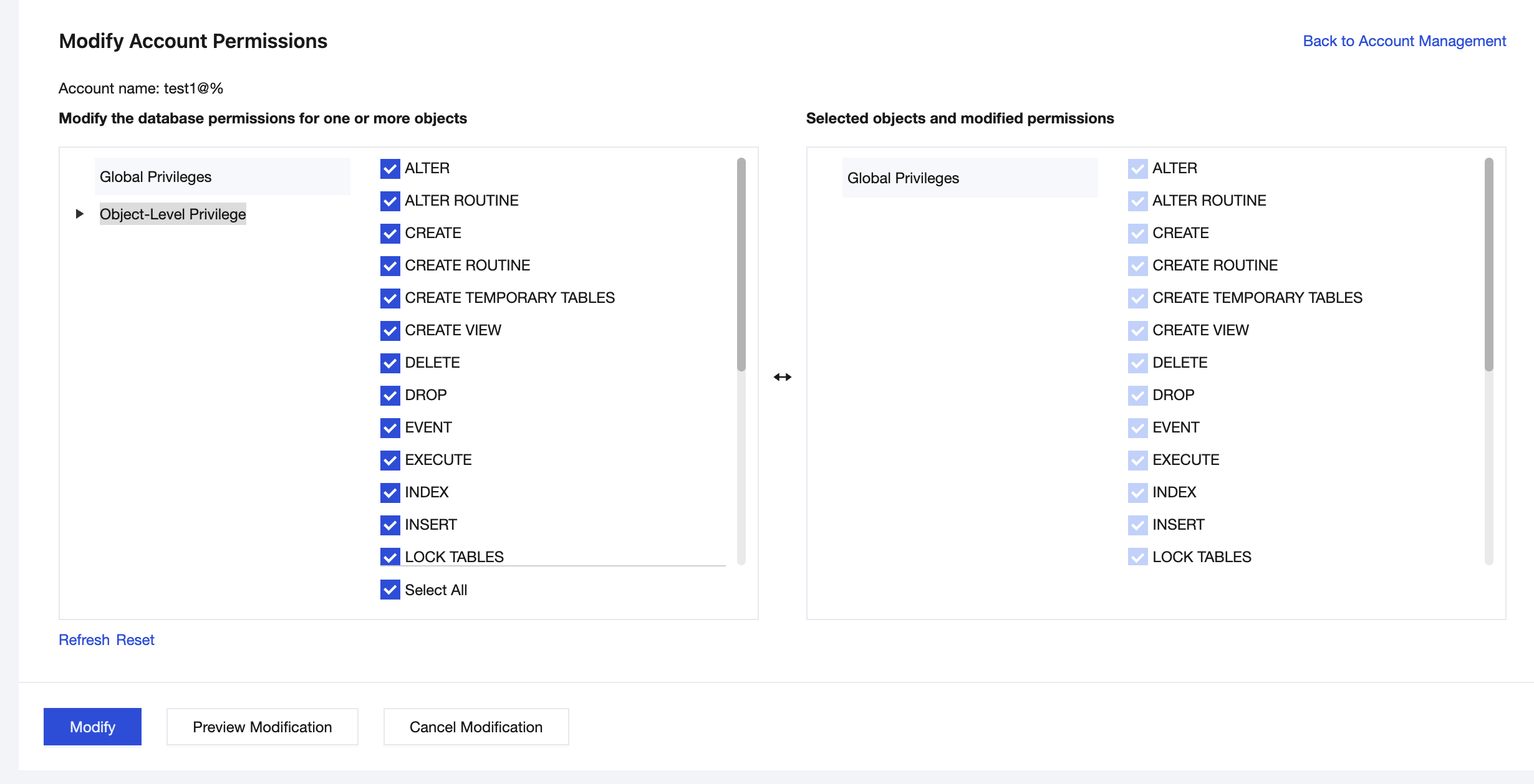
3. On the Modify Account Permissions page, select the database permissions. You can click Preview Modification and then click Modify if no errors exist.
Global Privileges: Possesses all permissions for all databases under the instance.
Object-Level Privilege: Possesses permissions for specific databases under the instance.
Ajuda e Suporte
Esta página foi útil?
Você também pode entrar em contato com a Equipe de vendas ou Enviar um tíquete em caso de ajuda.
comentários