Distribution Policy
Download
Modo Foco
Tamanho da Fonte
Distribution Policy (DP) is the rule system governing data object distribution in TDSQL Boundless. By explicitly setting rules for data objects, the Metadata Service (MC) can perform corresponding scheduling. Through configuring different scheduling rules, users gain granular control over data object distribution, including number of replicas, replica location distribution, and Replication Group Leader placement.
Rules Introduction
Distribution Policy typically consists of multiple specific rules. The Metadata Service validates user-specified rules to ensure their correctness and prevent conflicts between multiple rules. Specific validation rules can be referenced in the Precautions section. The design of individual DP rules draws inspiration from Kubernetes' LabelConstraint, usually structured as JSON containing
key, op, and values fields, as shown below:{"key": "key1", "op": "op1", "values": ["value1","value2"]}
Currently, the rules supported by TDSQL Boundless are as follows:
key | op | values |
region | "in", "notIn", "exists", "notExists" | region list, such as ["guangzhou"] |
zone | "in", "notIn", "exists", "notExists" | AZ list, such as ["guangzhou-1"] |
rack | "in", "notIn", "exists", "notExists" | rack list, such as ["rack-1","rack-2"] |
host | "in", "notIn", "exists", "notExists" | host list, such as ["host-1","host-2","host-3"] |
node | "in", "notIn" | node list, such as ["node-tdsql3-xxx-001"] |
replica-count | "=" | number of replicas, such as ["3"] |
follower-count | "=" | number of RG followers, such as ["2"] |
learner-count | "=" | number of RG learners, such as ["1"] |
witness-count | "=" | number of RG witnesses, such as ["1"] |
leader-preferences | "=" | RG leader preference. For usage, refer to note 2 |
fault-tolerance-level | "=" | disaster recovery level, such as ["zone"] |
tdsql-storage-type | "in", "notIn", "exists", "notExists" | disk type list, such as ["CLOUD_TCS","CLOUD_BSSD"] |
Note:
1. Operator meaning:
in: the value corresponding to the given key is contained in the given values list.
notIn: the value corresponding to the given key is not contained in the given values list.
exists: contains the given key.
notExists: does not contain the given key.
2. The values of leader-preferences are composed of nested structures, for example: ["{\\"key\\": \\"zone\\", \\"op\\": \\"in\\", \\"values\\": [\\"guangzhou-1\\"]}", "{\\"key\\": \\"zone\\", \\"op\\": \\"in\\", \\"values\\": [\\"guangzhou-2\\"]}"]. For your convenience, it is recommended that you use SQL to create a Distribution Policy.
Note:
1. RG replica rule description: RG leader quantity + RG follower quantity = replica-count - learner-count - witness-count.
When learner-count or witness-count is not specified, the default quantities for both learner and witness are 0.
For example, when replica-count = 4 is specified, it indicates that the RG leader quantity is 1 and the follower quantity is 3.
2. Rule description for using node as key:
2.1 The nodes in values must actually exist in the instance.
2.2 If the number of replicas is specified, the number of nodes in values must be greater than or equal to the number of replicas; otherwise, DP cannot be scheduled.
3. Rule description for using leader-preferences: The location of RG leaders must always be a subset of the replica location constraints. For example, when replica locations are specified in AZs ["zone1", "zone2", "zone3"], it is necessary to ensure that RG leader locations are also designated within the aforementioned AZs.
Warning:
The metadata service will refuse to schedule when it discovers unreasonable DP settings, but it will not affect the availability of other features or the correctness of data.
Using Distribution Policy
This section uses the tool
mc-ctl as an example, and the same result can be achieved using the corresponding HTTP API.Enable and Disable Distribution Policy
distribution-policy-enabled is enabled by default in v18.0.0.Enable Distribution Policy:
./mc-ctl schedule set --config_key distribution-policy-enabled --config_value 1
Disable Distribution Policy:
./mc-ctl schedule set --config_key distribution-policy-enabled --config_value 0
Create Distribution Policy
./mc-ctl dp create --data'{"policy_name":"$name","constraints":[{"key": "key1", "op": "op1", "values": ["value1","value2"]},...]}'
Note:
The JSON string for creating DP input needs to specify policy_name and constraints, and constraints can contain multiple DP rules as described earlier.
Modify Distribution Policy
./mc-ctl dp modify --data'{"policy_id": $id,"policy_name":"$name","constraints":[{"key": "key1", "op": "op1", "values": ["value1","value2"]},...]}'
Note:
To modify DP input, the JSON string must specify policy_id along with the policy_name or constraints to be updated. Only DP rules that are not bound to data objects can be modified. If you need to modify a DP that is already bound to data objects, you must first unbind the data objects from the DP.
Delete Distribution Policy
# Delete by ID./mc-ctl dp delete --distribution_policy_id ${id}# Delete by distribution policy name./mc-ctl dp delete --distribution_policy_name ${policy_name}
Note:
A DP can be deleted by distribution_policy_id or distribution_policy_name. Only DP rules that are not bound to data objects can be deleted. If you need to delete a DP that is bound to data objects, you must first unbind the data objects from the DP.
View Distribution Policy
# List all created DPs./mc-ctl dp info all# Get a single DP by distribution policy name./mc-ctl dp info single --distribution_policy_name ${policy_name}
Data Object Binding DP
After a DP is created, you can bind data objects to the DP to achieve the corresponding scheduling effect.
Database DP Binding
CREATE DATABASE db1 USING distribution policy ${policy_name};
Single Table Binding DP
CREATE TABLE t1(a INT) USING distribution policy ${policy_name};
Bind Partitioned Table to DP
CREATE TABLE t1(a INT) PARTITION BY HASH(a) PARTITIONS 4 USING distribution policy ${policy_name};
Note:
DP inheritance rules apply to data objects. For example, in the scenario described above, when database db1 is created and bound to a DP, all single tables and partitioned tables created within this database will inherit the same DP. However, if a different DP is explicitly bound to a specific table within this database, that binding takes precedence over the inheritance rule.
Typical DP Examples
Scenario 1: Create a 5-replica Distribution Policy.
./mc-ctl dp create --data '{"policy_name": "policy_1", "constraints": [{"key": "replica-count", "op": "=", "values": ["5"]}]}'
Scenario 2: Create a 4-replica Distribution Policy that includes one learner.
./mc-ctl dp create --data '{"policy_name": "policy_2", "constraints": [{"key": "replica-count", "op": "=", "values": ["4"]}, {"key": "learner-count", "op": "=", "values": ["1"]}]}'
Scenario 3: Create a DP with replicas on node-001, node-002, and node-003, and the RG Leader on node-001.
./mc-ctl dp create --data '{"policy_name": "policy_3", "constraints": [{"key": "node", "op": "in", "values": ["node-001", "node-002", "node-003"]},{"key": "leader-preferences", "op": "=", "values": ["{\\"key\\": \\"node\\", \\"op\\": \\"in\\", \\"values\\": [\\"node-001\\"]}"]}]}'
Scenario 4: Create a Distribution Policy with replicas placed on SSD disks.
./mc-ctl dp create --data '{"policy_name": "policy_4", "constraints": [{"key": "tdsql-storage-type", "op": "in", "values": ["SSD"]}]}'
Using SQL to Create a Distribution Policy
v21.2.3 provides SQL syntax for creating Distribution Policies. The syntax design for creating DPs using SQL aligns with the usage of
mc-ctl, minimizing the learning curve for users. The specific usage is as follows:SQL in DP keywords related to the
key rule include:REGION, ZONE, RACK, HOST, NODE, REPLICA_COUNT, FOLLOWER_COUNT, LEARNER_COUNT, WITNESS_COUNT, STORAGE_TYPE,FAULT_TOLERANCE_LEVEL, LEADER_PREFERENCESKeywords related to
op include:IN, NOT IN, EXISTS, NOT EXISTS SQL Create Distribution Policy
# Create a Distribution Policy that requires replicas to be placed in AZ zone1 and AZ zone2 with 2 replicas.CREATE DISTRIBUTION POLICY "policy_1" SET ZONE IN ("zone1", "zone2") AND REPLICA_COUNT = 2;
SQL Modification of Distribution Policy
# Modify the constraint for the Distribution Policy named "policy_1" to: replicas must be placed on disks of type "SSD".ALTER DISTRIBUTION POLICY "policy_1" SET STORAGE_TYPE IN ("SSD");# Rename the DP "old_dp_name" to "new_dp_name"RENAME DISTRIBUTION POLICY "old_dp_name" TO "new_dp_name";
SQL Delete Distribution Policy
# Delete the DP named "policy_1"DROP DISTRIBUTION POLICY "policy_1";
SQL Query Distribution Policy
The view META_CLUSTER_DPS has been added to information_schema, with the following table structure:
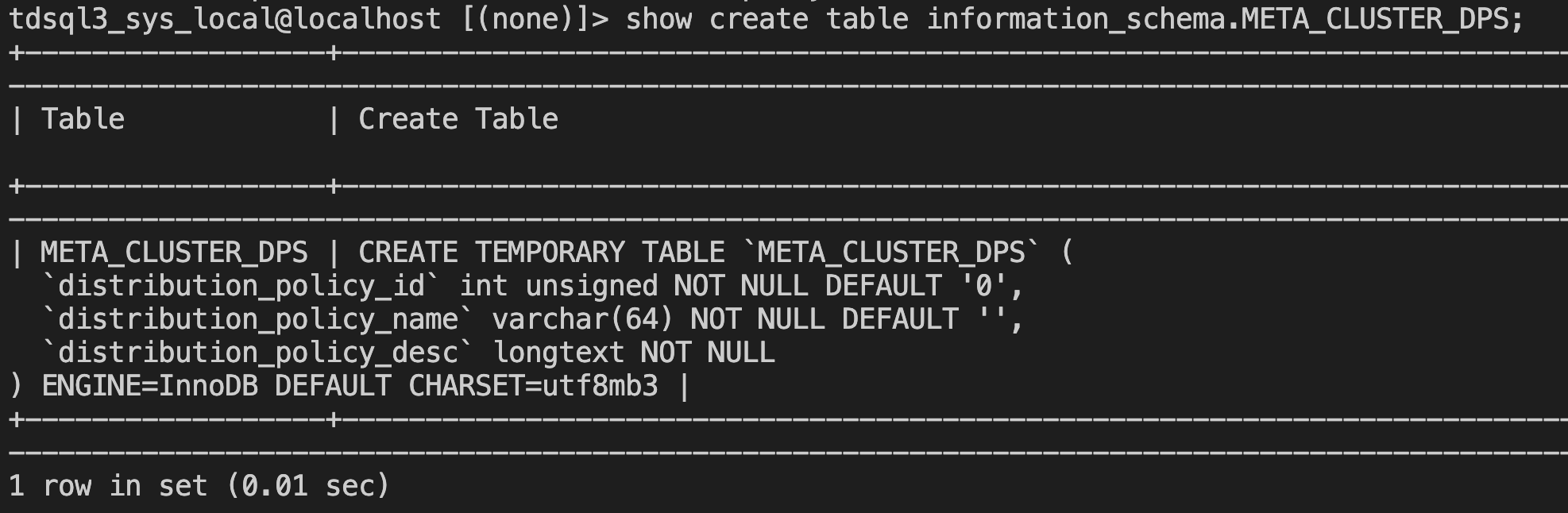
This view can be used to query existing DPs in real time.
Advanced Features
v21.2.3 version introduces an advanced Distribution Policy feature. Partition tables with RANGE and RANGE COLUMNS partitioning keys of time type can bind to this advanced Distribution Policy, enabling some partitions to be scheduled after a specified time. A typical scenario is automatically cooling down partitions. The details are as follows:
Create the following DP using SQL.
CREATE DISTRIBUTION POLICY "policy_x" SET PARTITION_METHOD = "RANGE" ANDPARTITION_KEY_TO_TIME_TYPE = "predefined:TO_DAYS" ANDEXPIRE = "1 YEAR" ANDSTART_TIME = "2024-06-11 00:11:22" ANDEND_TIME = "2025-06-11 00:11:22" ANDSTORAGE_TYPE IN ("HDD");
The keywords in this DP are explained as follows:
PARTITION_METHOD: indicates the partitioning method supported by partitioned tables associated with the DP. Currently, only RANGE and RANGE COLUMNS are supported.PARTITION_KEY_TO_TIME_TYPE: Only required for RANGE partitioning method, used to convert partition boundary values to time types. The values corresponding to this key are conversion functions. The system provides three predefined conversion functions: TO_DAYS, UNIX_TIMESTAMP, and YEAR. Users can also define custom conversion functions, which must provide calculation formulas for year, month, day, hour, minute, and second, following the format: year/month/day/hour/minute/second:(mathematical formula containing identifier v), where v is the identifier representing the integer value of the partition boundary. For example, setting values to ["year:v/100", "month:v%100"] will treat omitted day/hour/minute/second as zero values for their respective time units.EXPIRE: Partition expiration time, in the format of a positive integer + unit, such as 1 YEAR. Available units include: YEAR, MONTH, DAY, HOUR.START_TIME: Optional, defaults to the start of the partition. If START_TIME is specified, the DP rule is applied after this time.END_TIME: Optional, defaults to the end of the partition. If END_TIME is specified, the DP rule will be rejected from being applied after this time.Note:
1. Only supports related features for first-level RANGE and RANGE COLUMNS partitioning, and its partition key must also be of time type.
2. RANGE COLUMNS partitioning supports only one partition column.
Case Description
Case 1: Automatic Cold Data Archiving Based on UNIX_TIMESTAMP
# Use the predefined functionUNIX_TIMESTAMPto createpolicy_x1CREATE DISTRIBUTION POLICY "policy_x1" SET PARTITION_METHOD = "RANGE" ANDPARTITION_KEY_TO_TIME_TYPE = ("predefined:UNIX_TIMESTAMP") ANDEXPIRE = "1 MONTH" ANDSTORAGE_TYPE IN ("HDD");# Create a RANGE partitioned table and bind to policy_x1CREATE TABLE t_order_1(id bigint NOT NULL,gmt_modified timestamp NOT NULL)PARTITION BY RANGE(unix_timestamp(gmt_modified))(PARTITION p1 VALUES LESS THAN(unix_timestamp('2025-11-11')),PARTITION p2 VALUES LESS THAN(unix_timestamp('2025-12-11'))) USING DISTRIBUTION POLICY policy_x1;
Scheduling Behavior Description
p1 Partition Scheduling:
Partition boundary time: 2025-11-11
Expiration time offset: 1 month
Scheduling trigger time: 2025-11-11 + 1 month = 2025-12-11
Scheduling action: Migrate data replicas of the p1 partition to HDD.
p2 Partition Scheduling:
Partition boundary time: 2025-12-11
Expiration time offset: 1 month
Scheduling trigger time: 2025-12-11 + 1 month = 2026-01-11.
Scheduling action: Migrate data replicas of the p2 partition to HDD storage.
Case 2: Custom Time Conversion Function for Precise Scheduling Control
# Use a custom function to createpolicy_x2CREATE DISTRIBUTION POLICY "policy_x2" SET PARTITION_METHOD = "RANGE" ANDPARTITION_KEY_TO_TIME_TYPE = ("year:v/100", "month:v%100") ANDEXPIRE = "1 MONTH" ANDLEADER_PREFERENCES = (ZONE in ("zone1")) ANDSTART_TIME = "2025-12-10 00:00:00";# Create a RANGE partitioned table and bind topolicy_x2CREATE TABLE t_order_2(id bigint NOT NULL,gmt_modified datetime NOT NULL)PARTITION BY RANGE(YEAR(gmt_modified) * 100 + MONTH(gmt_modified))(PARTITION p1 VALUES LESS THAN(202511),PARTITION p2 VALUES LESS THAN(202512),PARTITION p3 VALUES LESS THAN(202601)) USING DISTRIBUTION POLICY policy_x2;
Conversion Function Parsing
Custom function: year:v/100, month:v%100The partition boundary value v = YEAR(gmt_modified) * 100 + MONTH(gmt_modified)Example calculation:- p1: v=202511 → year=202511/100=2025, month=202511%100=11- p2: v=202512 → year=202512/100=2025, month=202512%100=12- p3: v=202601 → year=202601/100=2026, month=202601%100=1
Partition Time Boundary Calculation
Partitioning Operations | Boundary Value | Converted Time | Scheduling Trigger Time | Whether Constrained |
p1 | 202511 | 2025-11-01 00:00:00 | 2025-12-01 00:00:00 | Unconstrained |
p2 | 202512 | 2025-12-01 00:00:00 | 2026-01-01 00:00:00 | Unconstrained |
p3 | 202601 | 2026-01-01 00:00:00 | 2026-02-01 00:00:00 | Constrained |
START_TIME Impact Analysis
START_TIME = "2025-12-10 00:00:00"
Only partitions with a partition boundary time ≥ START_TIME will apply the DP constraint.
p1(2025-11-01) and p2(2025-12-01) < START_TIME(2025-12-10) → unconstrained
p3(2026-01-01) > START_TIME(2025-12-10) → constrained.
Case 3: Time Window Scheduling for RANGE COLUMNS Partitioning
# Createpolicy_x3CREATE DISTRIBUTION POLICY "policy_x3" SET PARTITION_METHOD = "RANGE COLUMNS" ANDEXPIRE = "1 YEAR" ANDNODE NOT IN ("node-tdsql3-x-001") ANDSTART_TIME = "2025-12-10 00:00:00" ANDEND_TIME = "2026-12-10 00:00:00";# Create a RANGE COLUMNS partitioned table and bind topolicy_x3CREATE TABLE t_order_3(id bigint NOT NULL,gmt_modified datetime NOT NULL)PARTITION BY RANGE COLUMNS(gmt_modified)(PARTITION p1 VALUES LESS THAN("2024-12-10 00:00:00"),PARTITION p2 VALUES LESS THAN("2025-12-10 00:00:00"),PARTITION p3 VALUES LESS THAN("2026-12-10 00:00:00"),PARTITION p4 VALUES LESS THAN("2027-12-10 00:00:00")) USING DISTRIBUTION POLICY policy_x3;
Since it is a DP bound to RANGE COLUMNS time partitions, there is no need to use the PARTITION_KEY_TO_TIME_TYPE field to provide a conversion function, as the partition boundaries are already time-type values. Simultaneously, because START_TIME and END_TIME are specified, only partitions p2 and p3 will initiate scheduling one year after the partition boundary time is reached (EXPIRE = "1 YEAR").
Partitioning Operations | Boundary Time | Scheduling Trigger Time | Whether Within the Time Window |
p1 | 2024-12-10 | 2025-12-10 | Earlier than START_TIME |
p2 | 2025-12-10 | 2026-12-10 | Within [START_TIME, END_TIME] |
p3 | 2026-12-10 | 2027-12-10 | Within [START_TIME, END_TIME] |
p4 | 2027-12-10 | 2028-12-10 | Later than END_TIME |
Ajuda e Suporte
Esta página foi útil?
Você também pode entrar em contato com a Equipe de vendas ou Enviar um tíquete em caso de ajuda.
comentários