ContactList
Download
聚焦模式
字号
概述
ContactList 是一个高度可配置的联系人列表组件。该组件支持好友列表、群组列表、黑名单和申请管理,提供分组折叠、搜索过滤、自定义渲染等核心功能,适用于即时通信、社交应用等场景的联系人管理界面。
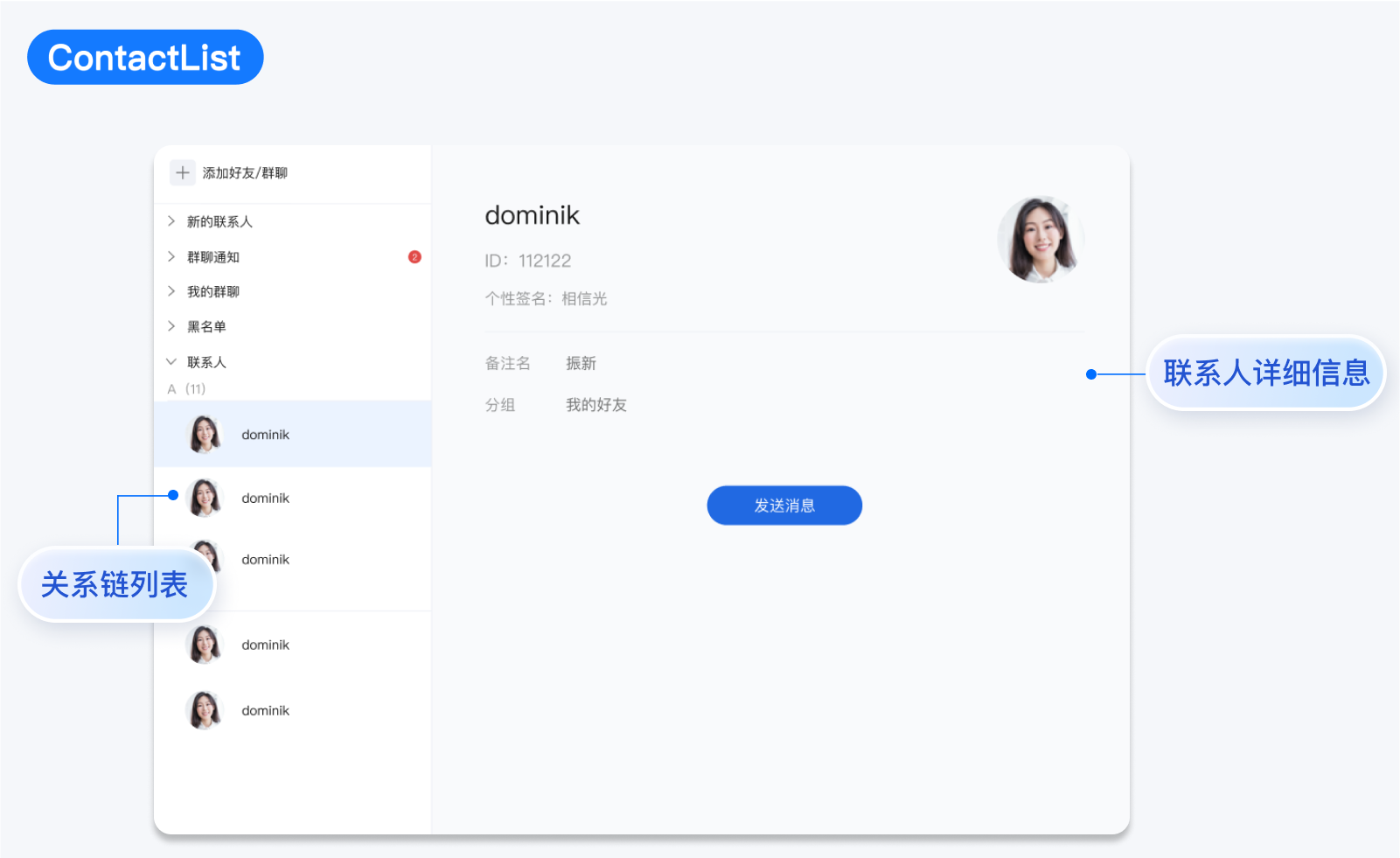
ContactList Props
字段 | 类型 | 默认值 | 描述 |
activeContactItem | ContactGroupItem | undefined | undefined | 当前激活的联系人项 |
enableSearch | boolean | true | 是否启用搜索功能 |
groupConfig | Partial<Record<ContactItemType, CustomGroupConfig>> | {} | 自定义分组配置 |
className | string | undefined | 自定义 CSS 类名 |
style | React.CSSProperties | undefined | 自定义内联样式 |
searchPlaceholder | string | 'Search contacts' | 搜索框占位符文本 |
emptyText | string | 'No contacts' | 空状态提示文本 |
ContactItem | React.ComponentType<ContactListItemProps> | undefined | ContactListItem | 自定义联系人项组件 |
ContactSearchComponent | React.ComponentType<ContactSearchProps> | undefined | ContactSearch | 自定义搜索组件 |
GroupHeader | React.ComponentType<{ data: ContactGroup }> | undefined | 默认分组头 | 自定义分组头部组件 |
PlaceholderEmptyList | React.ReactNode | undefined | 默认空状态 | 自定义空状态组件 |
onContactItemClick | (item: ContactGroupItem) => void | undefined | 联系人项点击事件 |
onFriendApplicationAction | (action: 'accept' | 'refuse', application: FriendApplication) => void | undefined | 好友申请操作事件 |
onGroupApplicationAction | (action: 'accept' | 'refuse', application: GroupApplication) => void | undefined | 群组申请操作事件 |
ContactInfo props
字段 | 类型 | 默认值 | 描述 |
contactItem | ContactGroupItem | undefined | undefined | 当前显示的联系人项 |
showActions | boolean | true | 是否显示操作按钮 |
PlaceholderEmpty | React.ReactNode | undefined | undefined | 空状态占位组件 |
FriendInfoComponent | React.ComponentType<FriendInfoProps> | FriendInfo | 好友信息组件 |
GroupInfoComponent | React.ComponentType<GroupInfoProps> | GroupInfo | 群组信息组件 |
BlacklistInfoComponent | React.ComponentType<BlacklistInfoProps> | BlacklistInfo | 黑名单信息组件 |
FriendApplicationInfoComponent | React.ComponentType<FriendApplicationInfoProps> | FriendApplicationInfo | 好友申请信息组件 |
GroupApplicationInfoComponent | React.ComponentType<GroupApplicationInfoProps> | GroupApplicationInfo | 群组申请信息组件 |
SearchGroupInfoComponent | React.ComponentType<SearchGroupInfoProps> | SearchGroupInfo | 搜索群组信息组件 |
SearchUserInfoComponent | React.ComponentType<SearchUserInfoProps> | SearchUserInfo | 搜索用户信息组件 |
onClose | () => void | undefined | 关闭信息面板回调 |
onSendMessage | (friend: Friend) => void | undefined | 发送消息回调 |
onDeleteFriend | (friend: Friend) => void | undefined | 删除好友回调 |
onUpdateFriendRemark | (friend: Friend, remark: string) => void | undefined | 更新好友备注回调 |
onAddToBlacklist | (friend: Friend) => void | undefined | 添加到黑名单回调 |
onRemoveFromBlacklist | (profile: UserProfile) => void | undefined | 从黑名单移除回调 |
onEnterGroup | (group: GroupModel) => void | undefined | 进入群组回调 |
onLeaveGroup | (group: GroupModel) => void | undefined | 退出群组回调 |
onDismissGroup | (group: GroupModel) => void | undefined | 解散群组回调 |
onFriendApplicationAction | (action: 'accept' | 'refuse', application: FriendApplication) => void | undefined | 好友申请操作回调 |
onGroupApplicationAction | (action: 'accept' | 'refuse', application: GroupApplication) => void | undefined | 群组申请操作回调 |
onAddFriend | (user: UserProfile, wording: string) => void | undefined | 添加好友回调 |
onJoinGroup | (group: GroupModel, note: string) => void | undefined | 加入群组回调 |
基础使用
import { ContactList, ContactInfo } from '@tencentcloud/chat-uikit-react';function App() {return (<div><ContactList /><ContactInfo /></div>);}
自定义能力
自定义联系列表搜索功能开关
通过设置
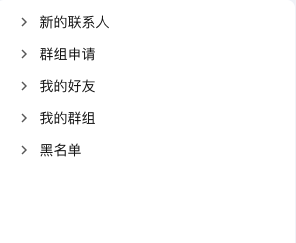
enableSearch 参数,您可以灵活地控制 ContactList 中的搜索好友群组功能的显示。<ContactList enableSearch={false} />
效果如下图所示:
自定义联系列表联系人分组配置
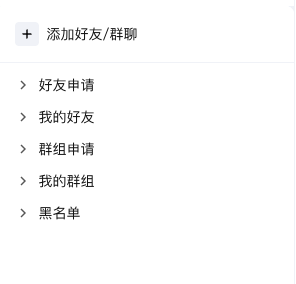
groupConfig 用于自定义分组配置,包括标题、显示顺序、隐藏状态等,默认值为 {}。import React from 'react';import { ContactList } from '@tencentcloud/chat-uikit-react';import { ContactItemType } from '@tencentcloud/chat-uikit-react';function CustomGroupTitlesContactList() {const groupConfig = {[ContactItemType.FRIEND]: {title: '我的好友',order: 1},[ContactItemType.GROUP]: {title: '我的群组',order: 2},[ContactItemType.FRIEND_REQUEST]: {title: '好友申请',order: 0}};return (<ContactListgroupConfig={groupConfig}onContactItemClick={(item) => {console.log('联系人点击:', item);}}/>);}
效果如下图所示:
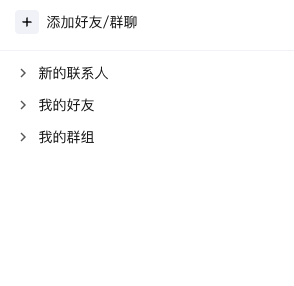
import React from 'react';import { ContactList } from '@tencentcloud/chat-uikit-react';import { ContactItemType } from '@tencentcloud/chat-uikit-react';function HiddenGroupsContactList() {const groupConfig = {[ContactItemType.BLACK]: {title: '黑名单',hidden: true // 隐藏黑名单分组},[ContactItemType.GROUP_REQUEST]: {title: '群组申请',hidden: true // 隐藏群组申请分组}};return (<ContactListgroupConfig={groupConfig}onContactItemClick={(item) => {console.log('联系人点击:', item);}}/>);}
效果如下图所示:
自定义联系列表子项
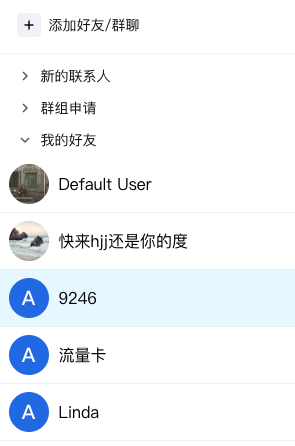
ContactItem 用于自定义联系人项的渲染组件,默认值为内置的
ContactListItem 组件。import React from 'react';import { ContactList, Avatar } from '@tencentcloud/chat-uikit-react';import type { ContactListItemProps } from '@tencentcloud/chat-uikit-react';const SimpleContactItem: React.FC<ContactListItemProps> = ({contactItem,onClick,activeContactItem}) => {const isActive = activeContactItem?.data.userID === contactItem.data.userID;return (<divclassName={`simple-contact-item ${isActive ? 'active' : ''}`}onClick={() => onClick?.(contactItem.type, contactItem.data)}style={{padding: '8px 12px',borderBottom: '1px solid #f0f0f0',cursor: 'pointer',backgroundColor: isActive ? '#e6f7ff' : 'transparent'}}><div style={{ display: 'flex', alignItems: 'center', gap: '10px' }}><Avatar src={contactItem.data.avatar} alt="avatar" /><span>{contactItem.data.nick || contactItem.data.name}</span></div></div>);};function ContactListWithSimpleItems() {return (<ContactListContactItem={SimpleContactItem}onContactItemClick={(item) => {console.log('联系人点击:', item);}}/>);}
效果如下图所示:
自定义联系人详情操作按钮开关
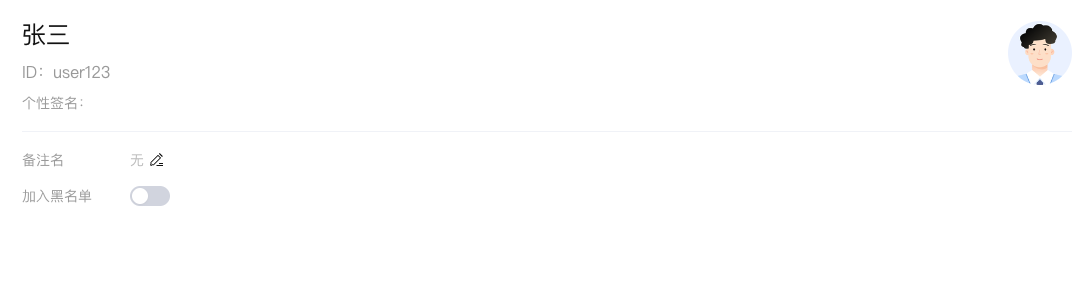
showActions 用于控制是否显示操作按钮,默认值为 true。import React from 'react';import { ContactInfo } from '@tencentcloud/chat-uikit-react';function ReadOnlyContactInfo() {const friendData = {type: ContactItemType.FRIEND,data: {userID: 'user123',nick: '张三',avatar: 'https://example.com/avatar.jpg',remark: '同事',// ... 其他好友属性},};return (<ContactInfocontactItem={friendData}showActions={false} // 隐藏所有操作按钮,只显示信息/>);}
效果如下图所示:
自定义联系人详情空状态
PlaceholderEmpty 用于自定义空状态显示内容,默认值为 undefined。import React from 'react';import { ContactInfo } from '@tencentcloud/chat-uikit-react';function CustomEmptyState() {const EmptyPlaceholder = () => (<div style={{width: '100%',textAlign: 'center',padding: '40px 20px',color: '#999',fontSize: '14px',background: '#fff',}}><div style={{ fontSize: '48px', marginBottom: '16px' }}>👤</div><div>请选择一个联系人查看详细信息</div><div style={{ marginTop: '8px', fontSize: '12px' }}>点击左侧联系人列表中的任意项目</div></div>);return (<ContactInfocontactItem={undefined}PlaceholderEmpty={<EmptyPlaceholder />}/>);}
效果如下图所示:

自定义联系人详情组件
说明:
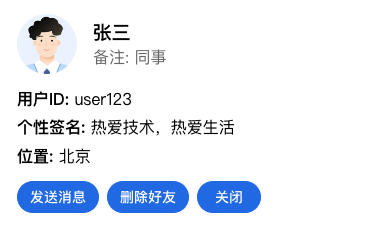
FriendInfoComponent 用于自定义好友信息组件,默认值为内置的 FriendInfo 组件。GroupInfoComponent 用于自定义群组信息组件,默认值为内置的 GroupInfo 组件。BlacklistInfoComponent 用于自定义黑名单信息组件,默认值为内置的 BlacklistInfo 组件。FriendApplicationInfoComponent 用于自定义好友申请信息组件,默认值为内置的 FriendApplicationInfo 组件。GroupApplicationInfoComponent 用于自定义群组申请信息组件,默认值为内置的 GroupApplicationInfo 组件。import React from 'react';import { ContactInfo } from '@tencentcloud/chat-uikit-react';import type { FriendInfoProps, Friend } from '@tencentcloud/chat-uikit-react';import { Button } from '@tencentcloud/uikit-base-component-react';// 自定义好友信息组件const CustomFriendInfo: React.FC<FriendInfoProps> = ({friend,showActions,onClose,onSendMessage,onDeleteFriend}) => {return (<div style={{ padding: '20px', border: '1px solid #e0e0e0', borderRadius: '8px' }}><div style={{ display: 'flex', alignItems: 'center', marginBottom: '16px' }}><imgsrc={friend.avatar}alt="avatar"style={{ width: '60px', height: '60px', borderRadius: '50%', marginRight: '16px' }}/><div><h3 style={{ margin: '0 0 4px 0' }}>{friend.nick}</h3><p style={{ margin: '0', color: '#666' }}>备注: {friend.remark}</p></div></div><div style={{ display: 'flex', flexDirection: 'column', gap: '10px', marginBottom: '16px' }}><p><strong>用户ID:</strong> {friend.userID}</p><p><strong>个性签名:</strong> {friend.selfSignature}</p><p><strong>位置:</strong> {friend.location}</p></div>{showActions && (<div style={{ display: 'flex', gap: '8px' }}><Button onClick={() => onSendMessage?.(friend)}>发送消息</Button><Button onClick={() => onDeleteFriend?.(friend)}>删除好友</Button><Button onClick={onClose}>关闭</Button></div>)}</div>);};function CustomFriendInfoDemo() {const friendData = {type: ContactItemType.FRIEND,data: {userID: 'user123',nick: '张三',avatar: 'https://example.com/avatar.jpg',remark: '同事',selfSignature: '热爱技术,热爱生活',location: '北京',// ... 其他属性},};return (<ContactInfocontactItem={friendData}FriendInfoComponent={CustomFriendInfo}onSendMessage={(friend) => console.log('发送消息给:', friend.nick)}onDeleteFriend={(friend) => console.log('删除好友:', friend.nick)}/>);}
效果如下图所示:
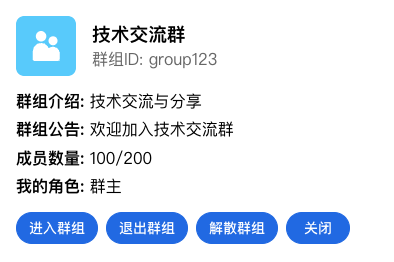
import React from 'react';import { ContactInfo, GroupMemberRole } from '@tencentcloud/uikit-component-react';import type { GroupInfoProps, GroupModel } from '@tencentcloud/uikit-component-react';import { Button } from '@tencentcloud/uikit-base-component-react';// 自定义群组信息组件const CustomGroupInfo: React.FC<GroupInfoProps> = ({group,showActions,onClose,onEnterGroup,onLeaveGroup,onDismissGroup}) => {const isOwner = group.selfInfo?.role === GroupMemberRole.OWNER; // 群主const isAdmin = group.selfInfo?.role === GroupMemberRole.ADMIN; // 管理员return (<div style={{ padding: '20px', border: '1px solid #e0e0e0', borderRadius: '8px' }}><div style={{ display: 'flex', alignItems: 'center', marginBottom: '16px' }}><imgsrc={group.avatar}alt="group avatar"style={{ width: '60px', height: '60px', borderRadius: '8px', marginRight: '16px' }}/><div><h3 style={{ margin: '0 0 4px 0' }}>{group.name}</h3><p style={{ margin: '0', color: '#666' }}>群组ID: {group.groupID}</p></div></div><div style={{ display: 'flex', flexDirection: 'column', gap: '10px', marginBottom: '16px' }}><p><strong>群组介绍:</strong> {group.introduction}</p><p><strong>群组公告:</strong> {group.notification}</p><p><strong>成员数量:</strong> {group.memberCount}/{group.maxMemberCount}</p><p><strong>我的角色:</strong> {isOwner ? '群主' : isAdmin ? '管理员' : '普通成员'}</p></div>{showActions && (<div style={{ display: 'flex', gap: '8px' }}><Button onClick={() => onEnterGroup?.(group)}>进入群组</Button><Button onClick={() => onLeaveGroup?.(group)}>退出群组</Button>{isOwner && (<Button onClick={() => onDismissGroup?.(group)}>解散群组</Button>)}<Button onClick={onClose}>关闭</Button></div>)}</div>);};function CustomGroupInfoDemo() {const groupData = {type: ContactItemType.GROUP,data: {groupID: 'group123',name: '技术交流群',avatar: 'https://example.com/group-avatar.jpg',type: 'Public',introduction: '技术交流与分享',notification: '欢迎加入技术交流群',ownerID: 'owner123',memberCount: 100,maxMemberCount: 200,selfInfo: {userID: 'currentUser',role: GroupMemberRole.OWNER, // 群主nameCard: '群主',joinTime: Date.now(),},},};return (<ContactInfocontactItem={groupData}GroupInfoComponent={CustomGroupInfo}onEnterGroup={(group) => console.log('进入群组:', group.name)}onLeaveGroup={(group) => console.log('退出群组:', group.name)}onDismissGroup={(group) => console.log('解散群组:', group.name)}/>);}
效果如下图所示:
import React from 'react';import { ContactInfo } from '@tencentcloud/uikit-component-react';import type { BlacklistInfoProps, UserProfile } from '@tencentcloud/uikit-component-react';import { Button } from '@tencentcloud/uikit-base-component-react';// 自定义黑名单信息组件const CustomBlacklistInfo: React.FC<BlacklistInfoProps> = ({profile,showActions,onClose,onRemoveFromBlacklist}) => {return (<div style={{ padding: '20px', border: '1px solid #e0e0e0', borderRadius: '8px' }}><div style={{ display: 'flex', alignItems: 'center', marginBottom: '16px' }}><imgsrc={profile.src}alt="avatar"style={{ width: '60px', height: '60px', borderRadius: '50%', marginRight: '16px' }}/><div><h3 style={{ margin: '0 0 4px 0', color: '#ff4d4f' }}>{profile.nick}</h3><p style={{ margin: '0', color: '#666' }}>用户ID: {profile.userID}</p></div></div><div style={{ display: 'flex', flexDirection: 'column', gap: '10px', marginBottom: '16px' }}><p><strong>个性签名:</strong> {profile.selfSignature}</p><p><strong>位置:</strong> {profile.location}</p><p style={{ color: '#ff4d4f', fontWeight: 'bold' }}>⚠️ 此用户已被加入黑名单</p></div>{showActions && (<div style={{ display: 'flex', gap: '8px' }}><ButtononClick={() => onRemoveFromBlacklist?.(profile)}style={{ backgroundColor: '#52c41a', color: 'white', border: 'none' }}>移出黑名单</Button><Button onClick={onClose}>关闭</Button></div>)}</div>);};function CustomBlacklistInfoDemo() {const blacklistData = {type: ContactItemType.BLACK,data: {userID: 'user456',nick: '李四',src: 'https://example.com/avatar2.jpg',gender: 1,birthday: 19920101,location: '深圳',selfSignature: '被拉黑用户',allowType: 1,adminForbidType: 0,},};return (<ContactInfocontactItem={blacklistData}BlacklistInfoComponent={CustomBlacklistInfo}onRemoveFromBlacklist={(profile) => console.log('移出黑名单:', profile.nick)}/>);}
效果如下图所示:
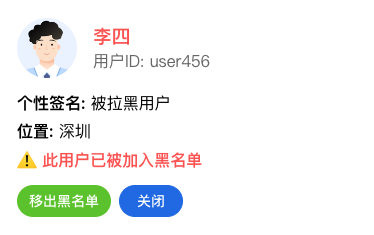
import React from 'react';import { ContactInfo } from '@tencentcloud/uikit-component-react';import type { FriendApplicationInfoProps, FriendApplication } from '@tencentcloud/uikit-component-react';import { Button } from '@tencentcloud/uikit-base-component-react';// 自定义好友申请信息组件const CustomFriendApplicationInfo: React.FC<FriendApplicationInfoProps> = ({application,showActions,onClose,onAccept,onRefuse}) => {const formatTime = (timestamp: number) => {return new Date(timestamp).toLocaleString();};return (<div style={{ padding: '20px', border: '1px solid #e0e0e0', borderRadius: '8px' }}><div style={{ display: 'flex', alignItems: 'center', marginBottom: '16px' }}><imgsrc={application.src}alt="avatar"style={{ width: '60px', height: '60px', borderRadius: '50%', marginRight: '16px' }}/><div><h3 style={{ margin: '0 0 4px 0' }}>{application.nick}</h3><p style={{ margin: '0', color: '#666' }}>申请时间: {formatTime(application.time)}</p></div></div><div style={{ display: 'flex', flexDirection: 'column', gap: '10px', marginBottom: '16px' }}><p><strong>申请来源:</strong> {application.source}</p><p><strong>申请附言:</strong> {application.wording}</p><p style={{ color: '#1890ff', fontWeight: 'bold' }}>📝 新的好友申请</p></div>{showActions && (<div style={{ display: 'flex', gap: '8px' }}><ButtononClick={() => onAccept?.(application)}style={{ backgroundColor: '#52c41a', color: 'white', border: 'none' }}>接受申请</Button><ButtononClick={() => onRefuse?.(application)}style={{ backgroundColor: '#ff4d4f', color: 'white', border: 'none' }}>拒绝申请</Button><Button onClick={onClose}>关闭</Button></div>)}</div>);};function CustomFriendApplicationInfoDemo() {const applicationData = {type: ContactItemType.FRIEND_REQUEST,data: {userID: 'user789',nick: '王五',src: 'https://example.com/avatar3.jpg',time: Date.now(),source: '搜索添加',g: '你好,我想加你为好友,一起交流技术',type: 1,},};return (<ContactInfocontactItem={applicationData}FriendApplicationInfoComponent={CustomFriendApplicationInfo}onFriendApplicationAction={(action, application) => {if (action === 'accept') {console.log('接受好友申请:', application.nick);} else {console.log('拒绝好友申请:', application.nick);}}}/>);}
效果如下图所示:
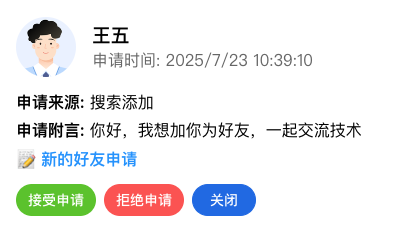
import React from 'react';import { ContactInfo } from '@tencentcloud/uikit-component-react';import type { GroupApplicationInfoProps, GroupApplication } from '@tencentcloud/uikit-component-react';import { Button } from '@tencentcloud/uikit-base-component-react';// 自定义群组申请信息组件const CustomGroupApplicationInfo: React.FC<GroupApplicationInfoProps> = ({application,showActions,onClose,onAccept,onRefuse}) => {const getApplicationTypeText = (type: number) => {return type === 0 ? '用户申请加入' : '邀请用户加入';};return (<div style={{ padding: '20px', border: '1px solid #e0e0e0', borderRadius: '8px' }}><div style={{ display: 'flex', alignItems: 'center', marginBottom: '16px' }}><div style={{ width: '60px', height: '60px', borderRadius: '8px', marginRight: '16px', backgroundColor: '#f0f0f0', display: 'flex', alignItems: 'center', justifyContent: 'center' }}>👥</div><div><h3 style={{ margin: '0 0 4px 0' }}>{application.groupName}</h3><p style={{ margin: '0', color: '#666' }}>{getApplicationTypeText(application.applicationType)}</p></div></div><div style={{ display: 'flex', flexDirection: 'column', gap: '10px', marginBottom: '16px' }}><p><strong>申请人:</strong> {application.applicantNick}</p><p><strong>群组ID:</strong> {application.groupID}</p><p><strong>申请备注:</strong> {application.note}</p><p style={{ color: '#1890ff', fontWeight: 'bold' }}>📋 群组申请待处理</p></div>{showActions && (<div style={{ display: 'flex', gap: '8px' }}><ButtononClick={() => onAccept?.(application)}style={{ backgroundColor: '#52c41a', color: 'white', border: 'none' }}>同意申请</Button><ButtononClick={() => onRefuse?.(application)}style={{ backgroundColor: '#ff4d4f', color: 'white', border: 'none' }}>拒绝申请</Button><Button onClick={onClose}>关闭</Button></div>)}</div>);};function CustomGroupApplicationInfoDemo() {const applicationData = {type: ContactItemType.GROUP_REQUEST,data: {applicant: 'user999',applicantNick: '赵六',groupID: 'group456',groupName: '产品经理交流群',applicationType: 0,userID: 'user999',note: '我想加入产品经理交流群,学习产品设计经验',},};return (<ContactInfocontactItem={applicationData}GroupApplicationInfoComponent={CustomGroupApplicationInfo}onGroupApplicationAction={(action, application) => {if (action === 'accept') {console.log('同意群组申请:', application.groupName);} else {console.log('拒绝群组申请:', application.groupName);}}}/>);}
效果如下图所示:
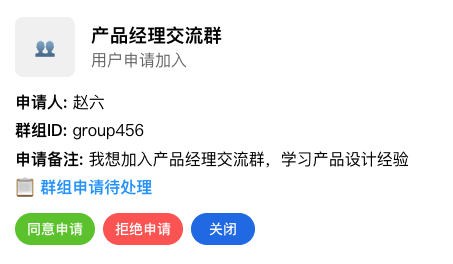
文档反馈