Cloud Resource Configuration Check
Download
Focus Mode
Font Size
Feature Description
The Cloud Resource Configuration Check feature inspects the configurations of cloud resources to identify security risks introduced by misconfigurations.
Access Entry
1. Log in to the CSC console, and click CSPM in the left navigation pane.
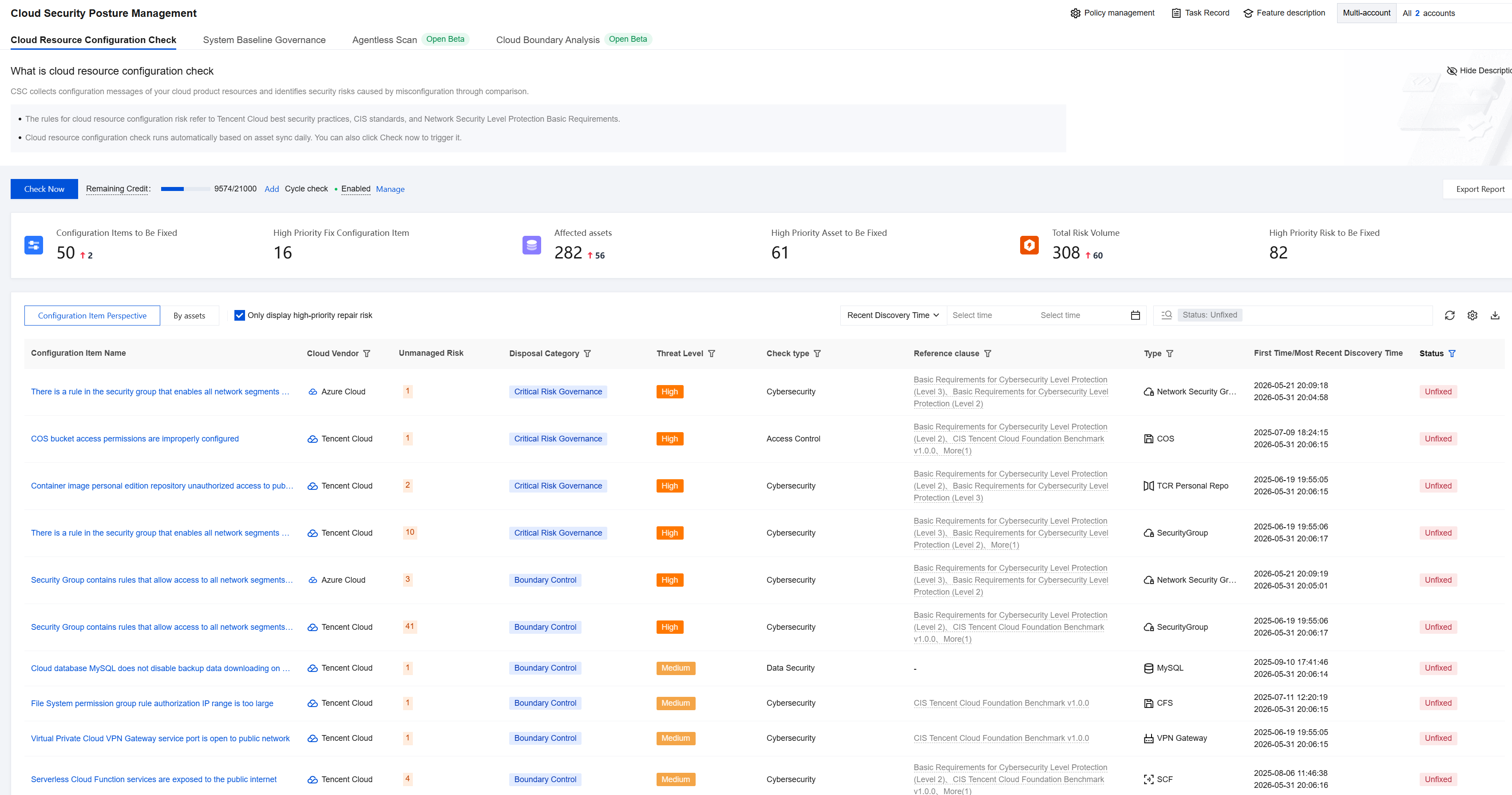
2. In Cloud Security Posture Management > Cloud Resource Configuration Check, you can view cloud resource configuration risks.
Initiating a Risk Check
1. Log in to the CSC console, and click CSPM in the left navigation pane.
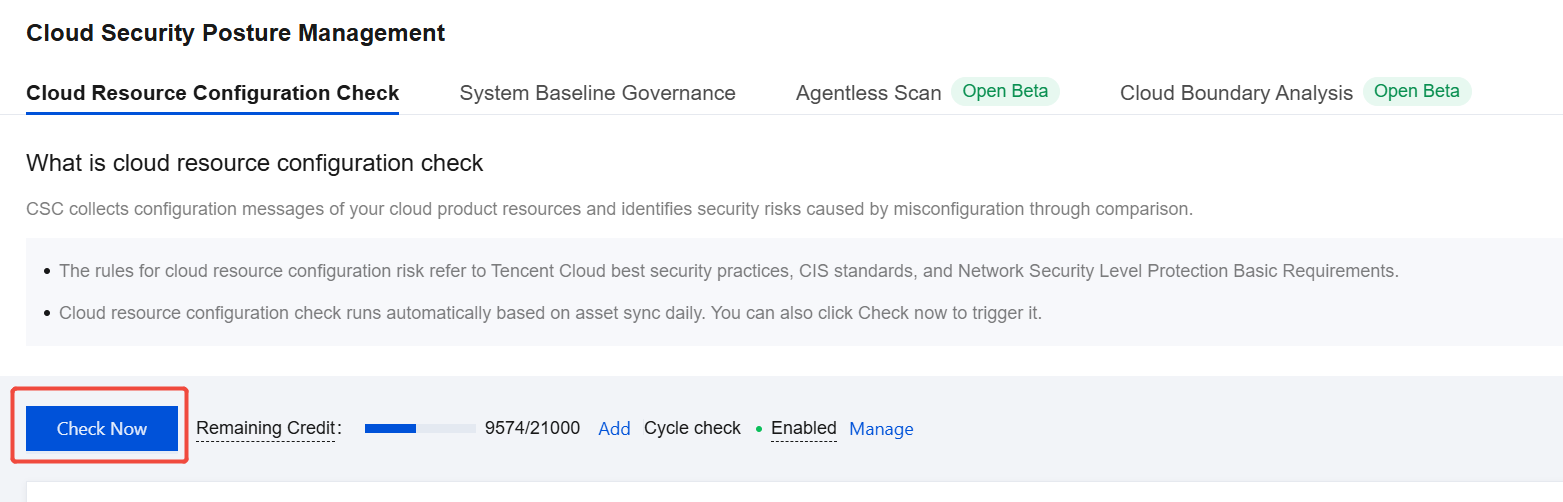
2. In Cloud Security Posture Management > Cloud Resource Configuration Check, click Check Now.
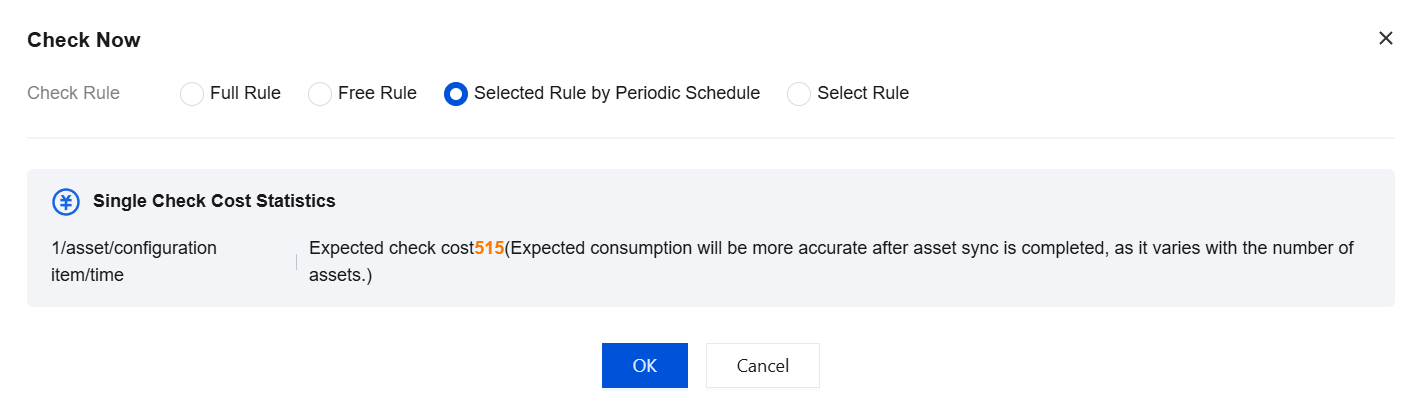
3. In the dialog box that appears, you can select a different detection mode. The detection mode supports four scenarios: Full Rules, Free Rules, Scheduled Selected Rules, and Custom Rules. You can view the expected quota consumption for the corresponding scenario.
Note:
When you perform a cloud resource configuration check, an asset synchronization is triggered. Therefore, the actual quota consumption is expected to have a slight variance.
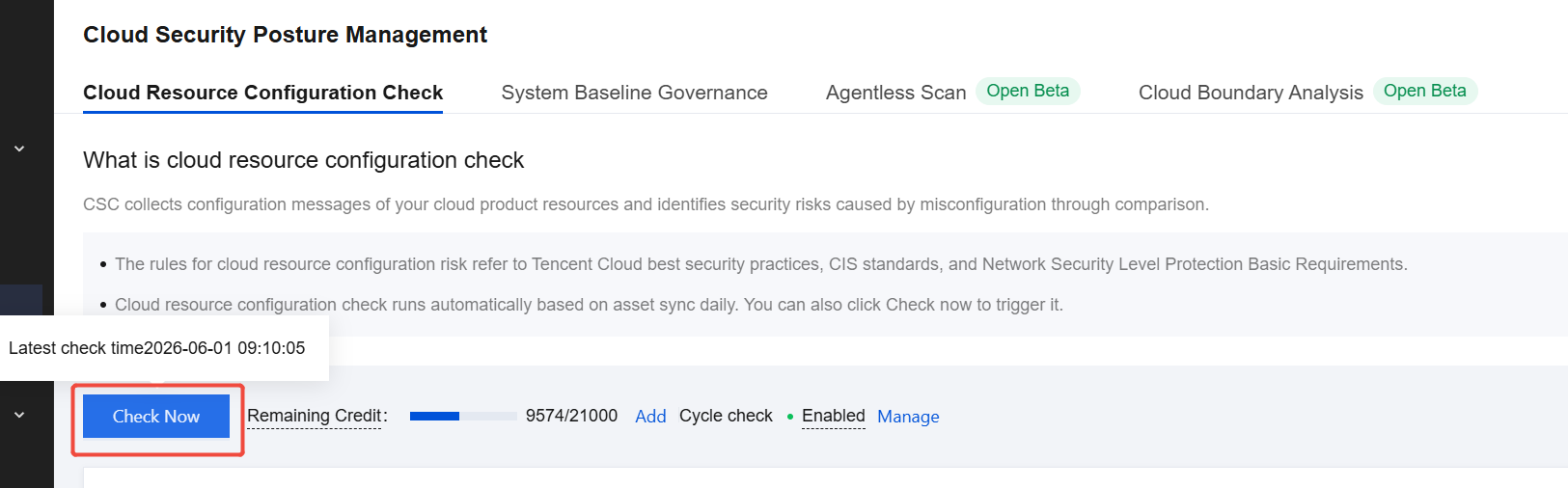
4. Hover your mouse over Check Now to view the execution time of the most recent detection task.
Periodic Check Management
The Cloud Resource Configuration Check feature supports periodic automatic checks. You must manually enable this configuration.
1. Log in to the CSC console, and click CSPM in the left navigation pane.
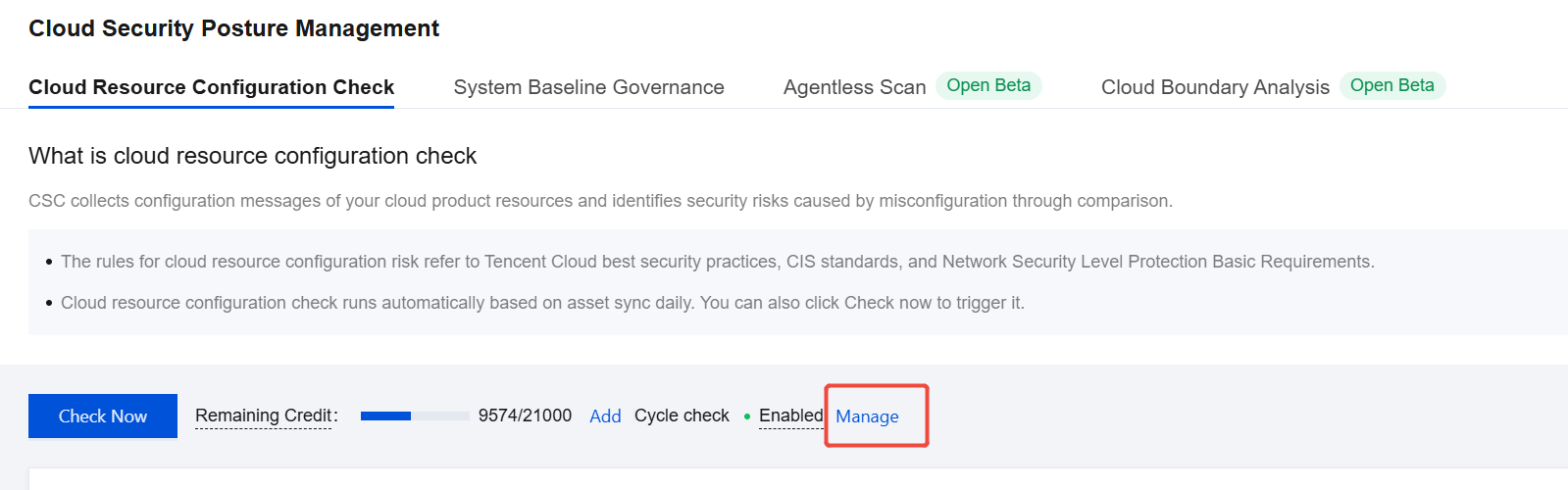
2. In Cloud Security Posture Management > Cloud Resource Configuration Check, click Manage.
3. In the drawer that appears, click the switch to enable periodic checks.
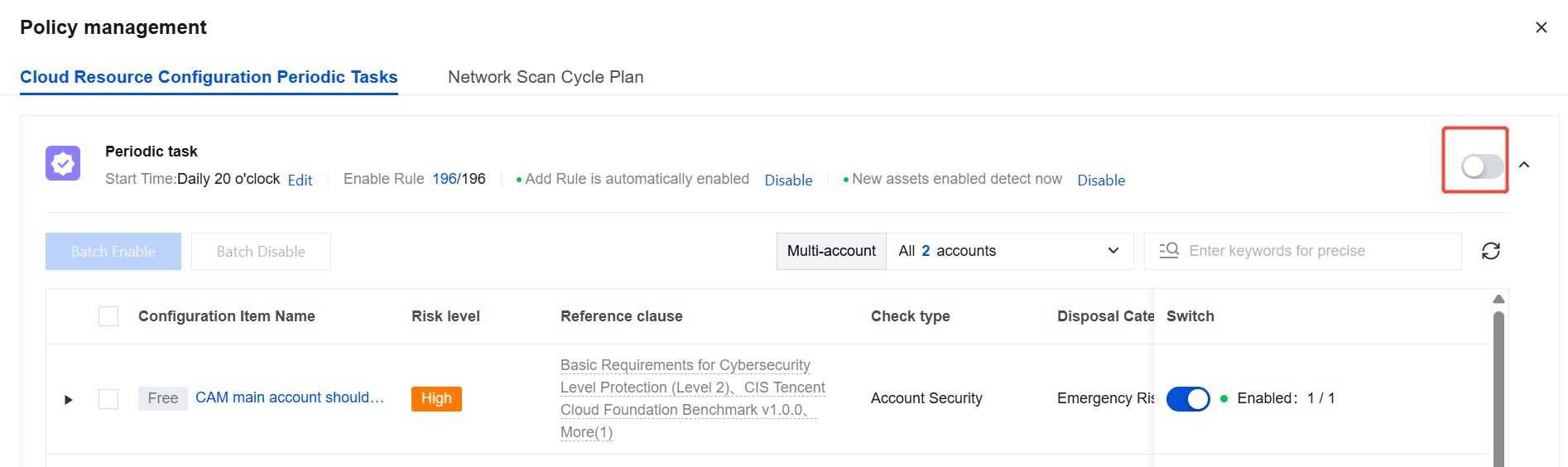
4. You can also click Edit in Periodic Task to adjust the execution time.

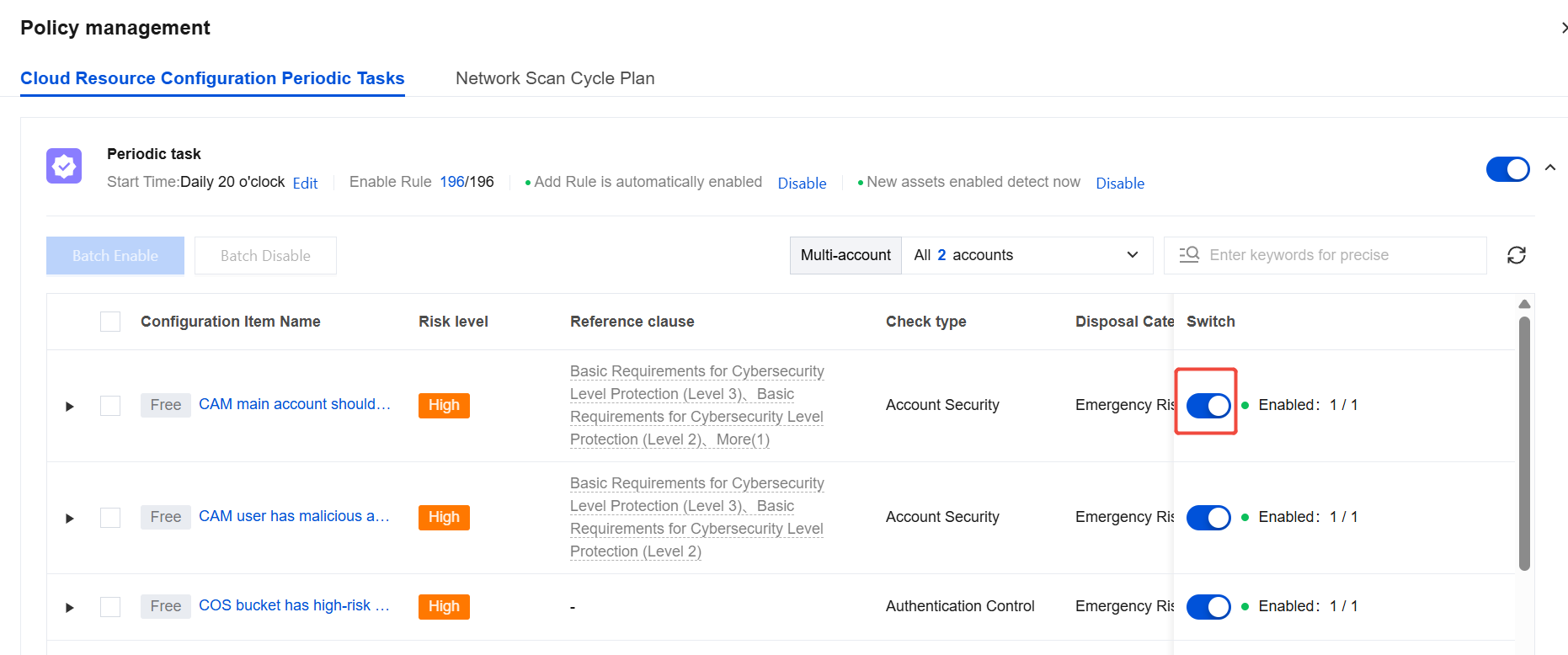
5. The "Auto-Enable New Rules" feature works as follows: When this feature is enabled, new check rules added by CSC are automatically included in your execution list. When this feature is disabled, new check rules added by CSC are not included in your execution list. This feature is enabled by default. We recommend that you keep it enabled to promptly detect new risks.

6. By controlling the switch, you can adjust the list of rules you want to execute. The feature supports search and batch operations.
Configuration Item Perspective
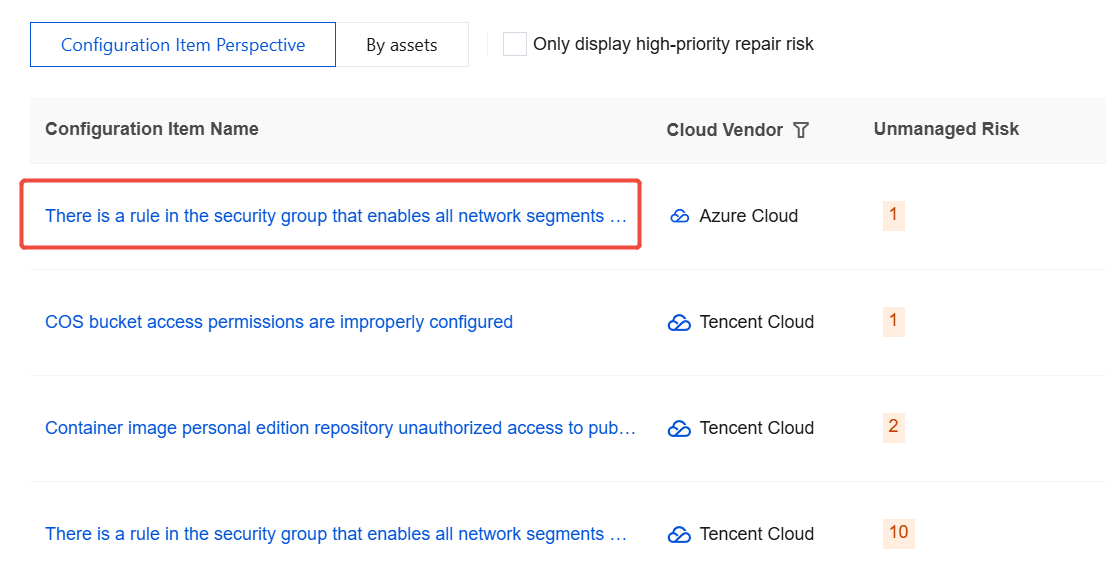
In the Configuration Item view, you can view the risk statistics categorized by rule name.
1. Log in to the CSC console, and click CSPM in the left navigation pane.
2. In Cloud Security Posture Management > Cloud Resource Configuration Check, choose Configuration Item Perspective.
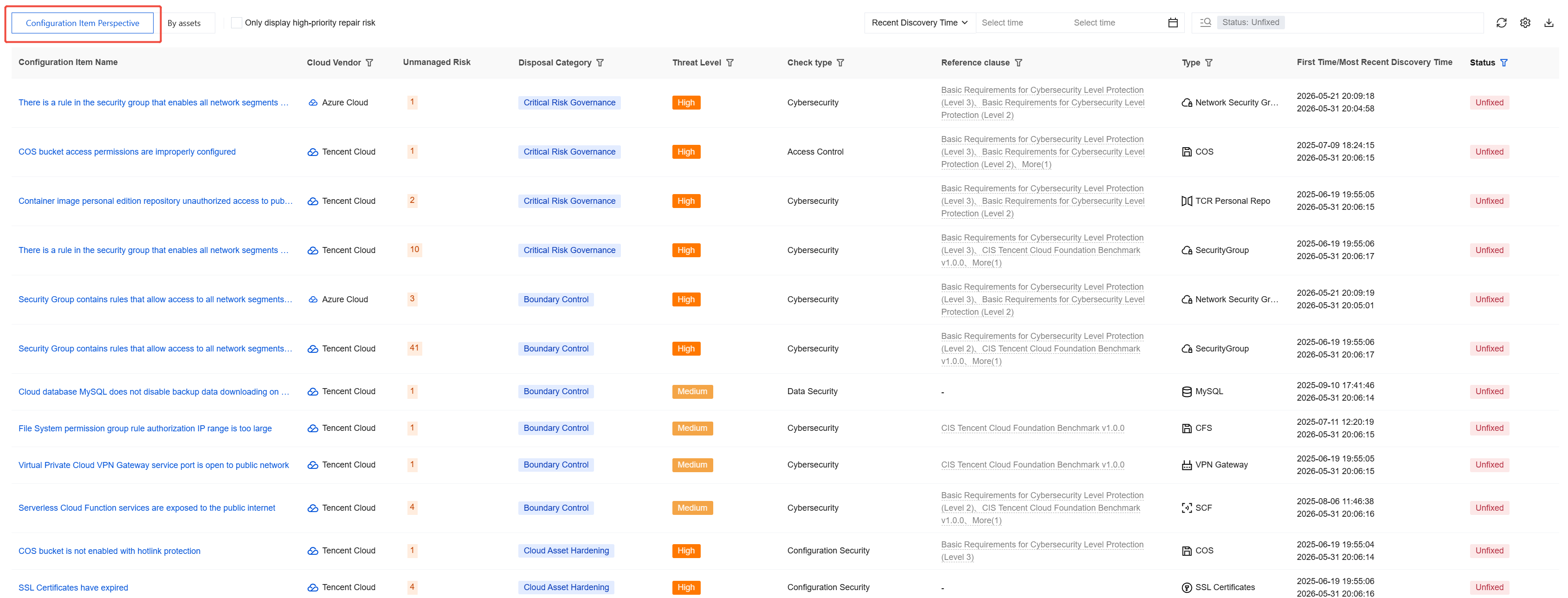
3. The list is sorted by risk priority. You can remediate the risks in order.
4. The list has Only display high-priority repair risk selected by default, which hides some risks with lower fixing priority. If you are concerned about such risks, you can deselect this option to view all content.

5. You can filter out data based on the first detection time, latest detection time, handling status, risk level, cloud provider, and threat level. The system associates risks with reference clauses such as the CIS benchmarks and the basic requirements for network security level protection, and provides a search feature.
6. Select the target data and click the Configuration Item Name to view all the details of that risk.
7. On the details page, you can view the risk impact, fixing suggestions, and risk details.
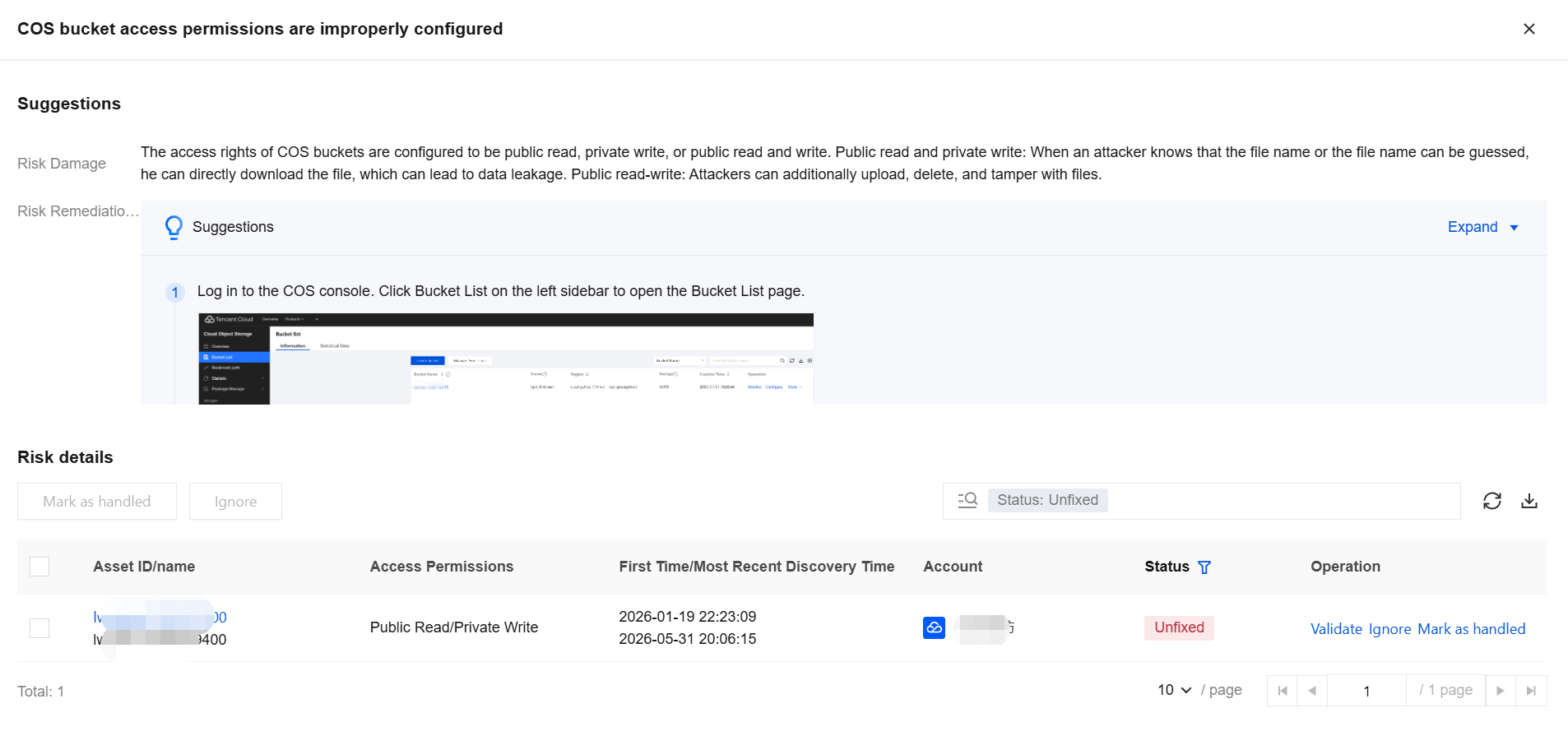
8. In the risk details, you can view the complete risk list for this configuration risk item and perform operations such as verifying, marking as ignored, or marking as handled on the target data.
Asset Perspective
1. Log in to the CSC console, and click CSPM in the left navigation pane.
2. In Cloud Security Posture Management > Cloud Resource Configuration Check, choose By assets .
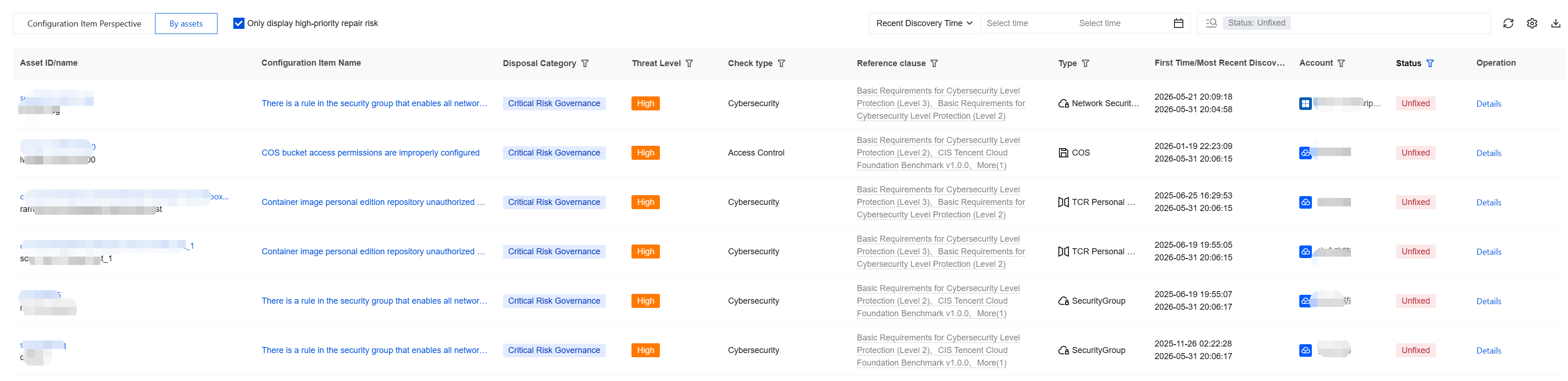
3. The list is sorted by risk priority. You can remediate the risks in order.
4. The list has Only display high-priority repair risk selected by default, which hides some risks with lower fixing priority. If you are concerned about such risks, you can deselect this option to view all content.

5. You can filter out data based on the first detection time, latest detection time, handling status, threat level, and cloud service provider. The system associates risks with reference clauses such as the CIS benchmarks and the basic requirements for network security level protection, and provides a search feature.
6. Select the target data and click Details to view all the details of the risks associated with that asset.

7. On the details page, you can view the risk impact, fixing suggestions, and risk details.
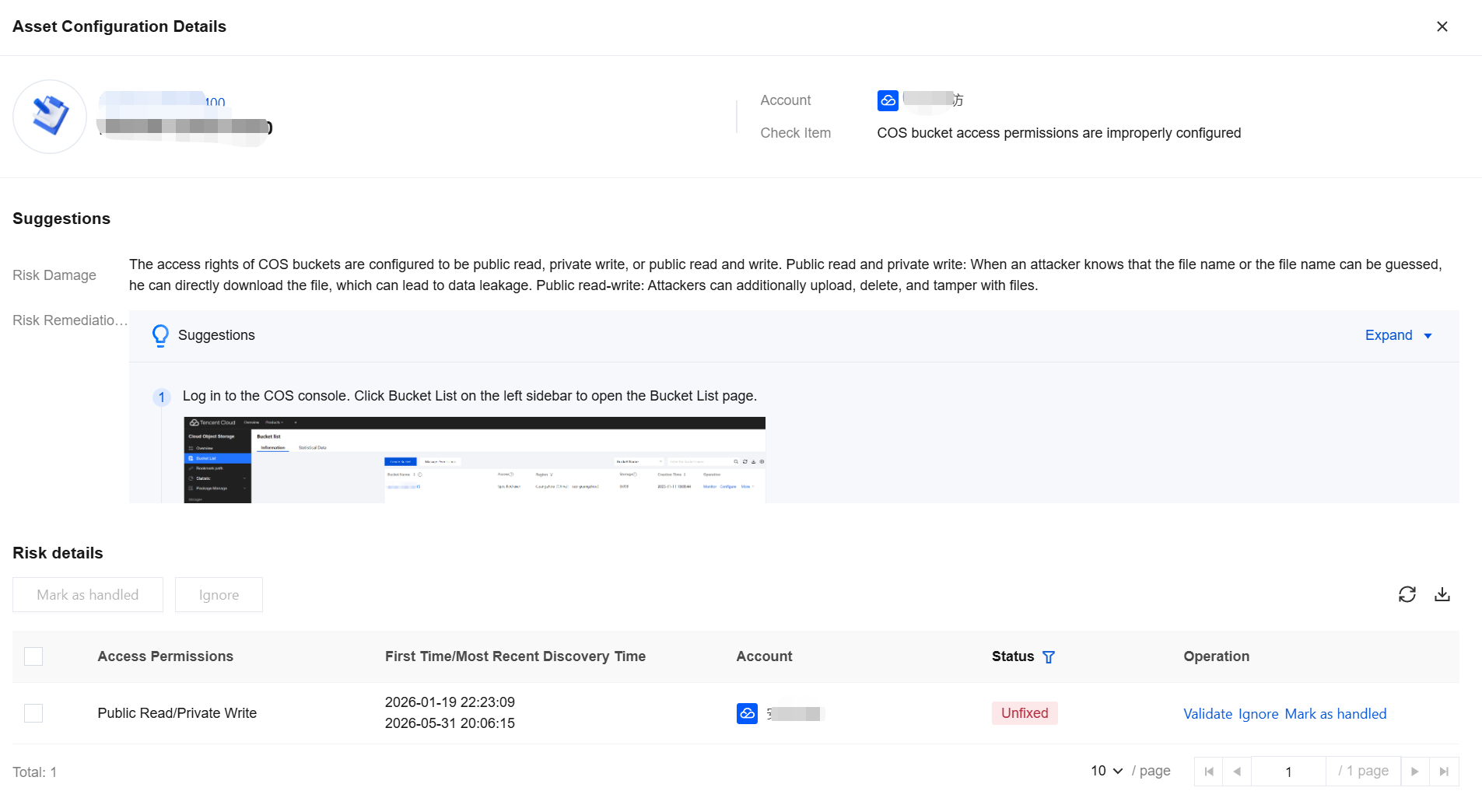
8. In Risk Details, you can view the complete risk list for this configuration risk item and perform operations such as verifying, marking as ignored, or marking as handled on the target data.
Policy Configuration
1. Log in to the CSC console, and click CSPM in the left navigation pane.
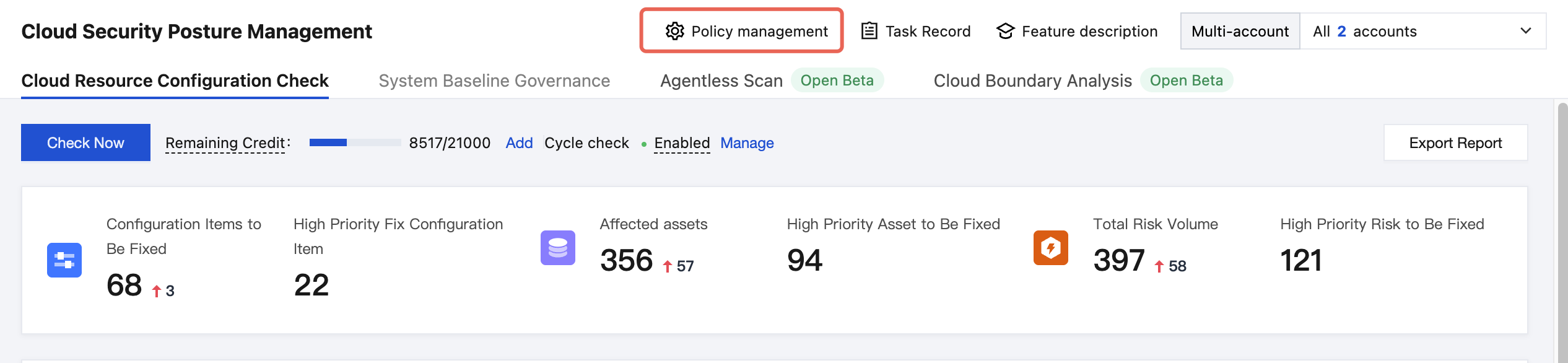
2. In Cloud Security Posture Management > Cloud Resource Configuration Check, click Policy Management in the upper-right corner.
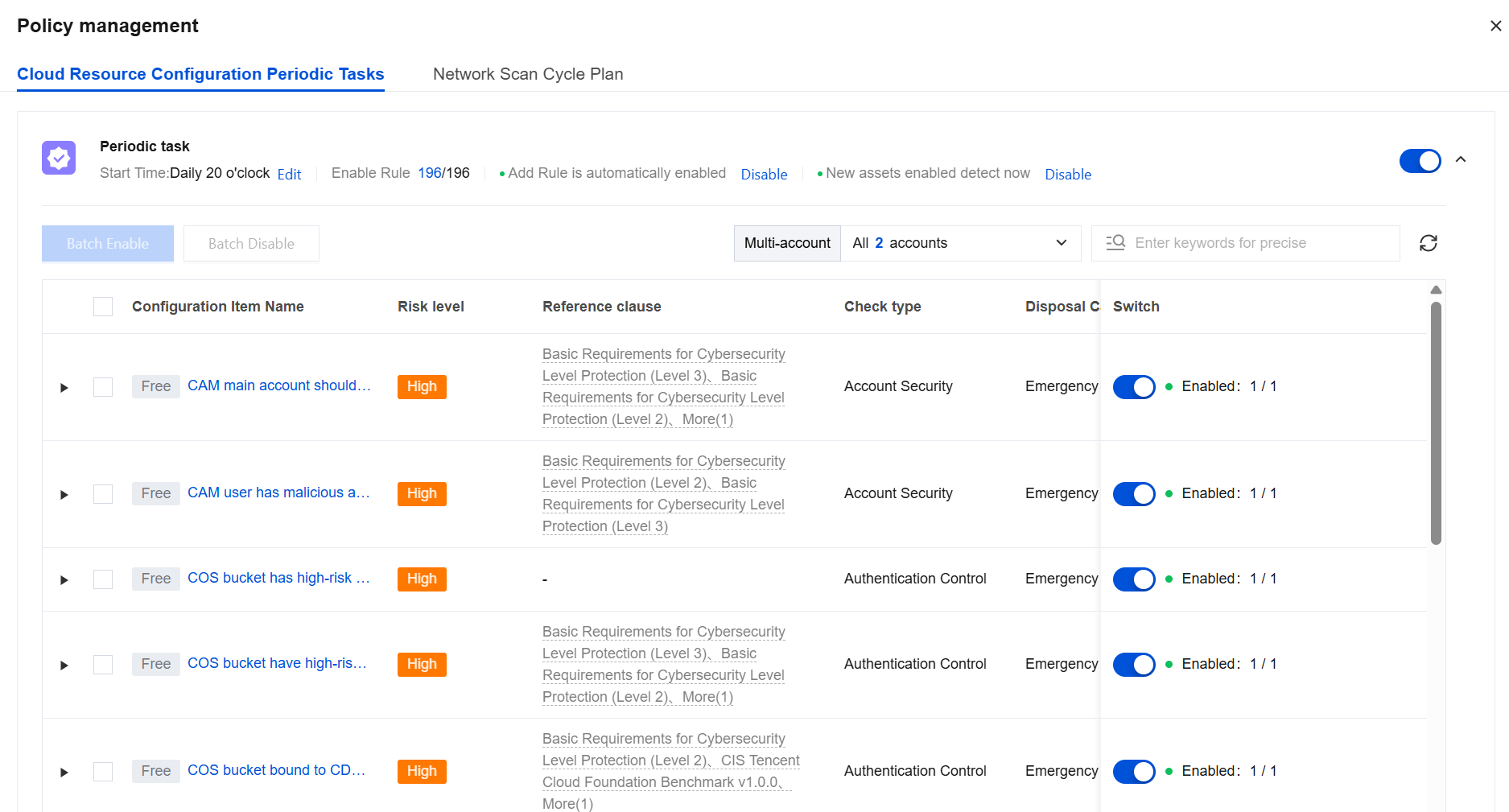
3. In Policy Management, you can view the list of risk configuration items and also select rules to disable them.
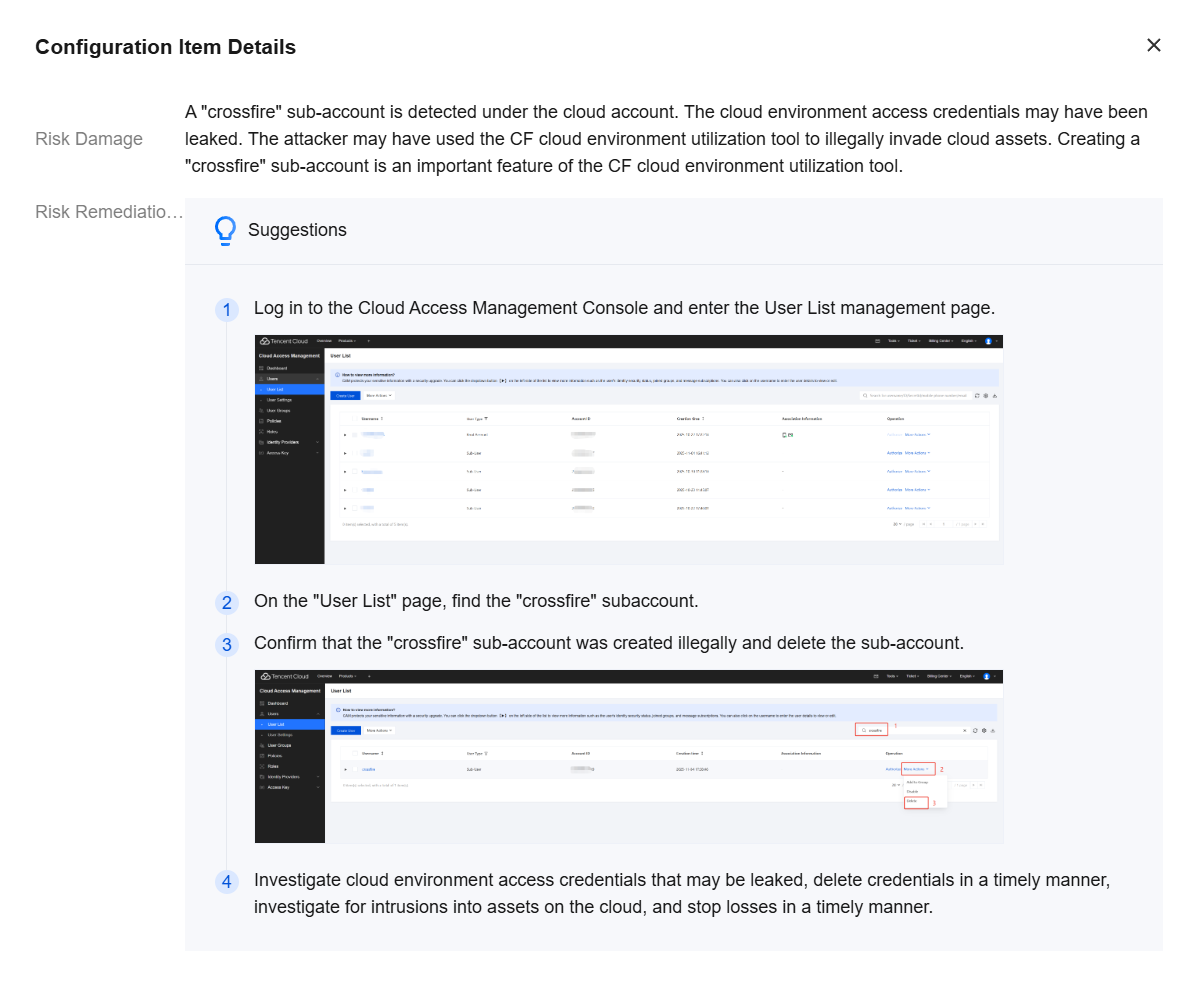
4. Click the Target Configuration Item Name. A dialog box will display the risk impact and fixing suggestions for this configuration item, helping you understand it.
Supported Cloud Products
Cloud Provider | Product Category | Product Name |
Tencent Cloud | Computing | CVM |
| | Lighthouse |
| Containers and Middleware | TKE |
| | Tencent Container Registry (TCR) |
| | SCF |
| | TDMQ for CKafka (CKafka) |
| | TDMQ |
| Networking | CLB |
| | Elastic IP |
| | ENI |
| | NAT Gateway |
| | VPC |
| CDN and Edge | CDN |
| Security | Web Application Firewall (WAF) |
| | CFW |
| | KMS |
| Database | TencentDB for MySQL |
| | TencentDB for MariaDB |
| | TencentDB for SQL Server |
| | TencentDB for MongoDB |
| | TencentDB for PostgreSQL |
| | TencentDB for Redis® |
| | TencentDB for KeeWiDB |
| | Tencent Cloud VectorDB |
| | TDSQL for MySQL |
| | TDSQL-C for MySQL |
| Storage | Object storage |
| | Cloud disk |
| | File storage |
| Big data | Elasticsearch Service |
| | Elastic MapReduce (EMR) |
| Cloud Communication and Enterprise Services | SSL Certificates |
| Development and Ops | Access management |
| | Operation audit |
| | Tencent Cloud Observability Platform |
Alibaba Cloud | Computing | Elastic Compute Service (ECS) |
| Container | TKE |
| | Tencent Container Registry (TCR) |
| Networking and CDN | Server Load Balancer (SLB) |
| | CDN |
| | Elastic IP |
| | ENI |
| | NAT Gateway |
| | Anycast EIP |
| | VPC |
| Big Data Computing | Elasticsearch |
| | Big Data Development and Governance Platform |
| Serverless | Function Compute |
| Middleware | Microservices Engine |
| | API Gateway |
| Database | ApsaraDB RDS |
| | TencentDB for MongoDB |
| | Tair (Redis-compatible) |
| | ApsaraDB for ClickHouse |
| | ApsaraDB for OceanBase |
| | Cloud-native Distributed Database |
| | AnalyticDB for PostgreSQL |
| | AnalyticDB for MySQL |
| | PolarDB |
| | Data Management Service (DMS) |
| Storage | Object Storage Service (OSS) |
| | Log Service |
| Security | Web Application Firewall (WAF) |
| | Cloud Security Center (CSC) |
| | CFW |
| | Cloud Identity Service |
| | Bastion Host |
| Migration and Ops Management | Access Control |
AWS | Computing | Amazon EC2 |
| | AWS Lambda |
| Container | Amazon EKS |
| | Amazon ECR |
| Storage | Amazon S3 |
| | Amazon EFS |
| Database | Amazon RDS |
| | Amazon DynamoDB |
| | Amazon MemoryDB |
| | Amazon ElastiCache |
| Networking and Content Delivery | Amazon VPC |
| Frontend Web and Mobile Applications | Amazon API Gateway |
| Application Integration | Amazon SQS |
| Security, Identity, and Compliance | Amazon IAM |
| Analysis | Amazon MSK |
| | Amazon EMR |
Help and Support
Was this page helpful?
You can also Contact sales or Submit a Ticket for help.
Help us improve! Rate your documentation experience in 5 mins.
Feedback