Sub-Customer Migration
Download
フォーカスモード
フォントサイズ
Target Audience
This document applies to resellers requiring Sub-Customer migration, distributors, and second-level resellers for reference. The following content will be described using the term "reseller".
Overview
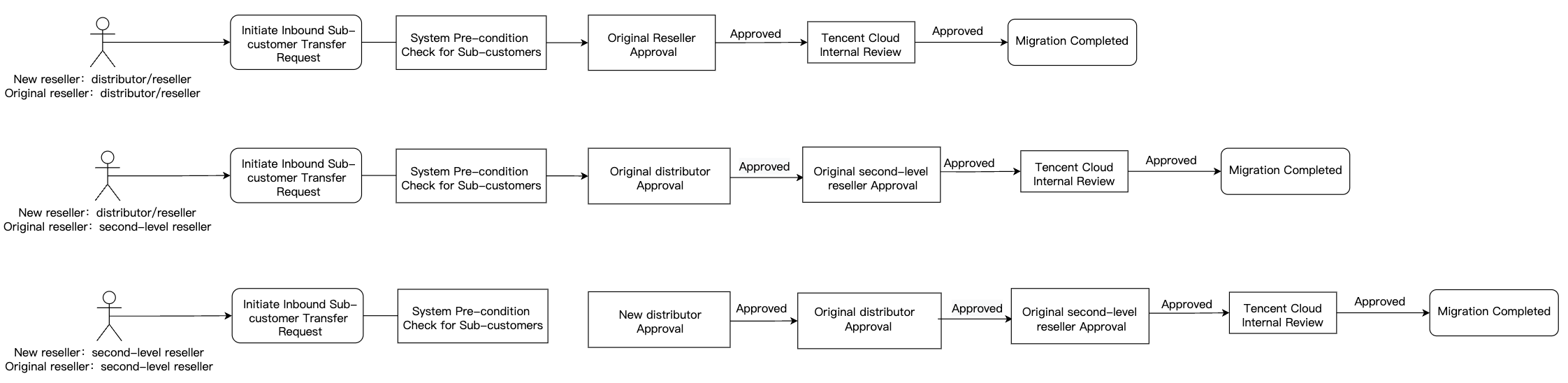
Distributors can initiate the sub-customer migration process on the Partner Center > Customer Migration page. Due to the business partnership between the reseller and the sub-customer, the migration operation requires confirmation from both the sub-customer and the transferring reseller before it can be executed. Refer to the diagram below for the migration process:
Note:
Before initiating the migration process, the receiving distributor must fully communicate with the sub-customer and the transferring reseller to address any existing contractual and financial matters, ensuring all three parties reach a consensus on the migration
Before initiating the migration, the Newreseller should contact the Original reseller to adjust the sub-customer account to a normal status, such as:
Disable the sub-customer account's arrears service suspension exemption privilege. If the sub-customer has postpaid or prepaid non-suspension privileges, the transferring distributor must disable these privileges before migration. Refer to Configure Sub-Customer Arrears Service Suspension Policy
Disable the frozen status of the sub-customer. If the sub-customer is frozen, it must be unfrozen by the transferring distributor before migration can proceed
If the sub-customer's available credit is less than 0, please have the transferring distributor reverse it first before migrating
When you are a second-level distributor, ensure that the allocatable credit limit is greater than the total credit limit allocated to the migrating sub-customer. If the allocatable credit limit is insufficient, the migration will fail
Migration Sub-Customer Conditions
To ensure your and your sub-customer's account and property safety, please read the following information carefully before proceeding with the operation:
Important Notice
This process applies to Tencent Cloud resellers (single-tier), distributors (Multi-tier), and second-level resellers.
Billing for cloud products may experience delays. There may still be delayed charges for the migrated sub-customer that will be billed under the account of the transferring distributor.
Please ensure you understand the migration operation instructions, as well as potential issues and precautions that may arise from the operation.
After initiating the migration, the system will notify the distributor of the transferring customer and Tencent Cloud's internal review team. After approval is completed, you will be notified via in-site messages, emails, and SMS.
Please allocate sufficient credit line for the migrating customer to prevent service suspension of resources due to insufficient credit after migration.
For customers initiated for migration in the same batch, new reseller must be the same.
Migration Process Operation Instructions
To successfully complete the process, please follow the steps below:
1. Carefully read this document to understand the relevant responsibilities and risks.
2. After communicating with the sub-customer and the transferring reseller to reach an agreement and properly handling the account assets, submit the migration application.
3. The transferring reseller will be notified and need to confirm the migration application.
4. If the transferring reseller approves the application, you will receive a system notification. Please return to the process to continue with subsequent operations.
Migration Limitations and Conditions
When the following limitations exist, migration cannot be initiated for the sub-customer:
The sub-customer to be migrated cannot be a group administrator or member. They must be removed from the group before migration.
The sub-customer to be migrated cannot create/join a savings plan shared unit. It must be removed before migration.
The service suspension policy for the sub-customer to be migrated cannot be the non-stop service privilege for arrears. You need to go to Partner Center > Customer Management > Operations: Service Suspension Policy to disable the privilege before migration.
The sub-customer to be migrated cannot be in an unbinding/migration process. Terminate the process before migration.
Operation Steps
1. Log in to the Tencent Cloud official website using the primary account.
2. Go to the Partner Center Console > Customer Migration page, and click Initiate an Application.

3. Click Download Template, fill in the account IDs of the sub-customers to be migrated and the required credit allocation according to the template fields, then upload the template file.
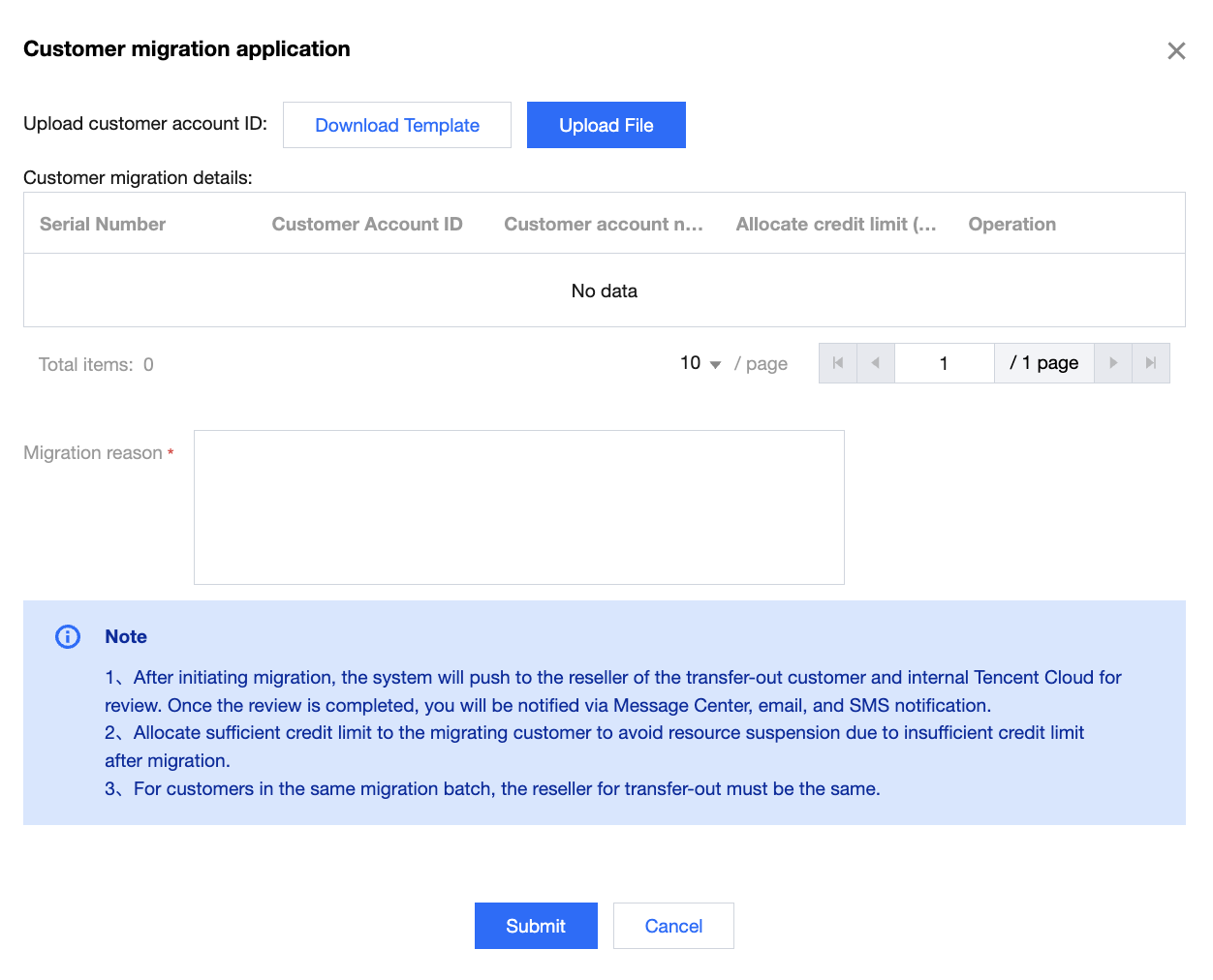
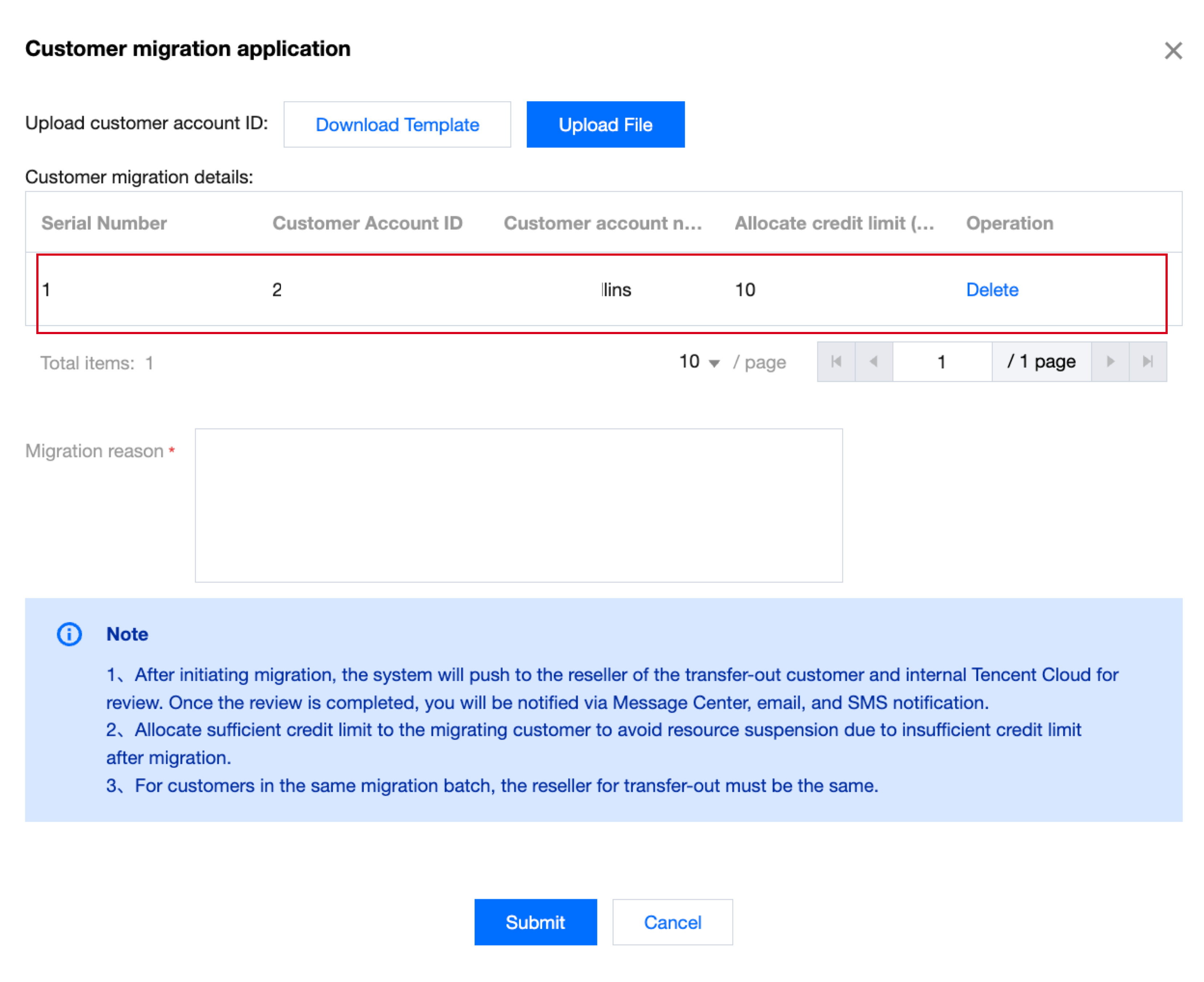
4. The successfully uploaded sub-customer account IDs will be imported into the inbound customer details table. After confirming the uploaded information is correct, click Submit.
Note:
For each batch of uploaded sub-customers, the source dealer account ID must be the same.
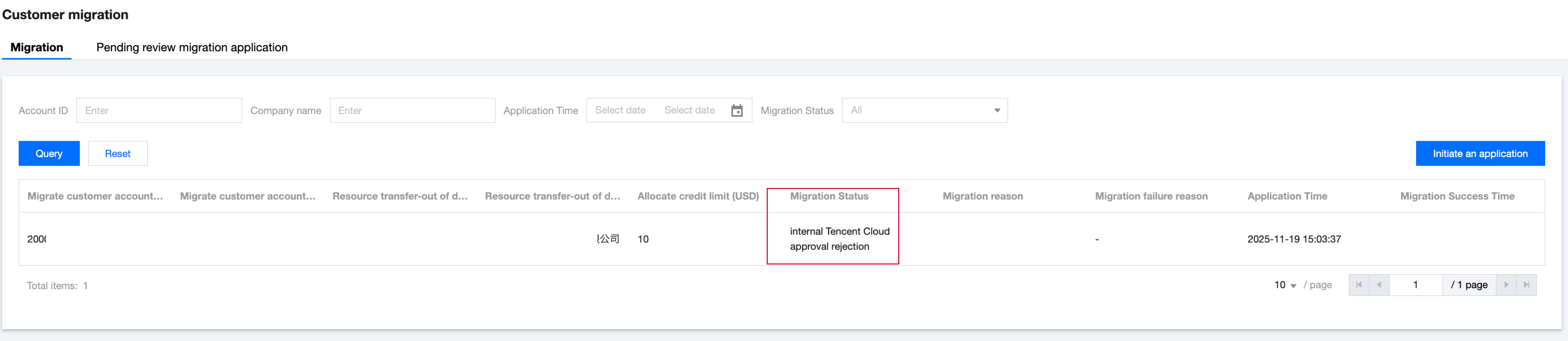
5. After submission, a migration record will be generated for the sub-customer to be migrated. The migration can only be completed only after both the source distributor and Tencent Cloud Internal Review have approved. You can track the migration status of each sub-customer under Customer Migration > Migrations.
If you are a second-level reseller, the system will then notify the outgoing distributor for confirmation after the migration request is approved by the incoming tier-1 distributor.
If you are a single-level reseller/ distributor, the system will directly notify the original reseller to confirm the migration application.
6. After receiving the migration application you submitted, the outgoing distributor needs to confirm in Customer Migration > Pending review migration applications. The outgoing distributor can choose to approve/reject the application.

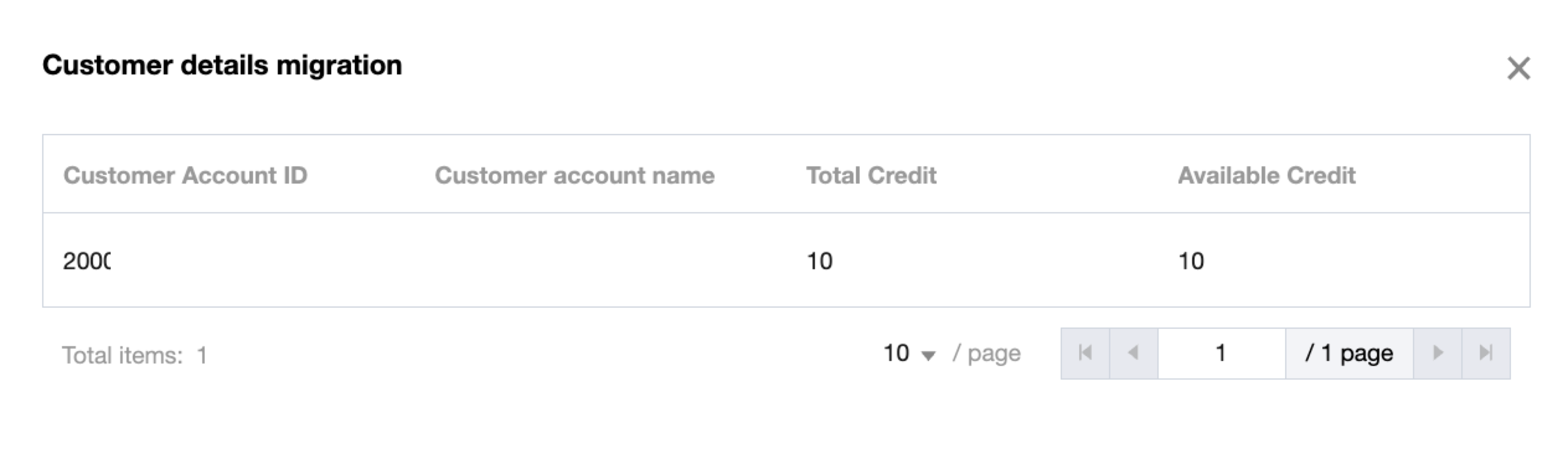
6.1 Click the number of customers in the pending migration application list to view the details of this migration, including all sub-customers to be migrated.
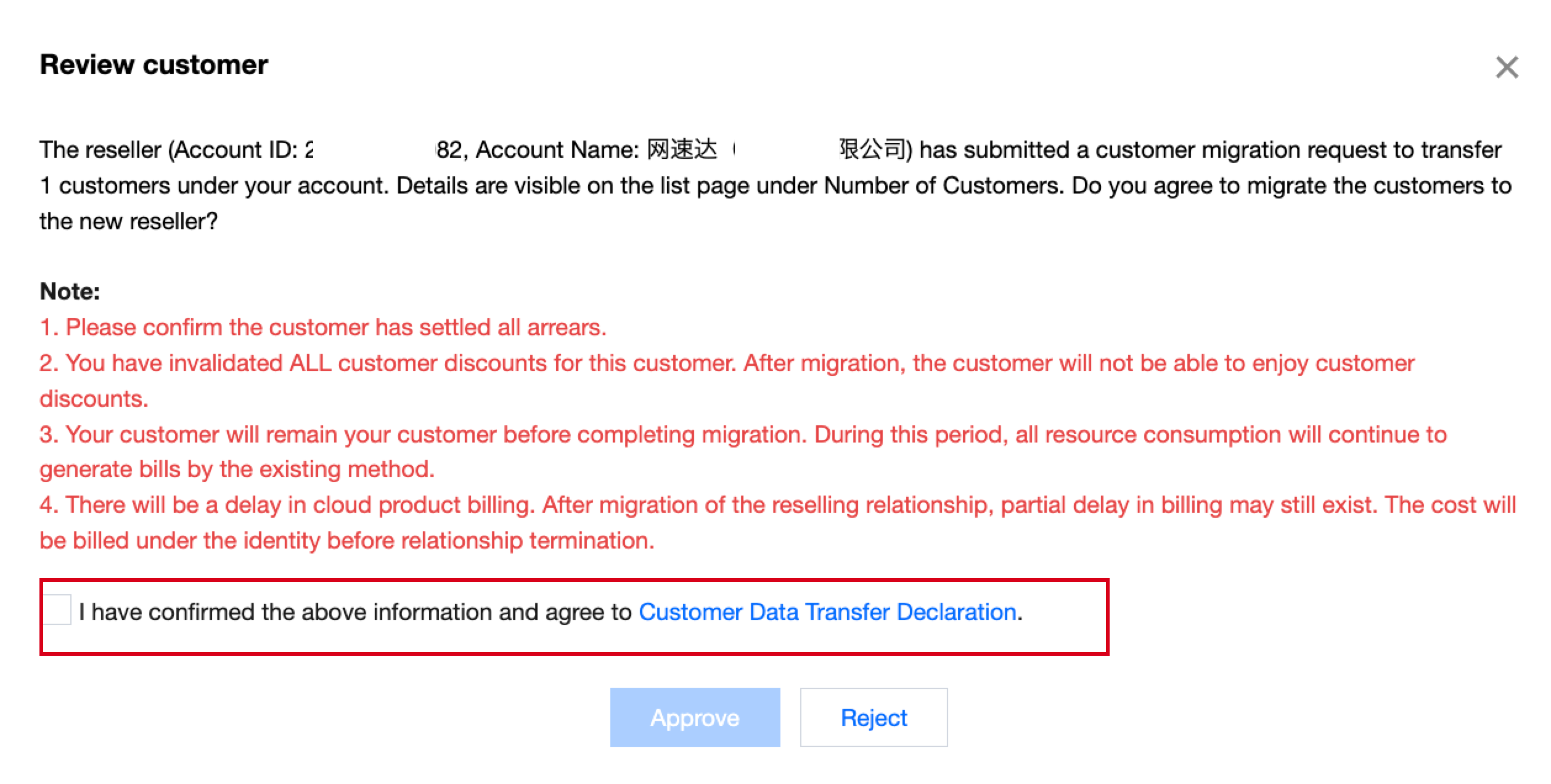
6.2 After clicking approve approval, the original reseller should select "I confirm that I have acknowledged the above information and agree to the Sub-Customer Data Transfer Statement" in the review pop-up window, then click Approve to approve the migration application.
7. After the Original reseller's review is completed, the system will submit it to Tencent Cloud for internal review. To check the progress of the internal review, please contact your business manager. Once approved by Tencent Cloud's internal review, the system will send you notifications via email, messages, and SMS.
フィードバック