tencent cloud

Tencent Real-Time Communication

お知らせ・リリースノート
製品アップデート情報
Tencent Cloudオーディオビデオ端末SDKの再生アップグレードおよび承認チェック追加に関するお知らせ
TRTCアプリケーションのサブスクリプションパッケージサービスのリリースに関する説明について
製品の説明
製品概要
基礎概念
製品の機能
製品の強み
ユースケース
性能データ
購入ガイド
Billing Overview
無料時間の説明
Monthly subscription
Pay-as-you-go
TRTC Overdue and Suspension Policy
課金に関するよくあるご質問
Refund Instructions
初心者ガイド
Demo体験
Call
コンポーネントの説明(TUICallKit)
Activate the Service
Run Demo
クイック導入
オフライン通知
Conversational Chat
クラウドレコーディング(TUICallKit)
AI Noise Reduction
インターフェースのカスタマイズ
Calls integration to Chat
Additional Features
No UI Integration
Server APIs
Client APIs
Solution
ErrorCode
公開ログ
よくある質問
ライブ配信
Billing of Video Live Component
Overview
Activating the Service (TUILiveKit)
Demo のクイックスタート
No UI Integration
UI Customization
Live Broadcast Monitoring
Video Live Streaming
Voice Chat Room
Advanced Features
Client APIs
Server APIs
Error Codes
Release Notes
FAQs
RTC Engine
Activate Service
SDKのダウンロード
APIコードサンプル
Usage Guidelines
クライアント側 API
高度な機能
RTC RESTFUL API
History
Introduction
API Category
Room Management APIs
Stream mixing and relay APIs
On-cloud recording APIs
Data Monitoring APIs
Pull stream Relay Related interface
Web Record APIs
AI Service APIs
Cloud Slicing APIs
Cloud Moderation APIs
Making API Requests
Call Quality Monitoring APIs
Usage Statistics APIs
Data Types
Appendix
Error Codes
コンソールガイド
アプリケーション管理
使用統計
監視ダッシュボード
開発支援
Solution
Real-Time Chorus
よくあるご質問
課金関連問題
機能関連
UserSig関連
ファイアウォールの制限の対応関連
インストールパッケージの圧縮に関するご質問
AndriodおよびiOS関連
Web端末関連
Flutter関連
Electron関連
TRTCCalling Web関連
オーディオビデオ品質関連
その他のご質問
旧バージョンのドキュメント
TUIRoom(Web)の統合
TUIRoom (Android)の統合
TUIRoom (iOS)の統合
TUIRoom (Flutter)の統合
TUIRoom (Electron)の統合
TUIRoom APIのクエリー
クラウドレコーディングと再生の実現(旧)
Protocols and Policies
セキュリティコンプライアンス認証
セキュリティホワイトペーパー
情報セキュリティの説明
Service Level Agreement
Apple Privacy Policy: PrivacyInfo.xcprivacy
TRTC ポリシー
プライバシーポリシー
データ処理とセキュリティ契約
用語集

Integration Offline Push (FCM)

PDF
フォーカスモード
フォントサイズ
最終更新日: 2026-03-05 17:29:11
On Android, incoming audio/video call invitations won't trigger notifications when your app is killed or running in the background. This prevents users from receiving and answering calls when the app isn't actively running.
To solve this, you need to integrate offline push notifications using FCM Data Messages. This allows critical signaling—like call invitations—to reach the device and wake up your app, even when it's completely closed, launching the call interface so users can answer incoming calls.
Note:
Offline push is not required if users are only calling always-online web agents.
This guide shows you how to integrate FCM Data Message push for audio/video calls.


Activate the Service

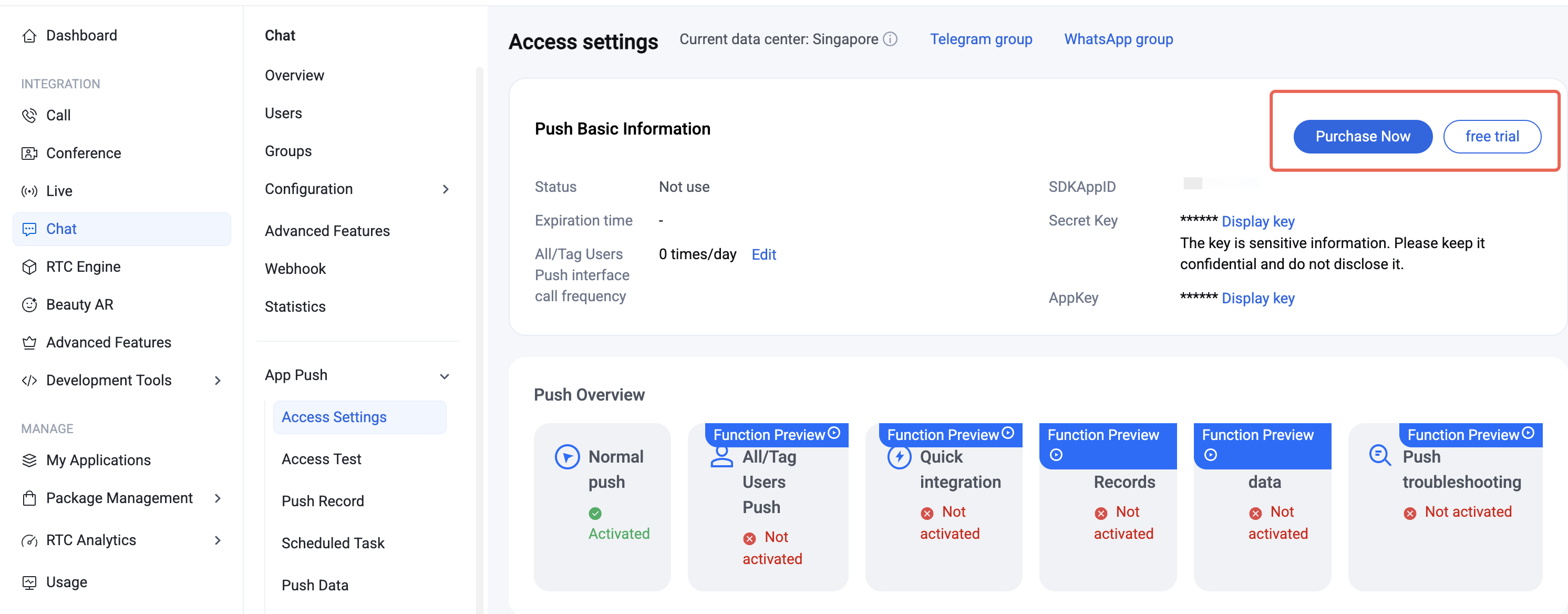
Go to the Chat Console > App Push > Access settings , and click Purchase Now or Free Trial (each app is eligible for one free trial, valid for 7 days).

Note:
When your push plugin trial or subscription expires, all push services (including offline push for regular messages, broadcast/tag push, etc.) will be automatically suspended. To ensure uninterrupted service, please purchase or renew your subscription in advance.

Integration Considerations

Improve Call Reach Rate

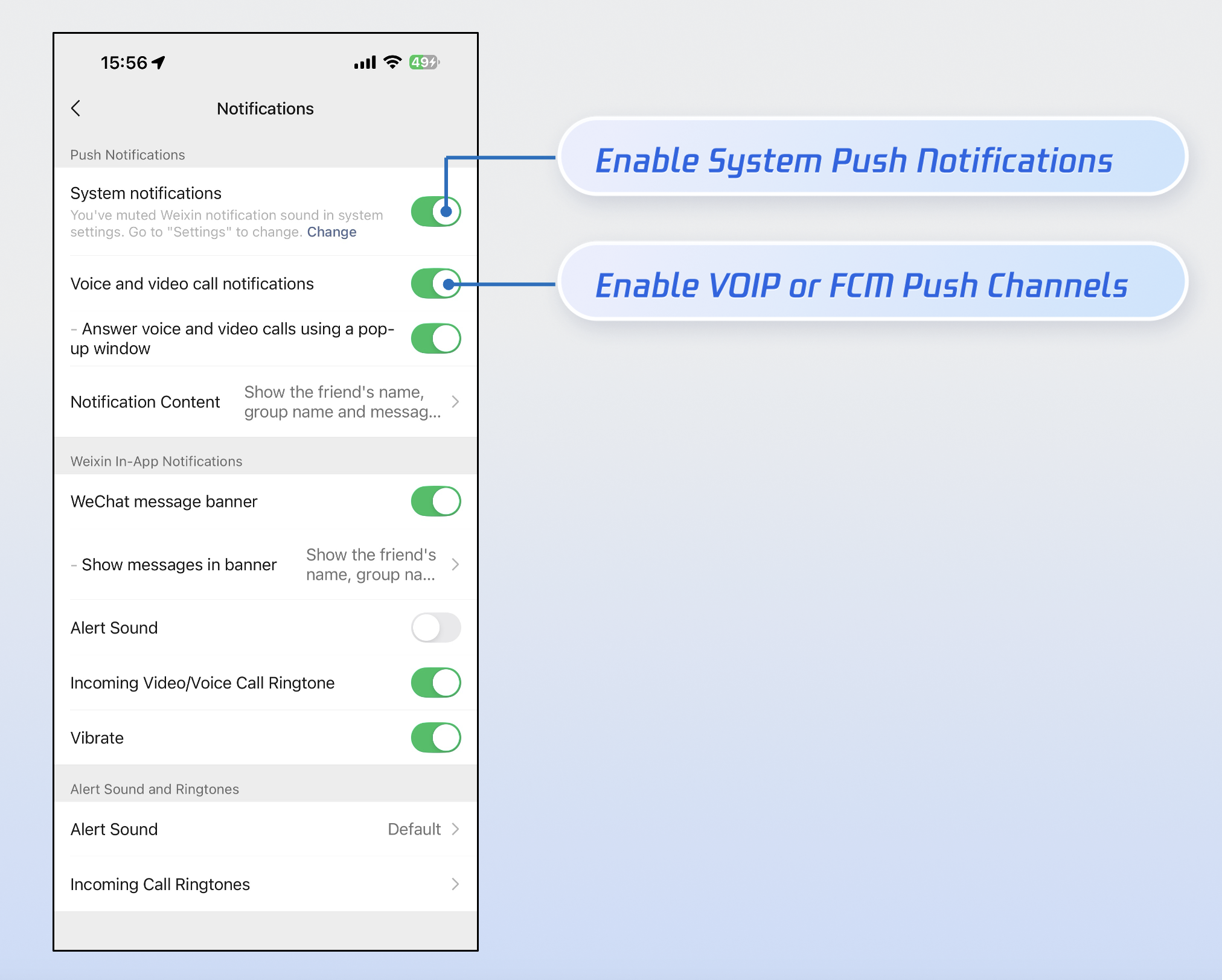
Over 90% of missed call notifications are due to users manually disabling app notification permissions. To maximize call delivery, we strongly recommend:
1. Send notifications responsibly: Avoid sending low-quality or irrelevant notifications to reduce the risk of users disabling notification permissions due to spam.
2. Offer granular notification controls: Like WeChat, provide separate toggles in your app settings for Notification and FCM Data Message instead of instructing users to disable all notifications in system settings.


Implementation Steps

Step 1: Configure Vendor

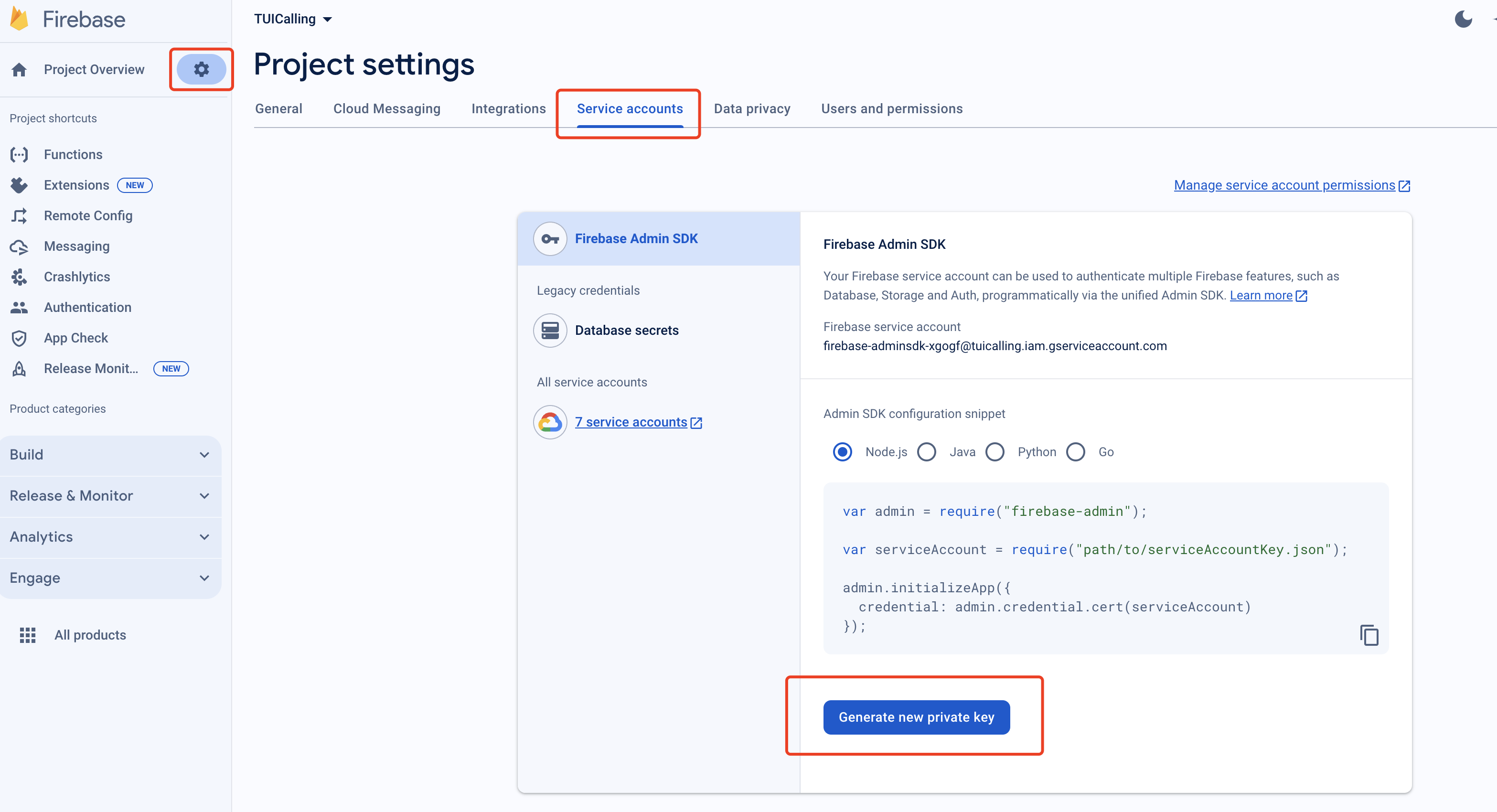
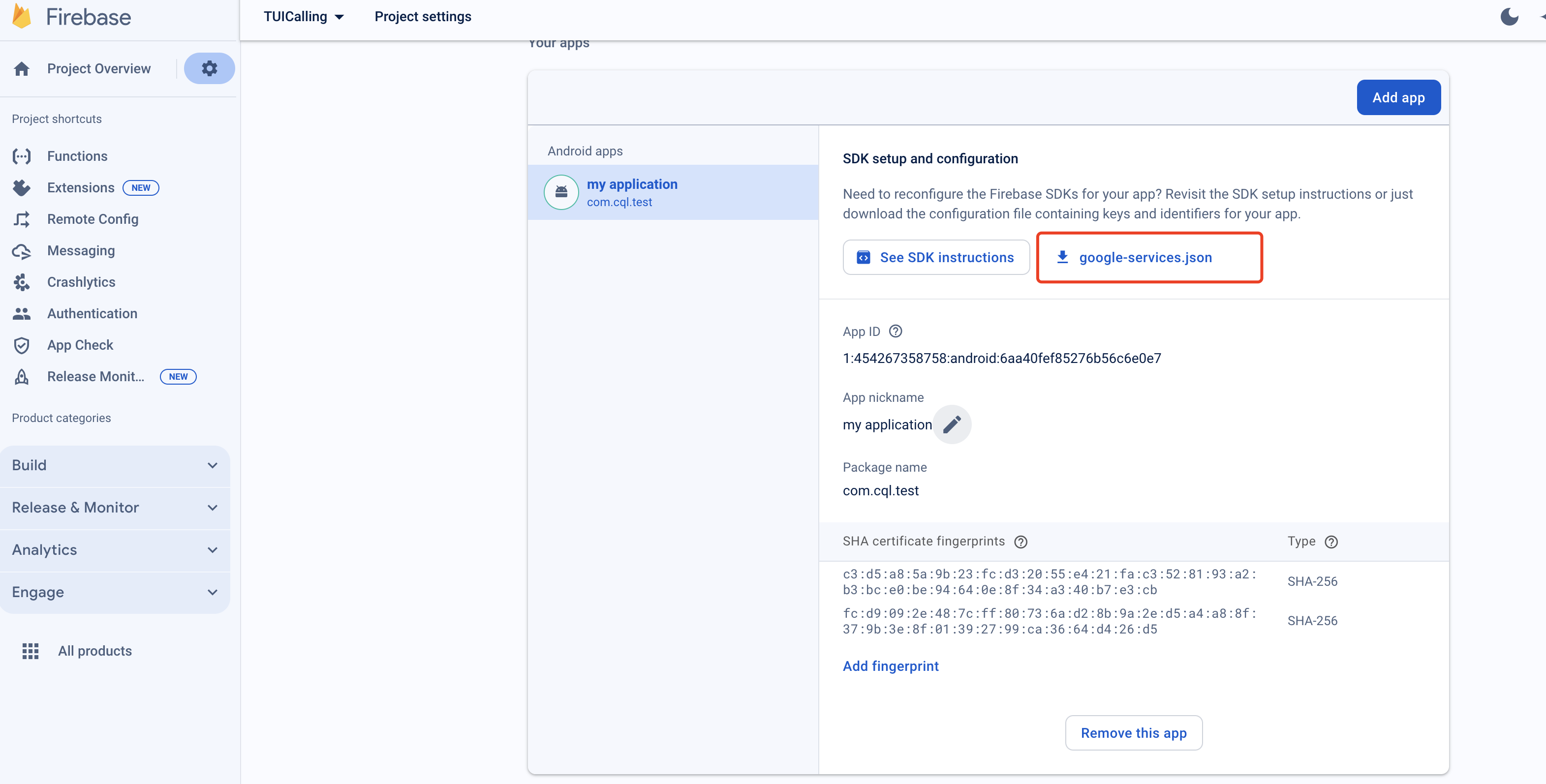
1. Register your app on the FCM Push Platform to obtain your AppID, AppKey, and the google-services.json file required for offline push.
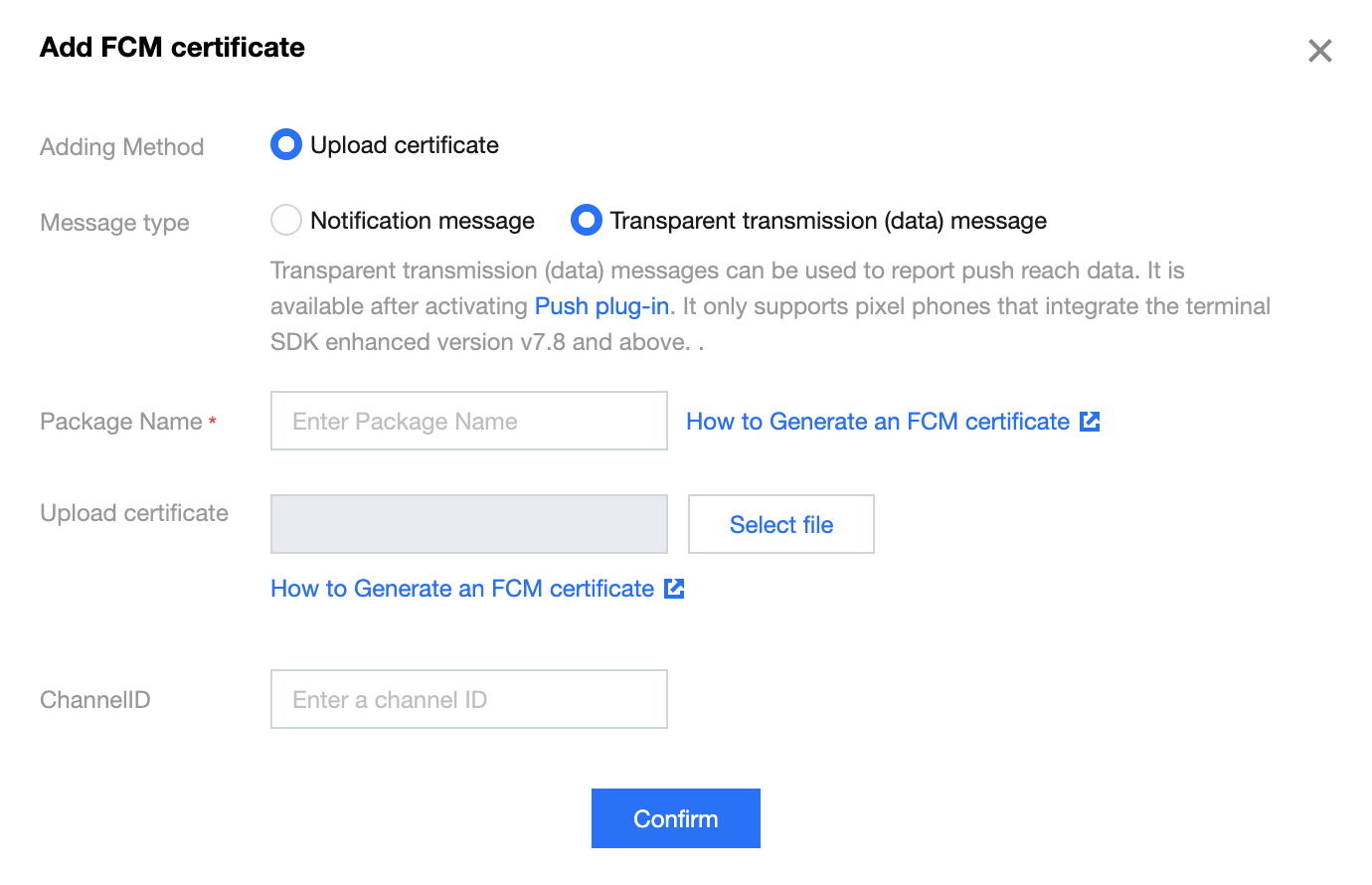
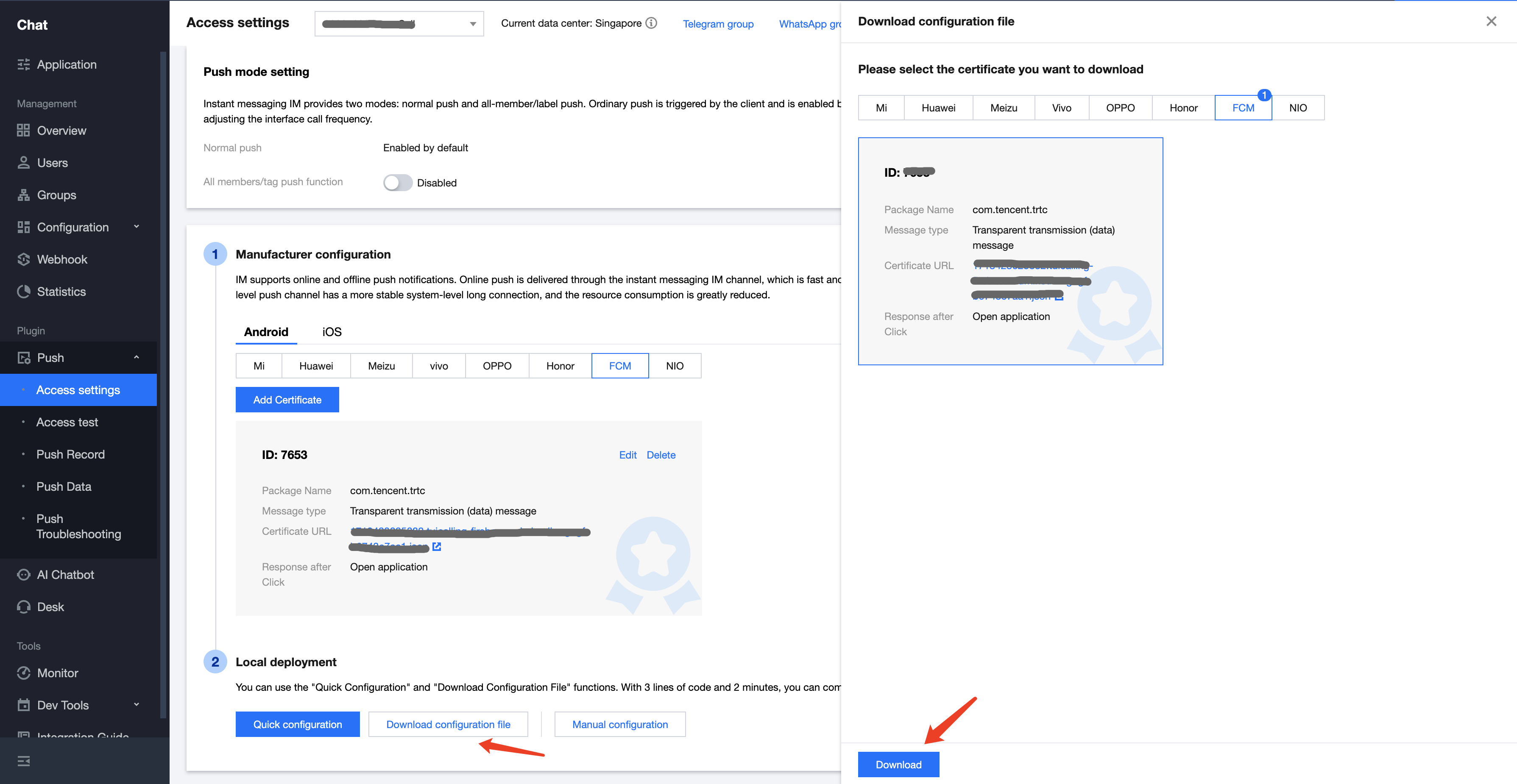
2. Log in to the Chat Console, go to App Push > Access settings feature tab, select FCM, add FCM's certificate, and select Transparent transmission(data) message.
Vendor Push Platform
IM Console Configuration


Step 2: Integrate the Push Plugin

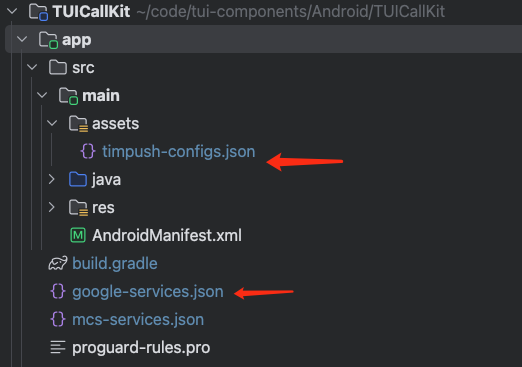
1. Add configuration files: After completing the vendor push setup in the console, download the configuration files and add them to your project. Place the downloaded timpush-configs.json file in your app module's assets directory, and add google-services.json to your project's app directory.
Download the file timpush-configs.json
Download file google-services.json
Add to your project


2. Integrate the push plugin: Add the following dependencies to your project's app module build.gradle file:
implementation "com.tencent.timpush:timpush:latest.release"
implementation "com.tencent.timpush:fcm:latest.release"
Note:
TIMPush requires IM SDK version 7.9.5666 or above.
You can update the Chat SDK version in the tuicallkit-kt/build.gradle file.

Step 3: Project Configuration

1. Add the following to the buildscript > dependencies section of your project-level build.gradle file:
buildscript {
dependencies {
classpath 'com.google.gms:google-services:4.3.15'
}
}
2. In your app module's build.gradle file, apply the following plugin:
apply plugin: 'com.google.gms.google-services'
3. In the same build.gradle file, set the applicationId to your actual app package name:
applicationId 'com.****.callkit'

Customize Incoming Call Notifications

Step 1: Listen for FCM Push

When FCM push wakes up your app, the TIMPush plugin sends an "app wakeup" broadcast. To display incoming call notifications correctly, follow these steps:
1. Listen for the app wakeup broadcast: Register a broadcast receiver to handle the wakeup event sent by TIMPush.
2. Perform auto login: After logging in, the call service becomes available. For login implementation, see login.
import android.content.BroadcastReceiver
import android.content.Context
import android.content.Intent
import android.content.IntentFilter
import android.os.Bundle
import androidx.localbroadcastmanager.content.LocalBroadcastManager

class PushWakeupReceiver : BroadcastReceiver() {
override fun onReceive(context: Context?, intent: Intent?) {
if (intent?.action == "TIMPush.BROADCAST_IM_LOGIN_AFTER_APP_WAKEUP") {
val bundle = intent.getExtras()
// 2.Execute Auto-Login
// autoLogin()
}
}
}

class MainActivity : AppCompatActivity() {
private val wakeupReceiver = PushWakeupReceiver()
private var callListener: CallListener? = null

override fun onCreate(savedInstanceState: Bundle?) {
super.onCreate(savedInstanceState)
// 1.Listen for App Wakeup Broadcast
observeAppWeakup()
}
private fun observeAppWeakup() {
val filter = IntentFilter("TIMPush.BROADCAST_IM_LOGIN_AFTER_APP_WAKEUP")
LocalBroadcastManager.getInstance(this).registerReceiver(wakeupReceiver, filter)
}
}

Step 2: Customize Notification Style

Use the NotificationManager class to display a custom incoming call notification interface:
1. Create an incoming call notification manager class (IncomingCallNotificationManager): Encapsulate the logic for creating and displaying notifications.
2. Customize the notification UI: Use RemoteViews to define the notification layout. For details on configuring notifications with NotificationCompat.Builder (such as Channel, PendingIntent, priority, etc.), refer to the Android documentation: NotificationCompat.Builder.
import android.app.Notification
import android.app.NotificationChannel
import android.app.NotificationManager
import android.content.Context
import android.content.Intent
import android.os.Build
import android.widget.RemoteViews
import androidx.core.app.NotificationCompat

class IncomingCallNotificationManager(private val context: Context) {
private val channelId = "incoming_call_channel"
private val channelName = "Call notification"
private val notificationId = 1001
private var remoteViews: RemoteViews? = null
private val notificationManager: NotificationManager =
context.getSystemService(Context.NOTIFICATION_SERVICE) as NotificationManager

init {
// 1.Create notification channels
createNotificationChannel()
}
private fun createNotificationChannel() {
if (Build.VERSION.SDK_INT >= Build.VERSION_CODES.O) {
val channel = NotificationChannel(
channelId, // Channel ID (Unique Identifier)
"Call notification", // Channel Name (Visible to Users)
NotificationManager.IMPORTANCE_HIGH // Importance: High priority
).apply {
description = "Display incoming call notification" // Channel description
enableLights(true) // Enable notification light
enableVibration(true) // Enable vibration
setShowBadge(false) // Do not display badges
}
notificationManager.createNotificationChannel(channel)
}
}
// 2. Display custom call notification UI style
fun showIncomingCallNotification(
callerName: String,
callerAvatar: Int?,
isVideoCall: Boolean
) {
// RemoteViews are used to display custom layouts in notifications.
remoteViews = RemoteViews(context.packageName, R.layout.incoming_call_notification)
// Set caller name
remoteViews?.setTextViewText(R.id.tv_caller_name, callerName)
// Set the call type description (video call or voice call).
remoteViews?.setTextViewText(R.id.tv_call_desc, if (isVideoCall) "Video" else "Audio")
// Set call type icon
val callTypeIcon = if (isVideoCall) {R.drawable.ic_video_call} else {R.drawable.ic_audio_call}
remoteViews?.setImageViewResource(R.id.img_call_type, callTypeIcon)
// Set caller avatar
remoteViews?.setImageViewResource(R.id.img_avatar, callerAvatar)
// Create a notification object
val notification = NotificationCompat.Builder(context, channelId)
.setSmallIcon(R.drawable.ic_notification_small) // Small icons displayed in the status bar
.setContent(remoteViews) // Set custom layout
.setCustomContentView(remoteViews) // Standard view (when the notification bar is collapsed)
.setCustomBigContentView(remoteViews) // Expanded view (when the notification bar is expanded)
.setOngoing(false) // Continuous notification (cannot be swiped to delete)
.setAutoCancel(true) // Automatically cancel after tapping
.setCategory(NotificationCompat.CATEGORY_CALL) // Category as call notification
.setVisibility(NotificationCompat.VISIBILITY_PUBLIC) // Visible on lock screen
.setTimeoutAfter(60000) // Automatically cancel after 60 seconds
.build()
notificationManager.notify(notificationId, notification)
}
}
The layout file for the above notification (R.layout.incoming_call_notification):
<?xml version="1.0" encoding="utf-8"?>
<LinearLayout xmlns:android="http://schemas.android.com/apk/res/android"
android:layout_width="match_parent"
android:layout_height="wrap_content"
android:orientation="horizontal"
android:padding="16dp"
android:background="#FFFFFF"
android:gravity="center_vertical">

<!-- User avatar -->
<ImageView
android:id="@+id/img_avatar"
android:layout_width="56dp"
android:layout_height="56dp"
android:layout_gravity="center_vertical"
android:scaleType="centerCrop"
android:src="@drawable/callview_ic_avatar"
android:background="@drawable/avatar_background" />

<!-- User info and description -->
<LinearLayout
android:layout_width="0dp"
android:layout_height="wrap_content"
android:layout_weight="1"
android:layout_gravity="center_vertical"
android:layout_marginStart="16dp"
android:orientation="vertical">

<TextView
android:id="@+id/tv_caller_name"
android:layout_width="wrap_content"
android:layout_height="wrap_content"
android:textSize="18sp"
android:textStyle="bold"
android:textColor="#212121"
android:maxLines="1"
android:ellipsize="end"
android:text="Incoming Call" />

<LinearLayout
android:layout_width="wrap_content"
android:layout_height="wrap_content"
android:layout_marginTop="6dp"
android:orientation="horizontal"
android:gravity="center_vertical">

<ImageView
android:id="@+id/img_call_type"
android:layout_width="16dp"
android:layout_height="16dp"
android:src="@drawable/ic_audio_call" />

<TextView
android:id="@+id/tv_call_desc"
android:layout_width="wrap_content"
android:layout_height="wrap_content"
android:layout_marginStart="6dp"
android:textSize="14sp"
android:textColor="#757575"
android:text="Audio Call" />
</LinearLayout>
</LinearLayout>
</LinearLayout>

Step 3: Display Incoming Call Notification

Listen for incoming call events. After a successful login (Step 1), if there are offline incoming call events, CallStore will automatically resend them. You can then display your custom notification (from Step 2) as follows:
1. Listen for incoming call events: Subscribe to the onCallReceived event. This event is triggered when an incoming call is received and contains key call information.
2. Display the incoming call notification: When the onCallReceived event is received, display the notification interface using the call information from the event. In the callback, use the event data to trigger your custom notification (see Step 2).
class MainActivity : AppCompatActivity() {
private val wakeupReceiver = PushWakeupReceiver()
private var callListener: CallListener? = null

override fun onCreate(savedInstanceState: Bundle?) {
super.onCreate(savedInstanceState)
// 1.Listening to incoming call events
observeCallReceived()
}
private fun observeCallReceived() {
callListener = object : CallListener() {
override fun onCallReceived(callId: String, mediaType: CallMediaType, userData: String) {
super.onCallReceived(callId, mediaType, userData)
// 2.Display incoming call notification
showIncomingCallNotification(mediaType)
}
}
callListener?.let { CallStore.shared.addListener(it) }
}
private fun showIncomingCallNotification(mediaType: CallMediaType) {
try {
val callerName = CallStore.shared.observerState.activeCall.value.inviterId
val notificationManager = IncomingCallNotificationManager(this)
notificationManager.showIncomingCallNotification(
callerName = callerName,
callerAvatar = R.drawable.callview_ic_avatar,
isVideoCall = mediaType == CallMediaType.Video
)
} catch (e: Exception) {
}
}
}
onCallReceived: Triggered when an incoming call event is received.
Parameter
Type
Description
callId
String
Unique identifier for this call.
mediaType
Call media type, used to specify whether to initiate an audio or video call.
CallMediaType.Video: Video call.
CallMediaType.Audio: Audio call.
activeCall: Contains real-time data for the active call, including call ID, inviter ID, invitee IDs, media type, duration, and other key information.
Field
Type
Description
callId
String
Unique identifier for this call.
roomId
String
Room ID for this call.
inviterId
String
ID of the user who initiated the call.
inviteeIds
LinkedHashSet
List of invitee user IDs.
chatGroupId
String
Group ID for this call, used in conjunction with Chat.
mediaType
Media type for this call.
CallMediaType.Video: Video call.
CallMediaType.Audio: Audio call.
result
Call result/direction.
CallDirection.Unknown: Unknown call.
CallDirection.Missed: Missed call.
CallDirection.Incoming: Incoming call.
CallDirection.Outgoing: Outgoing call.
duration
Long
Call duration.
startTime
Long
Call start time.

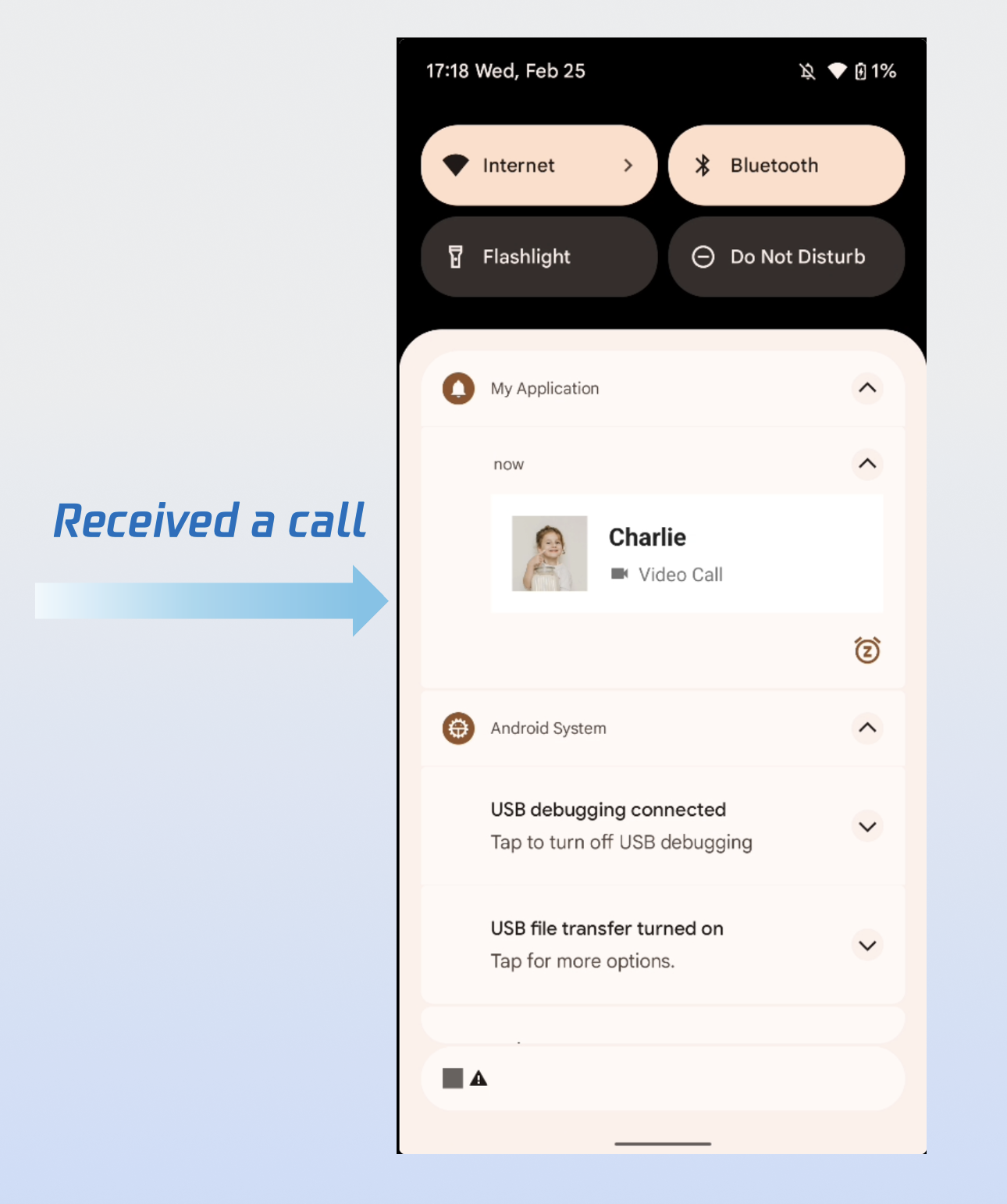
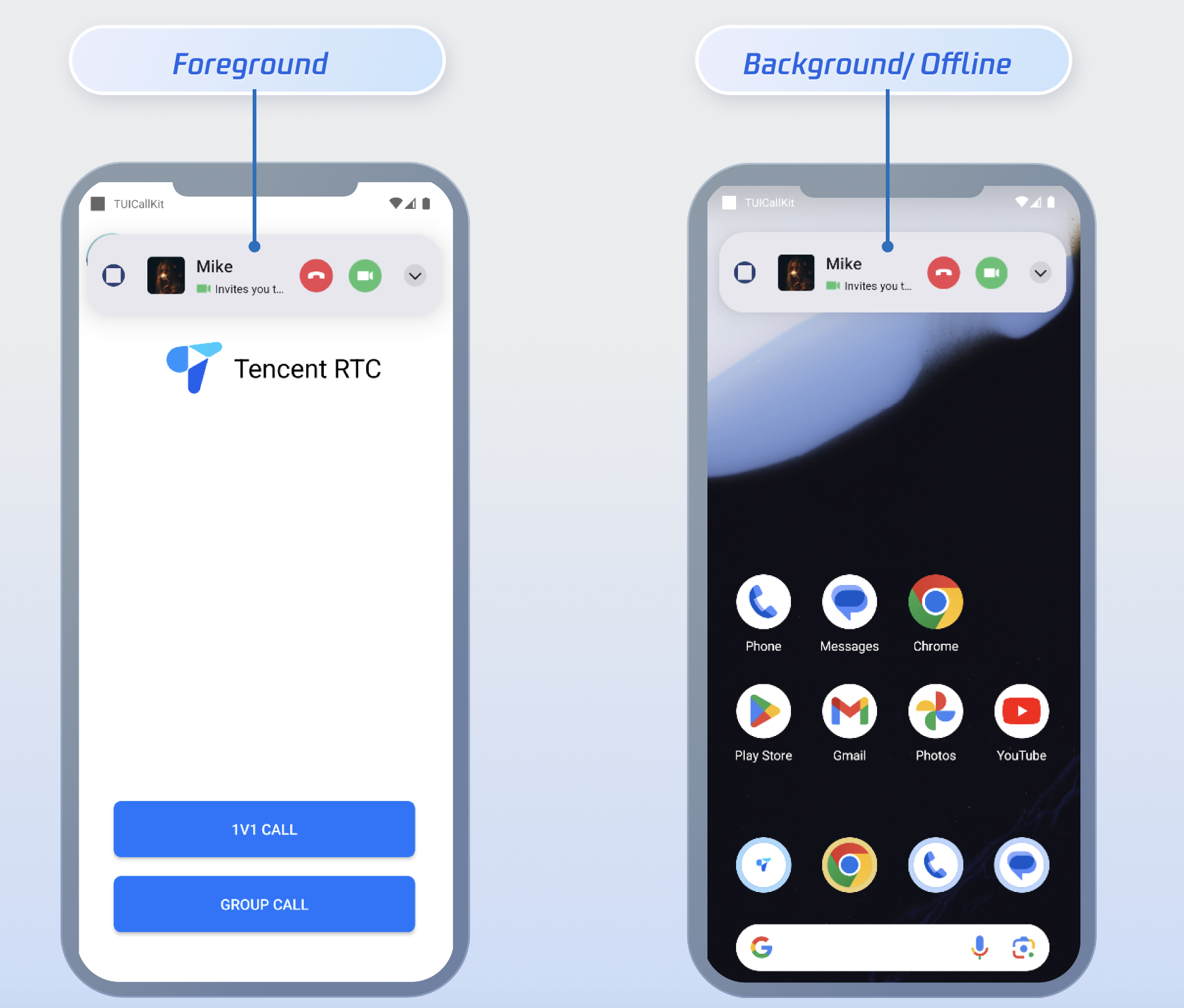
Demo Effect

After completing all three steps above, the incoming call notification will appear as shown below:


FAQs

Unable to Display Incoming Call Interface After App Is Killed?

Check if push notifications are being received. If not, verify that the IM Console certificate was uploaded correctly. Refer to Step 1 of Quick Integration in this guide.
Ensure that FCM Data Message is selected in the console, as described in Step 2 of Prerequisites above.
Confirm that data messages are being received. Filter your logs (keyword: TIMPush) and look for the following log output:

Make sure auto login is implemented. Only after auto login will call requests be pulled and the incoming call interface displayed.

How to Force FCM Channel Usage?

To force your app to always use the FCM channel, call the following method:
TIMPushManager.getInstance().forceUseFCMPushChannel(true);

Contact Us

If you have any questions or suggestions during integration or use, join the Telegram technical group or Contact Us for support.

ヘルプとサポート

この記事はお役に立ちましたか?

フィードバック