tencent cloud

Cloud GPU Service

Release Notes and Announcements
Release Notes
Announcements
Product Introduction
Overview
Strengths
Scenarios
Notes
Instance Types
Computing Instance
Rendering Instance
Billing
Billing Overview
Renewal
Getting Started
User Guide
Logging In to Instances
Restarting Instances
Installing NVIDIA Driver
Uninstalling NVIDIA Driver
Upgrading NVIDIA Driver
Using GPU Monitoring and Alarm
Use Cases
Installing NVIDIA Container Toolkit on a Linux Cloud GPU Service
Using Windows Cloud GPU Service to build a Deep Learning Environment
Implementing Image Quality Enhancement with GN7vi Instances
Using Docker to Install TensorFlow and Set GPU/CPU Support
Using GPU Instance to Train ViT Model
Troubleshooting
GPU Instance Troubleshooting Guide
Troubleshooting Common Xid Errors
Collecting Log for GPU Instances
GPU Usage Shows 100%
VNC Login Failures
FAQs
Related Agreement
Special Terms for Committed Sales Model
Contact Us

GPU Usage Shows 100%

PDF
포커스 모드
폰트 크기
마지막 업데이트 시간: 2024-01-11 17:11:13

Problem Description

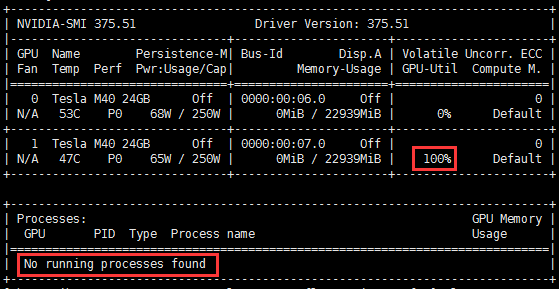
When using a GPU instance, if you use nvidia-smi to view the GPU status in the system, the GPU usage may be displayed as 100% while no processes are using GPU, as shown below:


Possible Causes

This may be caused by the ECC Memory Scrubbing mechanism used when the instance loads the NVIDIA driver.

Solution

Run the nvidia-smi -pm 1 command in the instance system to get the GPU Driver into the Persistence mode.

Instructions

1. Log in to the GPU instance and run the following command:
nvidia-smi -pm 1


2. Run the following command to check GPU usage:
nvidia-smi
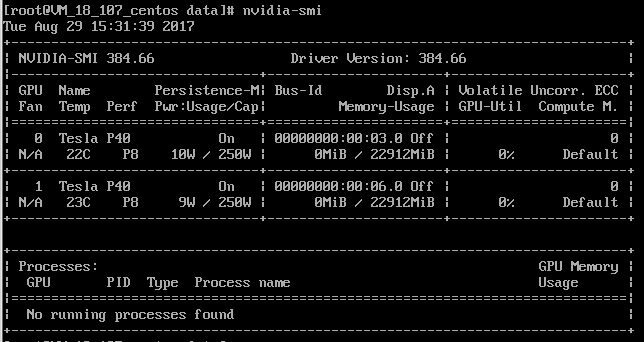
You will see the GPU usage is normal, as shown below:

도움말 및 지원

문제 해결에 도움이 되었나요?

피드백