Granting Access Permissions to a Root Account
Background
Since MQTT needs to access application programming interfaces (APIs) of other cloud products, you need to grant relevant permissions to the root account when using it to create an MQTT cluster for the first time.
Prerequisites
Note:
After you register a Tencent Cloud account, the system creates a root account for you by default to access Tencent Cloud resources conveniently.
Operation Steps
1. Log in with your root account to the TDMQ for MQTT console.
2. In the left sidebar, choose Resource > Cluster, and click Create Cluster.
3. On the cluster purchase page, select a Virtual Private Cloud (VPC) network in the Network Configuration section, and select Authorize binding the access point domain name of the newly purchased cluster to the specified VPC network. A pop-up window for authorization is displayed.

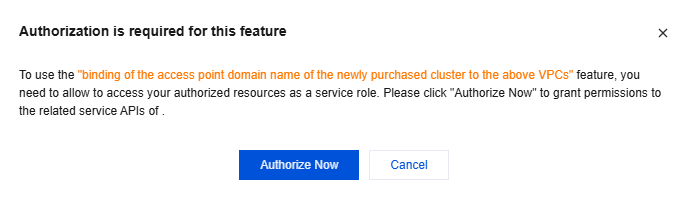
4. Click Authorize Now to go to the CAM console, click Authorize, and the authorized service role for MQTT will access your other cloud service resources.
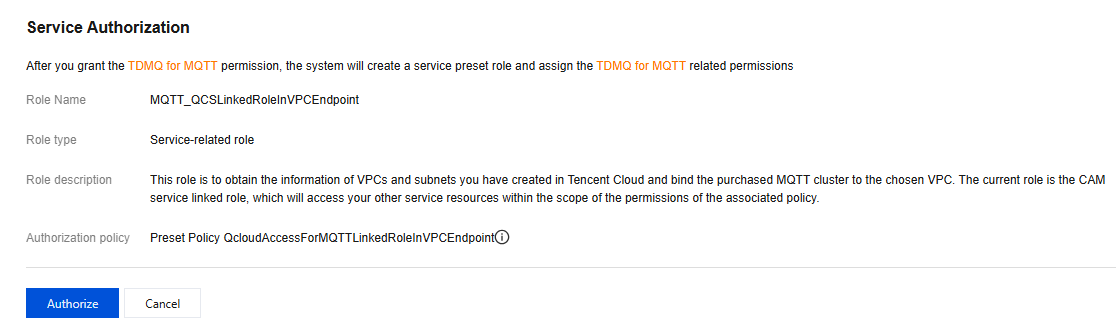
5. After authorization is completed, you can continue to create an MQTT cluster and use related services.
Help and Support
Was this page helpful?
You can also Contact sales or Submit a Ticket for help.
Help us improve! Rate your documentation experience in 5 mins.
Feedback