tencent cloud

Domains

Release Notes and Announcements
Announcements
Product Introduction
Overview
Strengths
Domain Suffixes
Introduction to Domain Name Registrars
Product Rules
Rules for 60-Day Inter-Registrar Transfer Lock
Domain Transfer-Out Rules
Domain Naming Rules
Purchase Guide
Purchase Method
Domain Registration
Registration Guide
.ai Domain Registration
Domain Management
Domain Renewal
Enabling Domain Security Protection
Mobile and Email Verification
Modifying DNS Servers
Domain Redemption
Custom DNS Host
Modifying Registrant Profile
Domain Registrant Profile
Managing Domain Expiration Reminders
Domain Lookup
Domain Status
Batch Operation
Batch Domain Renewal
Bulk Modifying DNS Servers
Batch Setting Update Prohibition Lock for Domains
Batch Setting Transfer Prohibition Lock for Domains
Domain Transfer
Cross-Account Domain Transfer
Domain Transfer Out
Domain Transfer In
Domain Push
Troubleshooting
Domain Registration
Domain Transfer-In
API Documentation
History
Introduction
API Category
Making API Requests
Domain Management APIs
Domain Query APIs
Bulk Operation APIs
Registrant Profile APIs
Other APIs
Data Types
Error Codes
FAQs
Domain Registration
Domain Transfer
Domain Renewal
Domain Transfer-In
DNS Settings
Cross-Account Domain Transfer
Domain Security
DNS Abuse Complaints
Product Policy
Privacy Policy
Data Processing And Security Agreement
Domain Name Registration Service Agreement
TLD registry policies

Modifying DNS Servers

PDF
Mode fokus
Ukuran font
Terakhir diperbarui: 2024-01-29 17:58:53

Overview

If you want to add a DNS record to a registered domain, you need to manage the domain at your DNS service provider to resolve it normally. This document describes how to change the DNS server address to specify the DNS service provider.

Directions

If your domain is registered in Tencent Cloud or has been transferred to Tencent Cloud, you can change the DNS server in the following steps:
1. Log in to the Domains console and enter the My Domains page.
2. Select the domain whose DNS is to be modified and click Manage as shown below:

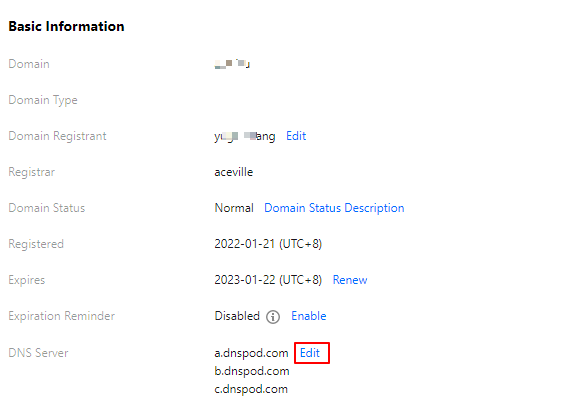
3. In the Basic Info section, click Modify next to DNS Server as shown below:

4. In the Modify DNS Server pop-up window, select the DNS server as shown below:

Use DNSPod: the DNS address of the DNSPod server will be automatically matched for the domain.
Custom DNS: enter the desired DNS server address.
Note:
The domain of a custom DNS server cannot be a private domain but must be an authoritative DNS server domain of the DNS service provider.

To change the DNS server address of a domain to be resolved in Tencent Cloud, see DNS Server Address of Different Packages.

Bantuan dan Dukungan

Apakah halaman ini membantu?

masukan