Before a domain expires, Tencent Cloud will send you email or SMS notifications. This document describes how to extend the validity period of a registered domain so as to ensure its continuity. You can also renew the domain as needed.
Once expired, a domain cannot be transferred out. You need to renew it before transferring it out. For more applicable rules, see Domain Transfer Out Rules.
Within 30 days after a domain expires, its status will change from renewable to redeemable. We recommend you renew it within 29 days after it expires. For the renewal prices, see Domain Pricing.
Directions
Log in to the Domains console and enter the My Domains page.
Renewing domain
Two renewal application methods are available for your choice.
Apply for renewal on the My Domains page.
Apply for renewal on the Basic Info page.
"My Domains" page
Click Renew in the row of the domain to be renewed to submit the renewal application.
"Basic Info" page
1. Click the domain to be renewed to enter the Domain Name Info page.
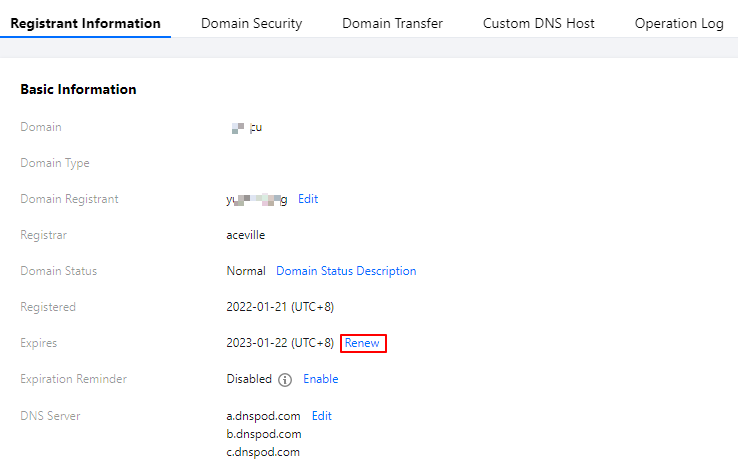
2. In the Basic Info section, click Renew to submit the renewal application as shown below:
Submitting renewal application
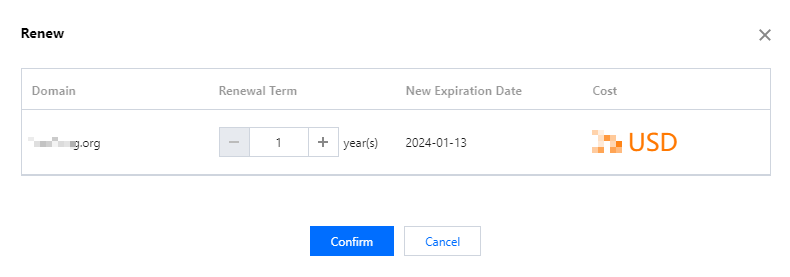
1. In the Renewal pop-up window, select the renewal period as needed and click Confirm as shown below:
Note:
As stipulated by the registry, the validity period of a domain cannot exceed 10 years (or 5 years for .co domains).
During domain redemption, you can renew the domain for only one year. If you want to renew it for multiple years, renew it after redeeming it.
2. Check your domain renewal information and fees and click Submit Order.
3. Select a payment method and click Confirm.
Note:
You can pay with your Tencent Cloud account balance, WeChat Pay, QQ Wallet, or online banking.
4. After the payment, if the page displays "Payment successful", the renewal is successful as shown below:
Note:
You can click Go to Console to check whether the validity period of your domain has been updated. If you need an invoice, you can apply for it in Cost > Cost Center > Invoice and Contract > Invoice Management.
Common Issues After Renewal
If you renew your domain during the redemption period, its DNS may have been paused by the registrar, making your website inaccessible.
DNS of domains resolved by DNSPod will be recovered within 48 hours after successful renewal.
DNS of domains not resolved by DNSPod will be recovered within 48–72 hours after successful renewal.