tencent cloud

Data Transfer Service

Release Notes and Announcements
Release Notes
Announcements
Product Introduction
Overview
Data Migration
Data Sync
Data Subscription (Kafka Edition)
Strengths
Supported Regions
Specification Description
Purchase Guide
Billing Overview
Configuration Change Description
Payment Overdue
Refund
Getting Started
Data Migration Guide
Data Sync Guide
Data Subscription Guide (Kafka Edition)
Preparations
Business Evaluation
Network Preparation
Adding DTS IP Addresses to the Allowlist of the Corresponding Databases
DTS Service Permission Preparation
Database and Permission Preparation
Configuring Binlog in Self-Built MySQL
Data Migration
Databases Supported by Data Migration
Cross-Account TencentDB Instance Migration
Migration to MySQL Series
Migrating to PostgreSQL
Migrating to MongoDB
Migrating to SQL Server
Migrating to Tencent Cloud Distributed Cache
Task Management
Data Sync
Databases Supported by Data Sync
Cross-Account TencentDB Instance Sync
Sync to MySQL series
Synchronize to PostgreSQL
Synchronization to MongoDB
Synchronize to Kafka
Task Management
Data Subscription (Kafka Edition)
Databases Supported by Data Subscription
MySQL series Data Subscription
Data Subscription for TDSQL PostgreSQL
MongoDB Data Subscription
Task Management
Consumption Management
Fix for Verification Failure
Check Item Overview
Cutover Description
Monitoring and Alarms
Supported Monitoring Indicators
Supported Events
Configuring Metric Alarms and Event Alarms via the Console
Configuring Indicator Monitoring and Event Alarm by APIs
Ops Management
Configuring Maintenance Time
Task Status Change Description
Practical Tutorial
Synchronizing Local Database to the Cloud
Creating Two-Way Sync Data Structure
Creating Many-to-One Sync Data Structure
Creating Multi-Site Active-Active IDC Architecture
Selecting Data Sync Conflict Resolution Policy
Using CLB as Proxy for Cross-Account Database Migration
Migrating Self-Built Databases to Tencent Cloud Databases via CCN
Best Practices for DTS Performance Tuning
FAQs
Data Migration
Data Sync
FAQs for Data Subscription Kafka Edition
Regular Expressions for Subscription
Error Handling
Common Errors
Failed Connectivity Test
Failed or Alarmed Check Item
Inability to Select Subnet During CCN Access
Slow or Stuck Migration
Data Sync Delay
High Data Subscription Delay
Data Consumption Exception
API Documentation
History
Introduction
API Category
Making API Requests
(NewDTS) Data Migration APIs
Data Sync APIs
Data Consistency Check APIs
(NewDTS) Data Subscription APIs
Data Types
Error Codes
DTS API 2018-03-30
Service Agreement
Service Level Agreements
ドキュメントData Transfer ServiceFAQsFAQs for Data Subscription Kafka Edition

FAQs for Data Subscription Kafka Edition

PDF
フォーカスモード
フォントサイズ
最終更新日: 2024-11-01 10:42:03

Why can't I consume data?

Check the network. The address of the Kafka server is a Tencent Cloud private network address, which can only be accessed in Tencent Cloud VPC that is in the same region of the subscribed instance.
Check whether the subscription topic, private network address, consumer group name, account or password is correct. You can click the subscription name on the Data Subscription console to go to the subscription details page and consumption management page to view such information.
Check whether the encryption parameter is correct. For more information, see What authentication mechanism does Kafka use.

What is the data format?

Data Subscription Kafka Edition uses Protobuf for data serialization. You can click here to download the Protobuf file. A demo project also contains the Protobuf file. For more information, see the “Key Demo Logic Description” section of Data Consumption Demo.

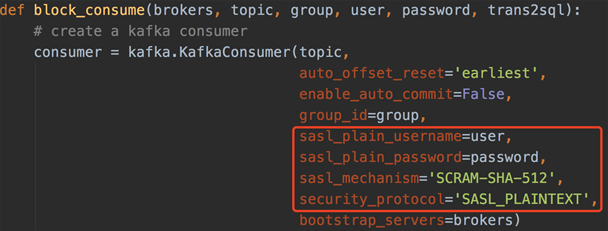
What authentication mechanism does Kafka use?

See the figure below:


When does Kafka commit?

Please first set the enable_auto_commit parameter of Kafka as false to disable auto commit. The producer inserts a checkpoint message at an appropriate position in the message sequence. After the checkpoint message is consumed, the Kafka client will commit feedback indicating the consumption is completed, so as to ensure message integrity.

How long are messages in the Kafka client retained? How do I set the consumer offset?

Messages in the Kafka client are retained for 1 day. You can set the auto_offset_reset parameter of Kafka as earliest or latest as needed. If you need to consume data from a specific offset, you can reset the consumer offset with the seek feature of the Kafka client.
ヘルプとサポート

この記事はお役に立ちましたか?

フィードバック