Selecting Data Sync Conflict Resolution Policy
Download
フォーカスモード
フォントサイズ
Overview
DTS supports complex topology structures, including many-to-one, one-to-many, cascading one-way, two-way, and cascading two-way sync. In such a structure, data is written to multiple nodes at the same time, so primary key conflicts may occur. To address this issue, DTS detects primary key conflicts and provides the following resolution policies:
Primary Key Conflict Resolution Policy | Description | SQL Statement Rewrite During Conflict Resolution |
Report | During a sync task, if an INSERT statement in the source database has a primary key conflict with the data in the target database, the task will report an error and pause. You need to handle the conflict manually first before proceeding. | The task reports an error, and the SQL statement isn't rewritten. |
Ignore | During a sync task, if an INSERT statement in the source database has a primary key conflict with the data in the target database, the data inserted into the source database will be ignored, and the data in the target database will prevail. | If an INSERT statement has a primary key conflict, INSERT will be rewritten to INSERT IGNORE. |
Overwrite | During a sync task, if an INSERT or UPDATE statement has a primary key conflict with the data in the target database, the data in the target database will be overwritten by the inserted or updated data in the source database. | If an INSERT or UPDATE statement has a primary key conflict, INSERT or UPDATE will be rewritten to REPLACE INTO or DELETE + REPLACE INTO respectively. |
Examples
Primary key conflict resolution policies take effect only for INSERT and UPDATE primary key conflicts but not in non-conflict scenarios. After a policy is applied, the task can report an error or proceed once a conflict occurs. Below are examples of two primary key conflict scenarios with results under different policies.
INSERT primary key conflict
An A > B one-way sync with
ID as the primary key is created. When an INSERT statement in A has a primary key conflict with the data in B during data sync, DTS will handle the conflict according to the configured conflict resolution policy.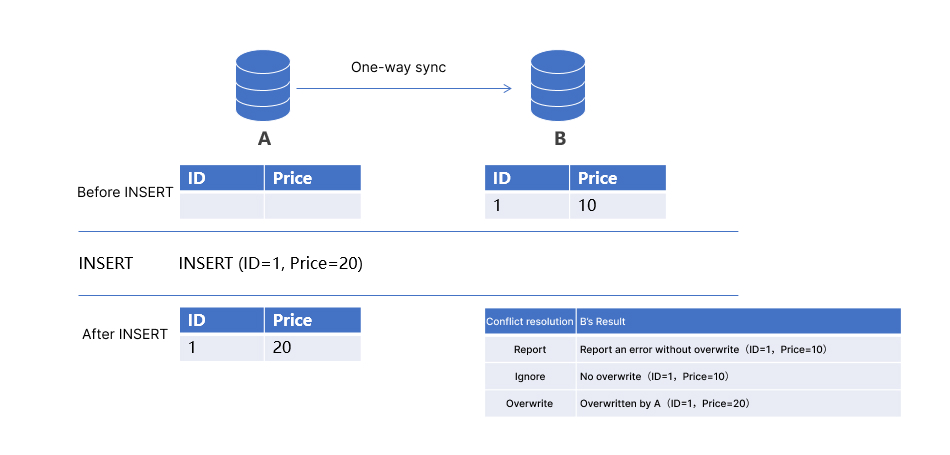
The respective sync results in B under different policies are as detailed below:
Report: The task reports an error, and the data in B remains unchanged (ID=1, Price=10).
Ignore: The task ignores the data with the same primary key in A, and the data in B remains unchanged (ID=1, Price=10).
Overwrite: The task overwrites the data in B with the data with the same primary key in A, and the data in B becomes
ID=1, Price=20.UPDATE primary key conflict
In some scenarios, you may modify the primary key, leading to a primary key conflict. For example, the primary key in A is updated (ID=1 > ID=2), which will conflict with the data with primary key
ID being 2 in B.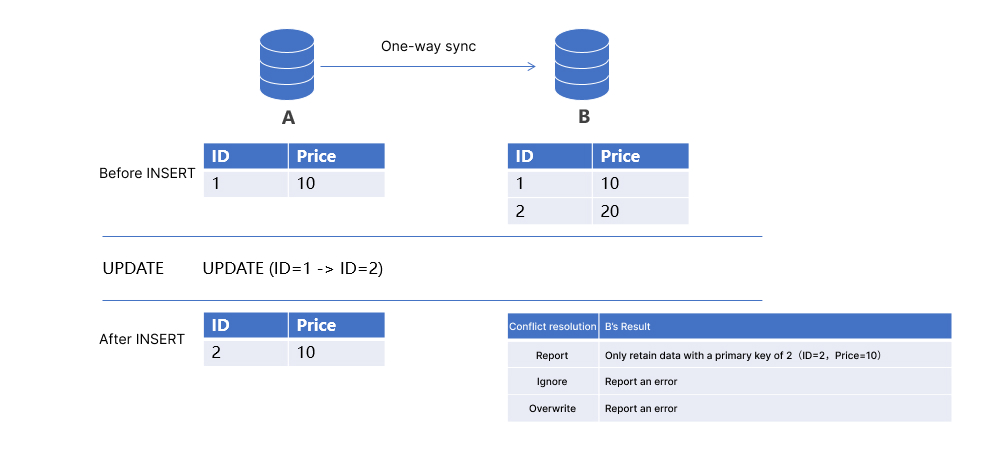
The respective sync results in B under different policies are as detailed below:
Report: The task reports an error, and the data in B remains unchanged.
Ignore: The task reports an error, and the data in B remains unchanged. Note that DTS ignores the conflict in this case.
Overwrite: The task overwrites the data in B with the data with the same primary key in A, and only the data with primary key
2 exists in B (ID=2, Price=10).Conflict Resolution Policy and Data Consistency
In complex data architectures such as 2-region-3-DC and multi-site active-active architectures, data may need to be written to three or more nodes at the same time, and it is crucial to guarantee the data consistency across multiple nodes. Many users believe that they can use a primary key conflict resolution policy to sync the data on the specified node to other nodes, but this actually doesn't work.
In the following two-way sync scenario, the Overwrite policy is set for both A > B and B > A sync. If different data records with the primary key
1 are inserted into nodes A and B at the same time, they will be swapped with each other between A and B eventually.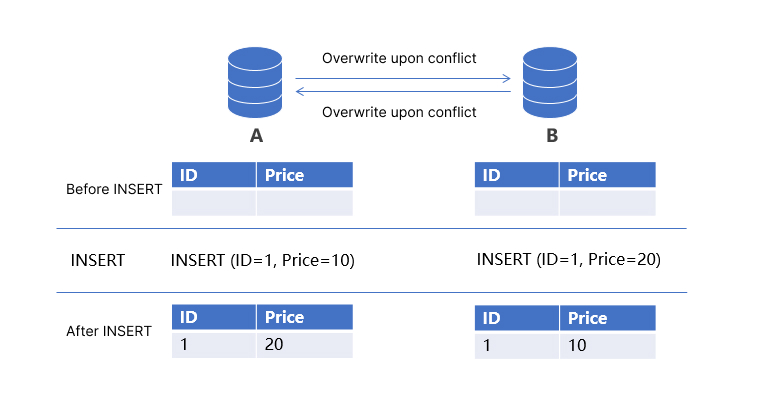
In real-world scenarios, to implement data consistency across nodes, you generally need to partition the database by primary key, introduce additional coordination mechanisms such as data overwriting by version number, and use other methods in addition to a conflict resolution policy.
フィードバック