Creating MySQL or TDSQL for MySQL Data Subscription
Download
フォーカスモード
フォントサイズ
最終更新日: 2024-07-08 16:52:02
This document describes how to create a data subscription task in DTS for TencentDB for MySQL or TDSQL-C for MySQL.
Prerequisites
You have prepared a TencentDB instance to be subscribed to, and the database version meets the requirements. For more information, see Databases Supported by Data Subscription.
You have enabled the binlog in the source instance.
You have created a subscription account in the source instance and granted it the following permissions: REPLICATION CLIENT, REPLICATION SLAVE, PROCESS, and SELECT for all objects.
Authorization statements are as follows:
create user 'migration account' IDENTIFIED BY 'account password';
grant SELECT, REPLICATION CLIENT,REPLICATION SLAVE,PROCESS on *.* to 'migration account'@'%';
flush privileges;
Restrictions
Currently, the subscribed message content is retained for 1 day by default. Once expired, the data will be cleared. Therefore, you need to consume the data promptly.
The region where the data is consumed should be the same as that of the subscribed instance.
Geometry data types are not supported currently.
The delivery semantics of subscription to Kafka messages in DTS is to deliver a message at least once; therefore, the consumed data may be duplicated in special cases. For example, if the subscription task is restarted, the source binlog will be pulled before the interruption offset after the restart, resulting in repeated delivery of messages. Operations in the console such as modifying subscribed objects and restoring abnormal tasks may cause duplicate messages. If your business is sensitive to duplicate data, you need to add deduplication logic based on the business data in the consumption demo.
SQL operations for subscription
Operation Type
Supported SQL Operations
DML
INSERT, UPDATE, and DELETE
DDL
CREATE DATABASE, DROP DATABASE, CREATE TABLE, ALTER TABLE, DROP TABLE, and RENAME TABLE
Directions
1. Log in to the DTS console, select Data Subscription on the left sidebar, and click Create Subscription.
2. On the Create Subscription page, select appropriate configuration items and click Buy Now.
Billing Mode: Monthly subscription and pay-as-you-go billing are supported.
Region: The region must be the same as that of the database instance to be subscribed to.
Database: Select your actual database type.
Version: Select Kafka Edition. You can directly consume data on a Kafka client.
Subscription Name: Edit the name of the current data subscription instance.
3. After successful purchase, return to the data subscription list. You need to click Configure Subscription in the Operation column to configure the newly purchased subscription before you can use it.
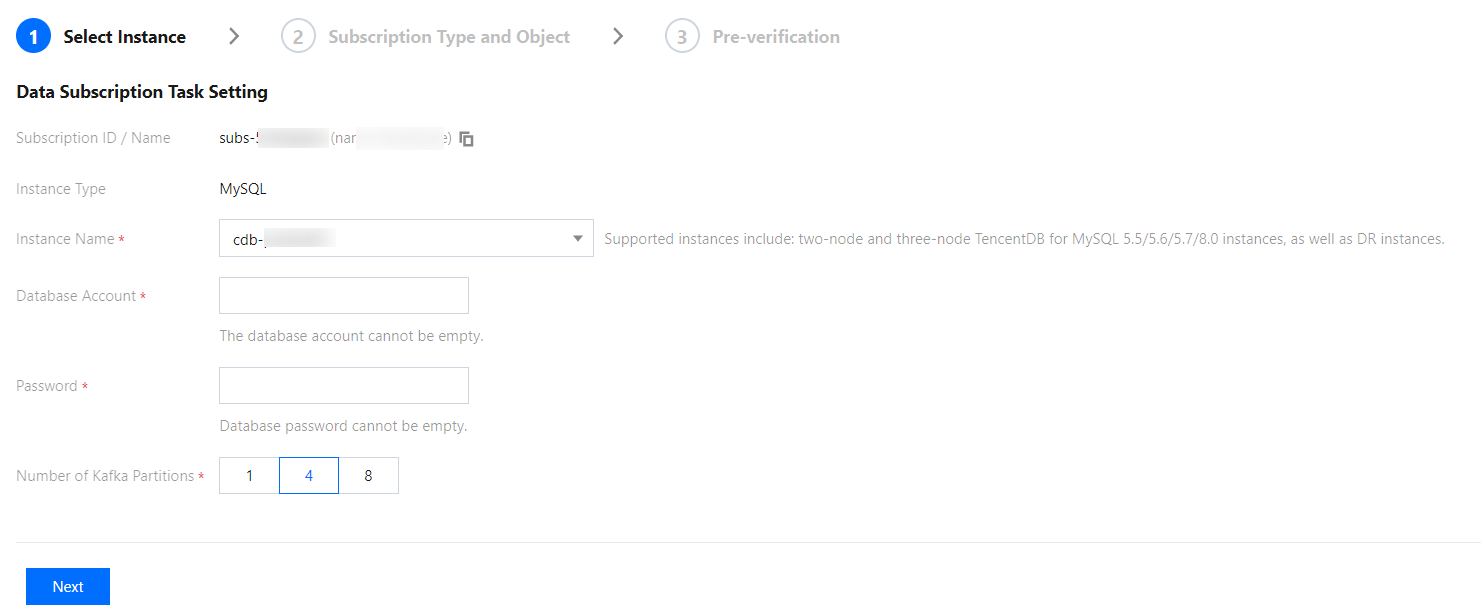
4. On the Subscription Configuration page, select the appropriate configuration items and click Next.
Instance: Select a database instance. Currently, read-only and disaster recovery instances do not support data subscription.
Database Account: Add the account and password of the instance to be subscribed to. The account must have the permissions required by the subscription task, including REPLICATION CLIENT, REPLICATION SLAVE, PROCESS, and SELECT of all objects.
Number of Kafka Partitions: Set the number of Kafka partitions. Increasing the number can improve the speed of data write and consumption. A single partition can guarantee the order of messages, while multiple partitions cannot. If you have strict requirements for the order of messages during consumption, set this value to 1.
5. On the Subscription Type and Object page, select a subscription type and click Save.
Subscription Type: Options include Data Update, Structure Update, and Full.
Data Update: Data updates of the selected objects are subscribed to, including INSERT, UPDATE, and DELETE operations.
Structure Update: Creation, modification, and deletion of the structures of all objects in the instance are subscribed to.
Full: Data and structure updates of all objects in the instance are subscribed to.
Format of Subscribed Data: You can select ProtoBuf, Avro, or JSON. ProtoBuf and Avro adopt the binary format with a higher consumption efficiency, while JSON adopts the easier-to-use lightweight text format.
Kafka Partitioning Policy: Select By table name or By table name + primary key.
Custom Partitioning Policy: Customize partitions as needed. For more information, see Setting Partitioning Policy.
6. On the Pre-verification page, a pre-verification task will run for 2–3 minutes. After the pre-verification is passed, click Start to complete data subscription task configuration.
Note:
If the verification fails, fix the problem as instructed in Database Connection Check and initiate the verification again.
7. After you click Start, the subscription task will be initialized, which will take 3–4 minutes. After successful initialization, the task will enter the Running status.
8. Add a consumer group. Data subscription (Kafka Edition) allows you to create multiple consumer groups for multi-point consumption. The consumption depends on the consumer groups of Kafka; therefore, you must create a consumer group first before data can be consumed.
9. After the subscription instance enters the Running status, you can start consuming data. For consumption in Kafka, you need to verify the password. We provide demo code in multiple programming languages and descriptions of main consumption processes and key data structures.