tencent cloud

Data Transfer Service

Release Notes and Announcements
Release Notes
Announcements
Product Introduction
Overview
Data Migration
Data Sync
Data Subscription (Kafka Edition)
Strengths
Supported Regions
Specification Description
Purchase Guide
Billing Overview
Configuration Change Description
Payment Overdue
Refund
Getting Started
Data Migration Guide
Data Sync Guide
Data Subscription Guide (Kafka Edition)
Preparations
Business Evaluation
Network Preparation
Adding DTS IP Addresses to the Allowlist of the Corresponding Databases
DTS Service Permission Preparation
Database and Permission Preparation
Configuring Binlog in Self-Built MySQL
Data Migration
Databases Supported by Data Migration
Cross-Account TencentDB Instance Migration
Migration to MySQL Series
Migrating to PostgreSQL
Migrating to MongoDB
Migrating to SQL Server
Migrating to Tencent Cloud Distributed Cache
Task Management
Data Sync
Databases Supported by Data Sync
Cross-Account TencentDB Instance Sync
Sync to MySQL series
Synchronize to PostgreSQL
Synchronization to MongoDB
Synchronize to Kafka
Task Management
Data Subscription (Kafka Edition)
Databases Supported by Data Subscription
MySQL series Data Subscription
Data Subscription for TDSQL PostgreSQL
MongoDB Data Subscription
Task Management
Consumption Management
Fix for Verification Failure
Check Item Overview
Cutover Description
Monitoring and Alarms
Supported Monitoring Indicators
Supported Events
Configuring Metric Alarms and Event Alarms via the Console
Configuring Indicator Monitoring and Event Alarm by APIs
Ops Management
Configuring Maintenance Time
Task Status Change Description
Practical Tutorial
Synchronizing Local Database to the Cloud
Creating Two-Way Sync Data Structure
Creating Many-to-One Sync Data Structure
Creating Multi-Site Active-Active IDC Architecture
Selecting Data Sync Conflict Resolution Policy
Using CLB as Proxy for Cross-Account Database Migration
Migrating Self-Built Databases to Tencent Cloud Databases via CCN
Best Practices for DTS Performance Tuning
FAQs
Data Migration
Data Sync
FAQs for Data Subscription Kafka Edition
Regular Expressions for Subscription
Error Handling
Common Errors
Failed Connectivity Test
Failed or Alarmed Check Item
Inability to Select Subnet During CCN Access
Slow or Stuck Migration
Data Sync Delay
High Data Subscription Delay
Data Consumption Exception
API Documentation
History
Introduction
API Category
Making API Requests
(NewDTS) Data Migration APIs
Data Sync APIs
Data Consistency Check APIs
(NewDTS) Data Subscription APIs
Data Types
Error Codes
DTS API 2018-03-30
Service Agreement
Service Level Agreements

Direct Connect

PDF
フォーカスモード
フォントサイズ
最終更新日: 2024-04-30 17:09:09

Overview

To use Direct Connect, users need to purchase a Tencent Cloud VPC and Direct Connect gateway, apply for Direct Connect, and connect the local IDC database to the Tencent Cloud VPC through nearby access, then transfer data via DTS.
DTS supports using the local IDC database as the source/destination for data transmission. The following example scenario is Local IDC Database (Direct Connect) -> Tencent Cloud Database (Database).
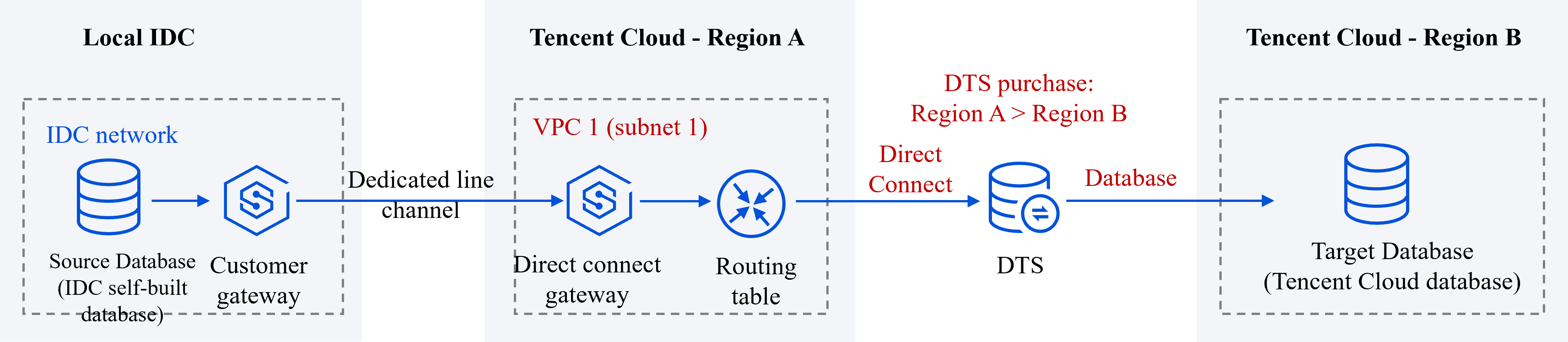

Establishing Network Interconnection Through Direct Connect

DTS Task Configuration

1. Purchasing a DTS Task

When purchasing a DTS task, select the Tencent Cloud VPC1's region as Source Instance Region, that is, region A. Select the region where the target database is located as Target Instance Region, that is, region B.

2. Configuring DTS Task

In source database settings, select Direct Connect as Access Type, select VPC1 as VPC, and select one of its subnets Subnet1. In target database settings, select Database as Access Type.

3. Connectivity Test

If the database and its associated network have configured security access rules, such as security groups, firewall, IP access restrictions, etc., it is necessary to allow DTS IP address, otherwise, connectivity test may fail.

Allowing DTS IP Address

1. When the connectivity test fails, follow the instructions in the popup to access DTS IP address.
2. Sequentially check if the database has set the following network rules, and if so, allow DTS IP address in the corresponding rules.
Check if the database-associated network layer has set network ACLs or security groups.
Check if the server layer where the database resides has set up a firewall (e.g., iptables rules for Linux systems).
Check if the source database layer has set IP access restrictions.

ヘルプとサポート

この記事はお役に立ちましたか?

フィードバック