Migration Instructions
Download
フォーカスモード
フォントサイズ
Scenarios
Data Transfer Service (DTS) supports the full + incremental migration method for MongoDB, that is, historical data from the source database before migration and new data written to the source database during migration can be migrated together.
This document describes how to use the DTS data migration feature to migrate data from MongoDB to TencentDB for MongoDB.
Preparations
1. Read the Use Instructions carefully to learn about feature constraints and must-knows.
2. Establish the access channel between DTS and the database in advance according to the access type you want to use. For details, see Network Preparations.
Internet Data Center (IDC) self-built databases/Databases of other cloud vendors: The access method can be set to Public Network/DC/VPN Access/CCN.
Self-built databases on Cloud Virtual Machine (CVM) instances: The access method can be set to Self-Built on CVM.
TencentDB instances: The access method can be set to Cloud Database.
3. It is recommended to create a read-only account in the source database for migration. The reference method for creating a read-only account is as follows.
# Syntax example when the source database is a replica set or a single node.use admindb.createUser({user: "username",pwd: "password",roles:[{role: "readAnyDatabase", db: "admin"},{role: "read", db: "local"}]})# Syntax example when the source database is a sharded cluster.use admindb.createUser({user: "username",pwd: "password",roles:[{role: "readAnyDatabase", db: "admin"},{role: "read", db: "local"},{role: "read", db: "config"}]})
4. When the target database is a TencentDB instance, you can use mongouser for migration or create an account yourself. The reference method for creating your own account is as follows.
db.createUser({user:"username",pwd:"password",roles:[{role:"readWriteAnyDatabase",db:"admin"}]})
Operation Steps
1. Log in to the DTS console, select Data Migration in the left sidebar, and then click Create Migration Task to go to the migration task creation page.
2. On the migration task creation page, select the source instance type and region as well as the target instance type, region, and specification for migration, and then click Buy Now.
Configuration Parameter | Description |
Creation Mode | New task: Create a task. Create a similar task: Quickly create a task with the same configuration as the historical task. The settings of the new task, such as the database type, access method, billing mode, and migration type, are pre-populated to match the historical task. Users can also modify these settings as needed. |
Source Instance Type | Select the instance type based on your source database type. This setting cannot be changed after purchase. In this example, select MongoDB. |
Region of the Source Instance | Select the region where the source database is located. If the source database is self-built, select the region closest to it. |
Target Instance Type | Select the instance type based on your target database type. This setting cannot be changed after purchase. In this example, select MongoDB. |
Region of the Target Instance | Select the region where the target database is located. |
Version | Default: NewDTS. This does not need to be modified. |
Specifications | Currently, only the Medium specification is supported. |
Task Name | Set it to Name After Creation. The task name is the same as the task ID by default. After the migration task is created, the task name can be reset. Set it to Name Immediately. Enter the task name in the input box below. |
3. After the purchase is completed, you are redirected to the data migration task list. Select the task you just purchased for the configuration.
If the task you purchased involves multiple regions or needs to be configured across regions, the task list will be displayed according to the region of the target instance. You can switch regions at the top to locate the purchased task.
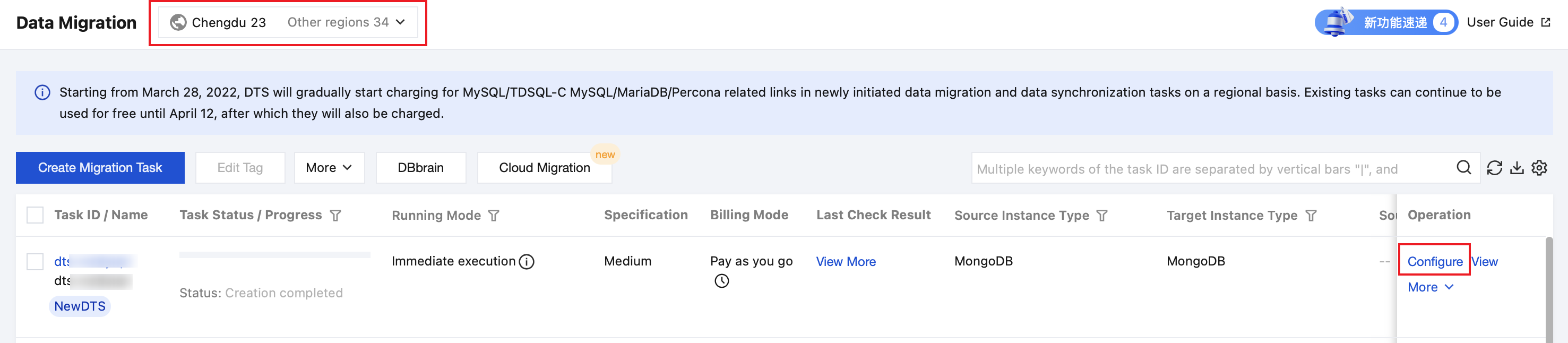
4. On the source and target database setting page, complete the task, source database, and target database settings.
Note:
When the source is Amazon DocumentDB, and you select the Change Stream migration method for incremental migration, you must enable Change Stream; otherwise, incremental data cannot be migrated.
Enter the read-only account created earlier for the source database; otherwise, the pre-check step will fail.
If the source or target database is a TencentDB instance, DTS uses the system service account to export or write data during the migration process. For example, when the source database is a TencentDB instance, DTS not only connects to the source database using the user-provided read-only account but also uses the system service account to export data from the source database. When the target database is a TencentDB instance, DTS not only connects to the target database using the user-provided account but also uses the system service account to write data to the target database.
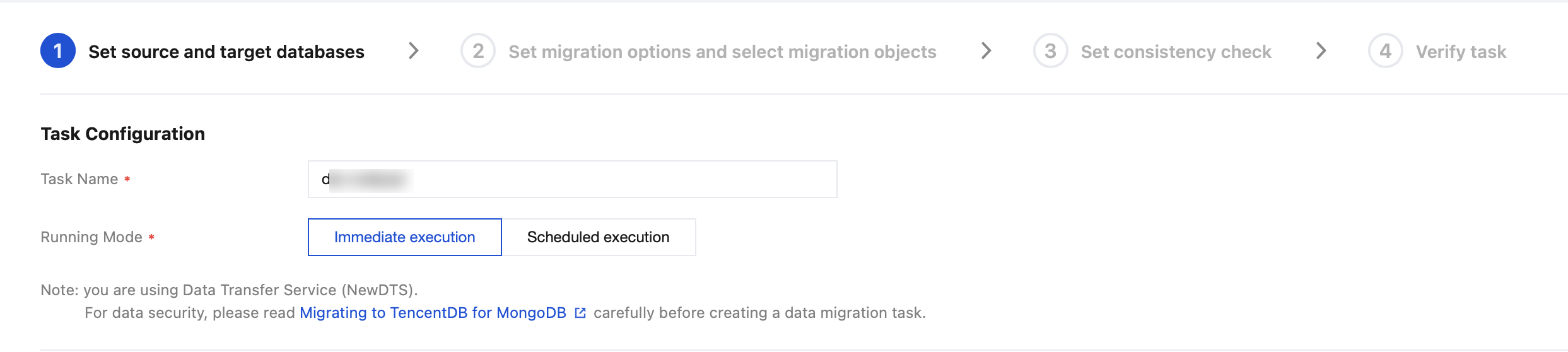
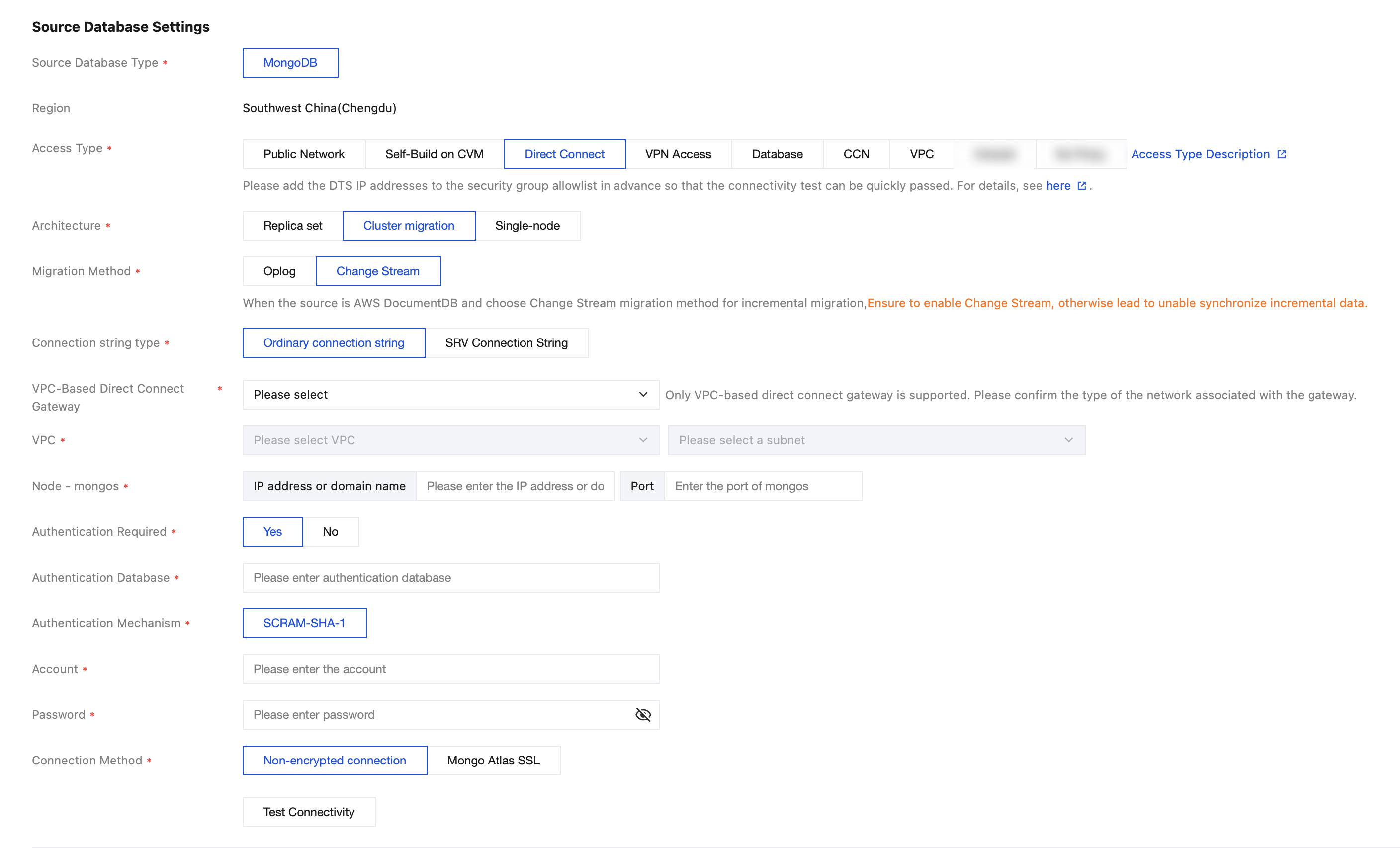
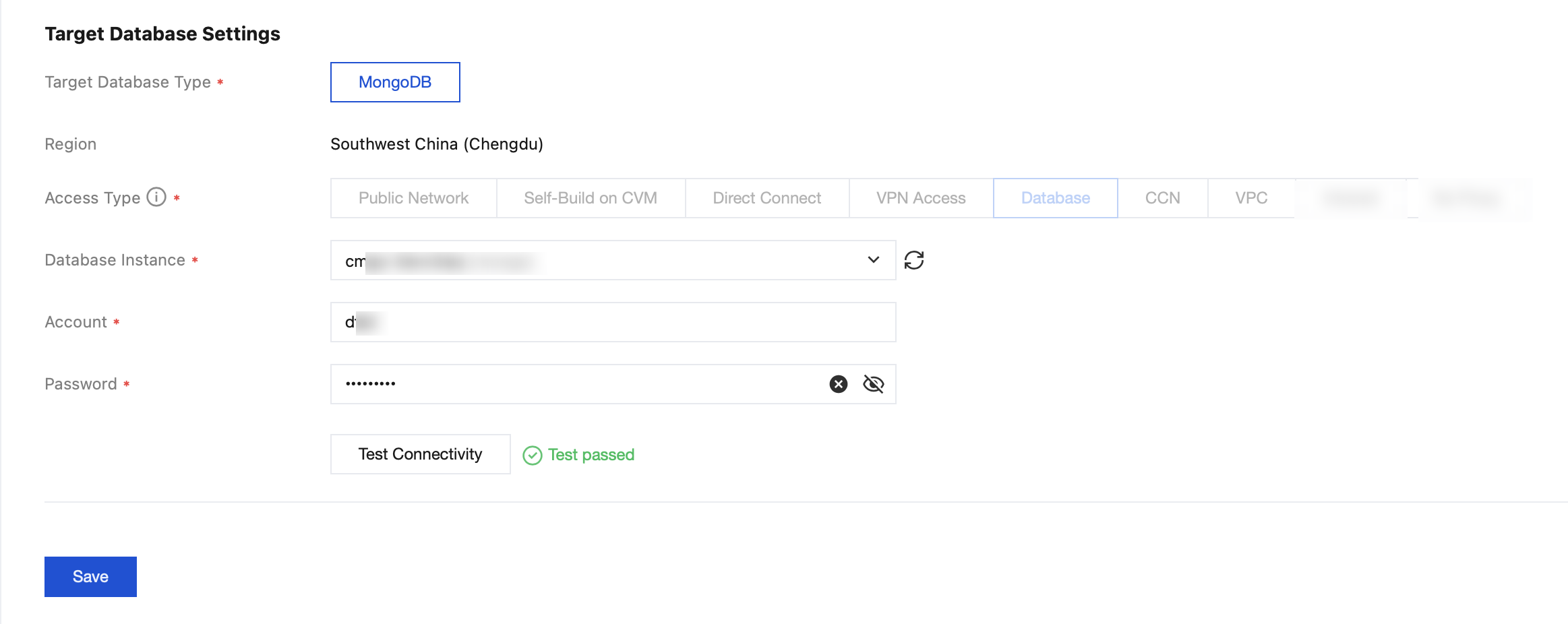
Task settings
Configuration Parameter | Description |
Task Name | Specify a business-relevant name to facilitate task identification. |
Running Mode | Immediate execution: The task will be started immediately once the pre-check passes. Scheduled execution: Set a start time for the task execution. After the pre-check passes, the task is not started immediately, but is started at the scheduled time. |
Source database settings
Configuration Parameter | Description |
Access Type | Select the access type according to your scenario. For preparations related to different access types, see Preparation Overview. Public network: The source database is accessible through a public network. Self-built on CVM: The source database is deployed on a Tencent Cloud CVM instance. Direct Connect (DC): The source database can connect to Tencent Cloud Virtual Private Cloud (VPC) through DC. VPN access: The source database can connect to Tencent Cloud VPC through VPN Access. Cloud database: The source database is a TencentDB instance. Cloud Connect Network (CCN): The source database can connect to Tencent Cloud VPC through CCN. VPC: Both the source and target databases are deployed on Tencent Cloud with VPC configured. For source databases that are IDC self-built databases or databases of other cloud vendors, set the access method to Public Network/DC/VPN Access/CCN. For source databases that are self-built databases on CVM instances, select Self-Built on CVM. For TencentDB instances, select Cloud Database. |
Architecture | This parameter is displayed when Access Type is set to Self-Built on CVM/DC/VPN Access/CCN/VPC. Select an access type according to the actual situation. Replica set: refers to an architecture in which the source database is a replica set, composed of one primary node and one or more secondary nodes. Cluster migration: refers to an architecture in which the source database is a sharded cluster, composed of components such as mongos nodes, config servers, and shard nodes. Single node: refers to an architecture in which the source database cluster is a single node that performs read and write operations. Note: After an architecture type is selected and the connectivity test is passed, changing to a different architecture type is not allowed; otherwise, an error is reported for the task. |
Migration Method | When Architecture is set to Cluster Migration and the migration method is set to oplog, the following parameters are required to be configured. Node group - mongod: Enter the IP address and port, or the domain name and port of the mongod node. For multiple nodes, enter each on a new line. Specifying only one mongod node per shard is required. Example: 1xx.xx.55.77:6xx9. Node - mongos: Enter the IP address and port, or the domain name and port of the mongos node. Node - Config Server: Enter the IP address and port, or the domain name and port of the Config Server node. When Architecture is set to Cluster Migration and the migration method is set to Change Stream, the following parameters are required to be configured. Connection string type: Regular or SRV connection strings are supported. Node - mongos: Enter the IP address and port, or the domain name and port of the mongos node. Note: The following DDL events are supported in the Change Stream migration method: createIndexes, dropIndexes, modify, drop, create, shardCollection, reshardCollection, and refineCollectionShardKey Among them, createIndexes, dropIndex, create, and modify are supported only in 6.0 and later versions; refineCollectionShardKey is supported only in 6.10 and later versions. |
Public Network | When Access Type is set to Public Network, the following parameters are required to be configured. Host address: IP address or domain name of the source database. Port: port used by the source database. |
Self-Built on CVM | When Access Type is set to Self-Built on CVM, the following parameters are required to be configured. CVM instance: Specify the CVM instance ID. Port: port used by the source database. |
DC | When Access Type is set to DC, the following parameters are required to be configured. VPC-based Direct Connect gateway: Only the VPC-based Direct Connect gateway is supported for DC. Confirm the network type associated with the gateway. VPC: Select a VPC network and a subnet. Host address: IP address or domain name of the source database. Port: port used by the source database. |
VPN Access | When Access Type is set to VPN Access, the following parameters are required to be configured. VPN gateway: Select the VPN gateway instance for access. VPC: Select a VPC network and a subnet. Host address: IP address or domain name of the source database. Port: port used by the source database. |
Cloud Database | When Access Type is set to Cloud Database, the following parameters are required to be configured. Cloud database instance: Specify the source database instance ID. |
Cloud Connect Network | When Access Type is set to CCN, the following parameters are required to be configured. When CCN access is used, both same-account CCN access and cross-account CCN access are supported. As this involves complex network configurations, see Migrating Self-built Databases to TencentDB via CCN. Host network environment: Select the network environment according to the actual situation. For example, if the source database is a TencentDB instance, select Tencent Cloud; if the source database is an IDC self-built database, select Self-built IDC; if the source database is a database of other cloud vendors, select the corresponding network. Host address: host IP address or domain name of the source database. Port: port used by the source database. CCN Instance Account My account: The CCN resources and DTS belong to the same Tencent Cloud root account. Other accounts: The CCN resources and DTS belong to different Tencent Cloud root accounts. VPC CCN: Specify the CCN instance name. Access VPC: Select the access VPC and subnet. The access VPC refers to the VPC network that is connected to the migration link within CCN. Select VPC networks associated with CCN, excluding the VPC network to which the source database belongs. Access VPC region: The region of the source database you selected when purchasing the task must be consistent with the region of the access VPC. If they are inconsistent, the source database region will be automatically changed to the VPC access region. |
VPC | When Access Type is set to VPC, the following parameters are required to be configured. VPC: Select a VPC network and a subnet. Host address: IP address or domain name of the source database. Port: port used by the source database. |
Authentication | Whether security authentication is required for the username and password of the source database. If Yes is selected, the following parameters are required. Database authentication: Name of the database that requires authentication, which is the name of the database to which the account executing the migration task belongs. Only admin is supported. Authentication mechanism: Currently, only SCRAM-SHA-1 is supported. Account and password selection Same account and password: Select this parameter if the mongod, mongos, and Config Server roles use the same account and password. Enter the unified account and password. Different accounts and passwords: Select this parameter if the mongod, mongos, and Config Server roles use different accounts and passwords. Enter the usernames and passwords for each role, respectively. |
Account/Password | Account/Password: the account and password of the source database. |
Connection Method | Non-encrypted connection: When the source is not MongoDB Atlas on AWS, only the non-encrypted connection method can be selected. Mongo Atlas SSL: When the source is MongoDB Atlas on AWS, you can select whether to use Secure Sockets Layer (SSL) encrypted connection based on your needs. For scenarios with high data security requirements, it is recommended to select Mongo Atlas SSL. |
Target Database Settings
The parameter settings for the target database are similar to those of the source database. Only the differences are described below.
Configuration Parameter | Description |
Access Type | Select the access type based on your scenario. The configuration principles for different access types are similar to those of the source database. Note: Migration off the cloud is supported. When the source database access type is set to Cloud Database, the access type of the target database can be set to Public Network/Self-Built on CVM/DC/VPN Access/CCN. |
5. On the page for configuring migration options and selecting migration objects, configure the migration type and migration objects.
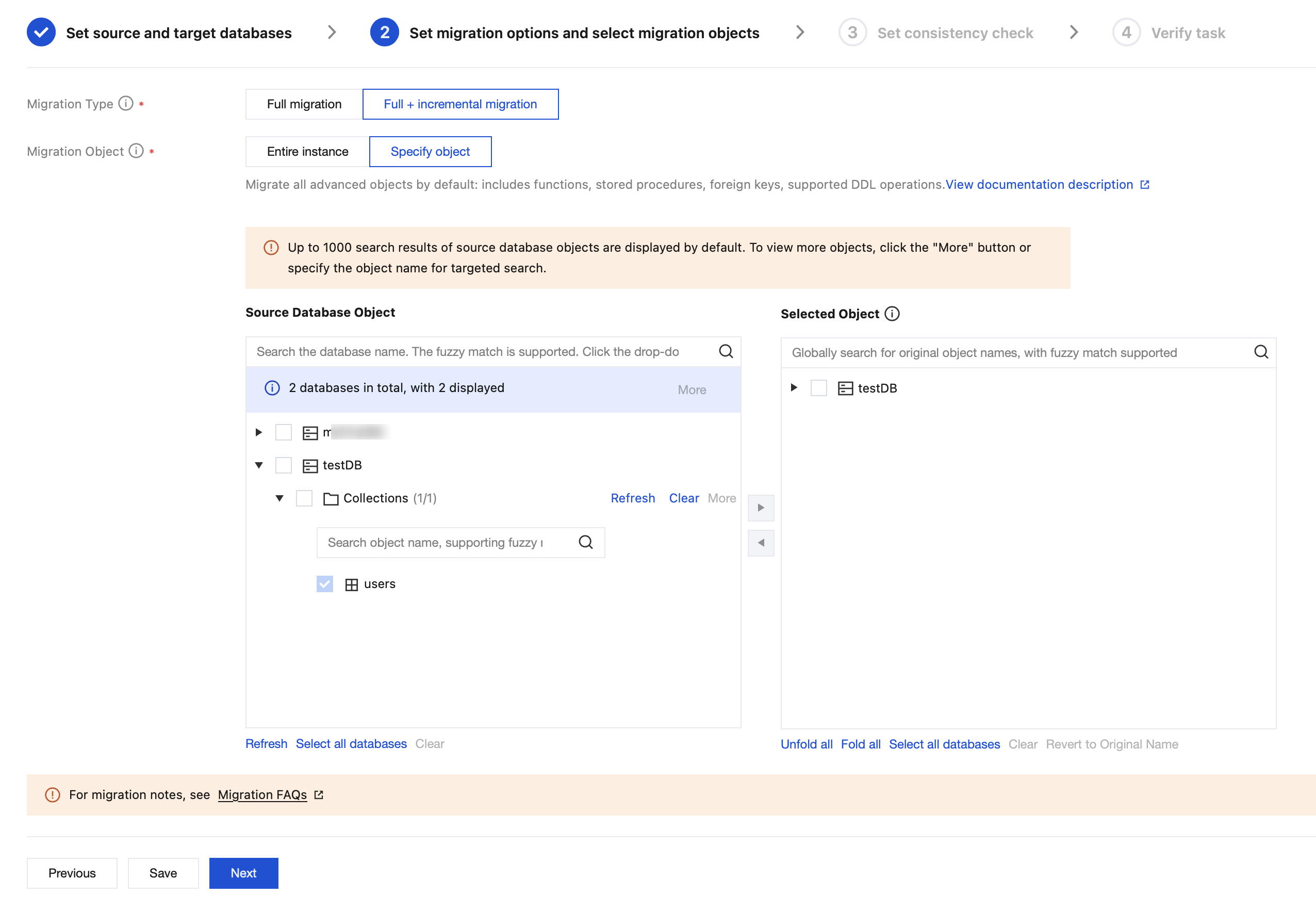
Configuration Parameter | Description |
Migration Type | Select the migration type based on your scenario. Full migration: The entire database will be migrated. The migration includes only the data that exists in the source database when the task starts and excludes any new data written after the migration begins. Full + Incremental migration: Both existing data in the source database at the start of the task and any new data written during the migration process are migrated. You can select this option if data is continuously written to the source database during migration, and a non-stop, hitless migration is required. |
Migration Object | Entire instance: Migrate the entire instance, excluding system databases admin, local, and config. Specified objects: Migrate specified objects. |
Specified Object | Select the objects to be migrated from the source database objects and move them to the box of selected objects. |
6. Data consistency check compares table data between the source and target databases through DTS during data migration. It provides comparison results and inconsistency details to help users quickly verify migration results.
On the Setting Up Consistency Check page, select Enable Data Consistency Check, configure the parameters, and then click Next.
Configuration Item | Parameter | Description |
Check Option | Verification Scope | Database information: Check indexes, database and table information, and shard keys in the source and target databases. When both the source and target databases are sharded clusters, it is supported to select shard keys for checking. Full check: Compare all data in the target database before it is fully synchronized with the source database. Continuous incremental check: Compare the incremental data generated after the initiation of the continuous incremental check task. |
| Database Information | Support checking indexes, database, and table information. |
| Verification Benchmark | Source: Use data from the source as the check benchmark. |
Verification Parameters | Thread Count | The value range is 1–8. Select an appropriate value according to the actual situation. Increasing the number of threads can accelerate the consistency check speed, but it will also increase the load on the source and target databases. |
Check Object Option | Check Object | All migration objects: The check scope includes all objects selected for the migration task. |
7. On the check task page, complete the pre-migration check work and click Start Now. In the pop-up dialog box, click OK.
If the check task fails, you can see Check Failure Handling Methods to fix the issue and re-initiate a check task.
Failed: indicates that a check item fails and the task is blocked. Fix the issue and execute the check task again.
Warning: indicates that a check item does not completely meet the requirements, and the task can be continued, but the business may be affected. Users are required to assess whether to ignore the warning or fix the issue before continuing to execute the task based on the prompt.
8. You are returned to the migration task list, and the migration task is running.
If you need to view task details, delete a task, or perform other operations, click the corresponding task operation. For details, see Managing Tasks. If a task error occurs, see Error Handling.
9. End the task.
Select Full Migration: The task automatically ends upon completion and does not need to be manually ended.
Select Full + Incremental Migration: After full migration is completed, the task enters the incremental data synchronization phase. Incremental data synchronization does not end automatically and requires users to manually end the task.
When incremental synchronization is completed (that is, the status is Ready) and the delay time between the target and source databases is 0 seconds, click Complete in the Operation column to end the migration task.
Note:
Before ending the task, perform a data consistency check and confirm that the comparison results are consistent.
It is recommended to perform a full data check or a check of critical business data. For large data volumes, content check can be selected based on business requirements; for small data volumes, row quantity check can be selected based on business requirements.
10. (Optional) If cutover is required, after the task is completed and its status changes to Task Successful, you can formally perform service cutover. For more details, see Cutover Instructions.
フィードバック