tencent cloud

Billing Center

Release Notes and Announcements
Release Notes
Product Announcements
Billing Details
Billing Mode
Frozen Funds
Balance Notifications
Refunds
Billing Mode
Yearly/Monthly Subscription Products
Purchase Guide
Purchasing Cloud Services
Payment Methods
Beneficiary Account Bank Transfer
Top-up
Payment Methods for Prepaid Products
Post-paid Account Payment
Auto-payment
Transactions
Promo Vouchers
Savings Plan
Renewal Management
Bill Management
View bills
Bill Introduction
Fields in Bills
Usage Details
Billing Export Center
Bill subscription
Saving Bills to COS
Granting Billing-related CAM Access
Self-Service Invoice
Tax Management
FOCUS 1.0
FOCUS 1.0 Conformance Gaps
Cost Management
Consumption Bill Overview
Consumption Bill Description
Anomaly Detection
Fields in Consumption Bill
Cost Explorer
Budget Management
Cost Allocation Management
Cost Allocation Units
Cost Allocation Bill
Cost Allocation Tags
Cost Allocation Backtracking
API Documentation
API Category
Funds Management APIs
Order Management APIs
Resource Management APIs
Bill Management APIs
Cost Allocation Management APIs
Cost Management APIs
Making API Requests
Organization Account APIs
Data Types
Error Codes
FAQs
Bills
Promo Vouchers
Renewal

Transactions

PDF
Modo Foco
Tamanho da Fonte
Última atualização: 2024-06-25 17:11:54

What is Transactions?

Transactions is used to record all account top-ups. For expenditure details, please refer to Bill Introduction.

Go to "Transactions" Page

Go to Tencent Cloud's "Console" page, and click "Transactions" at the upper right corner to enter the "Transactions" page.

How do I check Transactions?

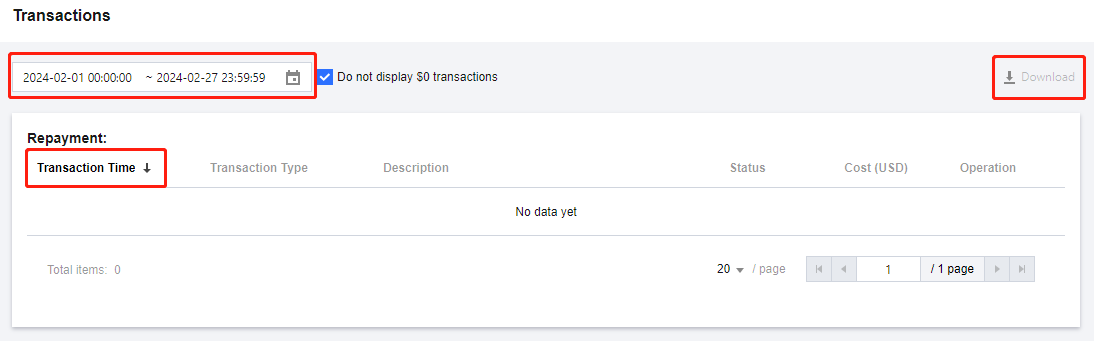
Filtering by Time: You can specify a time range to view Transactions for the specified time range.
Viewing transaction times in forward order or backward order: Click Transaction Time in the header to switch between displaying transaction times in forward order or backward order.
Downloading Transactions: Click the Download icon at the upper right corner to download Transactions for the specified time range. The details for a maximum of 3 months are allowed to be downloaded at a time. The details for a period beyond 3 months can be exported in batches.


Ajuda e Suporte

Esta página foi útil?

comentários