There are two distinct phases when you load data into the read-only analysis engine: the full data loading phase, followed by the real-time data loading phase. When data is being loaded into the read-only analysis engine, queries can only be performed after the data objects have been fully built. You can check the loading status of data tables using the following methods.
Method 1: Viewing Data Loading Status in the Console
1. Log in to MySQL console. In the instance list, click Instance ID or manage in the operation column to enter the instance detail page.
2. Select the Data Objects page to view the object information, and check the data loading status in the Status field.
Parameter
Description
Database Name
Indicates the name of the database to which the object belongs. Supports filtering by database name.
Note:
If a large number of databases are loaded into the read-only analysis engine, filtering by database may result in longer console loading times.
Object Name
Indicates the name of the table loaded into the read-only analysis engine. Views can also be loaded into the engine, but view information is not displayed here. To view loaded views, use MySQL commands.
When a large number of objects are loaded, you can search by keyword in the object name through the console.
Status
Status values include data loading, real-time increment, data sync error, and data sync completed. For details, see it in the console.
Data loading status
If an object is currently in the data loading phase, the data loading status will display the loading progress of the corresponding table.
Incremental Phase Latency
If an object is in the real-time incremental phase, its synchronization delay information will be displayed.
Other Info
If a data loading exception occurs, relevant information about the exception will be displayed under other information for the object.
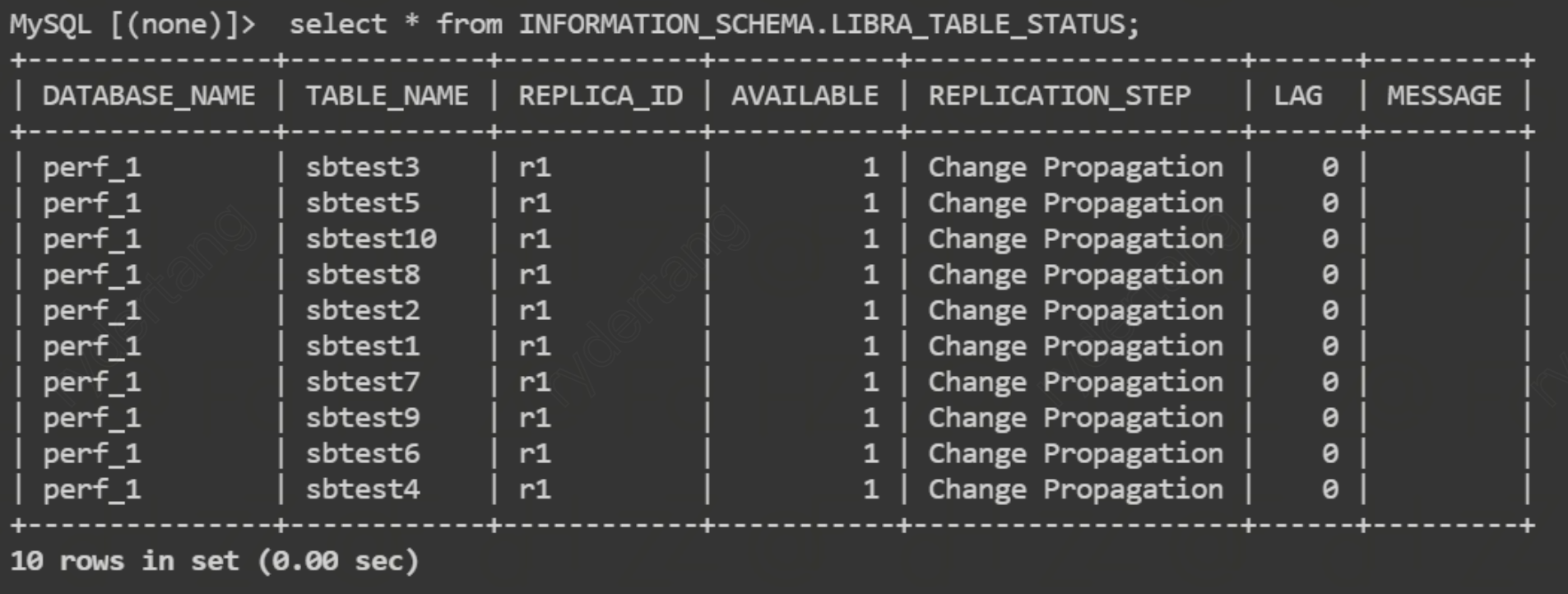
Method 2: Viewing Data Loading Status via SQL Statements
In the read-only analysis engine, executing this command allows you to view the status of all data objects currently being loaded. You can also apply a WHERE clause to filter the results.
The field display information is shown in the figure below: