tencent cloud

Data Transfer Service

Release Notes and Announcements
Release Notes
Announcements
Product Introduction
Overview
Data Migration
Data Sync
Data Subscription (Kafka Edition)
Strengths
Supported Regions
Specification Description
Purchase Guide
Billing Overview
Configuration Change Description
Payment Overdue
Refund
Getting Started
Data Migration Guide
Data Sync Guide
Data Subscription Guide (Kafka Edition)
Preparations
Business Evaluation
Network Preparation
Adding DTS IP Addresses to the Allowlist of the Corresponding Databases
DTS Service Permission Preparation
Database and Permission Preparation
Configuring Binlog in Self-Built MySQL
Data Migration
Databases Supported by Data Migration
Cross-Account TencentDB Instance Migration
Migration to MySQL Series
Migrating to PostgreSQL
Migrating to MongoDB
Migrating to SQL Server
Migrating to Tencent Cloud Distributed Cache
Task Management
Data Sync
Databases Supported by Data Sync
Cross-Account TencentDB Instance Sync
Sync to MySQL series
Synchronize to PostgreSQL
Synchronization to MongoDB
Synchronize to Kafka
Task Management
Data Subscription (Kafka Edition)
Databases Supported by Data Subscription
MySQL series Data Subscription
Data Subscription for TDSQL PostgreSQL
MongoDB Data Subscription
Task Management
Consumption Management
Fix for Verification Failure
Check Item Overview
Cutover Description
Monitoring and Alarms
Supported Monitoring Indicators
Supported Events
Configuring Metric Alarms and Event Alarms via the Console
Configuring Indicator Monitoring and Event Alarm by APIs
Ops Management
Configuring Maintenance Time
Task Status Change Description
Practical Tutorial
Synchronizing Local Database to the Cloud
Creating Two-Way Sync Data Structure
Creating Many-to-One Sync Data Structure
Creating Multi-Site Active-Active IDC Architecture
Selecting Data Sync Conflict Resolution Policy
Using CLB as Proxy for Cross-Account Database Migration
Migrating Self-Built Databases to Tencent Cloud Databases via CCN
Best Practices for DTS Performance Tuning
FAQs
Data Migration
Data Sync
FAQs for Data Subscription Kafka Edition
Regular Expressions for Subscription
Error Handling
Common Errors
Failed Connectivity Test
Failed or Alarmed Check Item
Inability to Select Subnet During CCN Access
Slow or Stuck Migration
Data Sync Delay
High Data Subscription Delay
Data Consumption Exception
API Documentation
History
Introduction
API Category
Making API Requests
(NewDTS) Data Migration APIs
Data Sync APIs
Data Consistency Check APIs
(NewDTS) Data Subscription APIs
Data Types
Error Codes
DTS API 2018-03-30
Service Agreement
Service Level Agreements

Offline Migration of MySQL Data

PDF
フォーカスモード
フォントサイズ
最終更新日: 2024-07-08 19:41:52
This document describes how to migrate data through the console and command line tool.

Data Migration Through Console

There are two modes for migrating data through the console: physical backup and logical backup. For more information, see:

Data Migration with Command Line Tool

1. Generate the SQL file to be imported with the MySQL command line tool "mysqldump" in the following way:
Note:
The data files exported using mysqldump must be compatible with the SQL specification of your purchased TencentDB for MySQL version. You can log in to the database and get the MySQL version information by running the select version(); command. The name of the generated SQL file can contain letters, digits, and underscores but not "test".
Make sure that the same source and target database versions, character sets, and mysqldump tool versions are used. You can specify the character set with the --default-character-set parameter.
shell > mysqldump [options] db_name [tbl_name ...] > bak_pathname
Here, options is the export option, db_name is the database name, tbl_name is the table name, and bak_pathname is the export path. For more information on how to export data with mysqldump, see MySQL's official documentation.
2. Import data to the target database with the MySQL command line tool as follows:
shell > mysql -h hostname -P port -u username -p < bak_pathname
Here, hostname is the target server for data restoration, port is the port of target server, username is the username of the database on the target server, and bak_pathname is the full path to the backup file.

Migrating data (Windows)

1. Use the Windows version of mysqldump to generate the SQL file to be imported. For more information, see the description in Data Migration with Command Line Tool.
2. Enter the command prompt and import the data into the target database with the MySQL command line tool.


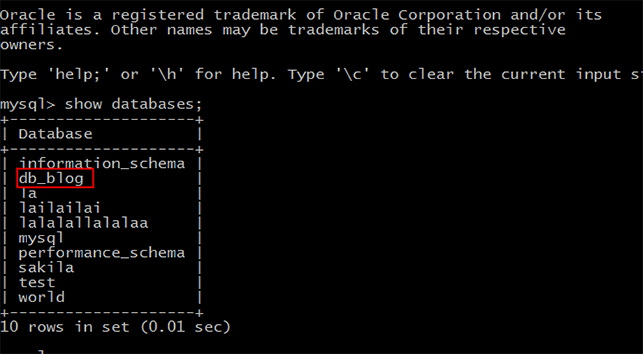
3. Log in to the target MySQL database, run the show databases; command, and you can see that the backup database has been imported into the target database.


Migrating data (Linux)

This document uses a Linux CVM instance as an example. For more information on how to access a database from a CVM instance, see Accessing MySQL Database
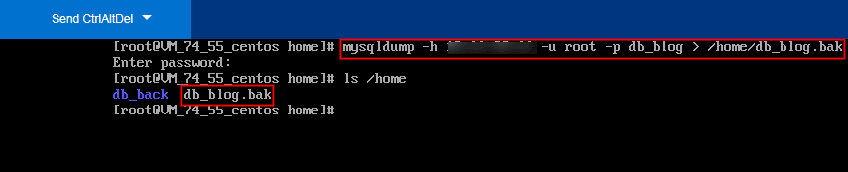
1. Log in to the CVM instance and generate the SQL file to be imported with the MySQL command line tool "mysqldump". Take the db_blog database in TencentDB as an example:


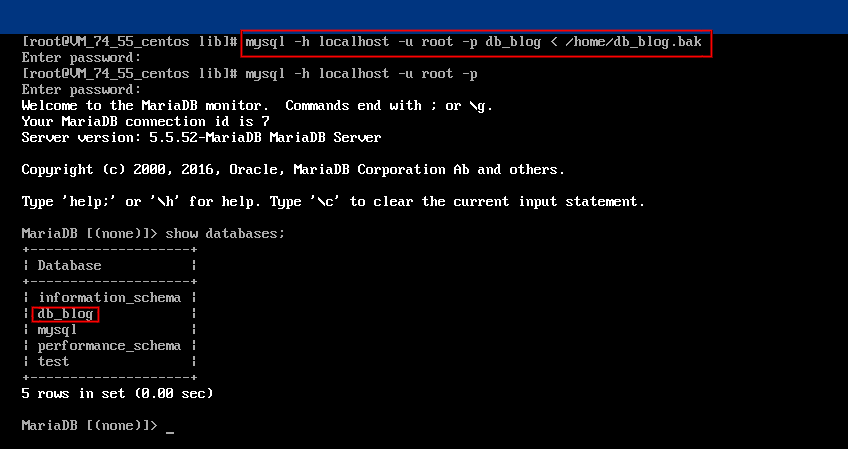
2. Use the MySQL command line tool to restore the data to the target database.
3. Log in to the target MySQL database, run the show databases; command, and you can see that the backup database has been imported into the target database.


Issues with Character Set of Imported Data Files

1. If no character set is specified during data file import into TencentDB, the one set by the database will be used.
2. Otherwise, the specified character set will be used.
3. If the specified character set is different from that of TencentDB, garbled text will be displayed.
For more information, see the character set description in Use Limits.

ヘルプとサポート

この記事はお役に立ちましたか?

フィードバック