C2CSetting State
Download
Focus Mode
Font Size
Introduction
C2CSettingState is a status management center related to personal setting, specialized in managing the status and operations of 1v1 (C2C) chat settings. It provides user information management, chat settings control, friend relationship queries, and other features, serving as a core tool for building one-on-one chat settings interface.C2CSettingState can automatically listen to changes in the current session. When entering a C2C session, it automatically retrieves the other party's user information and chat settings, and provides convenient operations to modify pinned, do not disturb, remark, and other settings.List of attributes
Field | Type | Description |
userID | string | undefined | user ID of the other party |
nick | string | undefined | Nickname of the other party |
avatar | string | undefined | Profile photo URL of the other party |
signature | string | undefined | Personal signature of the other party |
remark | string | undefined | Remark name of the other party |
isMuted | boolean | undefined | Whether to set to Do Not Disturb |
isPinned | boolean | undefined | Pin chat to top |
isContact | boolean | undefined | Whether friend relationship |
setChatPinned | (value: boolean) => void | Method of pinning chat status]] |
setChatMuted | (value: boolean) => void | Method of setting Do Not Disturb status |
setUserRemark | (remark: string) => void | Method of setting user remark |
Attribute Details
userID
Type:
string | undefinedDescription: The other party's unique identifier in the current C2C session. When there is no C2C session or it is loading, the value is
undefined.nick
Type:
string | undefinedDescription: The other party's nickname. If the user hasn't set a nickname or the info is not loaded, the value is
undefined.avatar
Type:
string | undefinedDescription: The other party's avatar image URL. Used to display user profile photo. If the user hasn't set an avatar or the info is not loaded, the value is
undefined.signature
Type:
string | undefinedDescription: The other party's personal signature. Displays the user's status or mood. If the user hasn't set a signature or the info is not loaded, the value is
undefined.remark
Type:
string | undefinedDescription: The remark name set by the current user for the other party. The remark name normally takes precedence over the nickname display for personalized friend identification. If no remark is set, the value is
undefined.isMuted
Type:
boolean | undefinedDescription: Whether the current session is set to do not disturb mode. When the value is
true, message push notifications for this session will not be received; when the value is false, notifications are received normally; when the value is undefined, the status is not yet confirmed.isPinned
Type:
boolean | undefinedDescription: Whether the current session is pinned to top. When the value is
true, the session will be displayed at the top of the session list; when the value is false, it will be arranged in normal sequential order; when the value is undefined, the status is not yet confirmed.isContact
Type:
boolean | undefinedDescription: Whether the other party is a friend of the current user. When the value is
true, it means both parties are mutual friends; when the value is false, it means false; when the value is undefined, the friend relationship query is not yet completed.setChatPinned
Type:
(value: boolean) => voidDescription: Method to set chat pinned status. Input
true to pin conversation to top, input false to unpin. This method will automatically call the underlying API and update status.setChatMuted
Type:
(value: boolean) => voidDescription: Method to set Do Not Disturb status. Input
true to enable Do Not Disturb, input false to disable it. This method will automatically call the underlying API and update status.setUserRemark
Type:
(remark: string) => voidDescription: Method to set user remark. Input new remark name to update the other party's user remark. This method will automatically call the friend service API and update status.
Usage Examples
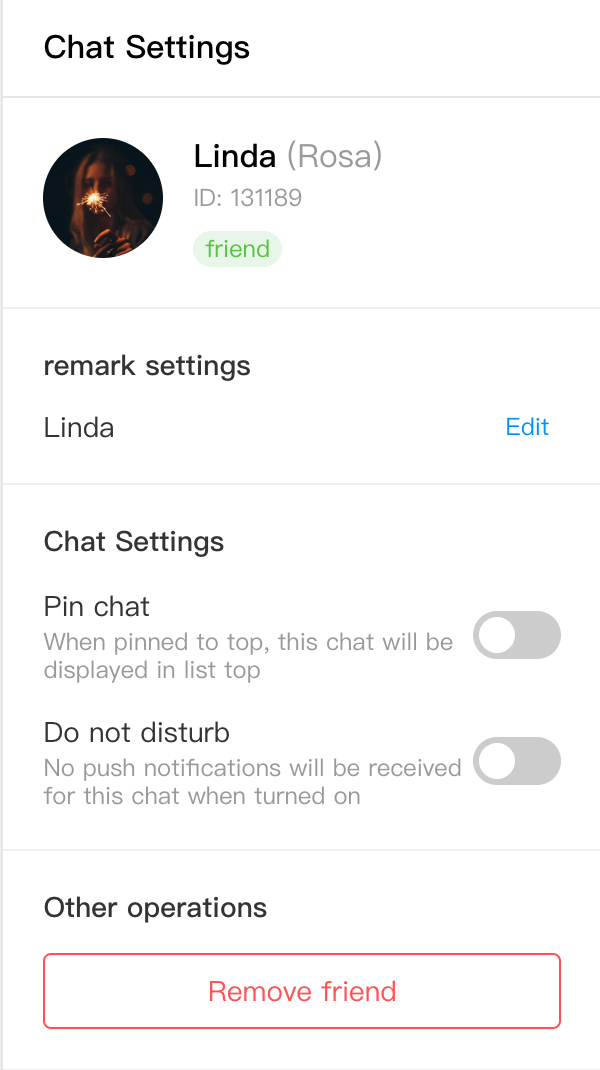
Here is a complete C2CSettingPanel component example that shows how to use various fields to build a C2C chat settings panel:
import React, { useState } from 'react';import { useC2CSettingState } from './states/C2CSettingState/C2CSettingState';interface C2CSettingPanelProps {className?: string;onClose?: () => void;}const C2CSettingPanel: React.FC<C2CSettingPanelProps> = ({ className, onClose }) => {const {userID,nick,avatar,signature,remark,isMuted,isPinned,isContact,setChatPinned,setChatMuted,setUserRemark,} = useC2CSettingState();const [isEditingRemark, setIsEditingRemark] = useState(false);const [remarkInput, setRemarkInput] = useState('');// start edit remarksconst handleEditRemark = () => {setRemarkInput(remark || nick || '');setIsEditingRemark(true);};// save remarkconst handleSaveRemark = () => {if (remarkInput.trim() !== remark) {setUserRemark(remarkInput.trim());}setIsEditingRemark(false);};// cancel edit remarksconst handleCancelEditRemark = () => {setIsEditingRemark(false);setRemarkInput('');};// Toggle pinned statusconst handleTogglePinned = () => {setChatPinned(!isPinned);};// Toggle Do Not Disturb statusconst handleToggleMuted = () => {setChatMuted(!isMuted);};if (!userID) {return (<div className={`c2c-setting-panel ${className || ''}`}><div className="no-conversation">Select one C2C session</div></div>);}return (<div className={`c2c-setting-panel ${className || ''}`}>{/* header */}<div className="panel-header"><h3>Chat Settings</h3>{onClose && (<button className="close-btn" onClick={onClose}>×</button>)}</div>{/* User information area */}<div className="user-info-section"><div className="user-avatar">{avatar ? (<img src={avatar} alt="user profile photo" />) : (<div className="default-avatar">{nick?.charAt(0) || userID?.charAt(0) || '?'}</div>)}</div><div className="user-details"><div className="user-name">{remark || nick || userID}{remark && nick && remark !== nick && (<span className="original-nick">({nick})</span>)}</div><div className="user-id">ID: {userID}</div>{signature && (<div className="user-signature">{signature}</div>)}<div className="friend-status">{isContact === true && (<span className="friend-badge">friend</span>)}{isContact === false && (<span className="stranger-badge">stranger</span>)}</div></div></div>{/* remark settings */}<div className="setting-section"><h4>remark settings</h4><div className="setting-item">{isEditingRemark ? (<div className="remark-edit"><inputtype="text"value={remarkInput}onChange={e => setRemarkInput(e.target.value)}placeholder="Enter remark name"className="remark-input"autoFocus/><div className="edit-actions"><button onClick={handleSaveRemark} className="save-btn">Save</button><button onClick={handleCancelEditRemark} className="cancel-btn">Cancel</button></div></div>) : (<div className="remark-display"><span className="remark-text">{remark || 'No remark set'}</span><button onClick={handleEditRemark} className="edit-btn">Edit</button></div>)}</div></div>{/* Chat Settings */}<div className="setting-section"><h4>Chat Settings</h4><div className="setting-item"><div className="setting-label"><span>Pin chat</span><p className="setting-desc">When pinned to top, this chat will be displayed in list top</p></div><div className="setting-control"><label className="toggle-switch"><inputtype="checkbox"checked={isPinned || false}onChange={handleTogglePinned}/><span className="slider"></span></label></div></div><div className="setting-item"><div className="setting-label"><span>Do not disturb</span><p className="setting-desc">No push notifications will be received for this chat when turned on</p></div><div className="setting-control"><label className="toggle-switch"><inputtype="checkbox"checked={isMuted || false}onChange={handleToggleMuted}/><span className="slider"></span></label></div></div></div>{/* other operations */}<div className="setting-section"><h4>Other operations</h4><div className="action-buttons">{isContact && (<button className="action-btn delete-friend danger">Remove friend</button>)}</div></div></div>);};export default C2CSettingPanel;
The rendering is shown below:
Style Reference
.c2c-setting-panel {width: 300px;height: 100%;background: white;border-left: 1px solid #e5e5e5;display: flex;flex-direction: column;.no-conversation {flex: 1;display: flex;align-items: center;justify-content: center;color: #999;font-size: 14px;}.panel-header {display: flex;align-items: center;justify-content: space-between;padding: 15px 20px;border-bottom: 1px solid #e5e5e5;h3 {margin: 0;font-size: 16px;font-weight: 500;}.close-btn {background: none;border: none;font-size: 20px;cursor: pointer;color: #999;&:hover {color: #333;}}}.user-info-section {padding: 20px;border-bottom: 1px solid #f0f0f0;display: flex;gap: 15px;.user-avatar {flex-shrink: 0;img, .default-avatar {width: 60px;height: 60px;border-radius: 50%;}img {object-fit: cover;}.default-avatar {background: #e5e5e5;display: flex;align-items: center;justify-content: center;font-size: 24px;font-weight: 500;color: #999;}}.user-details {flex: 1;.user-name {font-size: 16px;font-weight: 500;margin-bottom: 5px;.original-nick {color: #999;font-weight: normal;margin-left: 5px;}}.user-id {font-size: 12px;color: #999;margin-bottom: 8px;}.user-signature {font-size: 14px;color: #666;margin-bottom: 8px;line-height: 1.4;}.friend-status {.friend-badge, .stranger-badge {display: inline-block;padding: 2px 6px;border-radius: 10px;font-size: 12px;}.friend-badge {background: #e8f5e8;color: #52c41a;}.stranger-badge {background: #fff2e8;color: #fa8c16;}}}}.setting-section {padding: 20px;border-bottom: 1px solid #f0f0f0;h4 {margin: 0 0 15px 0;font-size: 14px;font-weight: 500;color: #333;}.setting-item {display: flex;align-items: center;justify-content: space-between;margin-bottom: 15px;&:last-child {margin-bottom: 0;}.setting-label {flex: 1;span {font-size: 14px;color: #333;}.setting-desc {margin: 2px 0 0 0;font-size: 12px;color: #999;}}.setting-control {flex-shrink: 0;}}.remark-edit {width: 100%;.remark-input {width: 100%;padding: 8px 12px;border: 1px solid #d9d9d9;border-radius: 4px;font-size: 14px;margin-bottom: 10px;&:focus {outline: none;border-color: #1890ff;}}.edit-actions {display: flex;gap: 10px;button {flex: 1;padding: 6px 12px;border-radius: 4px;font-size: 12px;cursor: pointer;}.save-btn {background: #1890ff;color: white;border: none;&:hover {background: #40a9ff;}}.cancel-btn {background: white;color: #666;border: 1px solid #d9d9d9;&:hover {border-color: #40a9ff;color: #40a9ff;}}}}.remark-display {display: flex;align-items: center;justify-content: space-between;width: 100%;.remark-text {font-size: 14px;color: #333;}.edit-btn {background: none;border: none;color: #1890ff;font-size: 12px;cursor: pointer;&:hover {color: #40a9ff;}}}.action-buttons {display: flex;flex-direction: column;gap: 10px;.action-btn {padding: 10px;border: 1px solid #d9d9d9;border-radius: 4px;background: white;cursor: pointer;font-size: 14px;&:hover {border-color: #40a9ff;color: #40a9ff;}&.danger {border-color: #ff4d4f;color: #ff4d4f;&:hover {background: #ff4d4f;color: white;}}}}}// Toggle switch styles.toggle-switch {position: relative;display: inline-block;width: 44px;height: 24px;input {opacity: 0;width: 0;height: 0;}.slider {position: absolute;cursor: pointer;top: 0;left: 0;right: 0;bottom: 0;background-color: #ccc;transition: .4s;border-radius: 24px;&:before {position: absolute;content: "";height: 18px;width: 18px;left: 3px;bottom: 3px;background-color: white;transition: .4s;border-radius: 50%;}}input:checked + .slider {background-color: #1890ff;}input:checked + .slider:before {transform: translateX(20px);}}}
Key Usage Points
This example shows how to:
1. User information display - Use fields such as
userID, nick, avatar, and signature to show complete user information.2. Friend relationship flag - Display friend status via the
isContact field.3. Remark management - Use the
remark field to display the current remark and modify it via the setUserRemark method.4. Chat settings control - Use the
isPinned and isMuted fields to control pin to top and do not disturb status.5. Interactive operation - Implement set toggle via the
setChatPinned and setChatMuted methods.6. Status handling - Correctly handle the
undefined status of fields to provide good user experience.
Help and Support
Was this page helpful?
You can also Contact sales or Submit a Ticket for help.
Help us improve! Rate your documentation experience in 5 mins.
Feedback