tencent cloud

Video on Demand

DocumentationVideo on Demand

Playing Encrypted Videos

Download
Focus Mode
Font Size
Last updated: 2022-12-01 15:58:37

Introduction

This document shows you how to use a third-party player to play encrypted (SimpleAES) videos of VOD.

Overview

To decrypt and play an encrypted video using a third-party player, you need to obtain the playback information.
You will need the following information:
DrmToken (which is used to get the decryption key)
The URL of the video content

Workflow


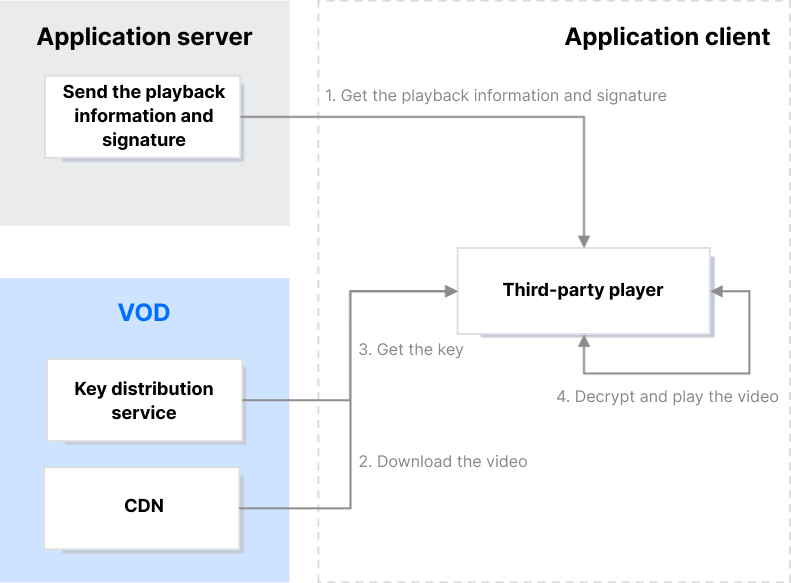
Get the playback information and signature After successful authentication, your application server sends the playback information and signature (DrmToken) to the client.
Download the video and get the key
A playback URL is generated based on the playback information obtained (DrmToken and content URL). When the player tries to play the video, a request to get the key will be sent automatically.
Decrypt and play the video
The player uses the key obtained to decrypt and play the video.

Generating DrmToken

DrmToken is essentially a variant of JSON Web Token (JWT). It also consists of three parts: the header, the payload, and the signature. However, unlike JWT, VOD connects the three parts with ~.
The header is in JSON format and indicates the algorithm information used. Its content is fixed as follows:
{
"alg": "HS256",
"typ": "JWT"
}

Payload

The payload is in JSON format and includes the player signature parameters. Below is an example:
{
"type": "DrmToken",
"appId": 1500014561,
"fileId": "387702307091793695",
"currentTimeStamp": 1650964374,
"expireTimeStamp": 2147483647,
"random": 4220003655,
"issuer": "client"
}

Payload parameters

Parameter
Type
Required
Description
type
string
Yes
The signature type, which should be set to DrmToken.
appId
int64
Yes
The AppId.
fileId
string
Yes
The file ID.
issuer
string
Yes
The issuer, which should be set to client.
currentTimeStamp
int64
Yes
The current time (Unix timestamp).
expireTimeStamp
int64
No
The expiration time (Unix timestamp). If you do not specify this, the signature will not expire.
random
int64
No
A random number.

Signature

Calculation method

Signature = HMACSHA256(base64UrlEncode(Header) + "." + base64UrlEncode(Payload), pkey)
Note:
For more information about the HMACSHA256 algorithm, see RFC 4868 - Using HMAC-SHA-256, HMAC-SHA-384, and HMAC-SHA-512 with IPsec. For details about base64UrlEncode, see Base 64 Encoding with URL and Filename Safe Alphabet.
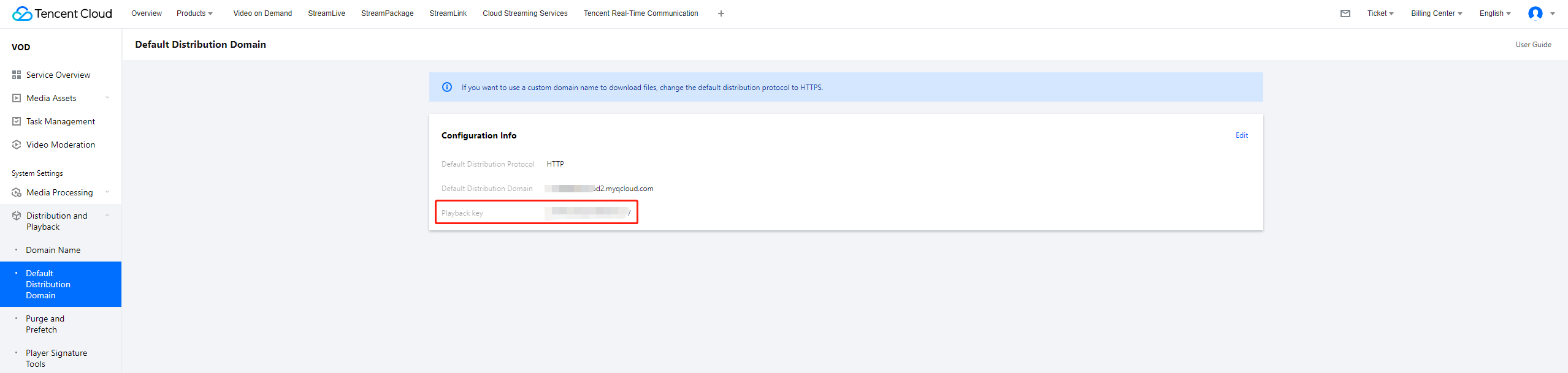
You can view the playback key (pkey) in the VOD console:
Select Distribution and Playback > Default Distribution Domain on the left sidebar.


DrmToken example

Header:
{
"alg": "HS256",
"typ": "JWT"
}
Encoded (base64UrlEncode): eyJhbGciOiJIUzI1NiIsInR5cCI6IkpXVCJ9
Payload:
{
"type": "DrmToken",
"appId": 1500014561,
"fileId": "387702307091793695",
"currentTimeStamp": 1650964374,
"expireTimeStamp": 2147483647,
"random": 4220003655,
"issuer": "client"
}
Encoded (base64UrlEncode): eyJ0eXBlIjoiRHJtVG9rZW4iLCJhcHBJZCI6MTUwMDAxNDU2MSwiZmlsZUlkIjoiMzg3NzAyMzA3MDkxNzkzNjk1IiwiY3Vyc
mVudFRpbWVTdGFtcCI6MTY1MDk2NDM3NCwiZXhwaXJlVGltZVN0YW1wIjoyMTQ3NDgzNjQ3LCJyYW5kb20iOjQyMjAwMDM2NTUsImlzc3VlciI6ImNsaWVudCJ9
Signature: NN_EBW7VxGK69v-w9Q7Dw-sm8Uryfe_NdRUe3RZZ4wY. It is generated using pkey (whose value is JduzsUuRvGVPRHvIYwLv).

Connect the header, payload, and signature with ~ and you will get the DrmToken, which is eyJhbGciOiJIUzI1NiIsInR5cCI6IkpXVCJ9~eyJ0eXBlI
joiRHJtVG9rZW4iLCJhcHBJZCI6MTUwMDAxNDU2MSwiZmlsZUlkIjoiMzg3NzAyMzA3MDkxNzkzNjk1IiwiY3VycmVudFRpbWVTdGFtcCI6MTY1MDk2NDM3NCwiZX
hwaXJlVGltZVN0YW1wIjoyMTQ3NDgzNjQ3LCJyYW5kb20iOjQyMjAwMDM2NTUsImlzc3VlciI6ImNsaWVudCJ9~NN_EBW7VxGK69v-w9Q7Dw-sm8Uryfe_NdRUe3R
ZZ4wY.

Generating a Playback URL

Call DescribeMediaInfos to get the URL of the video content (the value of MediaInfoSet.AdaptiveDynamicStreamingInfo.AdaptiveDynamicStreamingSet.Url).
If you have enabled key hotlink protection, refer to Key Hotlink Protection to generate a URL that includes the hotlink protection signature.
Generate the playback URL:
Suppose the original video URL is http(s)://xxx.com/xxx/xxx/test.m3u8.
The playback URL would be http(s)://xxx.com/xxx/xxx/voddrm.token.<DrmToken>.test.m3u8.
The prefix voddrm.token. is added to the filename, and the value of <DrmToken> is the DrmToken generated above.

Playback URL example

Suppose the URL of the video content is https://1500014561.vod2.myqcloud.com/4395be81vodtranscq1500014561/8f8e01fb3877023070917936
95/adp.12.m3u8?t=9ee2bdd0&sign=46f6120466d6e931ad792bad8e4f8dff.
The DrmToken is eyJhbGciOiJIUzI1NiIsInR5cCI6IkpXVCJ9~eyJ0eXBlIjoiRHJtVG9rZW4iLCJhcHBJZCI6MTUwMDAxNDU2MSwiZmlsZUlkIjoiMzg3Nz
AyMzA3MDkxNzkzNjk1IiwiY3VycmVudFRpbWVTdGFtcCI6MTY1MDk2NDM3NCwiZXhwaXJlVGltZVN0YW1wIjoyMTQ3NDgzNjQ3LCJyYW5kb20iOjQyMjAwMDM2N
TUsImlzc3VlciI6ImNsaWVudCJ9~NN_EBW7VxGK69v-w9Q7Dw-sm8Uryfe_NdRUe3RZZ4wY.
The playback URL would be as follows:
https://1500014561.vod2.myqcloud.com/4395be81vodtranscq1500014561/8f8e01fb387702307091793695/voddrm.token.eyJhbGciOiJIUzI1N
iIsInR5cCI6IkpXVCJ9~eyJ0eXBlIjoiRHJtVG9rZW4iLCJhcHBJZCI6MTUwMDAxNDU2MSwiZmlsZUlkIjoiMzg3NzAyMzA3MDkxNzkzNjk1IiwiY3VycmVudFRp
bWVTdGFtcCI6MTY1MDk2NDM3NCwiZXhwaXJlVGltZVN0YW1wIjoyMTQ3NDgzNjQ3LCJyYW5kb20iOjQyMjAwMDM2NTUsImlzc3VlciI6ImNsaWVudCJ9~NN_EBW7
VxGK69v-w9Q7Dw-sm8Uryfe_NdRUe3RZZ4wY.adp.12.m3u8?t=9ee2bdd0&sign=46f6120466d6e931ad792bad8e4f8dff

Playing the Video Using a Third-Party Player

Once you have the playback URL, you can use a third-party player to play the video.

Summary

Now, you should know how to play encrypted videos of VOD using a third-party player.

Help and Support

Was this page helpful?

Help us improve! Rate your documentation experience in 5 mins.

Feedback