tencent cloud

Data Transfer Service

Release Notes and Announcements
Release Notes
Announcements
Product Introduction
Overview
Data Migration
Data Sync
Data Subscription (Kafka Edition)
Strengths
Supported Regions
Specification Description
Purchase Guide
Billing Overview
Configuration Change Description
Payment Overdue
Refund
Getting Started
Data Migration Guide
Data Sync Guide
Data Subscription Guide (Kafka Edition)
Preparations
Business Evaluation
Network Preparation
Adding DTS IP Addresses to the Allowlist of the Corresponding Databases
DTS Service Permission Preparation
Database and Permission Preparation
Configuring Binlog in Self-Built MySQL
Data Migration
Databases Supported by Data Migration
Cross-Account TencentDB Instance Migration
Migration to MySQL Series
Migrating to PostgreSQL
Migrating to MongoDB
Migrating to SQL Server
Migrating to Tencent Cloud Distributed Cache
Task Management
Data Sync
Databases Supported by Data Sync
Cross-Account TencentDB Instance Sync
Sync to MySQL series
Synchronize to PostgreSQL
Synchronization to MongoDB
Synchronize to Kafka
Task Management
Data Subscription (Kafka Edition)
Databases Supported by Data Subscription
MySQL series Data Subscription
Data Subscription for TDSQL PostgreSQL
MongoDB Data Subscription
Task Management
Consumption Management
Fix for Verification Failure
Check Item Overview
Cutover Description
Monitoring and Alarms
Supported Monitoring Indicators
Supported Events
Configuring Metric Alarms and Event Alarms via the Console
Configuring Indicator Monitoring and Event Alarm by APIs
Ops Management
Configuring Maintenance Time
Task Status Change Description
Practical Tutorial
Synchronizing Local Database to the Cloud
Creating Two-Way Sync Data Structure
Creating Many-to-One Sync Data Structure
Creating Multi-Site Active-Active IDC Architecture
Selecting Data Sync Conflict Resolution Policy
Using CLB as Proxy for Cross-Account Database Migration
Migrating Self-Built Databases to Tencent Cloud Databases via CCN
Best Practices for DTS Performance Tuning
FAQs
Data Migration
Data Sync
FAQs for Data Subscription Kafka Edition
Regular Expressions for Subscription
Error Handling
Common Errors
Failed Connectivity Test
Failed or Alarmed Check Item
Inability to Select Subnet During CCN Access
Slow or Stuck Migration
Data Sync Delay
High Data Subscription Delay
Data Consumption Exception
API Documentation
History
Introduction
API Category
Making API Requests
(NewDTS) Data Migration APIs
Data Sync APIs
Data Consistency Check APIs
(NewDTS) Data Subscription APIs
Data Types
Error Codes
DTS API 2018-03-30
Service Agreement
Service Level Agreements

Overview of Preparations Related to Network

PDF
フォーカスモード
フォントサイズ
最終更新日: 2024-08-13 14:54:23

Overview

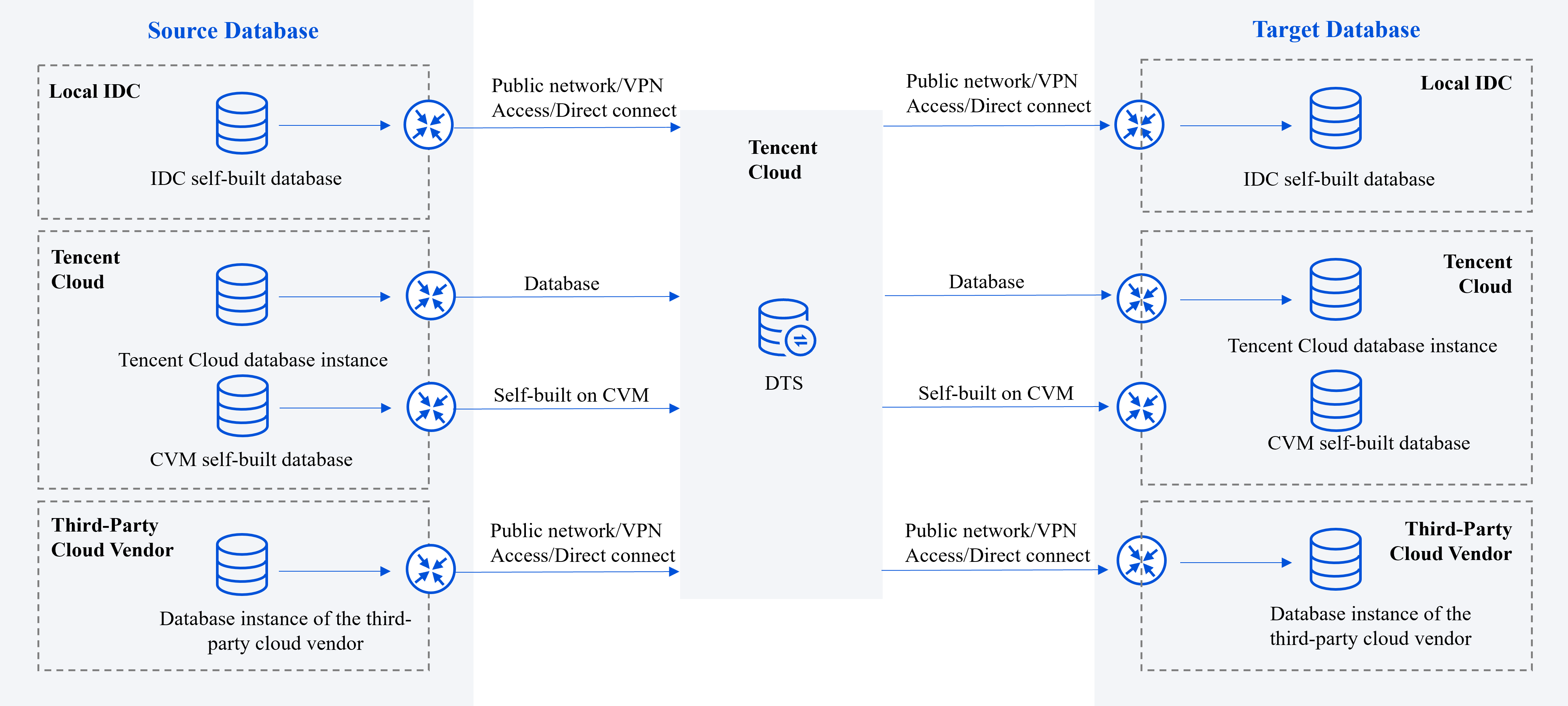
Using DTS, you can synchronize databases between different deployment forms such as local IDC, Tencent Cloud, and other third-party cloud vendors. This facilitates database migration, database backup, and building a hybrid cloud architecture with active-active deployment for enterprise users.
The DTS is part of the Tencent Cloud Network. If you use DTS for database synchronization, it's necessary to connect the networks where the source/target databases reside with the Tencent Cloud Network to which DTS belongs, ensuring DTS can connect to the source/target databases.


Choosing DTS Assess Type

The method chosen to connect the source/target database with the Tencent Cloud for DTS determines the access type selected when the DTS task is configured.


Note:
Adding DTS IP address to the security group or the allowlist of the interfacing database may pose certain security risks. Users are advised to enhance security measures during use, such as standardizing account password management, using authentication methods for internal API communications, inspecting and restricting unnecessary network segments, etc. Using DTS indicates you acknowledge the potential risks. If high security is a concern, it's recommended to choose Direct Connect, VPN Access, or VPC connections.
After using DTS, we recommend that you delete the DTS IP address from the security group or firewall promptly.
Deployment Type of Source/Target Database
Access Type
Applicable Scenarios
Network Configuration Guide
IDC self-built database
Other Cloud Vendors' Databases
Lighthouse Database on Tencent Cloud Lighthouse
Public Network
The database can be accessed through the public network IP.
The public network cannot guarantee transmission bandwidth and poses security risks, making it suitable for scenarios with low transmission requirements.
Add DTS IP address to the database allowlist.(For self-built databases, it is usually configured in the firewall; for other cloud vendor databases, it is configured in security groups.)
VPN Access
The database is interconnected with Tencent Cloud VPC through VPN connections.
VPN connection uses encrypted transmission with a certain bandwidth guarantee, meeting most network transmission security requirements.
Direct Connect
The database is interconnected with Tencent Cloud VPC through Direct Connect.
When Direct Connect is used, network links are dedicated to users, with no risk of data leakage, high security, and meet the high-level network connection requirements for users such as financial institutions and governments.
CCN
The database is interconnected with Tencent Cloud VPC through CCN.
CVM Self-built Database
on Tencent Cloud
Self-Build on CVM
The database is deployed on Tencent Cloud's Cloud Virtual Machine (CVM).
Tencent Cloud Database Instance
Database
The database belongs to Tencent Cloud's database instance.
CVM Self-Built Database/Lighthouse Database/Tencent Cloud Database Instance
VPC
Both the source and target databases are deployed on Tencent Cloud and are connected via a VPC.
1. If you need to use of the VPC access type, please submit a ticket to apply for it.

ヘルプとサポート

この記事はお役に立ちましたか?

フィードバック
