Web
Download
聚焦模式
字号
浏览器环境检测
在开始音视频通话之前,建议您先使用
TRTC.isSupported() 接口检测 SDK 是否支持当前网页。如果 SDK 不支持当前浏览器,建议用户使用最新版的 Chrome 浏览器、Edge 浏览器、Safari 浏览器、Firefox 浏览器。TRTC.isSupported().then(checkResult => {// 不支持使用 SDK,引导用户使用最新版的 Chrome 浏览器。if (!checkResult.result) {}// 不支持发布视频if (!checkResult.result.isH264EncodeSupported) {}// 不支持拉视频if (!checkResult.result.isH264DecodeSupported) {}})
1. 网页使用了 http 协议。浏览器不允许 http 协议的网站采集摄像头和麦克风,您需要使用 https 协议部署您的网页。
2. 当前浏览器不支持 WebRTC 相关能力,您需要引导用户使用推荐的浏览器,参考:Supported Browsers。
3. Firefox 浏览器安装完成后需要动态加载 H264 编解码器,因此会出现短暂的检测结果为 false 的情况,请稍等再试或引导使用其他浏览器。
音视频设备测试
为保证用户在使用 TRTC-SDK 的过程中有更好的用户体验,我们建议您在用户加入 TRTC 房间之前,对用户设备及网络状况进行检测并给出建议和引导。
为方便您快速集成设备检测及网络检测功能,我们提供一下几种方式供您参考:
rtc-detect 库
安装
npm install rtc-detect
使用方法
import RTCDetect from 'rtc-detect';// 初始化监测模块const detect = new RTCDetect();// 获得当前环境监测结果const result = await detect.getReportAsync();// result 包含了当前环境系统的信息,API 支持度,编解码支持度,设备相关的信息console.log('result is: ' + result);
API
(async) isTRTCSupported()
判断当前环境是否支持 TRTC。
const detect = new RTCDetect();const data = await detect.isTRTCSupported();if (data.result) {console.log('current browser supports TRTC.')} else {console.log(`current browser does not support TRTC, reason: ${data.reason}.`)}
getSystem()
获取当前系统环境参数。
Item | Type | Description |
UA | string | 浏览器的 ua |
OS | string | 当前设备的系统型号 |
browser | object | 当前浏览器信息{ name, version } |
displayResolution | object | 当前分辨率 { width, height } |
getHardwareConcurrency | number | 当前设备 CPU 核心数 |
const detect = new RTCDetect();const result = detect.getSystem();
getAPISupported()
获取当前环境 API 支持度。
Item | Type | Description |
isUserMediaSupported | boolean | 是否支持获取用户媒体数据流 |
isWebRTCSupported | boolean | 是否支持 WebRTC |
isWebSocketSupported | boolean | 是否支持 WebSocket |
isWebAudioSupported | boolean | 是否支持 WebAudio |
isScreenCaptureAPISupported | boolean | 是否支持获取屏幕的流 |
isCanvasCapturingSupported | boolean | 是否支持从 canvas 获取数据流 |
isVideoCapturingSupported | boolean | 是否支持从 video 获取数据流 |
isRTPSenderReplaceTracksSupported | boolean | 是否支持替换 track 时不和 peerConnection 重新协商 |
isApplyConstraintsSupported | boolean | 是否支持变更摄像头的分辨率不通过重新调用 getUserMedia |
const detect = new RTCDetect();const result = detect.getAPISupported();
(async) getDevicesAsync()
获取当前环境可用的设备。
Item | Type | Description |
hasCameraPermission | boolean | 是否支持获取用户摄像头数据 |
hasMicrophonePermission | boolean | 是否支持获取用户麦克风数据 |
cameras | array<CameraItem> | 用户的摄像头设备列表,包含支持视频流的分辨率信息,最大宽高以及最大帧率(最大帧率有部分浏览器不支持) |
microphones | array<DeviceItem> | 用户的麦克风设备列表 |
speakers | array<DeviceItem> | 用户的扬声器设备列表 |
CameraItem
Item | Type | Description |
deviceId | string | 设备 ID, 通常是唯一的,可以用于采集识别设备 |
groupId | string | 组的标识符,如果两个设备属于同一个物理设备,他们就有相同的标识符 |
kind | string | 摄像头设备类型:'videoinput' |
label | string | 描述该设备的标签 |
resolution | object | 摄像头支持的最大分辨率的宽高和帧率 {maxWidth: 1280, maxHeight: 720, maxFrameRate: 30} |
DeviceItem
Item | Type | Description |
deviceId | string | 设备 ID, 通常是唯一的,可以用于采集识别设备 |
groupId | string | 组的标识符,如果两个设备属于同一个物理设备,他们就有相同的标识符 |
kind | string | 设备类型,例如: 'audioinput', 'audiooutput' |
label | string | 描述该设备的标签 |
const detect = new RTCDetect();const result = await detect.getDevicesAsync();
(async) getCodecAsync()
获取当前环境参数对编码的支持度。
Item | Type | Description |
isH264EncodeSupported | boolean | 是否支持 h264 编码 |
isH264DecodeSupported | boolean | 是否支持 h264 解码 |
isVp8EncodeSupported | boolean | 是否支持 vp8 编码 |
isVp8DecodeSupported | boolean | 是否支持 vp8 解码 |
支持编码即支持发布音视频,支持解码即支持拉取音视频播放 | | |
const detect = new RTCDetect();const result = await detect.getCodecAsync();
(async) getReportAsync()
获取当前环境监测报告。
Item | Type | Description |
system | object | 和 getSystem() 的返回值一致 |
APISupported | object | 和 getAPISupported() 的返回值一致 |
codecsSupported | object | 和 getCodecAsync() 的返回值一致 |
devices | object | 和 getDevicesAsync() 的返回值一致 |
const detect = new RTCDetect();const result = await detect.getReportAsync();
(async) isHardWareAccelerationEnabled()
检测 Chrome 浏览器是否开启硬件加速。
注意:
该接口的实现依赖于 WebRTC 原生接口,建议在 isTRTCSupported 检测支持后,再调用该接口进行检测。检测最长耗时 30s。经实测:
1. 开启硬件加速的情况下,该接口在 Windows 耗时 2s 左右, Mac 需耗时 10s 左右。
2. 关闭硬件加速的情况下,该接口在 Windows 和 Mac 耗时均为 30s。
const detect = new RTCDetect();const data = await detect.isTRTCSupported();if (data.result) {const result = await detect.isHardWareAccelerationEnabled();console.log(`is hardware acceleration enabled: ${result}`);} else {console.log(`current browser does not support TRTC, reason: ${data.reason}.`)}
设备检测的 React 组件
设备检测 UI 组件特点
1. 处理了设备连接及设备检测逻辑
2. 处理了网络检测的逻辑
3. 网络检测 tab 页可选
4. 支持中、英文两种语言
设备检测 UI 组件相关链接
组件npm包使用说明请参考:rtc-device-detector-react
组件源码调试请参考:github/rtc-device-detector
组件引用示例请参考:WebRTC API Example
设备检测 UI 组件界面
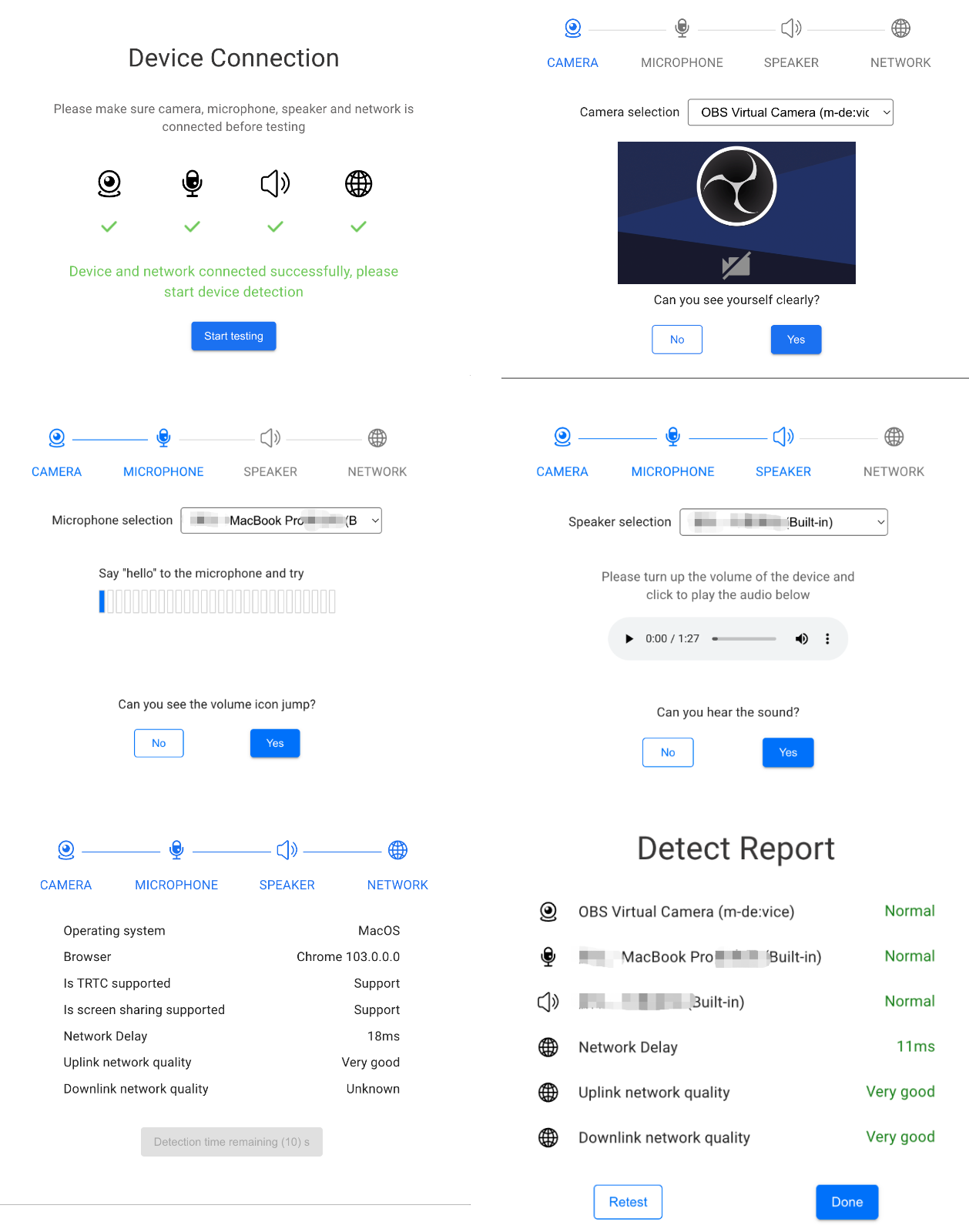
设备及网络检测逻辑
1)设备连接
设备连接的目的是检测用户使用的机器是否有摄像头,麦克风,扬声器设备,是否在联网状态。如果有摄像头,麦克风设备,尝试获取音视频流并引导用户授予摄像头,麦克风的访问权限。
判断设备是否有摄像头,麦克风,扬声器设备
import TRTC from 'trtc-sdk-v5';const cameraList = await TRTC.getCameraList();const micList = await TRTC.getMicrophoneList();const speakerList = await TRTC.getSpeakerList();const hasCameraDevice = cameraList.length > 0;const hasMicrophoneDevice = micList.length > 0;const hasSpeakerDevice = speakerList.length > 0;
获取摄像头,麦克风的访问权限
await trtc.startLocalVideo({ publish: false });await trtc.startLocalAudio({ publish: false });
判断设备是否联网
export function isOnline() {const url = 'https://web.sdk.qcloud.com/trtc/webrtc/assets/trtc-logo.png';return new Promise((resolve) => {try {const xhr = new XMLHttpRequest();xhr.onload = function () {resolve(true);};xhr.onerror = function () {resolve(false);};xhr.open('GET', url, true);xhr.send();} catch (err) {// console.log(err);}});}const isOnline = await isOnline();
2) 摄像头检测
检测原理:打开摄像头,并在页面中渲染摄像头画面。
打开摄像头
trtc.startLocalVideo({ view: 'camera-video', publish: false });
切换摄像头
trtc.updateLocalVideo({option: { cameraId }});
设备插拔检测
检测完成后关闭摄像头
trtc.stopLocalVideo();
3)麦克风检测
检测原理:打开麦克风,并获取麦克风音量。
打开麦克风
trtc.startLocalAudio({ publish: false });
检测麦克风音量
trtc.on(TRTC.EVENT.AUDIO_VOLUME, event => {event.result.forEach(({ userId, volume }) => {const isMe = userId === ''; // 当 userId 为空串时,代表本地麦克风音量。if (isMe) {console.log(`my volume: ${volume}`);} else {console.log(`user: ${userId} volume: ${volume}`);}})});// 开启音量回调,并设置每 500ms 触发一次事件trtc.enableAudioVolumeEvaluation(500);// 出于性能的考虑,当页面切换到后台时,SDK 不会抛出音量回调事件。如需在页面切后台时接收音量回调事件,可设置该参数为 true。trtc.enableAudioVolumeEvaluation(500, true);// 如需关闭音量回调,传入 interval 值小于等于0即可trtc.enableAudioVolumeEvaluation(-1);
切换麦克风
trtc.updateLocalAudio({ option: { microphoneId }});
设备插拔检测
检测完成后释放麦克风占用
trtc.stopLocalAudio();
4) 扬声器检测
检测原理:通过 audio 标签播放一个 mp3 媒体文件
创建 audio 标签,提醒用户调高播放音量,播放 mp3 确认扬声器设备是否正常。
<audio id="audio-player" src="xxxxx" controls></audio>
检测结束后停止播放
const audioPlayer = document.getElementById('audio-player');if (!audioPlayer.paused) {audioPlayer.pause();}audioPlayer.currentTime = 0;
5) 网络检测
TRTC 能力检测页面
文档反馈