从 Agora 迁移到 TRTC
Download
聚焦模式
字号
欢迎阅读 Tencent RTC Engine SDK 迁移指南。本文旨在协助开发者将基于 Agora Video SDK 的实施方案高效迁移到 Tencent RTC Engine SDK。我们将通过提供详细的 Tencent RTC Engine 应用部署指南, 以及基础 RTC 功能/ API 的代码对比, 帮助您实现快速且无缝的迁移。
如果您计划为新项目接入 Tencent RTC Engine SDK, 我们建议您从 跑通 Demo 或 集成指南 开始学习;如果您想了解 Tencent RTC Engine 的更多信息, 我们建议您访问 产品概述。
创建 Tencent RTC Engine 应用程序
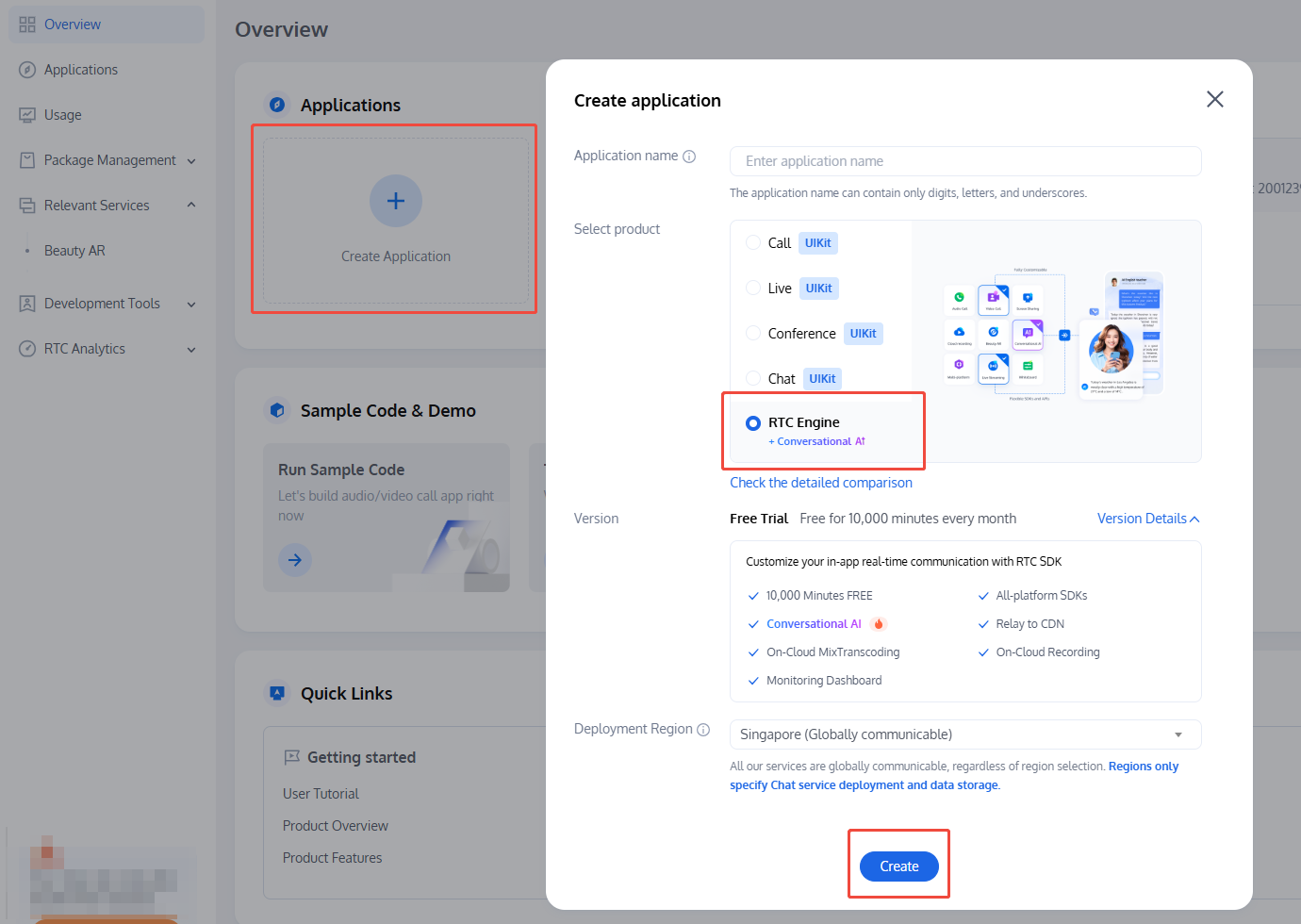
要访问 Tencent RTC Engine 服务,需要一个 Tencent RTC Engine 应用程序及其凭据。您可以按照以下步骤在 Tencent RTC 控制台中创建新的 Tencent RTC Engine 应用程序:
1. 注册或登录您的 Tencent RTC 账号,并登录到 Tencent RTC 控制台。
2. 点击 Create Application。
3. 在创建弹窗中,输入您的应用程序名称,选择 RTC Engine,点击 Create。
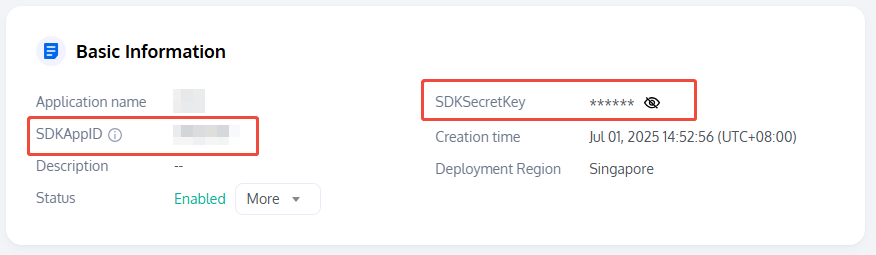
应用程序创建后,可在 Basic Information 获取以下凭证:
SDKAppID:这是自动生成的 ID,用于唯一标识您的 Tencent RTC 应用程序。
SDKSecretKey:用于生成安全签名的关键参数之一 UserSig,用于保障 Tencent RTC 服务的安全访问。该凭证及 UserSig 计算方式请参见 UserSig。
安装 Tencent RTC Engine SDK
Tencent RTC Engine SDK 已支持多种主流平台,提供全面的跨平台兼容性,涵盖 Web、桌面、移动端。您可以通过以下方式安装适合您当前实现的 Tencent RTC Engine SDK:
使用
npm 安装:1. 在你的 Web 项目中安装 trtc-sdk-v5:
npm install trtc-sdk-v5 --save
2. 在脚本中导入模块:
import TRTC from 'trtc-sdk-v5'
使用 HTML 安装
<script>:<script src="/your_path/trtc.js"></script>
flutter pub add tencent_rtc_sdk
1. 在 React Native 项目中安装 trtc-react-native:
npm install trtc-react-native --save# oryarn add trtc-react-native
2. 在脚本中导入模块:
import TRTCCloud, { TRTCParams, TRTCCloudDef } from 'trtc-react-native'
术语比较
Tencent RTC Engine 术语 | Agora 术语 | 说明 |
房间 | 频道 | 将 RTC 参与者联系在一起的团体。 |
主播 | 主持人 | 拥有推流权限的房间用户类型,可以向服务端推送音视频流。 主播也可以订阅并播放其他主播的音视频流。 |
观众 | 观众 | 只能订阅其他主播/主持人的房间用户类型。 |
功能和 API 比较
本节列出了一些代码示例,比较了 Agora Video SDK 和 Tencent RTC Engine SDK 中常见 RTC 功能的实现:
3. 设置事件监听器
初始化 Tencent RTC /声网客户端实例
Agora
// Create an Agora Web clientconst agoraWebClient = AgoraRTC.createClient({mode: "rtc",codec: "vp8"});
Tencent RTC
// Create a TRTC Web clientconst trtcWebClient = TRTC.create();
Agora
RtcEngine agoraFlutterEngine = createAgoraRtcEngine();await agoraFlutterEngine.initialize(const RtcEngineContext(appId: "<app id>"));
Tencent RTC
// Create a TRTC instanceTRTCCloud trtcFlutterEngine = await TRTCCloud.sharedInstance();
Agora
const agoraRNEngine = createAgoraRtcEngine();await agoraRNEngine.initialize({ appId: "<app id>" });
Tencent RTC
// Create a TRTC instanceconst trtcRNEngine = TRTCCloud.sharedInstance();
进入 Tencent RTC 房间/声网频道
Agora
await agoraWebClient.join(appId, channelName, token, userId);
Tencent RTC
try {await trtcWebClient.enterRoom({// Your application's SDKAppIDsdkAppId: 12345678,userId: "<custom user id>",// User signature, generated from your appliction's SDKSecretKeyuserSig: "<user signature>",roomId: 1234});console.log('Entered the room successfully');} catch (error) {console.error('Failed to enter the room ' + error);}
Agora
await agoraFlutterEngine.joinChannel(token: "<your token>",channelId: "<channel id>",// user iduid: 0options: const ChannelMediaOptions(autoSubscribeVideo: true,autoSubscribeAudio: true,publishCameraTrack: true,publishMicrophoneTrack: true));
Tencent RTC
trtcFlutterEngine.enterRoom(TRTCParams(// Your application's SDKAppIDsdkAppId: 12345678,userId: "<custom user id>",// User signature, generated from your appliction's SDKSecretKeyuserSig: "<user signature>",roomId: 1234,// Enter the room as Anchorrole: TRTCRoleType.anchor,),TRTCAppScene.live);print("Enter the room successfully");
Agora
const token = "<your token>";const channelName = "<your channel id>";const localUserId = 0;agoraRNEngine.joinChannel(token,channelName,localUserId,{autoSubscribeVideo: true,autoSubscribeAudio: true,publishCameraTrack: true,publishMicrophoneTrack: true});
Tencent RTC
trtcRNEngine.enterRoom(new TRTCParams({// Your application's SDKAppIDsdkAppId: 12345678,userId: "<custom user id>",// User signature, generated from your appliction's SDKSecretKeyuserSig: "<user signature>",roomId: 1234}),// Enter the room in audio and video call scenariosTRTCCloudDef.TRTC_APP_SCENE_VIDEOCALL);
设置事件监听器
Agora
agoraWebClient.on("user-joined", async (user, mediaType) => {console.log("User joins the channel");});
Tencent RTC
trtcWebClient.on(TRTC.EVENT.REMOTE_USER_ENTER, event => {const userId = event.userId;console.log(User ${userId}enters the room);});
Agora
agoraFlutterEngine.registerEventHandler(RTCEngineEventHandler(onUserJoined: (RtcConnection connection, int remoteUid, int elapsed) {print("Remote user $remoteUid joined");},));
Tencent RTC
// Define a TRTCCloudListener with relative eventsTRTCCloudListener listener = TRTCCloudListener(onEnterRoom: (result) {if(result > 0) {print("Enter room success.");}},onRemoteUserEnterRoom: (userId) {print("Remote user $userId enters the room.")},onError: (errCode, errMsg) {print("Error $errCode: $errMsg");});// Register the event listener with TRTC enginetrtcFlutterEngine.registerListener(listener);
Agora
agoraRNEngine.registerEventHandler({onUserJoined: (connection, uid) {console.log(`Remote user ${uid} joins the room`);}});
Tencent RTC
const onRtcListener = useCallback((type:TRTCCloudListener, params:any) => {if (type === TRTCCloudListener.onEnterRoom) {if (params.result > 0) {console.log("Enter room success.");}} else if (type === TRTCCloudListener.onRemoteUserEnterRoom) {console.log(`Remote user ${params.userId} enters the room.`);} else if (type === TRTCCloudListener.onError) {console.error(`Error ${params.errCode}: ${params.errMsg}.`);}});trtcRNEngine.registerListener(onRtcListener);
收集, 发布或取消发布本地 Tencent RTC 音视频流/声网音视频轨道
Assume the container HTML element for local audio and video is:
<div class="local-video-container" width="1920" height="1080"></div>
Agora
// Capture both microphone and camera tracksconst [microphoneTrack, cameraTrack] = await agoraWebClient.createMicrophoneAndCameraTracks();// Renderconst localMediaContainer = document.getElementById('local-video-container');cameraTrack.play(localMediaContainer);// Publish microphone and camera tracksawait agoraWebClient.publish([microphoneTrack, cameraTrack]);// Unpublish tracksawait agoraWebClient.unpublish();
Tencent RTC
const view = document.getElementById('local-video-container');// Local video stream// Get the list of available camerasconst cameraList = await TRTC.getCameraList();if(cameraList[0]) {// Start collecting video// Publish the first (available) camera's video stream to the current roomawait trtcWebClient.startLocalVideo({view,options: { cameraId: cameraList[0].deviceId }});}// Unpublish and stop collecting videoawait trtcWebClient.stopLocalVideo();// Local audio stream// Get the list of available microphones.const microphoneList = await TRTC.getMicrophoneList();if(microphoneList[0]) {// Start collecting audio// Publish the first (available) microphone's audio stream to the current roomawait trtcWebClient.startLocalAudio({options: { microphoneId: microphoneList[0].deviceId }});}// Unpublish and stop collecting audioawait trtc.stopLocalAudio();
Agora
// Local video track// Display the local video by enabling the video module and starting local video previewawait agoraFlutterEngine.enableVideo();await agoraFlutterEngine.startPreview();// Render the local video via AgoraVideoView widgetWidget _localVideo() {return AgoraVideoView(controller: VideoViewController(rtcEngine: agoraFlutterEngine,canvas: const VideoCanvas(// Specify the local user iduid: 0,// Set the video rendering moderenderMode: RenderModeType.renderModeHidden)));}// Disable the video module and stop local video previewagoraFlutterEngine.disableVideo();agoraFlutterEngine.stopPreview();// Local audio track is enabled by default in Agora
Tencent RTC
// Local video streamimport 'package:tencent_rtc_sdk/trtc_cloud_video_view.dart';// Before enabling the camera preview, you can set the local video rendering parameterstrtcFlutterEngine.setLocalRenderParams(TRTCRenderParams(fillMode: TRTCVideoFillMode.fill,mirrorType: TRTCVideoMirrorType.auto,rotation: TRTCVideoRotation.rotation0));// Render the local video via TRTCCloudVideoView widgetWidget _localVideo() {return TRTCCloudVideoView(key: ValueKey(0),onViewCreated: (viewId) {// Set to 'false' if using rear camerabool useFrontCamera = true;// Start local video preview using front cameratrtcFlutterEngine.startLocalPreview(useFrontCamera, viewId);// Stop local video previewtrtcFlutterEngine.stopLocalPreview();})}// Local audio stream// Enable the audio module and start publishing local audiotrtcFlutterEngine.startLocalAudio(TRTCAudioQuality.speech);// Disable the audio module and stop publishing local audiotrtcFlutterEngine.stopLocalAudio();
Agora
<RtcSurfaceViewcanvas={{ uid: 0 }}style={ width: '90%', height: 200 }/><!-- Local audio track is enabled by default in Agora -->
Tencent RTC
import { TXVideoView } from 'trtc-react-native';
<TXVideoView.LocalViewstyle={{ width: 1080, height: 1080 }}/>
// Enable the audio module and start publishing local audiotrtcRNEngine.startLocalAudio();// Disable the audio module and stop publishing local audiotrtcRNEngine.stopLocalAudio();
订阅并播放远端 Tencent RTC 音视频流/声网音视频轨道
Assume the container HTML element for remote audio and video is:
<div class="remote-video-container" width="1920" height="1080"></div>
Agora
agoraWebClient.on("user-published", async (user, mediaType) => {// Initiate a subscriptionawait client.subscribe(user, mediaType);// Subscribe to an audio trackif (mediaType === "audio") {const audioTrack = user.audioTrack;// Automatically play audioaudioTrack.play();} else {const videoTrack = user.videoTrack;// Automatic video playbackvideoTrack.play('remote-video-container');}});
Tencent RTC
// Video (listen for TRTC.EVENT.REMOTE_VIDEO_AVAILABLE)trtcWebClient.on(TRTC.EVENT.REMOTE_VIDEO_AVAILABLE, ({ userId, streamType }) => {// To play the video image, you need to place an HTMLElement in the DOM// Assume this is a <div> element and has the id of `${userId}_${streamType}`const view = `${userId}_${streamType}`;// Start rendering remote videotrtcWebClient.startRemoteVideo({ userId, streamType, view });});// Audio (listen for TRTC.EVENT.REMOTE_AUDIO_AVAILABLE)trtcWebClient.on(TRTC.EVENT.REMOTE_AUDIO_AVAILABLE, event => {// Start playing remote audiotrtcWebClient.muteRemoteAudio(event.userId, false);});
Agora
// Remote video track// Render the remote video of a joined user, also via AgoraVideoView widgetWidget _remoteVideo(remoteuid, channelid) {return AgoraVideoView(controller: VideoViewController.remote(rtcEngine: agoraFlutterEngine,canvas: const VideoCanvas(uid: remoteuid),connection: const RtcConnection(channelId: channelid)));}// Local audio track is enabled by default in Agora
Tencent RTC
// Remote video streamimport 'package:tencent_rtc_sdk/trtc_cloud_video_view.dart';// You can also set the remote video rendering parameters before renderingtrtcFlutterEngine.setRemoteRenderParams(TRTCRenderParams(fillMode: TRTCVideoFillMode.fill,mirrorType: TRTCVideoMirrorType.auto,rotation: TRTCVideoRotation.rotation0));// Render the remote video, also via TRTCCloudVideoView widgetWidget _remoteVideo(remoteuid) {return TRTCCloudVideoView(key: ValueKey(0),onViewCreated: (viewId) {// Start remote video viewtrtcFlutterEngine.startRemoteView(remoteuid,TRTCVideoStreamType.big,viewId);// Stop remote video viewtrtcFlutterEngine.stopLocalPreview(remoteuid,TRTCVideoStreamType.big,);})}// Remote audio stream// Mute/unmute a remote user's audio streambool isMuted = true;trtcFlutterEngine.muteRemoteAudio(remoteuid, isMuted);
Agora
<React.Fragment key={remoteUid}><RtcSurfaceViewcanvas={{ uid: remoteUid }}style={ width: '90%', height: 200 }/></React.Fragment>
// Mute/unmute a remote user's audio streamlet isMuted = true;trtcRNEngine.muteRemoteAudioStream(remoteuid, isMuted);
Tencent RTC
import { TXVideoView } from 'trtc-react-native';// Stop remote video playbacktrtcRNEngine.stopRemoteView(remoteuid, TRTCCloudDef.TRTC_VIDEO_STREAM_TYPE_BIG);// Mute/unmute remote audio playbacklet isMuted = true;trtcRNEngine.muteRemoteAudio(remoteuid, isMuted);
<TXVideoView.RemoteViewuserId={remoteUserId}streamType={TRTCCloudDef.TRTC_VIDEO_STREAM_TYPE_BIG}style={{ width: 1080, height: 1080 }}/>
退出 Tencent RTC 房间/声网频道
Agora
await agoraWebClient.leave();
Tencent RTC
await trtcWebClient.exitRoom();// Destroy the client instance and release releated resource if neededtrtcWebClient.destroy();
Agora
await agoraFlutterEngine.leaveChannel();
Tencent RTC
await trtcFlutterEngine.exitRoom();// Destroy the client instance and release releated resource if neededtrtcFlutterEngine.destroySharedInstance();
Agora
agoraRNEngine.leaveChannel();
Tencent RTC
trtcRNEngine.exitRoom();// Destroy the client instance and release releated resource if neededtrtcRNEngine.destroySharedInstance();
结论
Tencent RTC 致力于帮助开发者快速搭建低成本、低延时、高品质的音视频互动解决方案. 如果您需要开发协助或其他关于 Tencent RTC Engine 集成的帮助, 欢迎 联系我们 或加入我们的 Discord 或 Telegram 社群。
文档反馈