tencent cloud

Chat

News and Announcements
Release Notes
Announcements
Product Introduction
Overview
Basic Concepts
Scenarios
Features
Account System
User Profile and Relationship Chain
Message Management
Group Related
Official Account
Audio/Video Call
Use Limits
Purchase Guide
Billing Overview
Pricing
Purchase Instructions
Renewal Guide
Service Suspension Explanation
Refund Policy
Development Guidelines
Demo Zone
Activate Service
Free Demos
Quick Run
Download
SDK and Demo Source Code
Update Log
Chat Interaction (UI Included)
TUIKit Introduction
Getting Started
Full-feature Integration
Single-function Integration
Build with AI
Build Basic Interfaces
More Features
Customizing Appearance
Internationalization
Push Service
Overview
Noun explanation
Activate the Service
Quick Start
Manufacturer Channel
Statistics
Troubleshooting Tool
Client APIs
REST API
Push Callback
Advanced Features
Release Notes
Error Codes
FAQS
Desk
Overview
Quick Start
Integration Guide
Admin Operation Manual
Agent Manual
More Practices
Live Streaming Setup Guide
AI Chatbot
Super Large Entertainment and Collaboration Community
Discord Implementation Guide
How to Integrate Chat into Games
WhatsApp Channel-style Official Account Integration Solution
Send Red Packet
Firewall Restrictions
No UI Integration
Quick Start
SDK Integration
Initialization
Login and Logout
Message
Conversation
Group
Community Topic
User Profile and Relationship Chain
Offline Push
Cloud Search
Local Search
Official Channel Management
Client APIs
JavaScript
Android
iOS & macOS
Swift
Flutter
Electron
Unity
React Native
C APIs
C++
Server APIs
Secure authentication with UserSig
RESTful APIs
Webhooks
Console Guide
New Console Introduction
Creating and Upgrading an Application
Basic Configuration
Feature Configuration
Account Management
Group Management
Official Channel Management
Webhook Configuration
Usage
Viewing Guide for Resource Packages
Real-Time Monitor
Auxiliary Development Tools
Access Management
Advanced Features
FAQs
uni-app FAQs
Purchase
SDK
Account Authentication
User Profile and Relationship Chain
Message
Group
Audio-Video Group
Nickname and Profile Photo
Security Compliance Certification
Service Level Agreement
Security Compliance Certification
Chat Policies
Privacy Policy
Data Privacy and Security Agreement
Migration
Migration Solutions
Migration Solutions Lite
Error Codes
Contact Us

Web & H5 & Uniapp(Vue)

PDF
Focus Mode
Font Size
Last updated: 2025-03-20 16:07:00

Description

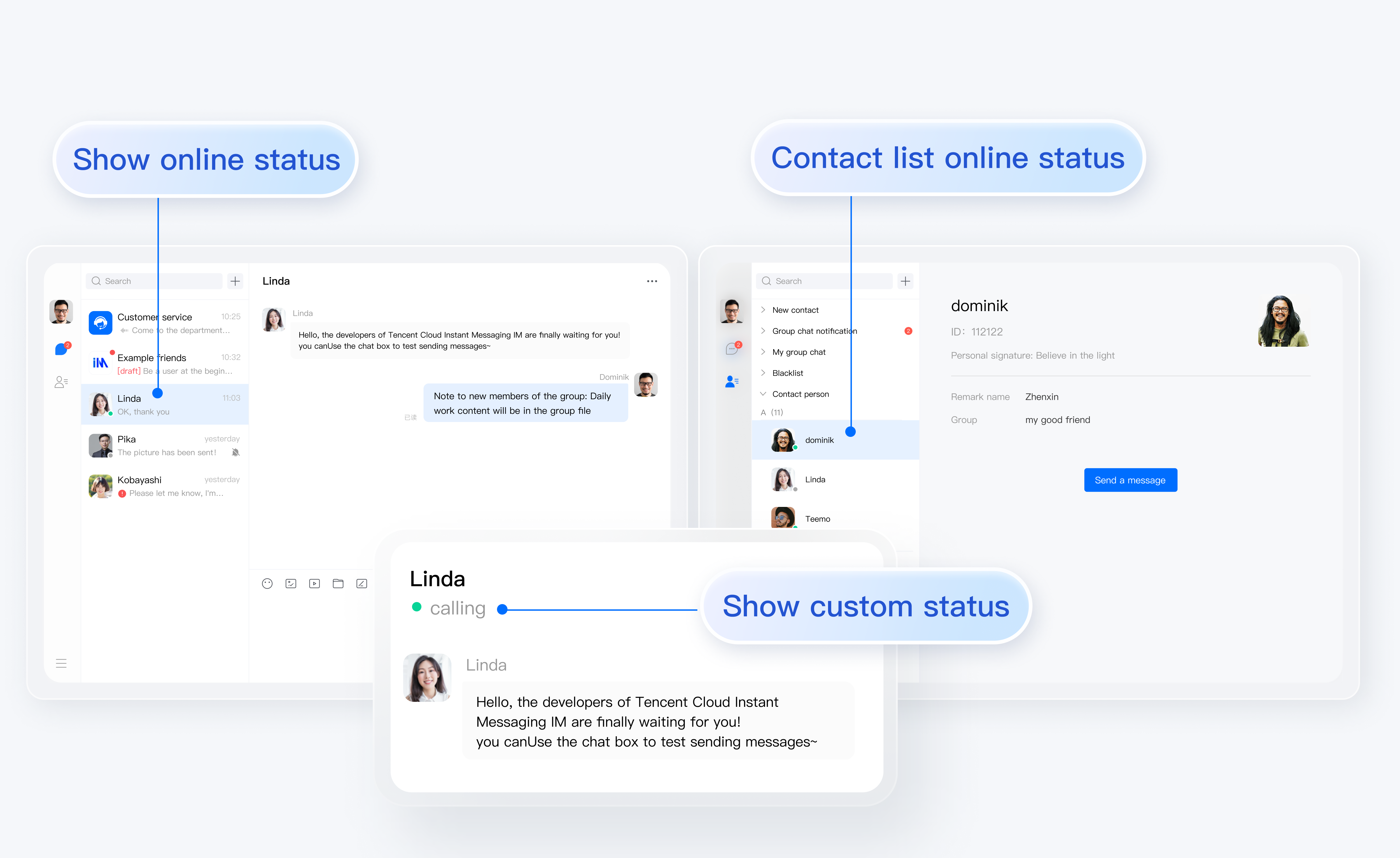
@tencentcloud/chat-uikit-vue starting from the v2.0.0 version, has started to support the "User Online Status" feature。


Note:
The User Online Status feature is only supported by the Pro edition 、Pro Plus edition 、Enterprise edition, please confirm before use.
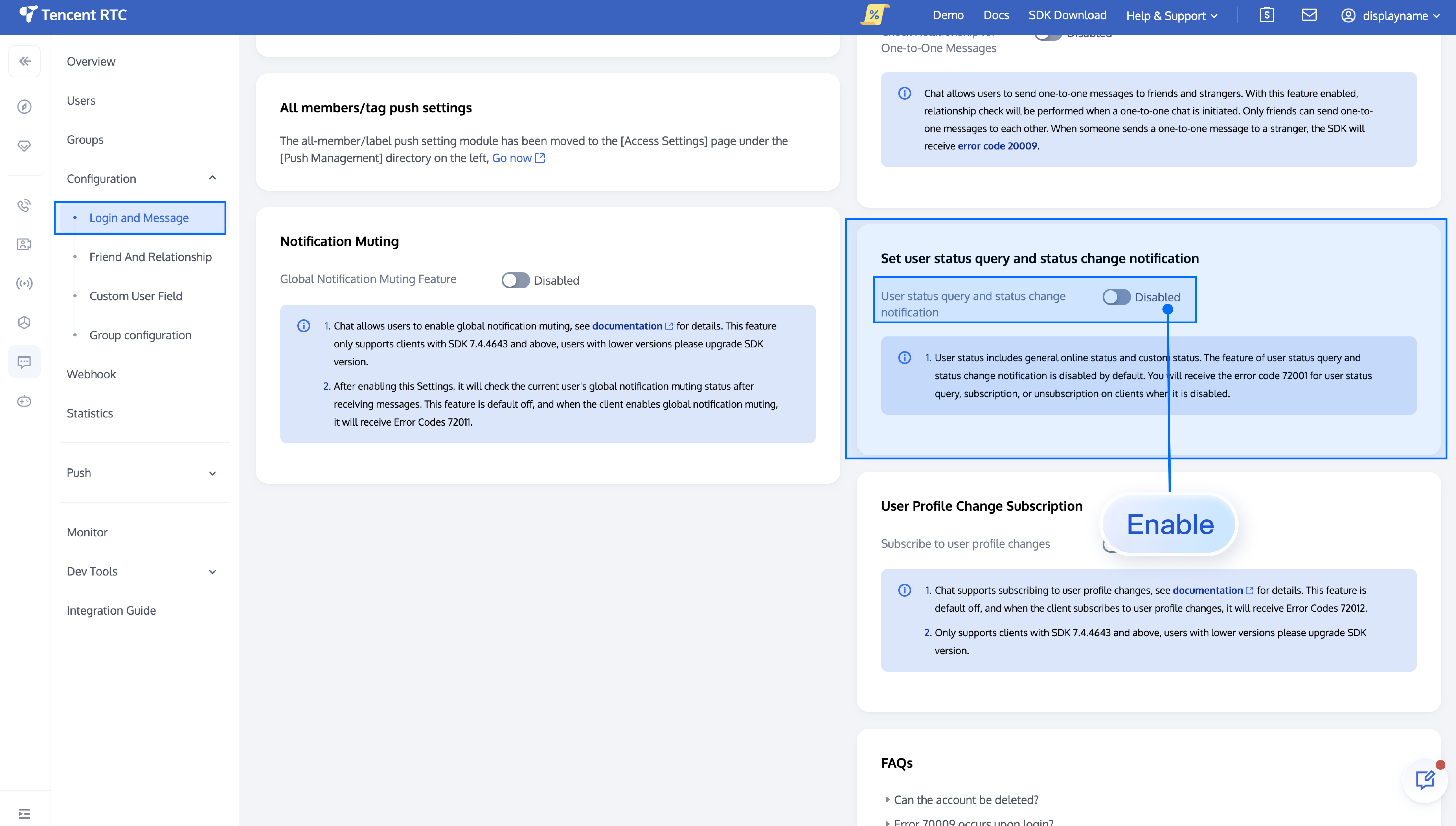
The User Online Status feature needs to be activated via the Chat Console, please confirm before use.

Enable/Disable User Online Status

"User Online Status" is switched off by default, you need to follow the steps below to enable it:
import { TUIUserService } from "@tencentcloud/chat-uikit-engine";

// open user online status
// This interface is only valid when called after successful login
TUIUserService.switchUserStatus({ displayOnlineStatus: true });

// close user online status
// This interface is only valid when called after successful login
TUIUserService.switchUserStatus({ displayOnlineStatus: false });
Note:
The above interface TUIUserService.switchUserStatus is only effective after a successful sign in, please make sure to call this interface only after signing in.
Here is the example code to enable user online status by calling this interface after signing in:
import { TUILogin } from "@tencentcloud/tui-core";
import { TUIUserService } from "@tencentcloud/chat-uikit-engine";

TUILogin.login(loginInfo).then((res: any) => {
TUIUserService.switchUserStatus({ displayOnlineStatus: true });
});

Supplementary Information: How does TUIKit internally achieve the "user online status" feature?

Note:
The following content is only for the purpose of auxiliary reading. The user online status feature is already included in TUIKit by default, negating the need for manual implementation by the user.
Both the TUIConversion and TUIContact components support the "User Online Status" feature. The TUIContact is given as an example for discussion below:
1. Monitor User Online Status List Changes
In TUIKit/components/TUIContact/contact-list/index.vue, monitor changes in the user online status list:
TUIStore.watch(StoreName.USER, {
...
displayOnlineStatus: (status: boolean) => {
displayOnlineStatus.value = status;
},
userStatusList: (list: Map<string, IUserStatus>) => {
list?.size && (userOnlineStatusMap.value = Object.fromEntries(list?.entries()));
},
});
2. Display of User Online Status
In TUIKit/components/TUIContact/contact-list/contact-list-item/index.vue:
2.1 Interpretation of the user's online status:
function getOnlineStatus(): boolean {
return (
props.displayOnlineStatus &&
props.userOnlineStatusMap &&
props.item?.userID &&
props.userOnlineStatusMap?.[props.item.userID]?.statusType === TUIChatEngine.TYPES.USER_STATUS_ONLINE
);
};
2.2 Display the online status of the user:
<div
v-if="props.displayOnlineStatus"
:class="{
'online-status': true,
'online-status-online': isOnline,
'online-status-offline': !isOnline
}"
></div>

FAQs

When invoking the Subscription/Cancel Subscription API, the interface prompts the error code "72001"

The error code 72001 indicates that the corresponding capability is not enabled on the console, please sign in to the Chat Console to activate the corresponding functional switch.


Error: The package does not support the usage of this API, please upgrade to the Pro edition 、Pro Plus edition 、Enterprise edition

The "User Online Status" feature is only supported by the Pro edition 、Pro Plus edition or Enterprise edition. This error message indicates that your current package does not support this capability.
Contact us

Join the Telegram technical exchange group or WhatsApp discussion group, benefit from the support of professional engineers, and solve your toughest challenges.


Help and Support

Was this page helpful?

Help us improve! Rate your documentation experience in 5 mins.

Feedback