Read Cloud-Hosted Prometheus Instance Data via Remote Read
Download
Focus Mode
Font Size
Last updated: 2024-08-07 22:02:54
Overview
TMP provides the remote read API, which supports organizing a series of data sources of the Prometheus protocol into a single data source for query. This document describes how to use self-built Prometheus to read data from a cloud-managed TMP instance through the remote read API.
Remote Read Configuration
The recommended configuration for prometheus.yml is as follows:
remote_read:
-url:'http://prom_ip:prom_port/api/v1/read'
read_recent:true
basic_auth:
username: app_id
password: token
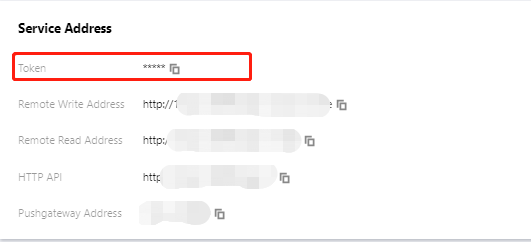
It is recommended to use the Basic Auth method to access the cloud-managed TMP instance. The username is the account AppID and the password is the token obtained on Basic Info > Service Address in the Prometheus console.
Note
Configure global:external_labels carefully for TMP instances with remote read enabled:
As external_labels will be appended to the query condition of remote read, an inaccurate label may prevent you from querying the necessary data.
The filter_external_labels: false configuration item can avoid adding external_labels to the query condition (supported in v2.34 and later).
Avoid identical series:
For two identical series, TMP will randomly select a series value at each time point to form a new series as the query result during query merging, which will lead to inaccurate query results.
Since there is no multi-copy redundant storage in the design concept of TMP, identical series will not be supported.
Remote Read Configuration Items
Note
The configuration items in [] are optional. This document shows Prometheus v2.40 configuration, and some configuration items may be missing in lower versions. For more information, see Prometheus official documentation.
# The API address of the target TMP instance for remote read
url: <string>
# Identify a unique remote read configuration name
[name: <string>]
# The PromQL must contain the following label filter conditions to perform remote read query
required_matchers:
[<labelname>: <labelvalue>...]
# The timeout for remote read query
[remote_timeout: <duration>| default = 1m ]
# Customize the headers attached to the remote read request. You can’t overwrite the headers originally added by TMP.
headers:
[<string>: <string>...]
# Whether to perform remote read query in the time range with complete local data storage
[read_recent: <boolean>| default = false ]
# Add Authorization header to each remote read request, and choose password or password_file.
basic_auth:
[username: <string>]
[password: <secret>]
[password_file: <string>]
# Customize authorization header configuration
authorization:
# Authentication type
[type:<string> | default: Bearer ]
# Authentication key. You can choose credentials or credentials_file.
[credentials: <secret>]
# Get the key from the file
[credentials_file: <filename>]
# OAuth2.0 authentication, which cannot be used with basic_auth authorization at the same time.
oauth2:
[ <oauth2>]
# TLS configuration
tls_config:
[ <tls_config>]
# Proxy URL
[proxy_url: <string>]
# Query whether the request accepts 3XX redirection
[follow_redirects: <boolean>| default = true ]
# Whether to enable HTTP2
[enable_http2:<bool> | default:true]
# Whether to append `external_labels` for remote read